If your team started with Keploy, you probably love one thing about it: you ran your app, hit a few endpoints, and tests appeared. No writing assertions, no stubbing dependencies by hand. Keploy captures real traffic at the network layer and replays it for you.
So why would anyone want to move off Keploy? Usually it comes down to a different need. Captured tests are great for catching regressions in what already happened, but they are harder to read, review, and own across a team. At some point you want tests that a new engineer can open in a pull request, understand at a glance, and change on purpose. You want test data you control, environments you switch with a flag, and mock servers you design rather than ones derived from a recording.
Two different paradigms, honestly compared
Keploy and Apidog overlap on the words “API testing,” but they are different categories of tool. Pretending otherwise would do you a disservice.
Keploy is an open-source platform for creating isolated test sandboxes. Its signature move is record and replay: using eBPF at the network layer, it captures real API calls and their dependencies (database queries, downstream services, streaming events) with no SDK and no code changes. From that captured traffic it auto-generates test cases and mocks for those dependencies. It also has an AI test-generation path that builds suites from an OpenAPI spec, Postman collection, cURL command, or a live endpoint. Because capture happens at the eBPF layer, it is language-agnostic and leans on Linux and elevated privileges. You can read the source on GitHub.
Apidog is an all-in-one API platform: design, debug, mock, document, and test in one place. The Apidog CLI (apidog run) executes test scenarios and collections you authored, from your terminal and in CI/CD. It supports data-driven testing, environment switching, multiple report formats, and cloud reports. Apidog also has AI test-case generation, but it works from your API schema and endpoints inside the app, not by recording production traffic.
Here is the honest line you need before you plan anything: Apidog does not capture live traffic via eBPF, and it does not auto-generate tests by recording production calls plus dependency mocks. That is Keploy’s distinct strength. If runtime capture is the core of your workflow, keep Keploy for that job. What you gain by moving to Apidog is designed, reviewable, cross-team tests and a platform that covers the whole API lifecycle.
| Keploy approach | Apidog approach |
|---|---|
keploy record captures real traffic via eBPF |
Import your API surface as OpenAPI, Postman, or cURL |
| Tests auto-generated from captured calls | AI test-case generation from the spec, plus scenarios you author |
keploy test --delay 10 replays recordings |
apidog run executes authored scenarios in CI |
| Dependency mocks captured from real DB/network traffic | Mock servers you design and control |
| Test data baked into the recording | Data-driven testing via -d (CSV/JSON) you maintain |
| Implicit environment from the recorded run | Explicit environments switched with -e |
| Linux/eBPF, elevated privileges | Runs anywhere the CLI runs, including standard CI runners |
Read that table as a translation guide, not a feature scorecard. Each Keploy capability maps to a deliberate authoring step in Apidog. You are swapping “the tool figured it out from traffic” for “you described what correct looks like.”
Step 1: Capture your API surface as a spec
Keploy starts from a running app. Apidog starts from a description of your API. So the first task is to get that description.
If you already publish an OpenAPI document, you are done. Point to it and move on. If you don’t, you have a few options, all of which produce something importable:
- Generate OpenAPI from your framework (most modern frameworks have an exporter or a library that emits it).
- Export a Postman collection if your team already keeps one.
- Collect the cURL commands you use to hit each endpoint.
A nice side effect: if you have Keploy recordings, the captured requests are a real-world inventory of which endpoints actually get called and with what payloads. Use them as a checklist so your spec covers the same surface area, even though you won’t import the recordings themselves.
Step 2: Import into Apidog
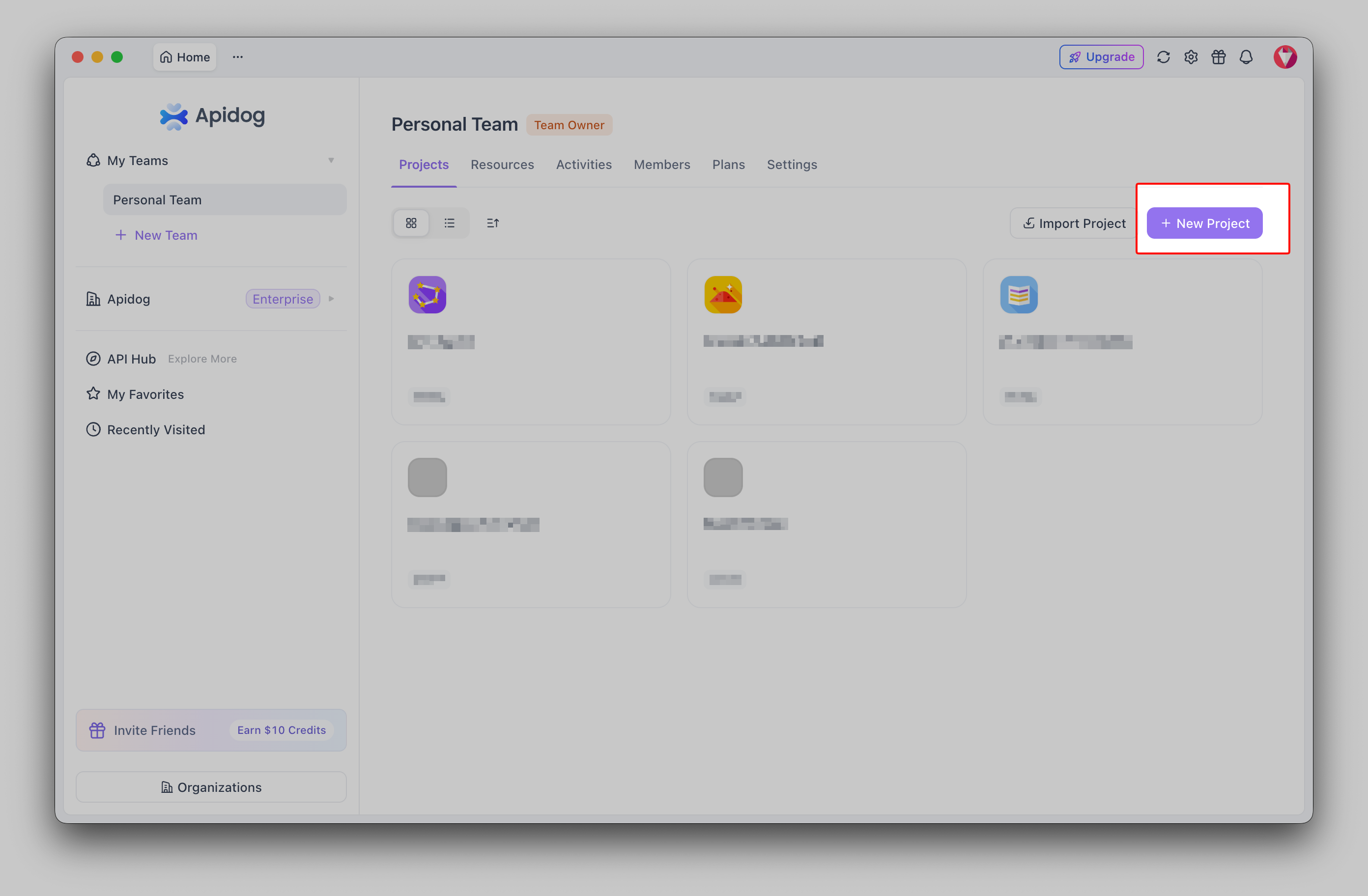
Download Apidog, create a project, and import your OpenAPI file, Postman collection, or cURL commands. Apidog reads the spec and populates endpoints, request schemas, parameters, and response models. You now have a structured definition of every endpoint, the same surface Keploy was hitting, but in a form you can edit, version, and share.
This is also the moment the platform difference shows up. Those imported endpoints are not just test fixtures. They are live documentation, debuggable requests, and the basis for mock servers, all from one import. For a step-by-step walkthrough of the toolchain, the Apidog CLI complete guide covers the full setup.
Step 3: Generate a starting test suite, then author the real scenarios
Here is where you recover some of the speed you liked about Keploy. Apidog’s AI test-case generation reads your imported schema and endpoints and drafts test cases for you: valid requests, boundary values, and common failure responses based on the spec. It is a strong starting point, and it gets you off a blank page fast. If you want to see how this compares across tooling, the rundown of the best AI test-case generators puts it in context.
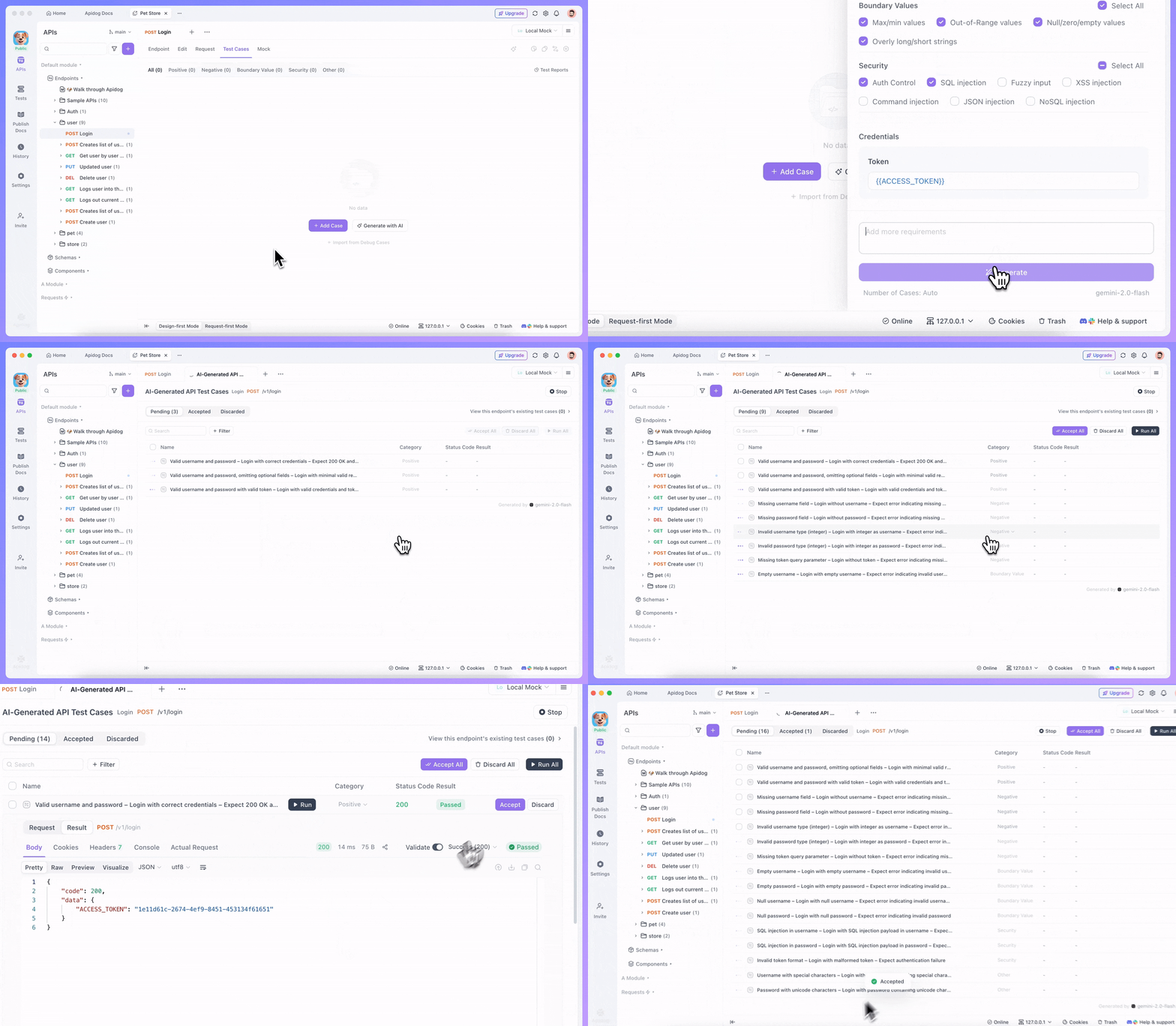
Two honest notes. First, AI-drafted cases (in Apidog or Keploy) need a human pass. Treat the output as a draft, prune what doesn’t apply, and tighten the assertions. Second, this is generation from a spec, not from runtime behavior, so it won’t know about a quirk that only shows up under real production data. That is exactly the gap Keploy’s capture filled, and it is the gap you accept when you move to designed tests.
Then you author the scenarios that matter. A scenario chains requests into a real flow: create a user, log in with the returned token, fetch the profile, update it, delete it. You assert on status codes, response fields, and how data carries from one step to the next. This is the work Keploy did implicitly inside a recording. Doing it explicitly is more effort up front, and it pays off every time someone reads, reviews, or changes the test later. The guide on how to write test cases with AI assistance helps you balance generation with hand-authoring.
Step 4: Set environments and data-driven inputs
A recording carries one set of values from one run. Authored tests should run against any environment with any dataset.
Define environments in Apidog (local, staging, production) with their own base URLs, tokens, and variables. At run time you pick one with -e. For test data, attach a CSV or JSON file and Apidog runs each scenario once per row, so one login scenario covers a dozen credential combinations. You point to the file with -d. The data-driven testing guide shows the file formats and variable binding in detail.
apidog run \
  --access-token "$APIDOG_ACCESS_TOKEN" \
  -i 123456 \
  -e "staging" \
  -d ./test-data/login-cases.csv
This is a concrete upgrade over a fixed recording. Your test data is a file you own, review in pull requests, and extend as new edge cases appear.
Step 5: Run in CI with apidog run
The command that replaces keploy test in your pipeline is apidog run. It executes your authored scenarios, applies the chosen environment and data file, and emits reports. You can produce CLI, HTML, and JSON output, and push results to the cloud with --upload-report for a shareable link.
apidog run \
  --access-token "$APIDOG_ACCESS_TOKEN" \
  -i 123456 \
  -e "staging" \
  -r html,cli \
  --upload-report
Wiring this into your pipeline is the same shape as any CI test step: install the CLI, pass your token and scenario ID, fail the build on a non-zero exit. The CI/CD pipeline guide and the GitHub Actions walkthrough cover the exact YAML, and the test reports guide explains how to read the output your team will actually look at.
Step 6: Build mock servers you control
Keploy gives you mocks for free by capturing dependency traffic during recording. Apidog takes the other path: you design the mock. Since you already imported your schema, Apidog can generate a mock server from it, returning realistic example responses based on field types and rules you set. You decide the latency, the error cases, and the exact payloads.
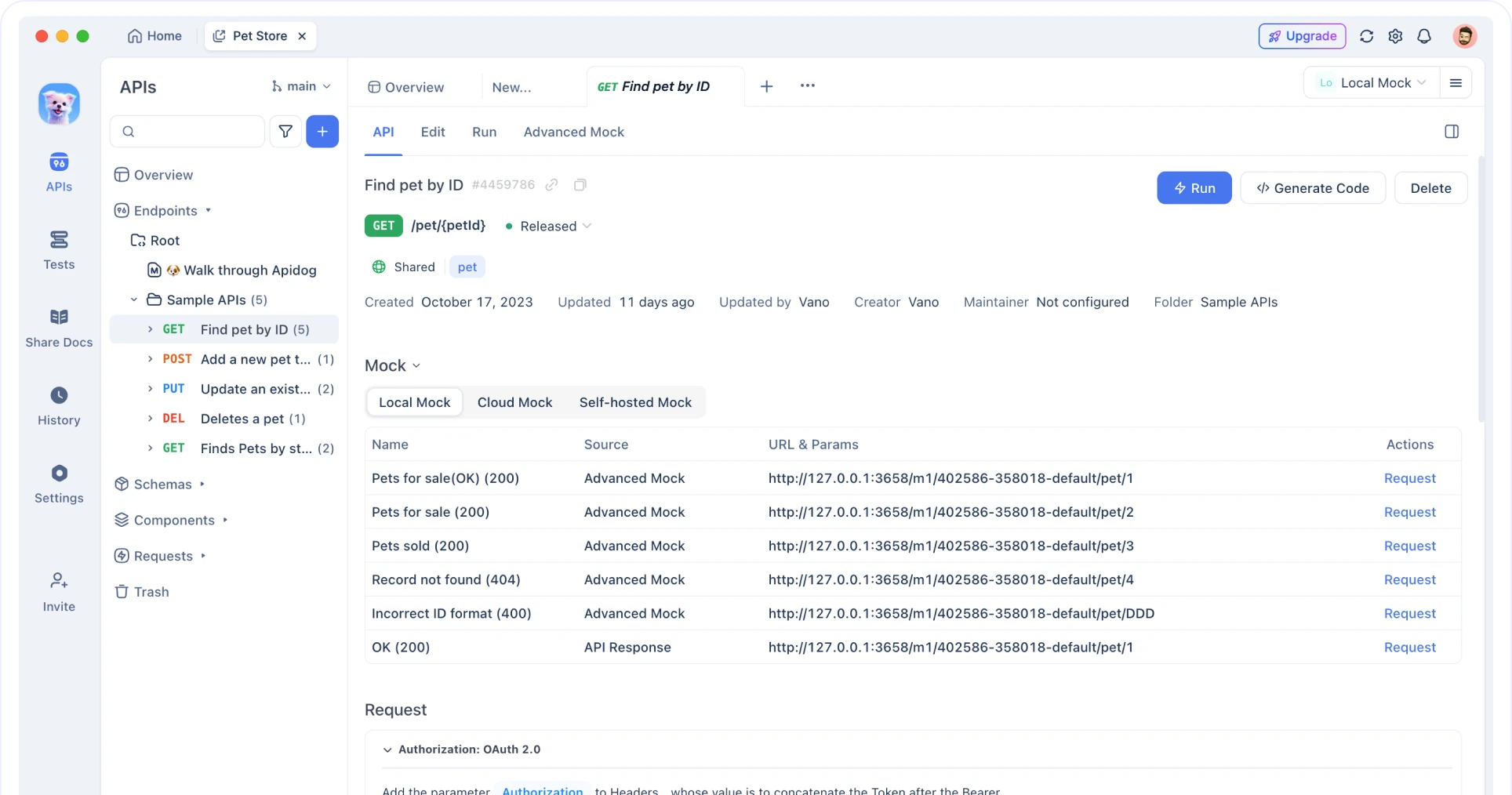
The trade is the same as everywhere else in this guide. Captured mocks reflect what your dependencies actually did; designed mocks reflect what you decided they should do. For contract testing and stable CI, designed mocks tend to win because they don’t drift with production. If you want the deeper background, see contract testing and mocking tools and generating mock data from OpenAPI schemas.
What you keep and what you give up
Be honest with your team about both sides of this move.
You give up automatic capture. No keploy record watching real traffic, no dependency mocks derived from production runs, no eBPF magic that needs zero code. If that capability is load-bearing for you, keep Keploy in the toolbox for it. The two tools can coexist.
You gain tests that read like documentation, environments you switch with a flag, test data you own and review, mock servers you design, and a single platform for design, debugging, docs, and testing. The cost is real (authoring takes more effort than recording), and the payoff is maintainability your whole team can act on. The broader survey of API test automation tools puts these tradeoffs in context, and how to test an API with Apidog is a good hands-on next read.
If you are weighing the two tools side by side, the Apidog vs Keploy comparison breaks it down feature by feature, and if Keploy specifically isn’t fitting your team, the best Keploy alternative roundup is worth a look.
FAQ
Can Apidog import my existing Keploy recordings? Not directly. Keploy recordings are runtime captures, and Apidog works from API specs. The practical path is to capture your API surface as OpenAPI (or Postman/cURL) and import that. Use your Keploy recordings as a checklist of which endpoints to cover.
Does Apidog record live traffic and auto-mock my database like Keploy? No. Apidog does not capture traffic via eBPF and does not auto-generate dependency mocks from real runs. That is Keploy’s distinct strength. Apidog generates tests and mocks from your schema, and you author scenarios on top of that.
What replaces keploy record and keploy test? There is no record equivalent. Instead you import a spec, generate a starting suite with AI, author scenarios, and run them with apidog run in place of keploy test.
Is it worth the extra authoring effort to migrate from Keploy? If you want tests that are readable, reviewable in pull requests, and owned across a team, yes. If your core need is zero-effort capture of real runtime behavior including dependency mocks, Keploy still does that better, so keep it for that job.
Can I run both tools at once? Yes. Many teams use Keploy for capture-based regression checks and Apidog for designed end-to-end suites, docs, and mocks. They solve different problems.
Where to start
Pick one service. Export its OpenAPI spec, import it into Apidog, let AI draft a few test cases, then author one real scenario with an environment and a small data file. Run it with apidog run and wire it into CI. Once that loop feels good, expand outward. You will trade the convenience of recording for tests your whole team can read, change, and trust. To go deeper on the CLI itself, start with the installation guide and the command-line REST API testing walkthrough.