Alibaba released Qwen 3.8-Max in early August 2026, and the API is already live on Model Studio. The model brings 2.4T total parameters (95B active), a 1M-token context window, and a flat $2 input / $6 output price per million tokens. If you want the full background on the model itself, start with our Qwen 3.8 explainer. This guide covers the practical side: getting a key, picking a region, making your first call, and wiring the model into your tools.
One detail sets this API apart from most model launches. Qwen 3.8 ships with two protocols on day one: an OpenAI-compatible endpoint and an Anthropic-compatible endpoint. Your existing OpenAI SDK code works. Your Claude Code setup works too, with three environment variables. That dual-protocol design also makes this a fun API to poke at in Apidog, where you can fire the same prompt at both protocol shapes and watch how each one streams back. More on that below.
Here’s the full walkthrough.
What you need before you start
A quick reference so nothing below surprises you:
| Item | Value |
|---|---|
| Model ID | qwen3.8-max |
| Context window | 1,000,000 tokens |
| Max output | 65,536 tokens |
| Input types | Text and images |
| Pricing | $2 input / $6 output per 1M tokens, flat across the full context |
| Reasoning control | reasoning_effort: xhigh (default), medium, low |
| Protocols | OpenAI chat completions + responses, Anthropic Messages |
| Key env var | DASHSCOPE_API_KEY |
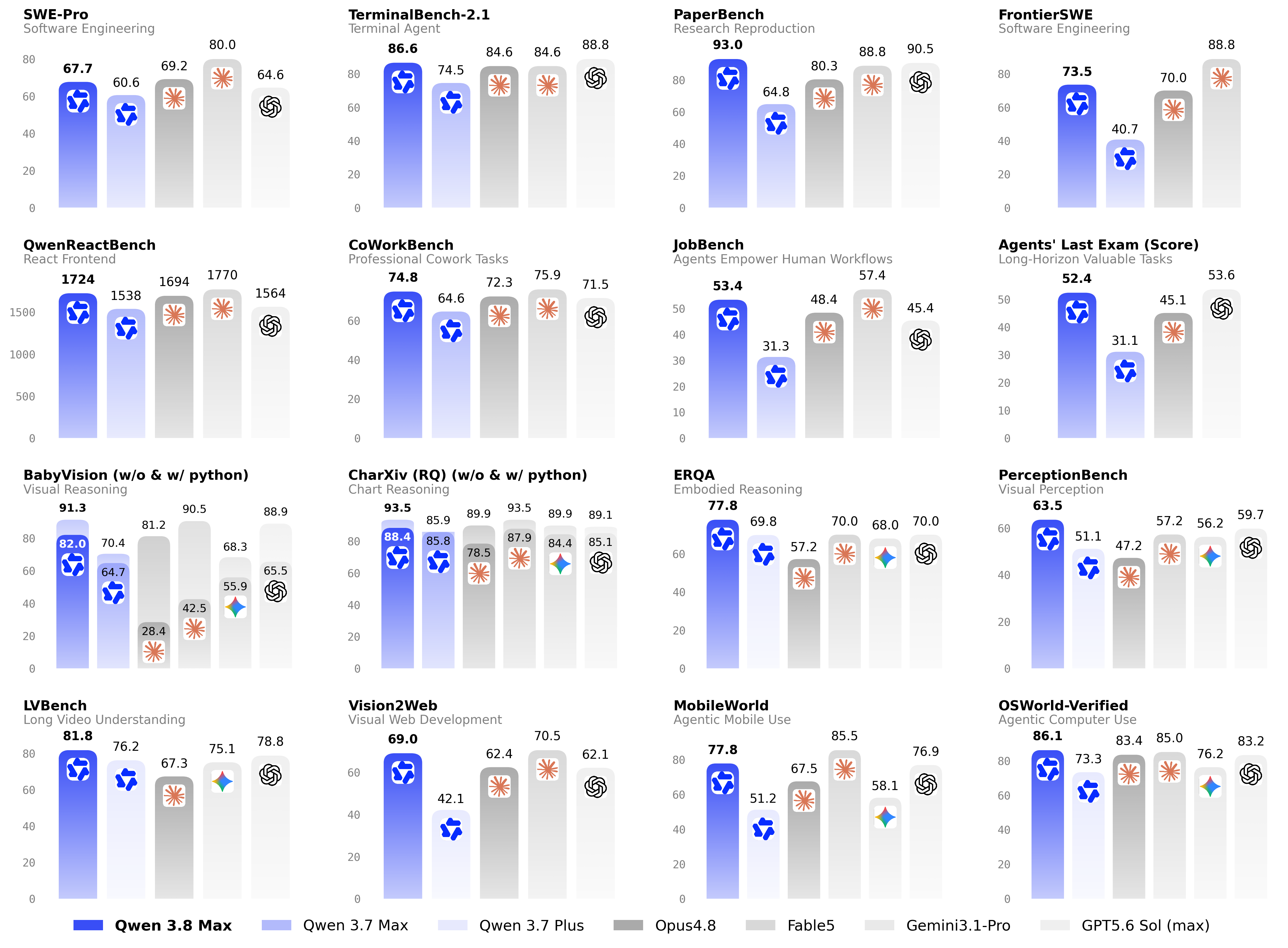
All of this comes from the official Qwen 3.8 release post and the Alibaba Cloud Model Studio docs. One note on weights: Alibaba promised open weights on Hugging Face and ModelScope for next week, but as of early August 2026 they aren’t downloadable yet. Everything in this guide runs against the hosted API.
Step 1: get an API key from QwenCloud
Head to home.qwencloud.com and sign in or create an account. Once you’re in the console, create an API key. Alibaba’s platform still uses the DashScope name internally, so the environment variable convention is DASHSCOPE_API_KEY:
export DASHSCOPE_API_KEY="sk-your-key-here"
Put it in your shell profile or a .env file, not in your source code. Every snippet in this guide reads the key from that variable.
If you want to test the model before committing real money, there’s a free quota: 1M tokens, valid for 90 days, available in the Singapore region only. That’s enough for a serious evaluation run.
Step 2: pick a regional base URL
Model Studio serves the OpenAI-compatible API from three regions. Pick the one closest to your servers:
| Region | Base URL |
|---|---|
| Beijing | https://dashscope.aliyuncs.com/compatible-mode/v1 |
| Singapore | https://dashscope-intl.aliyuncs.com/compatible-mode/v1 |
| US (Virginia) | https://dashscope-us.aliyuncs.com/compatible-mode/v1 |
The Singapore endpoint (dashscope-intl) is the default choice for most international users, and it’s where the free quota lives. The Model Studio model list confirms qwen3.8-max is available for text generation plus image and video understanding, and it sits at the top of the recommended models table as of the August 3 update.
The examples below use Singapore. Swap the base URL if you’re closer to Beijing or Virginia.
Step 3: make your first call
The endpoint speaks the OpenAI chat completions format, so the official openai Python SDK works as-is. Point it at the DashScope base URL:
import os
from openai import OpenAI

client = OpenAI(
    api_key=os.getenv("DASHSCOPE_API_KEY"),
    base_url="https://dashscope-intl.aliyuncs.com/compatible-mode/v1",
)

completion = client.chat.completions.create(
    model="qwen3.8-max",
    messages=[
        {"role": "system", "content": "You are a precise technical assistant."},
        {"role": "user", "content": "Explain idempotency in REST APIs in two sentences."},
    ],
)

print(completion.choices[0].message.content)
The same call in cURL:
curl https://dashscope-intl.aliyuncs.com/compatible-mode/v1/chat/completions \
  -H "Authorization: Bearer $DASHSCOPE_API_KEY" \
  -H "Content-Type: application/json" \
  -d '{
    "model": "qwen3.8-max",
    "messages": [
      {"role": "user", "content": "Explain idempotency in REST APIs in two sentences."}
    ]
  }'
If you’ve used any OpenAI-compatible provider before, nothing here will feel new. That’s the point. Migration from another model is a base URL swap and a model ID change. If you’re coming from the previous generation, the workflow is identical to the one in our Qwen 3.7 Plus API guide, just with a new model ID and better numbers behind it.
Step 4: stream responses and read the reasoning
Qwen 3.8-Max is a reasoning model, and it thinks by default. In streaming mode, the thinking arrives as reasoning_content deltas before the final answer arrives as regular content deltas. Handle both:
stream = client.chat.completions.create(
    model="qwen3.8-max",
    messages=[
        {"role": "user", "content": "Design a rate limiting strategy for a public API."}
    ],
    stream=True,
)

thinking_done = False
for chunk in stream:
    delta = chunk.choices[0].delta
    reasoning = getattr(delta, "reasoning_content", None)
    if reasoning:
        print(reasoning, end="", flush=True)
    elif delta.content:
        if not thinking_done:
            print("\n--- answer ---")
            thinking_done = True
        print(delta.content, end="", flush=True)
Two things to know about the thinking stream. First, thinking tokens are billed as output tokens at the same rate as everything else, so long reasoning chains show up on your bill. Second, at the default effort level the model reasons hard, which is great for correctness and slow for chat UIs. That brings us to the controls.
Step 5: tune reasoning_effort and the thinking flags
The API exposes three official levels of reasoning_effort: xhigh (the default), medium, and low. Higher effort means more thinking tokens, better results on hard problems, and higher latency plus cost. Lower effort is the right call for classification, extraction, and simple chat.
Two related flags control the thinking behavior itself: enable_thinking turns the reasoning process on or off, and preserve_thinking (on by default) keeps reasoning context across turns. Pass them through extra_body when you’re on the OpenAI SDK, since they’re DashScope extensions:
completion = client.chat.completions.create(
    model="qwen3.8-max",
    messages=[{"role": "user", "content": "Classify this ticket: 'Login page 500s on Safari.'"}],
    extra_body={
        "reasoning_effort": "low",
        "enable_thinking": True,
    },
)
Billing is identical whether thinking is on or off, per token. The lever that changes your costs is how many thinking tokens the model generates, which reasoning_effort controls directly. A sensible default: xhigh for agentic coding and analysis, low for high-volume production endpoints, medium when you’re not sure. Benchmark your own workload rather than trusting anyone’s defaults, including Alibaba’s.
The Anthropic-compatible endpoint
This is the unusual part. Alongside the OpenAI-compatible API, Qwen 3.8 ships an Anthropic-protocol endpoint:
https://dashscope-intl.aliyuncs.com/apps/anthropic
It speaks the Anthropic Messages format, which means any tool built for Claude’s API can talk to Qwen 3.8-Max without code changes. The headline use case is Claude Code. Alibaba published an official config, and it’s three environment variables:
export ANTHROPIC_BASE_URL=https://dashscope-intl.aliyuncs.com/apps/anthropic
export ANTHROPIC_AUTH_TOKEN=$DASHSCOPE_API_KEY
export ANTHROPIC_MODEL=qwen3.8-max
Launch claude after setting those, and Claude Code runs its full agentic loop against Qwen 3.8-Max. There’s a detail worth pausing on here: Alibaba ran most of its own coding benchmarks with the Claude Code harness. The Anthropic endpoint isn’t a compatibility afterthought; it’s the configuration the vendor itself used to produce the coding numbers. If agentic coding is your use case, our Qwen 3.8 for coding breakdown walks through those benchmark rows and the other supported harnesses (Codex, Qoder, Qwen Code, and OpenClaw all have official configs too).
Why does dual protocol matter beyond Claude Code? Because your team probably has code and tooling split across both ecosystems. One API that answers both formats means you can test a migration in either direction without rewriting clients first.
What it costs
Short version: $2 per million input tokens, $6 per million output tokens, one flat tier from 0 to 1M context. No long-context surcharge, which is rare among 1M-context models. Context caching cuts repeated input to 10% of the input price on cache hits, with explicit cache creation billed at 125%. The official pricing page has the current numbers.
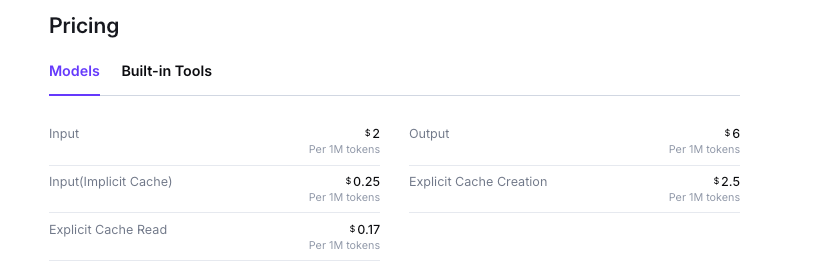
For comparison, that launch price undercuts Qwen 3.7-Max’s list price of $2.5/$7.5. Remember the billing note from the streaming section, though: thinking tokens count as output, and the default effort level is xhigh, so real bills run higher than a naive sticker calculation. For worked cost examples and the free-quota fine print, see the full Qwen 3.8 pricing breakdown.
Test and debug the Qwen 3.8 API in Apidog
A dual-protocol, triple-region, streaming reasoning API is exactly the kind of surface where a proper API workbench earns its keep. Here’s a practical setup in Apidog:
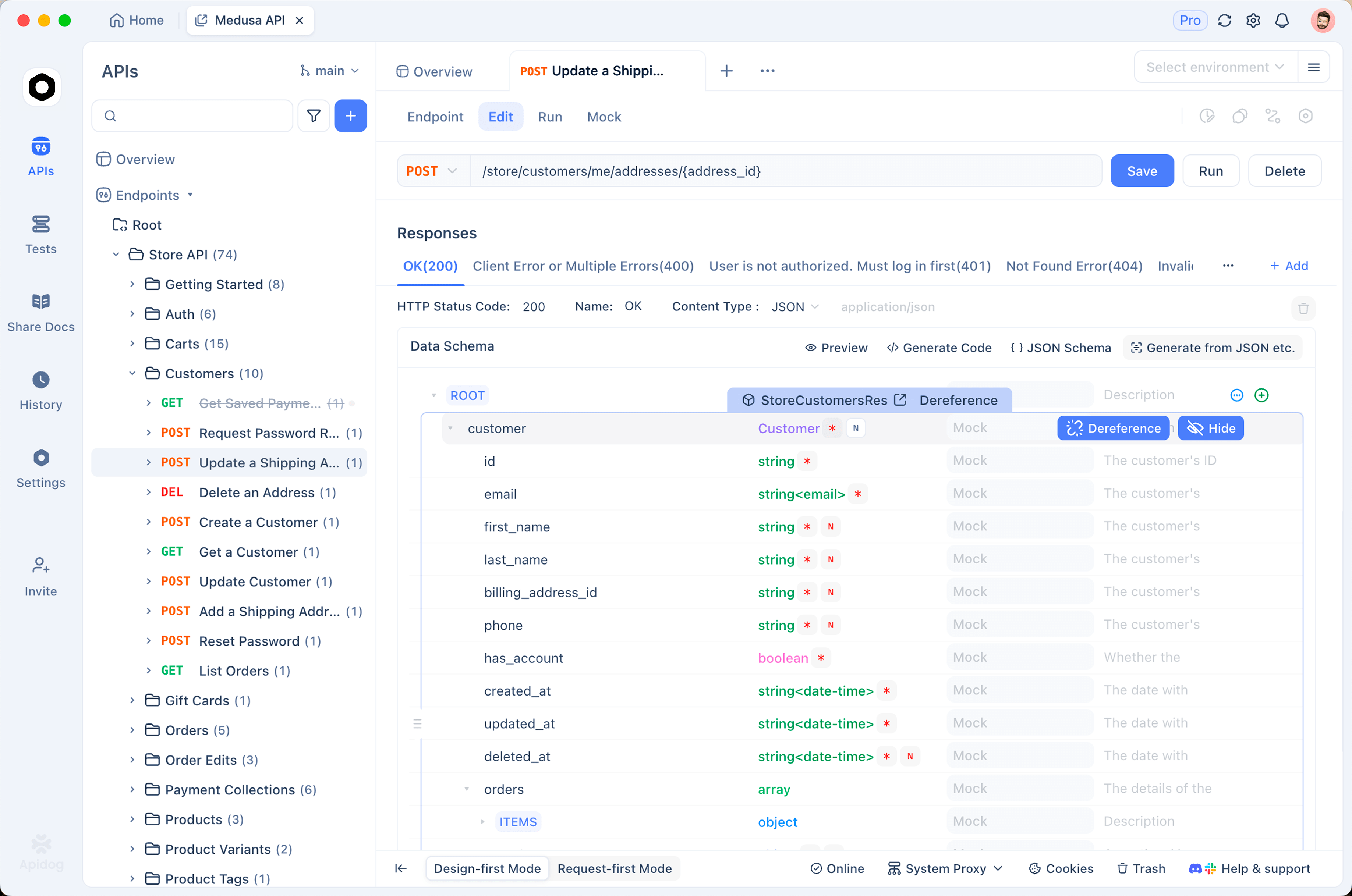
Import the OpenAI-compatible spec. Create a project and add the chat completions endpoint (POST /chat/completions) with the request body schema. Since the API follows the OpenAI format, you can import an existing OpenAI spec and change nothing but the server URL. Add the Anthropic Messages endpoint as a second API in the same project so both protocol shapes live side by side.
Model the regions as environments. Create three Apidog environments (Beijing, Singapore, US-Virginia), each with a base_url variable set to the matching compatible-mode URL and a shared DASHSCOPE_API_KEY secret. Switching regions becomes a dropdown click instead of an edit to every request. This is also the clean way to check latency from your location against each region before you commit one to production.
Inspect the SSE stream. Send a request with "stream": true and watch the raw server-sent events in the response view. You’ll see the reasoning_content deltas arrive first, then the content deltas. When your streaming parser misbehaves in production, comparing its output against the raw event sequence in Apidog is the fastest way to find out whether the bug is yours or the provider’s.
Compare models side by side. Duplicate a request, change the model ID to qwen3.7-max, and run both against the same prompt. Same trick works across providers: keep a Kimi K3 API request in the same project and A/B the two open-weight flagships on your actual workload, with response times and token counts logged for each run. Vendor benchmark tables are a starting point; your own prompts are the real test.
Download Apidog for free to follow along; the whole setup above takes about ten minutes.
FAQ
Is there a free way to try the Qwen 3.8 API? Yes. New Model Studio accounts get a 1M-token free quota for qwen3.8-max, valid for 90 days, in the Singapore region only. That’s the whole offer, so route your evaluation traffic through dashscope-intl to use it.
Can I run Qwen 3.8 locally instead of using the API? Not yet. Alibaba promised open weights on Hugging Face and ModelScope for next week, but as of early August 2026 they aren’t downloadable. And at 2.4T total parameters, self-hosting will be a multi-node project even quantized. For now the hosted API is the only way to run the model.
Does the Anthropic endpoint support the same features as the OpenAI one? The Anthropic endpoint speaks the Anthropic Messages protocol and exists primarily to power tools from that ecosystem, with Claude Code as the officially documented integration. For direct application code, the OpenAI-compatible endpoint is the better-documented path, with reasoning_effort, enable_thinking, and streaming reasoning_content all covered above.
How does qwen3.8-max compare to Qwen3-Coder for coding work? They’re different tools. Qwen3-Coder is a specialized coding model line; qwen3.8-max is the general flagship that happens to post strong agentic coding numbers on Alibaba’s own table (86.6 on Terminal Bench 2.1, per vendor-run benchmarks). If you’re choosing between them, test both through the same API surface: the calls are identical except for the model ID.
Teams that are already testing Qwen 3.8 and want a second Chinese open-weight model for comparison will find that setting up the GLM-5.3 API follows a nearly identical pattern, so the incremental effort to run both is low.
Wrapping up
The Qwen 3.8 API is one of the easier flagship launches to adopt. Your OpenAI SDK code works after a base URL swap, your Claude Code setup works after three environment variables, and the flat $2/$6 pricing means you don’t need a spreadsheet to predict costs across the 1M context. The main things to actually watch: thinking tokens billed as output at xhigh default effort, and the regional split on the free quota.
Start with the free Singapore quota, stream a few requests to see how the reasoning deltas behave, and put your own prompts through it before trusting any benchmark table, Alibaba’s included. Setting the whole thing up as a project in Apidog, with regions as environments and both protocols as saved requests, turns that evaluation from an afternoon of ad-hoc cURL into something your whole team can rerun when the next model drops.