The Qwen4-Max API is live on QwenCloud as a pay-per-token model with the ID qwen4-max. Create a pay-as-you-go key in your region, point the OpenAI SDK at https://ap-southeast-1.maas.qwencloudapi.com/compatible-mode/v1 (Singapore), and call it. It costs $1.50 per million input tokens and $4.50 per million output tokens, with a 1M-token context.
This guide covers the key, base URLs, thinking, vision, tools, structured outputs, caching, the Anthropic route, limits and errors. Every snippet follows the QwenCloud docs as read on November 16, 2026.
For background, read what Qwen4-Max is. For subscription access instead of pay-per-token, see every way to use Qwen4-Max and the Token Plan guide.
What the Qwen4-Max API gives you
The Qwen4-Max API is Alibaba’s flagship model served over QwenCloud with OpenAI-compatible, Anthropic-compatible and DashScope endpoints. It takes text, image and video input, returns text, thinks before answering by default, and supports function calling, structured outputs, context caching, batch jobs, web search and fine-tuning.
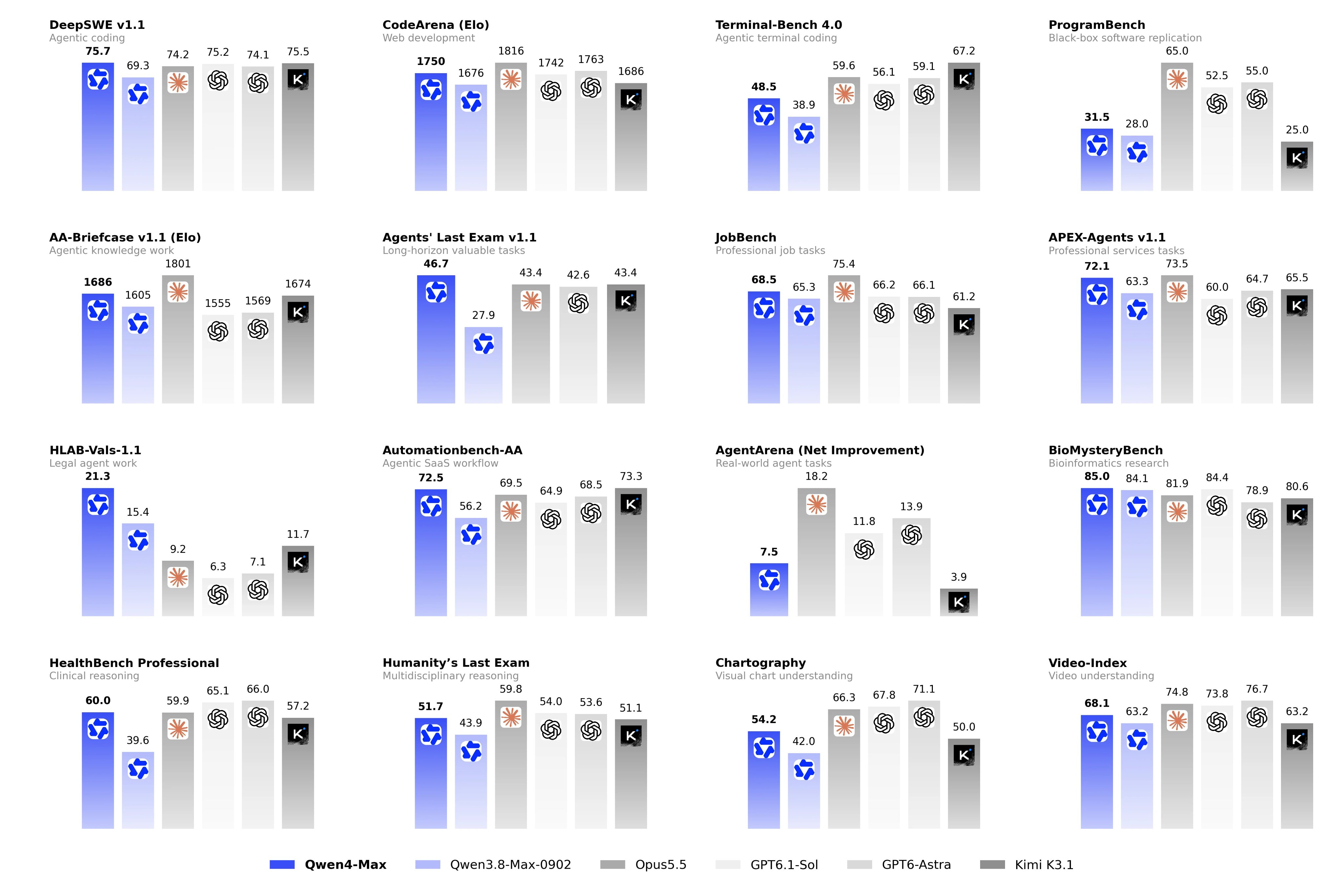
Here are the numbers from the qwen4-max model page:
| Item | Value |
|---|---|
| Model ID | qwen4-max |
| Input price | $1.50 per 1M tokens |
| Output price | $4.50 per 1M tokens |
| Implicit cache input / explicit cache read | $0.075 per 1M tokens |
| Explicit cache creation | $1.875 (5-minute) or $3 (1-hour) per 1M tokens |
| Context window | 1M tokens |
| Max input | 991K (983K with thinking) |
| Max output | 393K |
| Max reasoning | 262K |
| Throughput | 5,000,000 TPM |
Thinking tokens bill as output tokens. For a full cost breakdown, see the Qwen4-Max pricing guide.
Get a key and pick the right base URL
Keys are tied to a region, and the key type has to match the endpoint.
- Open the QwenCloud console and choose a region in the upper-right selector.
- Go to API Keys, click Create API key, add a description and click Generate Key.
- Copy the key right away. It’s shown once. New pay-as-you-go keys start with
sk-ws-. - Export it:
export DASHSCOPE_API_KEY="sk-ws-...".
Every region uses the domain {region}.maas.qwencloudapi.com. Singapore is ap-southeast-1; Frankfurt is eu-central-1, Tokyo is ap-northeast-1 and US (Virginia) is us-east-1. Then append the protocol path:
| Protocol | Base URL (Singapore) |
|---|---|
| OpenAI compatible (Chat Completions, Responses) | https://ap-southeast-1.maas.qwencloudapi.com/compatible-mode/v1 |
| Anthropic compatible | https://ap-southeast-1.maas.qwencloudapi.com/apps/anthropic |
| DashScope HTTP | https://ap-southeast-1.maas.qwencloudapi.com/api/v1 |
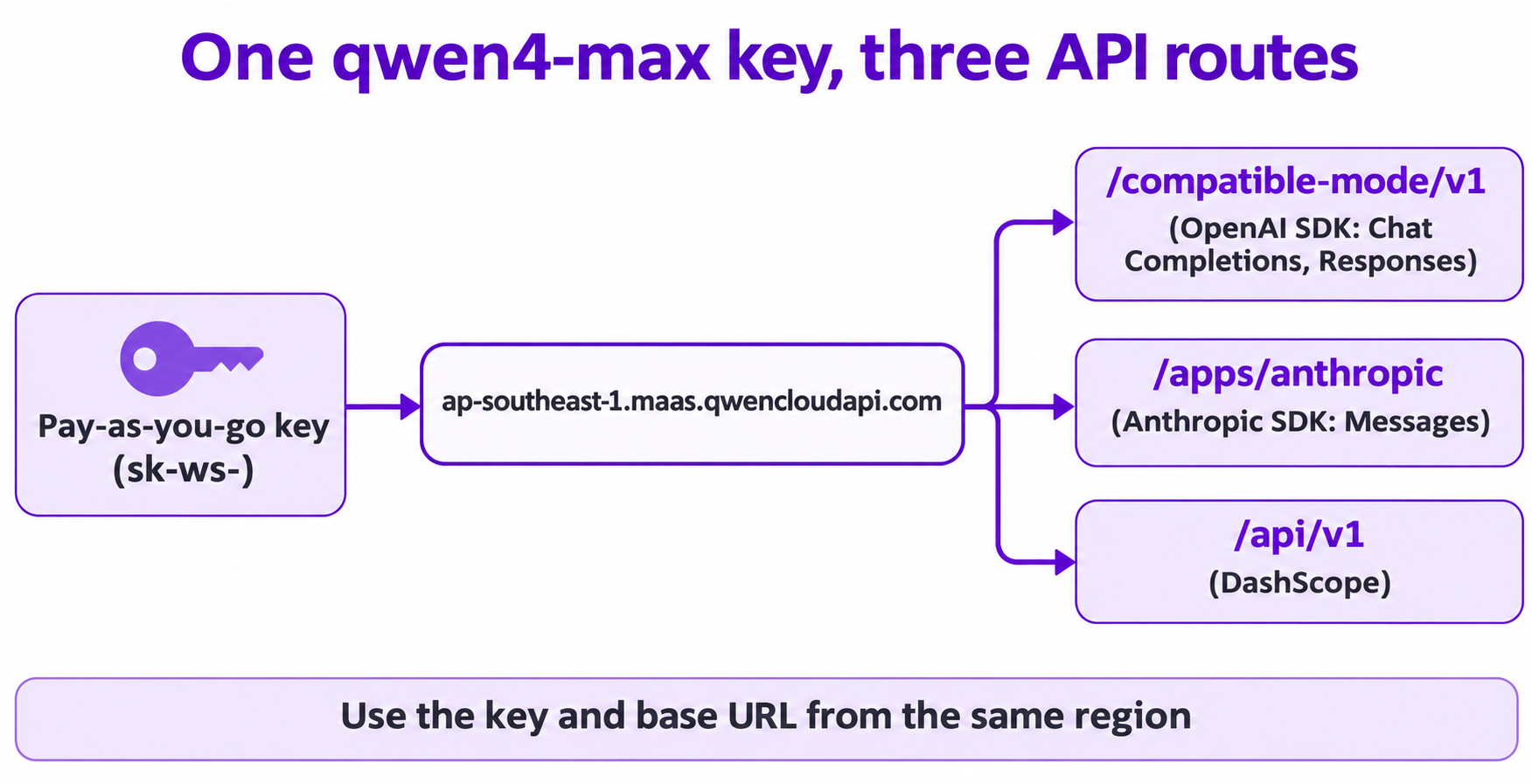
A Token Plan key (sk-sp-) only works on token-plan.maas.qwencloudapi.com, and a pay-as-you-go key only on its own region’s domain. Mixing them causes a 401. See regions and endpoints.
Your first Qwen4-Max API call
Install the OpenAI SDK (pip install openai) and run the quickstart from the docs:
import os
from openai import OpenAI

client = OpenAI(
  api_key=os.getenv("DASHSCOPE_API_KEY"),
  base_url="https://ap-southeast-1.maas.qwencloudapi.com/compatible-mode/v1"
)
completion = client.chat.completions.create(
  model="qwen4-max",
  messages=[{"role": "user", "content": "Summarize the benefits of solar energy in three bullet points."}]
)
print(completion.choices[0].message.content)
Thinking is on by default for qwen4-max, so this call also spends reasoning tokens. For long prompts, stream or set a client timeout of 180 seconds or more.
Thinking mode and streaming reasoning_content
Qwen4-Max is a hybrid thinking model. The documented defaults are enable_thinking=true, reasoning_effort=high and thinking_budget=131072. Effort levels are low, high and xhigh; none turns thinking off.
Stream reasoning and answer as two phases (adapted from the model page sample):
from openai import OpenAI
import os

client = OpenAI(
    api_key=os.getenv("DASHSCOPE_API_KEY"),
    base_url="https://ap-southeast-1.maas.qwencloudapi.com/compatible-mode/v1",
)
messages = [{"role": "user", "content": "Who are you"}]
completion = client.chat.completions.create(
    model="qwen4-max",
    messages=messages,
    extra_body={"enable_thinking": True},
    stream=True
)
for chunk in completion:
    if not chunk.choices:
        continue
    delta = chunk.choices[0].delta
    if getattr(delta, "reasoning_content", None):
        print(delta.reasoning_content, end="", flush=True)  # phase 1: thinking
    if delta.content:
        print(delta.content, end="", flush=True)            # phase 2: answer
Three rules:
- Cap output with
max_completion_tokens. With thinking on,max_tokensonly accepts 1 to 32,768 (a 400 otherwise).max_completion_tokenscovers reasoning plus reply with no such cap. - Tune depth with
extra_body. Pass{"enable_thinking": True, "reasoning_effort": "xhigh"}for hard problems, or"low"for cheap ones. - Keep reasoning in multi-turn chats.
qwen4-maxhaspreserve_thinkingon by default, so send earlier reasoning back in each assistant message’sreasoning_contentfield, never insidecontent.
To skip thinking, pass {"enable_thinking": False}.
Image and video input
Send images as image_url parts and videos as video_url parts. This mirrors the docs’ vision sample with the model set to qwen4-max:
completion = client.chat.completions.create(
  model="qwen4-max",
  messages=[{
    "role": "user",
    "content": [
      {"type": "image_url", "image_url": {"url": "https://example.com/invoice.jpg"}},
      {"type": "text", "text": "Describe what you see in this image"},
    ],
  }],
)
For video, use {"type": "video_url", "video_url": {"url": "..."}, "fps": 2}. Local files go in as Base64 Data URIs.
The vision guide allows up to 2,048 URL images at 20 MB each, 250 Base64 images, and 64 MB per request. Image detail defaults to high, which costs more input tokens.
Function calling
Pass a tools array like any OpenAI-compatible model:
tools = [{
  "type": "function",
  "function": {
    "name": "get_current_weather",
    "description": "Useful when you want to check the weather for a specific city.",
    "parameters": {
      "type": "object",
      "properties": {"location": {"type": "string", "description": "City or county, such as Singapore or New York."}},
      "required": ["location"],
    },
  },
}]
completion = client.chat.completions.create(model="qwen4-max", messages=messages, tools=tools)
Read message.tool_calls, run the function, append a tool message and call again.
In thinking mode, tool_choice only accepts "auto" or "none"; to force a function, disable thinking first. With thinking on, send reasoning_content back with tool results, or accuracy drops.
Structured outputs
qwen4-max supports strict JSON Schema mode:
completion = client.chat.completions.create(
  model="qwen4-max",
  messages=[{"role": "user", "content": "Extract the name and age: Ana is 31."}],
  response_format={
    "type": "json_schema",
    "json_schema": {
      "name": "user_info",
      "strict": True,
      "schema": {
        "type": "object",
        "properties": {"name": {"type": "string"}, "age": {"type": "integer"}},
        "required": ["name", "age"],
        "additionalProperties": False,
      },
    },
  },
)
With the looser {"type": "json_object"} mode, the word “JSON” must appear in a message or the API rejects the request. Image or video input falls back to json_object, so the schema isn’t enforced on multimodal calls.
Context cache and batch
Cache. With no settings, the implicit cache matches prefixes but doesn’t guarantee hits. For deterministic hits, use the Qwen4 explicit cache: mark a content block with "prompt_cache_breakpoint": {"mode": "explicit"} (the message content must be an array), and set the TTL with extra_body={"prompt_cache_options": {"mode": "explicit", "ttl": "5m"}}. TTL is 5m or 1h, and the cached prefix needs at least 1,024 tokens. Reads cost $0.075 per million tokens, 95% less than fresh input.
Batch. The batch guide bills input and output at 50% of the real-time price and returns results within 24 hours. For qwen4-max, Batch File runs in one region outside Singapore and doesn’t support context caching, so check the batch guide before you plan a pipeline around it.
The Anthropic-compatible route
Already built on the Anthropic SDK? Change the base URL and key:
import anthropic
import os

client = anthropic.Anthropic(
    api_key=os.getenv("DASHSCOPE_API_KEY"),
    base_url="https://ap-southeast-1.maas.qwencloudapi.com/apps/anthropic",
)
message = client.messages.create(
    model="qwen4-max",
    max_tokens=1024,
    messages=[{"role": "user", "content": "Who are you?"}],
    thinking={"type": "disabled"},
)
print(message.content)
This sample turns thinking off, as the docs’ own sample does. End the base URL at /apps/anthropic. Adding /v1/ produces /v1/v1/... and a 404. Thinking is on by default here too, and with thinking enabled max_tokens must exceed the thinking budget. Effort uses output_config.effort (low, high, xhigh), and the built-in web_search and web_fetch tools are available on this route.
Qwen4-Max API rate limits
From the rate limits page:
| Region | RPM | TPM |
|---|---|---|
| Singapore | Dynamic | Dynamic tiers: 5M, 10M, 20M |
| Frankfurt, Tokyo, US (Virginia) and other Global-scope regions | 30,000 | 5,000,000 |
Limits apply per account per region and also per second (RPS = RPM / 60), so a burst can throttle you under the per-minute total.
The free quota page says free quota exists only in Singapore, is per model (typically 1,000,000 tokens), lasts 90 days and needs payment details on file. It doesn’t name qwen4-max, so check the Free Tier page in the console, or read how to use Qwen4-Max for free.
Common Qwen4-Max API errors
| Code | What it means | Fix |
|---|---|---|
401 InvalidApiKey |
Key and base URL are from different regions, or a Token Plan key hit a pay-as-you-go endpoint | Use a key created in the same region as the URL |
400 InvalidParameter |
Often max_tokens outside 1 to 32,768 with thinking on |
Switch to max_completion_tokens |
403 AllocationQuota.FreeTierOnly |
Free quota used up before payment setup | Add payment details on the Free Tier page |
404 ModelNotFound |
qwen4-max isn’t offered in the region you called |
Check Model prices for that region |
429 Throttling |
RPM or TPM limit reached | Back off and retry, or spread load across seconds |
Let your coding agent test the Qwen4-Max API with Apidog CLI
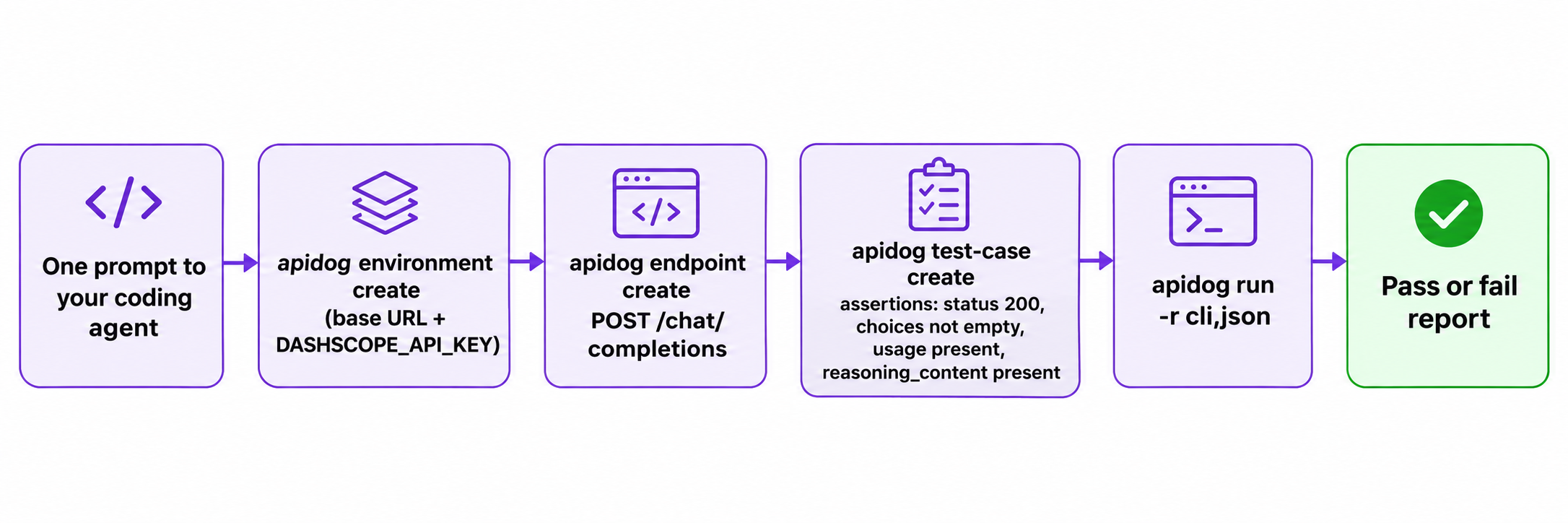
Your coding agent writes the integration, so let it write the regression test too. Apidog CLI lets it save the endpoint, store the key and run assertions.
Set it up once:
npm install -g apidog-cli@latest
apidog login --with-token <YOUR_TOKEN>
npx -y skills add https://apidog.com   # pick your agent when prompted
Then give your agent one prompt:
In Apidog project <projectId>, create an environment "Qwen Singapore" with base URL
https://ap-southeast-1.maas.qwencloudapi.com/compatible-mode/v1 and a secret
variable DASHSCOPE_API_KEY. Add POST /chat/completions with a Bearer auth header,
model qwen4-max and enable_thinking true. Create a test case asserting status 200,
a non-empty choices array, a usage object, and reasoning_content present on the
first choice's message. Run it and summarize any failures.
The agent reads each payload schema before it writes, then runs the case:
apidog environment create "Qwen Singapore" --project <projectId> --base-url https://ap-southeast-1.maas.qwencloudapi.com/compatible-mode/v1
apidog cli-schema get environment-update
apidog environment update <envId> --project <projectId> --file env.json
apidog cli-schema get endpoint-create
apidog endpoint create --project <projectId> --file endpoint.json
apidog cli-schema validate test-case-create --file case.json
apidog test-case create --project <projectId> --file case.json
apidog run --test-case <caseId> --project <projectId> -e <envId> -r cli,json
The cli reporter prints pass or fail; json writes a report the agent reads. Move the same apidog run ... -r junit into CI with the Apidog CLI CI/CD guide, and see Apidog CLI in Claude Code for more prompts. Apidog’s Free plan covers up to 4 users.
FAQ
What is the Qwen4-Max API model ID?
The stable ID is qwen4-max. The earlier qwen4-max-preview ID was for the Token Plan only during the preview that began on November 11, 2026.
Is the Qwen4-Max API OpenAI compatible?
Yes. Use the OpenAI SDK with the /compatible-mode/v1 base URL for Chat Completions and the Responses API. An Anthropic-compatible endpoint and the DashScope API are also available.
How do I turn off thinking in the Qwen4-Max API?
Pass extra_body={"enable_thinking": False}. You lose reasoning_content, but latency and output tokens drop. Comparing models? See Qwen4-Max vs Qwen3.8.
How much does the Qwen4-Max API cost?
$1.50 per million input tokens and $4.50 per million output tokens, with cached reads at $0.075 per million.
Can I use my Token Plan key with the pay-per-token API?
No. Token Plan keys (sk-sp-) only work on token-plan.maas.qwencloudapi.com, and pay-as-you-go keys only work on their own region’s domain.