
Quick answer: The Qwen4-Max Token Plan route costs $3 to $43 a month today. QwenCloud’s Token Plan Individual runs $6 (Lite), $10 (Essential), $18 (Standard) or $43 (Pro) a month, and new subscribers pay $3 or $5 for Lite or Essential until November 30, 2026. The model ID is qwen4-max-preview. It burns Credits at 20% of its standard rate until the preview ends on November 25, 2026, and at 4% overnight (UTC+8). There’s no pay-per-token Qwen4-Max price yet.
Alibaba’s Qwen team announced Qwen4-Max as a preview on November 11, 2026, and the Token Plan is the only documented way to call it from your own tools. This guide covers the tiers, how Credits are counted, the preview discount and when the plan beats pay-per-token billing. For model background, read what Qwen4-Max is; for client setup, see how to use Qwen4-Max. Every price below comes from QwenCloud’s own pages, checked November 11, 2026.
What is the Token Plan?
The Token Plan is QwenCloud’s monthly subscription for AI coding and agent tools. You pay a flat fee, get a monthly pool of Credits, and spend them on any model the plan lists, including qwen4-max-preview. It works with any tool that speaks the OpenAI or Anthropic API protocol and accepts a custom base URL and key.
The Token Plan overview lists Claude Code, Codex, Cursor, Qwen Code, OpenCode, OpenClaw, Qoder, Cline and Kilo CLI among supported tools. The same Credits also cover image, video and speech models, plus “Harness tools” such as web search. An Individual edition serves one developer; a Team edition adds seats and usage analytics. This guide covers Individual.
Qwen4-Max Token Plan pricing: every tier
Here are the Individual tiers, from the Token Plan pricing page and the Token Plan Individual docs, checked November 11, 2026:
| Plan | List price | Website price | New-user price (to Nov 30) | Credits per month | Concurrent agents |
|---|---|---|---|---|---|
| Lite | $8/month | $6/month | $3/month | 20,000 | 1 to 2 |
| Essential | $16/month | $10/month | $5/month | 45,000 | 2 to 3 |
| Standard | $25/month | $18/month | none listed | 80,000 | 3 to 4 |
| Pro | $51/month | $43/month | none listed | 200,000 | 6 to 8 |
| Credit Pack | n/a | $15/pack | n/a | 20,000 (valid 1 month) | n/a |
The pricing page shows the list price struck through; you pay the website price, or the new-user price if your account has never bought Token Plan Individual. Checkout has the final amount. Quotas also rose on November 9, 2026 (Lite went from 11,500 to 20,000 Credits) and Pro dropped from $68 to $43 (price change notice), so older guides quote stale numbers.
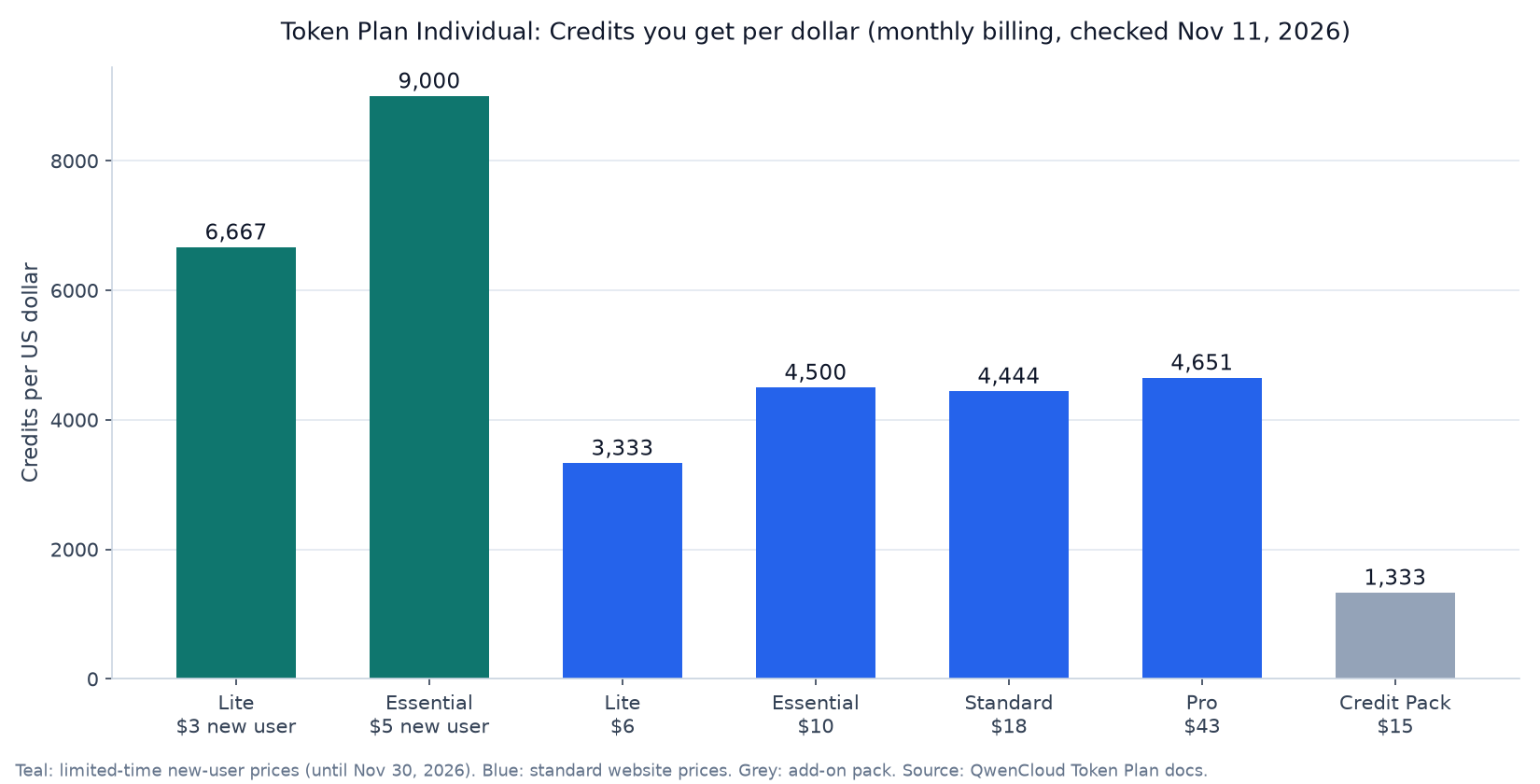
Divide Credits by price and the offer gets clearer. Essential, Standard and Pro all land between 4,444 and 4,651 Credits per dollar, so higher tiers buy capacity and concurrency, not a better rate. Lite is weakest at 3,333. The new-user Essential deal (9,000 per dollar) is the best rate on the page, and Credit Packs (1,333) are the worst, so upgrade before you buy packs.
How Credits are counted
QwenCloud says the Credits a request consumes depend on “model type, token usage, thinking mode, and tool calls.” It doesn’t publish a Credits-per-token table for any model, Qwen4-Max included. The real number shows up in Model usage on the console’s Token Plan page.
What the Token Plan Individual FAQ does spell out:
- Everything in the context counts: system prompts, tool schemas, conversation history, tool results and the model’s reasoning. Your agent’s token counter shows less than the console.
- Pricier models burn more Credits for the same tokens.
- Thinking mode costs extra; turning it off saves Credits.
- Cache hits are cheaper than fresh input.
- Harness tools are billed per successful call.
The quota resets each subscription month, counted from your purchase date. Unused Credits don’t roll over, and there’s no weekly cap. When the quota and any Credit Packs run out, calls fail with 429 insufficient_quota rather than switching to pay-as-you-go.
What the Qwen4-Max preview pricing really means
The Token Plan model list tags qwen4-max-preview with “Limited-Time 80% Off.” The Individual overview gives the full terms:
- Preview window: 10:00 on November 11, 2026 to 24:00 on November 25, 2026 (UTC+8). QwenCloud says the model won’t change during that window and will be retired when it ends.
- Daytime rate: Credits at as low as 20% of the standard rate, which QwenCloud describes as 5x usage.
- Night rate: between 22:00 and 08:00 (UTC+8), a further 80% off, so 4% of the standard rate. That’s 25x the usage per Credit.
The 22:00 to 08:00 UTC+8 window is 09:00 to 19:00 US Eastern time (EST), so a US workday falls almost entirely inside the 4% rate.
The catch is length. A monthly plan bought today gives you about 14 days of Qwen4-Max, then the rest of the month on the other listed models (Qwen3.8-Max, GLM-5.3, DeepSeek V4 Pro and others). Plans are non-refundable and can’t be downgraded mid-cycle, so pick a tier for the whole month.
Not published as of November 11, 2026: a standard Credits rate for Qwen4-Max, a pay-as-you-go price (it isn’t on the QwenCloud API pricing page), official benchmarks or a context window spec. For a generation comparison, see Qwen4-Max vs Qwen3.8.
Token Plan vs pay-per-token: which is cheaper?
No exact break-even exists yet, because neither a Credits-per-token rate nor a Qwen4-Max token price is public. The closest reference is Qwen3.8-Max pay-as-you-go: $2 per million input tokens and $6 per million output. At that rate, $6 buys about 3 million fresh input tokens, which a busy agent session can burn in an afternoon because every turn resends the context.
| Factor | Token Plan Individual | Pay-as-you-go API |
|---|---|---|
| Qwen4-Max access today | Yes, qwen4-max-preview |
Not listed yet |
| Cost model | Flat monthly fee, Credits pool | Per million tokens |
| Overage | Blocked at quota, or Credit Packs | Billed as you go |
| Allowed use | Interactive use in tools you drive | Production, batch, CI |
| Sharing | One person, one key | Team keys allowed |
| Region | Singapore only, sk-sp- keys |
Per region, sk-ws- keys |
The usage policy decides most cases. Token Plan Individual is for “personal interactive development”; production automation, batch scripts, scheduled jobs and key sharing aren’t allowed. So pick the Token Plan if you drive a coding agent by hand and want Qwen4-Max now. Pick pay-as-you-go for anything that runs without you, using a current model such as Qwen3.8 (see our Qwen 3.8 API guide) until Qwen4-Max gets a public listing.
Is the Qwen4-Max Token Plan worth it?
For developers who already use a coding agent, yes, as a cheap trial: $3 for 20,000 Credits, with Qwen4-Max at 4% of its standard rate overnight in UTC+8.
- Subscribe to Lite or Essential at the new-user price before November 30.
- Set
qwen4-max-previewas your agent’s main model. - Do one real task, then check Model usage in the console.
- Scale that to your week. If you’d run out, upgrade (it’s prorated) rather than buy packs.
- After November 25, keep the plan only if the other models earn it.
It’s not worth it if you need Qwen4-Max inside a product, or a stable model: the preview retires on November 25. The best Qwen models roundup lists stable options.
Spend Qwen4-Max Credits once with Apidog CLI
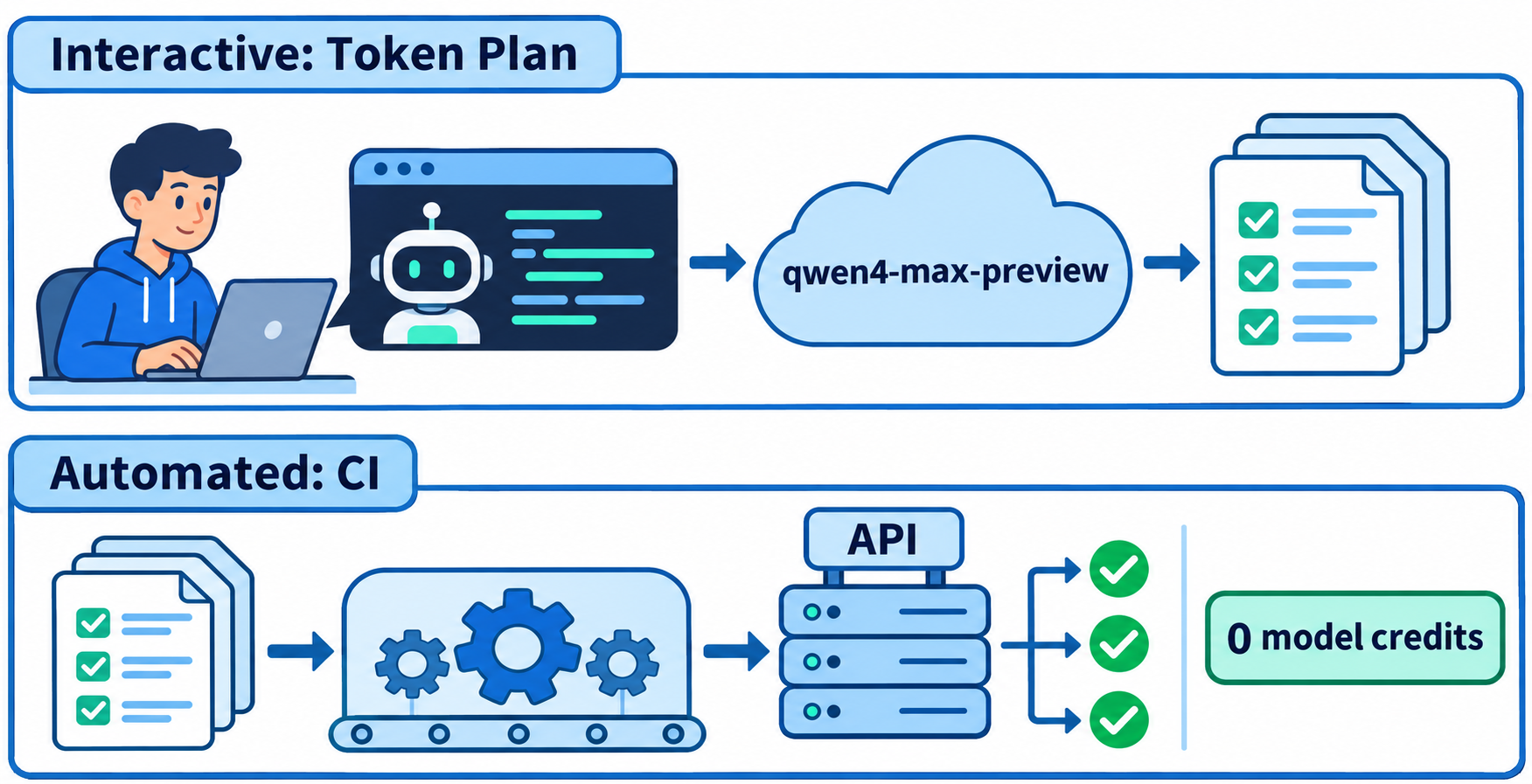
Preview Credits are best spent on work that keeps paying off. A good example is API tests: your agent writes them once with Qwen4-Max during an interactive session, then Apidog CLI replays them in CI forever without touching a model. That keeps your Token Plan key out of automation, which its terms require anyway.
Install the CLI, log in and add the Apidog skill to your agent:
npm install -g apidog-cli@latest
apidog login --with-token <YOUR_TOKEN>
npx -y skills add https://apidog.com   # pick your agent when prompted
Then give your agent, running on qwen4-max-preview, one prompt:
In Apidog project <projectId>, create test cases for POST /orders and GET /orders/{id}:
valid order returns 201 with an id, missing fields return 400, unknown id returns 404.
Validate each payload against the CLI schema first, then run them against
environment <envId> and summarize any failures.
The agent reads the payload schema, validates its JSON, writes each case and runs it:
apidog cli-schema get test-case-create
apidog test-case category --project <projectId>
apidog cli-schema validate test-case-create --file case.json
apidog test-case create --project <projectId> --file case.json
apidog run --test-case <caseId> --project <projectId> -e <envId> -r cli,json
The -r cli,json report gives a pass or fail per assertion in the terminal plus a JSON file the agent can read back. That Qwen4-Max session is the only part that costs Credits. In CI, the same apidog run with -r junit executes the saved cases with no model in the loop. The Apidog CLI CI/CD guide shows the pipeline setup, and Apidog CLI in Claude Code has more agent prompts. Apidog’s Free plan covers up to 4 users.
FAQ
How much does the Qwen4-Max Token Plan cost?
Token Plan Individual costs $6 (Lite), $10 (Essential), $18 (Standard) or $43 (Pro) a month at website prices, checked November 11, 2026. New subscribers pay $3 for Lite or $5 for Essential until November 30, 2026. Every tier can call qwen4-max-preview.
How many Credits does a Qwen4-Max request use?
QwenCloud doesn’t publish a fixed rate. Consumption depends on model, tokens, thinking mode and tool calls. During the preview, Qwen4-Max uses as little as 20% of its standard rate, and 4% between 22:00 and 08:00 UTC+8. Check Model usage in the console for real figures.
Is there a pay-as-you-go Qwen4-Max API?
Not yet. As of November 11, 2026, Qwen4-Max isn’t on QwenCloud’s API pricing page, so the Token Plan’s qwen4-max-preview is the only documented API route.
Can I use a Token Plan key in production or CI?
No. Token Plan Individual is for personal interactive use in tools such as Claude Code or Cursor. Production automation, batch scripts and scheduled jobs aren’t allowed, and keys can’t be shared. Use a pay-as-you-go key for those workloads.
What happens when I run out of Credits?
Calls fail with 429 insufficient_quota until your subscription month resets. You can buy Credit Packs ($15 for 20,000 Credits, up to 5 at a time, valid one month) or upgrade with prorated pricing. You’re never moved to pay-as-you-go automatically.