
The Movie Database (TMDB) is a community-built catalog of movies, TV shows, cast, and artwork. Its API is free for non-commercial use as long as you credit TMDB, which makes it the usual starting point on any list of free movie APIs. The catch is the onboarding: TMDB hands you two different credentials, and the official getting started guide assumes you already know which one to use.
This guide covers the whole path: account, key request, v3 key versus v4 read access token, first search and details calls in curl and Python, the same calls saved as a test in Apidog, and the rate limits, attribution rules, and errors you’ll meet on day one.
What you need before you start
- A TMDB account with a verified email address. The API refuses unverified accounts with a 401.
- A desktop browser. TMDB’s docs say the API registration pages are not optimized for mobile devices.
- curl, or Python 3 with the
requestspackage. - Apidog, to store the token safely and keep the requests. Download Apidog for macOS, Windows, or Linux.
Step 1: create a TMDB account
Go to themoviedb.org, click “Join TMDB,” and sign up with an email address. Open the verification email and confirm it before you touch the API settings. Skip it and you’ll meet a confusing 401 later, status code 32: “Email not verified: Your email address has not been verified.”
Step 2: request the API key
Once you’re logged in, open your account settings and click “API” in the left sidebar. TMDB’s FAQ describes this as the only route: “You can apply for an API key by clicking the ‘API’ link from the left hand sidebar within your account settings page.”
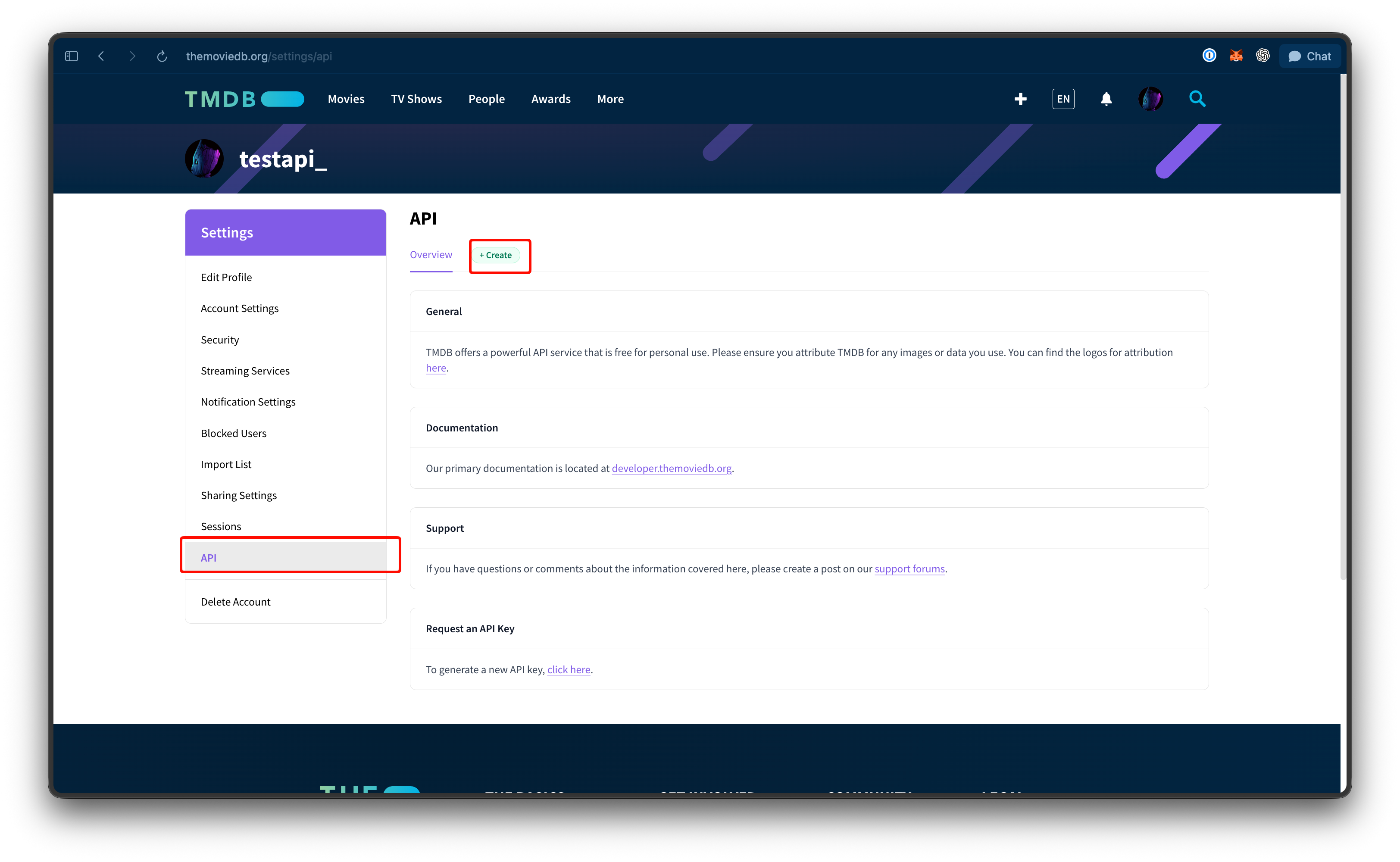
You’ll accept the API terms of use, then fill in a short application: what you’re building, a URL if you have one, a summary of how you’ll use the data, and the type of use. Pick the developer option for personal projects, prototypes, and internal tools. TMDB counts a project as commercial “if the primary purpose is to create revenue for the benefit of the owner,” and that path requires a written agreement with their sales team.
After you submit, the same settings page shows two credentials:
- API Key, labeled for v3 auth. A 32-character hex string.
- API Read Access Token, a much longer JWT-style string.
TMDB doesn’t publish a review timeline; in practice both values appear as soon as the form goes through. Treat them like any other secret and keep them out of commits, chat windows, and screenshots.
v3 API key vs v4 read access token
The two credentials aren’t “old” and “new.” They’re two ways of identifying the same application, and the official authentication docs state that both “provide the same level of access.”
| API Key (v3) | API Read Access Token | |
|---|---|---|
| How you send it | Query parameter: ?api_key=YOUR_KEY |
Header: Authorization: Bearer YOUR_TOKEN |
| Works with | v3 endpoints under /3/ |
v3 and v4 endpoints |
| TMDB’s default | No | Yes |
| Shows up in server logs and browser history | Yes, it’s in the URL | No |
TMDB’s own recommendation is the Bearer token: “The default method to authenticate is with your access token,” and it “has the added benefit of being a single authentication process that you can use across both the v3 and v4 methods.”
Use the Bearer header unless your client can’t set headers. Keeping the credential out of the URL is the same argument behind any API key versus bearer token decision: URLs get logged, cached, and shared.
One more distinction. Everything in this article is read-only catalog data, which needs only the application credential. The v4 API adds account features such as lists, favorites, ratings, and watchlists. Writing to those for a TMDB user takes an extra handshake: a request token from /4/auth/request_token, user approval, then a user access token from /4/auth/access_token. None of it is needed to search movies or read details.
Step 3: make your first request
All v3 calls go to https://api.themoviedb.org/3. Two endpoints cover most first projects: search by title, then fetch details by id.
Search for a movie with curl
curl --request GET \
  --url 'https://api.themoviedb.org/3/search/movie?query=fight%20club&include_adult=false&language=en-US&page=1' \
  --header 'Authorization: Bearer YOUR_READ_ACCESS_TOKEN' \
  --header 'accept: application/json'
The response is a page object with page, results, total_pages, and total_results. Each result carries id, title, release_date, overview, poster_path, genre_ids, and vote_average. In TMDB’s own search example, the first hit for “fight club” is id 550, released 1999-10-15.
The same call with the v3 key looks like this. Note there’s no auth header at all:
curl 'https://api.themoviedb.org/3/search/movie?query=fight%20club&api_key=YOUR_API_KEY'
Get movie details with Python
Now take the id from the search and ask for the full record. The movie details endpoint returns runtime, genres, budget, revenue, and overview. Its append_to_response parameter adds sub-resources such as credits to the same round trip, up to 20 per request.
import os
import requests

TOKEN = os.environ["TMDB_READ_ACCESS_TOKEN"]
BASE = "https://api.themoviedb.org/3"
HEADERS = {"Authorization": f"Bearer {TOKEN}", "accept": "application/json"}


def search_movie(title):
    r = requests.get(
        f"{BASE}/search/movie",
        params={"query": title, "include_adult": "false", "language": "en-US"},
        headers=HEADERS,
        timeout=10,
    )
    r.raise_for_status()
    return r.json()["results"]


def movie_details(movie_id):
    r = requests.get(
        f"{BASE}/movie/{movie_id}",
        params={"append_to_response": "credits"},
        headers=HEADERS,
        timeout=10,
    )
    r.raise_for_status()
    return r.json()


hit = search_movie("Fight Club")[0]
movie = movie_details(hit["id"])
print(movie["title"], movie["release_date"], f'{movie["runtime"]} min')
print("https://image.tmdb.org/t/p/w500" + movie["poster_path"])
The last line is the part people miss. poster_path is only a path. As the image basics guide explains, a working URL is https://image.tmdb.org/t/p/, then a size such as w500 or original, then the path. /3/configuration lists every valid size.
Step 4: run and save the requests in Apidog
Once the raw calls work, move them somewhere you won’t lose them. In Apidog this takes a few minutes and leaves you with a saved, shareable test.
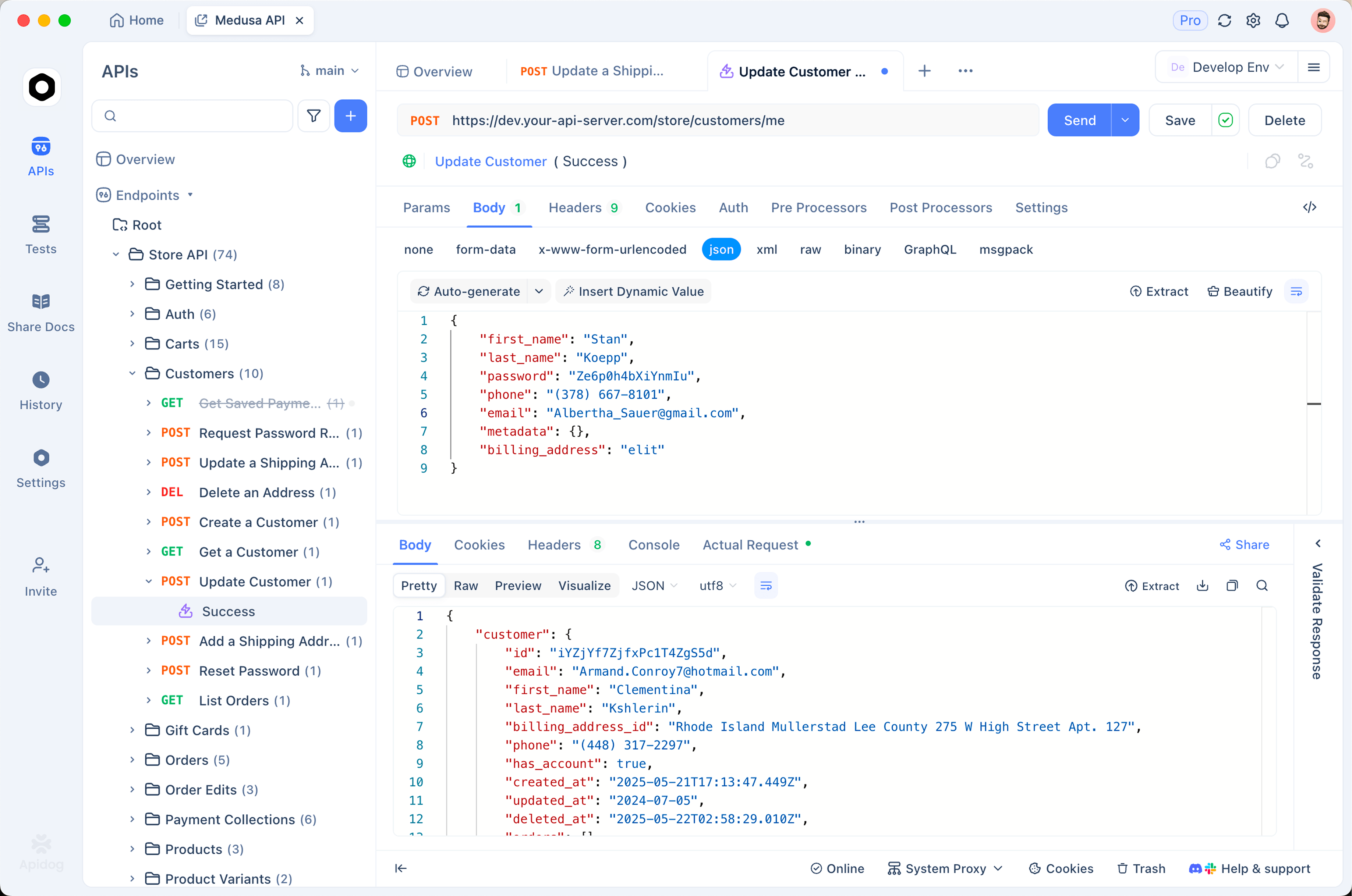
- Create a project and add an environment called “TMDB” with two variables:
base_urlset tohttps://api.themoviedb.org/3, andtmdb_tokenholding your read access token. Mark the token as a secret so it’s masked in the UI and kept out of exports; the guide to environment and secret variables covers the options. - Add a GET request to
{{base_url}}/search/moviewith aqueryparameter. On the Auth tab, choose Bearer Token and enter{{tmdb_token}}. Send it and confirm you get a 200 and aresultsarray. - Add a second GET request to
{{base_url}}/movie/{{movie_id}}. In the first request’s post-processor, extractresults[0].idintomovie_idso the second call always follows the first. - Save both as a test scenario with assertions: status equals 200,
total_resultsis greater than 0, andtitlein the details response is non-empty. Run it whenever the integration changes.
Building a frontend against this data? Turn on the mock server for the search endpoint. Apidog generates a schema-matching response, so the UI team can build the poster grid without a live token or real requests against TMDB’s limits.
Rate limits and attribution rules
Everything below is quoted from TMDB’s docs.
Rate limits. TMDB’s rate limiting page says the original limit of 40 requests every 10 seconds was disabled on December 16, 2019. Upper bounds remain “to help mitigate needlessly high bulk scraping,” and they “sit somewhere in the 40 requests per second range.” That figure can change without notice, so respect any HTTP 429, back off, and retry.
Cost. From the FAQ: “Our API is free to use for non-commercial purposes as long as you attribute TMDB as the source of the data and/or images.” Commercial projects must contact sales@themoviedb.org.
Attribution. Display the TMDB logo and this notice in your application: “This product uses the TMDB API but is not endorsed or certified by TMDB.” The API terms of use use slightly longer wording and require the logo to be less prominent than your own branding, and never recolored, stretched, flipped, or rotated.
Caching. The terms forbid caching any TMDB data for longer than six months. Store what you need, but plan a refresh.
No SLA. TMDB says so plainly. Build in timeouts and retries.
Key hygiene. Both credentials belong in environment variables or a secrets manager, never in source. If one lands in a repo, rotate it from the settings page and run an API key leak check across your history.
Common errors and what they mean
TMDB returns a JSON body with status_code and status_message alongside the HTTP status. The errors reference lists dozens of codes; these are the ones you’ll see first.
| HTTP | status_code | Message | Usual cause and fix |
|---|---|---|---|
| 401 | 7 | Invalid API key: You must be granted a valid key. | Wrong credential or wrong slot. The v3 key goes in api_key, the read access token in the Bearer header, never the other way round. Check for a trailing space. |
| 401 | 3 | Authentication failed: You do not have permissions to access the service. | Malformed credential or missing header. Confirm it reads Authorization: Bearer <token> with a single space. |
| 401 | 32 | Email not verified: Your email address has not been verified. | Verify your TMDB email, then retry. No new key needed. |
| 404 | 34 | The resource you requested could not be found. | Wrong id or a typo in the path. It’s /3/movie/550, not /3/movies/550. |
| 429 | 25 | Your request count (#) is over the allowed limit of (40). | Past the burst ceiling. Sleep and retry with backoff; batch lookups with append_to_response. |
FAQ
Is the TMDB API key free?
Yes, for non-commercial use with attribution. There’s no paid self-serve tier. If your project earns revenue, TMDB asks you to arrange a commercial agreement through its sales team.
Should I use the API key or the read access token?
Use the read access token as a Bearer header. TMDB calls it the default, it works on both v3 and v4, and it stays out of your URLs. The v3 key exists for tools that can only send query parameters. If the concept is new, this primer on what an API key is explains the model TMDB follows.
Can I call TMDB directly from a browser or mobile app?
You can, but anything shipped to the client is public, including your token. For a personal project that’s an accepted risk. For anything with users, put a small backend or serverless function in front of TMDB, keep the token there, and cache popular queries.
What’s the difference between v3 and v4?
v3 is the catalog: search, movie and TV details, people, images, discovery. v4 covers account features such as lists, favorites, ratings, and watchlists, and its write endpoints require a user access token. Your read access token authenticates against both.
Where to go from here
You now have a working TMDB API key, a rule for which credential to send, a search-then-details flow in curl and Python, and the same flow saved as an Apidog test scenario. Next, add discover/movie for filtered browsing and put the attribution notice in your app before you share it. Everything else in the catalog uses the same base URL, Bearer header, and error shapes.