A YouTube API key is the credential that lets your code read public YouTube data: video details, channel stats, search results, playlist contents. Google’s docs put it plainly: “A request that does not provide an OAuth 2.0 token must send an API key. The key identifies your project and provides API access, quota, and reports.” No key, no data.
This guide takes you from an empty Google Cloud project to a working request in about fifteen minutes. You’ll enable the YouTube Data API v3, create a key, lock it down, call the API from curl and Python, then store the key in Apidog and save the call as a repeatable test. If you want the lay of the land first, our YouTube Data API overview covers what the API exposes; this post is the hands-on part.
What you need before you start
- A Google account. That’s enough to open the Cloud Console and create a project.
- curl (ships with macOS and most Linux distributions) and Python 3 with the
requestspackage for the code samples. - Apidog if you want the key stored as a secret and the request saved as a test. The free plan covers everything here.
Step 1: create a Google Cloud project
Open the Google Cloud Console and sign in. Use the project picker at the top of the page to create a new project, for example youtube-integration. Every API key, quota bucket, and usage report you’ll see later is scoped to this project, so keep one project per app instead of sharing a key across unrelated tools. If the app already has a project, use that one.
Step 2: enable the YouTube Data API v3
APIs are off by default in a new project. In the console, go to APIs & Services, open the API Library, search for “YouTube Data API v3”, and enable it. Google’s getting-started guide describes the same check from the other direction: visit the Enabled APIs page and enable the API if it isn’t listed.
Skip this step and your first request fails with a 403 saying the API hasn’t been used in the project or is disabled. It’s the most common reason a brand-new key “doesn’t work”.
Step 3: create the API key
Go to APIs & Services, then Credentials. Click Create credentials and pick API key. The console generates the key immediately and shows it in a dialog; copy it somewhere safe.
Treat the key like a password. Don’t paste it into a Git repo, a Slack thread, or a client-side JavaScript bundle. If it has already slipped into a commit, our guide to finding and fixing exposed API keys covers the cleanup.
Step 4: restrict the key
Google’s own docs say “Unrestricted API keys are insecure.” Right after creation, click Restrict key. You get two independent controls, documented in the Cloud API keys guide:
- Application restrictions decide who can present the key. Choose one: websites (HTTP referrers, with limited wildcard support), IP addresses (IPv4, IPv6, or CIDR ranges), Android apps (package name plus SHA-1 certificate fingerprint), or iOS apps (bundle IDs). A backend service should use IP addresses. A browser-only widget should use referrers.
- API restrictions decide which APIs the key can call. Choose “Restrict key” and select only YouTube Data API v3. If the key leaks, the attacker gets YouTube quota and nothing else.
Save and give the change a few minutes to take effect before you test. Two more habits from the same guide: rotate keys periodically to limit the damage from a compromised one, and delete old keys once every caller has moved to the replacement. One catch for the next step: if you restrict by IP to your server, curl from your laptop is blocked, so test from the allowed host or create a separate development key.
Step 5: make your first request with curl and Python
Every endpoint hangs off https://www.googleapis.com/youtube/v3/. Pass the key as the key query parameter, which is how Google’s own examples do it, or in an x-goog-api-key header, which keeps it out of URLs and access logs. Both work on the live API.
Start with videos.list, the cheapest useful call: it returns details for one or more video IDs and costs 1 quota unit. The ID below is the one Google uses in its docs.
export YOUTUBE_API_KEY="AIza...your-key..."

curl -s "https://www.googleapis.com/youtube/v3/videos?part=snippet,statistics&id=7lCDEYXw3mM" \
  -H "x-goog-api-key: $YOUTUBE_API_KEY"
A trimmed response looks like this:
{
  "kind": "youtube#videoListResponse",
  "items": [
    {
      "id": "7lCDEYXw3mM",
      "snippet": { "title": "...", "channelTitle": "...", "publishedAt": "..." },
      "statistics": { "viewCount": "...", "likeCount": "..." }
    }
  ]
}
The part parameter is required and controls which sections come back; snippet, statistics, contentDetails, and status are the ones you’ll use most.
Now a search, which is the call most people are after. In Python with requests:
import os
import requests

API_KEY = os.environ["YOUTUBE_API_KEY"]
BASE = "https://www.googleapis.com/youtube/v3"

resp = requests.get(
    f"{BASE}/search",
    params={"part": "snippet", "q": "api testing", "type": "video", "maxResults": 10},
    headers={"x-goog-api-key": API_KEY},
    timeout=10,
)

if resp.status_code != 200:
    err = resp.json()["error"]
    raise SystemExit(f"{err['code']} {err['errors'][0]['reason']}: {err['message']}")

for item in resp.json()["items"]:
    print(item["id"]["videoId"], item["snippet"]["title"])
For search.list, part must be snippet, maxResults defaults to 5 and accepts 0 to 50, and type defaults to video,channel,playlist, so set it to video if you only want videos. Search results carry videoId inside id, not at the top level, which is why the loop above reads item["id"]["videoId"].
Step 6: store the key and run the request in Apidog
A shell variable works for one script. It doesn’t work for a team, and it doesn’t give you a saved, re-runnable check. Here’s the same request in Apidog, with the key kept off the cloud.
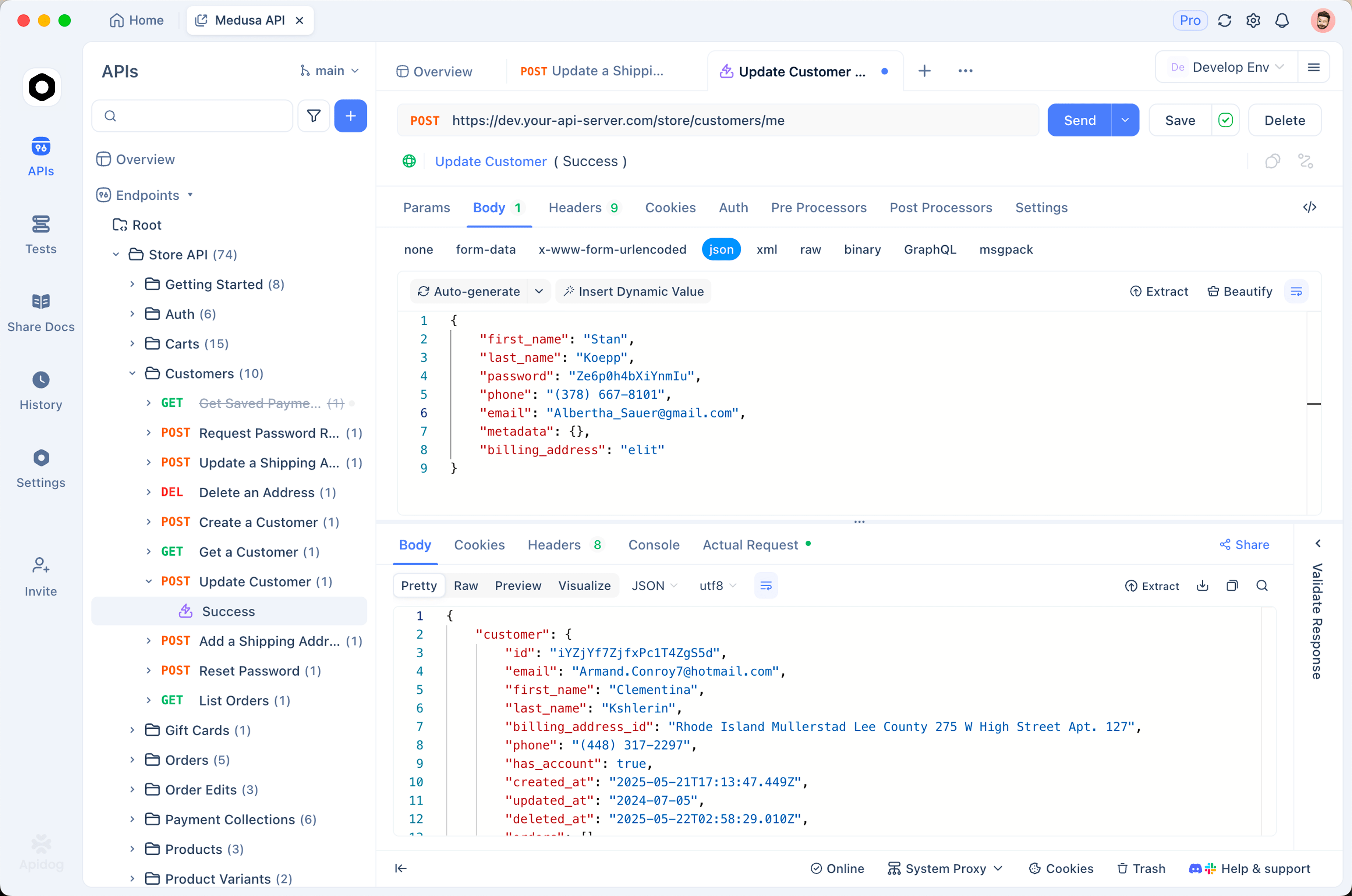
- Create an environment. Add an environment called
YouTubewith two variables:base_urlset tohttps://www.googleapis.com/youtube/v3, andyoutube_api_key. For the key, leave the shared value as a placeholder and paste the real key into the local value field. Local values stay in your client’s cache and never sync to teammates; the full setup is in our guide to environments and secret variables in Apidog. - Build the request. New request, GET
{{base_url}}/videos, query paramspart=snippet,statisticsandid=7lCDEYXw3mM, and a headerx-goog-api-keyset to{{youtube_api_key}}. Select theYouTubeenvironment and send. You should see the same JSON as the curl call. - Turn it into a test. In the request’s post-processors, add assertions: status equals 200, and
$.items[0].idequals7lCDEYXw3mM. Save the request and add it to a test scenario. The check now runs on demand, on a schedule, or in CI through the Apidog CLI, where--env-var "youtube_api_key=$YOUTUBE_API_KEY"injects the key at runtime instead of storing it.
The payoff comes the first time the key is rotated or a restriction changes: re-run one scenario and you know within seconds whether every YouTube call still works. Download Apidog to follow along; it’s free for teams of up to four.
Quota and limits
The YouTube Data API doesn’t bill you in dollars; it bills you in quota units, and the numbers come from Google’s quota calculator page. Every project that enables the API gets this default allocation:
| Bucket | Default per day | Cost per call |
|---|---|---|
search.list |
100 calls | 1 unit (own bucket) |
videos.insert |
100 calls | 1 unit (own bucket) |
| All other endpoints combined | 10,000 units | varies, see below |
Within the shared 10,000-unit pool, list methods such as videos.list, channels.list, playlistItems.list, and commentThreads.list cost 1 unit each. Writes cost more: videos.update and videos.delete are 50 units, and captions.insert is 400. Four rules from the same page shape how you should design around this:
- Quotas reset at midnight Pacific Time.
- Every request, including an invalid one, costs at least 1 unit. A loop that retries a bad call burns quota for nothing.
- Each additional page of a paginated result costs the same as the first page.
- The default allocation is “subject to change”. Check the page, not a tutorial, before you plan capacity.
Older guides price a search at 100 units out of the 10,000 pool. The current page puts search.list in its own bucket, so the ceiling is still 100 searches a day, but searches no longer eat into the quota for your other calls.
If that isn’t enough, the quota and compliance audits page points you to the YouTube API Services Audit and Quota Extension Form. Before you file it, cache responses, request only the part values you need, and batch IDs into one videos.list call (the id parameter takes a comma-separated list). Usage shows on the Quotas page in the Cloud Console.
Common errors and how to fix them
Google’s error reference lists the API’s own reason codes. The first two rows below come from sending real requests to the live API with a bad key and with no key.
| HTTP | Reason | Message you’ll see | Fix |
|---|---|---|---|
| 400 | badRequest (API_KEY_INVALID) |
“API key not valid. Please pass a valid API key.” | Typo, deleted key, or an API restriction that excludes YouTube Data API v3. Recreate or edit the key. |
| 403 | forbidden |
“Method doesn’t allow unregistered callers…” | No key was sent. Add the key parameter or the x-goog-api-key header. |
| 403 | quotaExceeded |
“The request cannot be completed because you have exceeded your quota.” | Wait for the midnight PT reset, cut redundant calls, or request an extension. |
| 400 | missingRequiredParameter |
“The request is missing a required parameter.” | Almost always a missing part. |
| 401 | authorizationRequired |
“The request uses the mine parameter but is not properly authorized.” | This call needs an OAuth 2.0 token, not a key. See the FAQ. |
One more from practice: if an application restriction doesn’t match the caller, you get a 403 that names the blocked referrer or IP. Fix the restriction or call from the allowed host. And note that older forum threads call the invalid-key error keyInvalid; the live API returns badRequest with an API_KEY_INVALID detail, so match on the message or the detail, not the legacy reason string.
FAQ
Is a YouTube API key free?
Yes. Creating a key costs nothing, and the docs price the API in quota units, not money. The default allocation above is what you get without asking for anything.
When do I need OAuth instead of an API key?
An API key identifies your project and unlocks public data. The moment you touch private user data, or insert, update, or delete anything, Google requires an OAuth 2.0 token from the user who owns that data. Rating a video, listing your own subscriptions, or using the mine=true filter all fall on the OAuth side. Our comparison of API keys and bearer tokens explains why the two credentials answer different questions.
Can an AI agent use my YouTube API key?
Yes, as long as the agent runs where the key’s restrictions allow. A YouTube MCP server is one way to hand video data to a coding assistant; give it a key restricted to the Data API and to the machine it runs on, and keep it out of the prompt itself.
What should I do if the key leaks?
Delete it in the Credentials page and create a replacement. Then fix the source: move the key into a local value in Apidog or a secret store, and scan the repository so the old key isn’t still sitting in history.
Next step
You now have a project, an enabled API, a restricted key, and a request that works from curl, Python, and Apidog. Wire the saved scenario into CI and let the Quotas page tell you when it’s time to optimize.