A Perplexity API key is the credential you send with every request to api.perplexity.ai. It identifies your project, draws down your prepaid credit balance, and sets your rate limit tier. If you’ve never handled one before, our primer on what an API key is covers the basics. This guide covers the Perplexity-specific part: creating the account, adding credits, generating the key, and sending your first grounded Sonar request from curl, Python, and Apidog.
One timing note before you start. Perplexity moved Sonar onto its Agent API, and the official quickstart now points there. The old Sonar chat-completions endpoint keeps working until September 27, 2026, then retires. Every example below uses the current endpoint, with a short note on the legacy form in case you’re maintaining older code.
What you need before you start
- A Perplexity account. Google, Apple, SSO, or a passwordless email sign-in all work, and they resolve to the same account by email address.
- A payment card. The API is pay-as-you-go with no subscription, but requests fail once your credit balance hits zero.
- curl or Python 3.9+ for the first request.
- Apidog if you want the key stored as a local secret and the request saved as a repeatable test.
Step 1: sign in to the API console and create a project
Go to console.perplexity.ai and pick a sign-in method. Signing in creates a Perplexity account, but not an API project. On your first visit the setup wizard prompts you to create or join a project before you can generate a key, because keys are scoped to projects.
Open Settings in the left sidebar and fill in your organization’s name, address, and tax details; they land on your invoices. If your company already has a project, ask an admin to add you to it instead of creating a second one. Separate projects get separate credit balances and keys, which is useful for isolating a production app from an experiment.
Step 2: add a payment method and credits
Open the Billing page and add a card. Per the docs, adding a payment method doesn’t charge the card; it stores the details for future usage. Then buy credits. The balance, per-model usage breakdowns, and invoice history all live on this page.
Two details matter here. The API bills from prepaid credits, and if the balance runs out your keys are blocked until you top up. The docs describe that failure as a 401, not a 402, so an out-of-credits app looks like an auth bug at first glance. And next to Auto reload, click Change preferences to have the console add credits automatically when the balance drops below a threshold you set. Turn that on before anything goes to production.
The docs don’t publish a minimum purchase amount, so go by what the billing page shows you. Your usage tier, which sets your rate limits, is based on cumulative credits purchased over the life of the account, not on the current balance.
Step 3: generate the API key
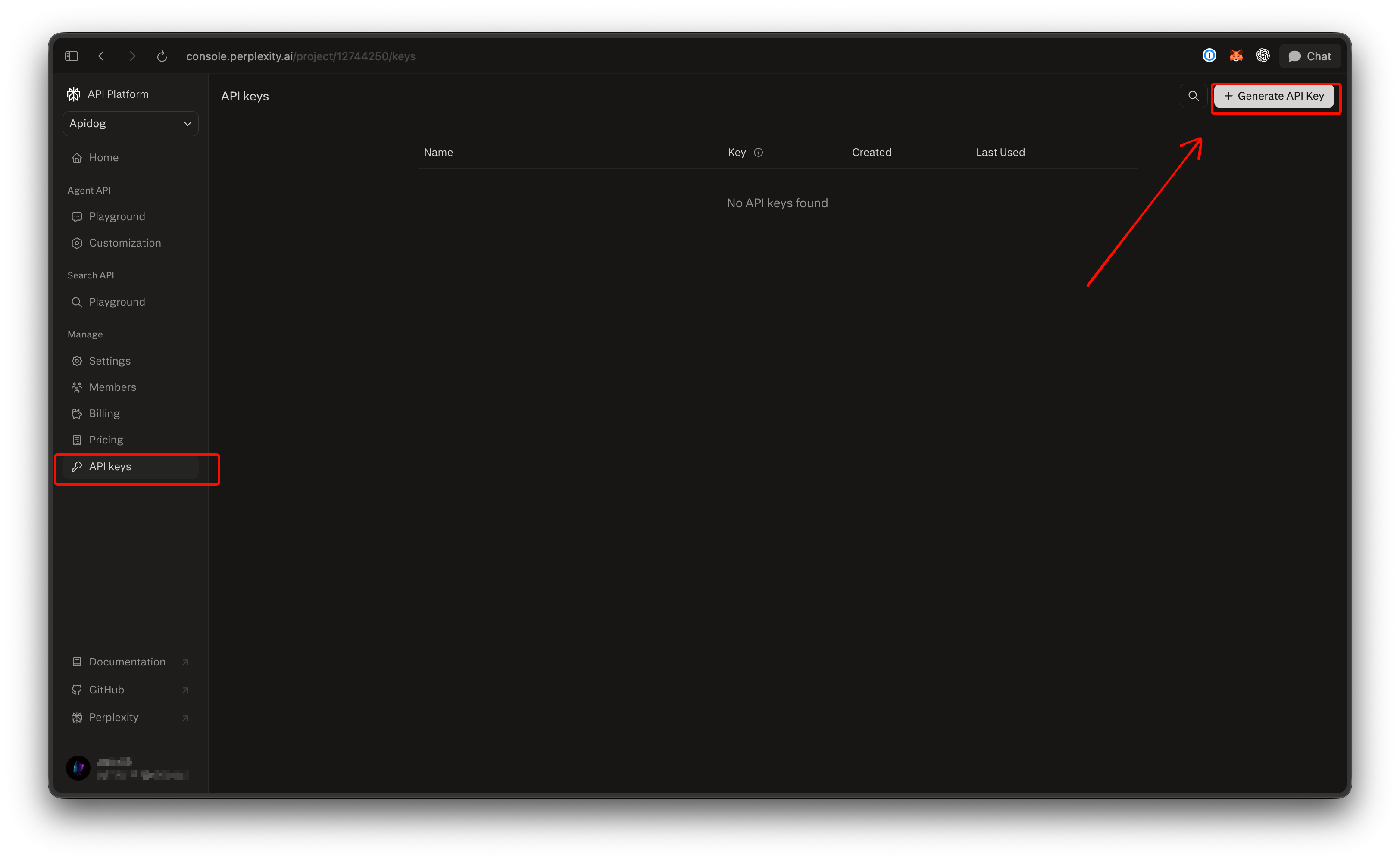
Open the API Keys page in the console and create a key. Give it a descriptive name such as dev-laptop or prod-search-worker. After creation, the name is the only way to tell keys apart, because the full value is shown once and can’t be retrieved again. Copy it right away.
Put the key in an environment variable, never in code:
export PERPLEXITY_API_KEY="pplx-your-key-here"
On Windows, use setx PERPLEXITY_API_KEY "pplx-your-key-here" and open a new terminal.
You can create several keys within one project, so make one per environment and per service. Revoking a key is permanent, which is what you want when a key leaks. If you’re not sure whether a key has already leaked into a repo, run a secret scanner over your git history before you rotate.
Step 4: make your first Sonar request
The current endpoint is POST https://api.perplexity.ai/v1/agent. Authentication is a standard bearer header, Authorization: Bearer $PERPLEXITY_API_KEY. The body takes a model and an input string. The Sonar model id on this endpoint is perplexity/sonar, and adding the web_search tool tells it to search the live web and attach sources.
Ask it something with a real answer that changes over time:
curl https://api.perplexity.ai/v1/agent \
  -H "Authorization: Bearer $PERPLEXITY_API_KEY" \
  -H "Content-Type: application/json" \
  -d '{
    "model": "perplexity/sonar",
    "input": "Which Node.js release line is currently Active LTS, and when does it reach end of life?",
    "tools": [{ "type": "web_search" }]
  }' | jq
The response carries output_text, the answer as plain text, and an output array with one item per step the model took. The message item holds the answer; the search_results item lists the pages it read, each with a url, title, snippet, and date. The usage object reports token counts and cost. A status of completed means the run finished.
The same request in Python with the official SDK:
pip install perplexityai
from perplexity import Perplexity

client = Perplexity()  # reads PERPLEXITY_API_KEY from the environment

response = client.responses.create(
    model="perplexity/sonar",
    input="Which Node.js release line is currently Active LTS, and when does it reach end of life?",
    tools=[{"type": "web_search"}],
)

print(response.output_text)
If you prefer the OpenAI SDK, set base_url="https://api.perplexity.ai/v1" and call client.responses.create() with the same arguments. The SDK routes it to /v1/responses, which Perplexity accepts as an alias. Presets (fast, low, medium, high, xhigh) bundle a model, token budgets, and tools for you; on the OpenAI SDK you pass them through extra_body.
If you’re on the legacy chat-completions form
Older code sends messages to https://api.perplexity.ai/v1/sonar with model ids sonar, sonar-pro, sonar-reasoning-pro, or sonar-deep-research, and reads choices[0].message.content. That form works until September 27, 2026. The migration guide maps sonar to perplexity/sonar, sonar-pro to perplexity/sonar with the low preset, and deep research to the high preset. The search_domain_filter and search_recency_filter options move inside the web_search tool as a filters object.
Step 5: store the key and save the request in Apidog
A curl that works once is not a test. Here’s the setup we use in Apidog so the key stays off the cloud and the request runs on demand.
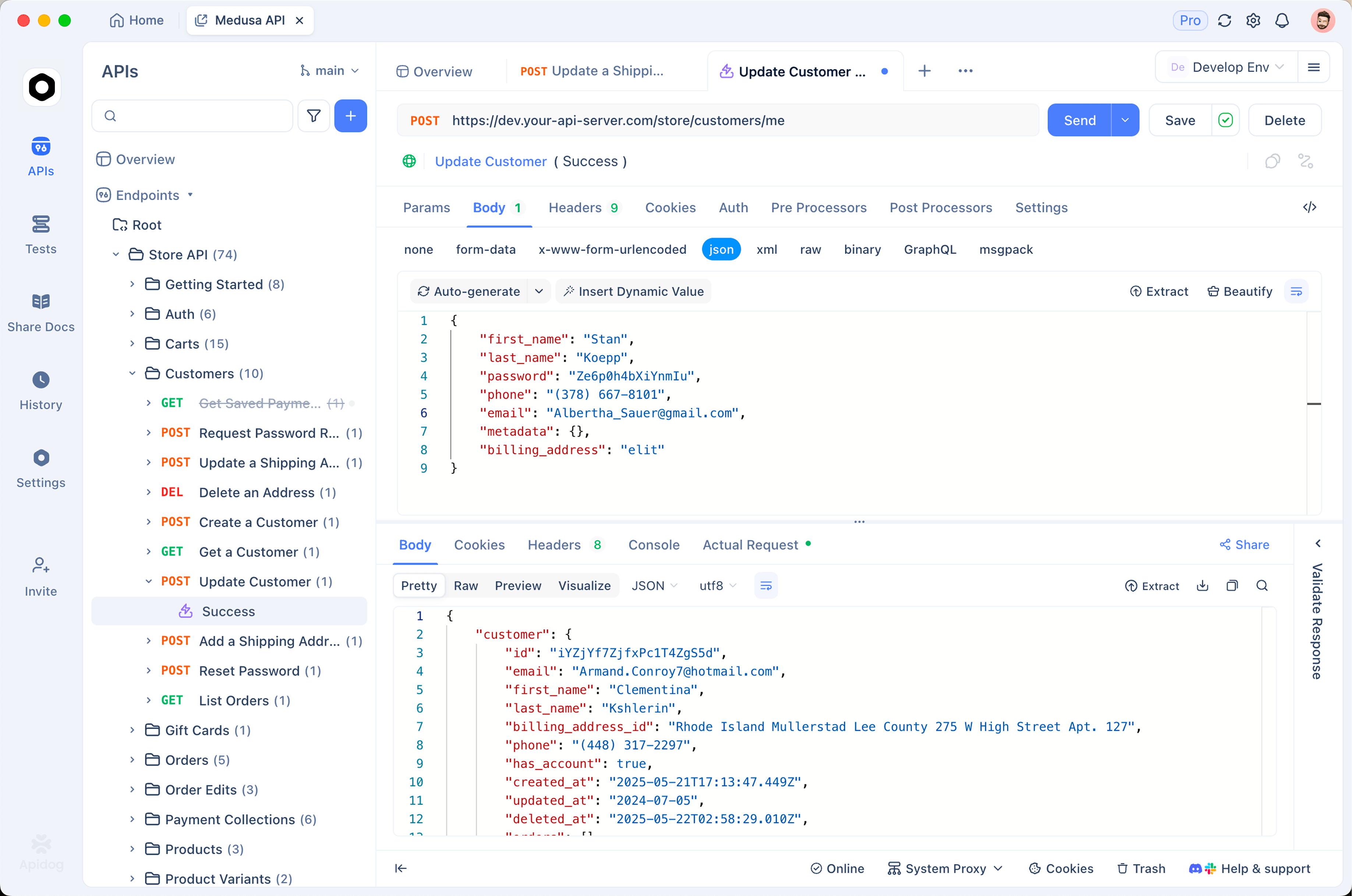
Create an environment. Add an environment called Perplexity with two variables: base_url set to https://api.perplexity.ai as a shared value, and PERPLEXITY_API_KEY with the shared value left as a placeholder and the real key in the local value only. Local values live in your client’s cache and never sync to teammates, which is the whole point. Our guide to environments and secret variables in Apidog goes deeper on the shared-versus-local split.
Build the request. New request, POST {{base_url}}/v1/agent. Add a header Authorization: Bearer {{PERPLEXITY_API_KEY}}, set the body type to JSON, and paste the same body as the curl above. Select the Perplexity environment and click Send. You should see the output_text and the search_results block in the response panel.
Turn it into a test. Add three assertions: the status code is 200, $.status equals completed, and $.output_text is not empty. Save the request into a test scenario. Now anyone on the team can pull the project, paste their own key into the local value, and verify their setup in one click. Rotating the key means editing one field, not hunting through scripts.
If you don’t have it yet, Download Apidog for free; the free plan covers four users, enough for a small team to share the project.
Rate limits and what a request costs
Rate limits on the Agent API scale with your usage tier, and tiers are set by lifetime credit purchases, per the rate limits page:
| Tier | Credits purchased | Requests per second | Requests per minute |
|---|---|---|---|
| 0 | $0 | 1 | 50 |
| 1 | $50+ | 3 | 150 |
| 2 | $250+ | 8 | 500 |
| 3 | $500+ | 17 | 1,000 |
| 4 | $1,000+ | 33 | 4,000 |
| 5 | $5,000+ | 33 | 8,000 |
Limits use a leaky-bucket algorithm, so short bursts up to the limit pass. When you exceed it the API returns a 429 with a Retry-After header, and rejected requests aren’t billed. Your current tier shows on the console’s Pricing page under the usage tiers tab.
On pricing, one paragraph is enough here. The pricing page lists perplexity/sonar on the Agent API at $0.25 per million input tokens and $2.50 per million output tokens, plus $0.0025 per web_search invocation. The legacy Sonar chat-completions models bill differently: sonar at $1 per million tokens in and out, plus $5 to $12 per thousand requests depending on search context size. For the full breakdown and the Pro-account angle, see our Perplexity API guide.
Common errors and how to fix them
401 Unauthorized. Three causes, in order of likelihood: the header is wrong (it must be Authorization: Bearer <key>, and the shell variable must be exported in the same terminal), the key was revoked, or the credit balance is at zero. Check the billing page before you regenerate anything. The Python SDK raises AuthenticationError for this.
400 Bad Request. Usually a body from the old format sent to the new endpoint: messages instead of input, or a bare sonar-pro model id on /v1/agent. The SDK surfaces this as ValidationError.
404 Not Found. The path is wrong. /v1/agent is the Agent API and /v1/sonar is the legacy chat-completions endpoint; the docs list nothing else.
429 Too Many Requests. You hit your tier’s limit. Read Retry-After, wait that long, then retry with exponential backoff and jitter. Buying credits raises your tier if you need sustained throughput. The SDK’s error handling guide shows the RateLimitError pattern.
500 or 503. Server side. Retry with a delay; tight retry loops make rate limiting worse.
FAQ
Is there a free Perplexity API key?
No free tier is documented. The API is pay-as-you-go from a prepaid credit balance, and a project with no credits gets blocked. The cost of a first request with perplexity/sonar and one web search is a fraction of a cent, so a small top-up covers a lot of testing.
Which model id should I use for a first request?
Use perplexity/sonar on /v1/agent with the web_search tool. It’s the lowest-cost grounded option and the one the migration guide maps the old sonar and sonar-pro ids onto. Switch to a preset such as low or medium when you want Perplexity to choose the model and search budget for you.
Do I need the Agent API if I only want search results?
No. The separate Search API returns ranked results without running a model, which is cheaper when you’re feeding pages into your own pipeline. Our walkthrough of the Perplexity Search API shows the request shape and filters.
How do I rotate a key without downtime?
Create a second key in the same project, deploy it everywhere the old one was used, confirm traffic on the new key, then revoke the old one. Revocation is permanent, so update every consumer first. Perplexity also exposes /generate_auth_token and /revoke_auth_token endpoints if you want to script the rotation.
Wrapping up
Sign in, create a project, buy credits, generate a key, send one request to /v1/agent with perplexity/sonar. That’s the whole path. Store the key as a local value in Apidog and save the request as a test, and the next person on your team gets a verifiable setup in minutes. If you still have code on the chat-completions endpoint, migrate it before September 27, 2026.