
If your Node.js tests fail because a third-party API is down, slow, or rate-limited, you don’t have a code problem. You have a dependency problem. The fix is to mock the HTTP layer so your unit tests run the same way every time, and nock is the npm package most Node developers reach for. This guide explains what nock is, shows a small working example, and covers where a shared mock server fits better than in-process interception. For the full library reference, the nock GitHub repo is the source of truth.
What is nock?
nock is an HTTP server mocking and expectations library for Node.js. It works by overriding Node’s http and https modules at runtime, so any outgoing request your code makes can be intercepted and answered with a canned response. Nothing leaves your machine. The network call never happens.
That matters for unit tests. When you test a function that calls an external API, you don’t want to hit the real service. Real calls are slow, they cost money, they can fail for reasons unrelated to your code, and they make your test suite non-deterministic. nock lets you say “when my code makes a GET request to this URL, return this exact JSON with this status code.” Your test then asserts on how your function handles that response.
nock is Node.js-only. It hooks into the native HTTP stack, so it works with fetch, axios, got, node-fetch, and anything else built on top of http/https. It has millions of weekly downloads and it’s been a default choice for backend testing for years. You install it as a dev dependency because it only runs in tests, never in production.
A small nock example
Say you have a function that fetches a user from an API. Here’s the function:
// user-service.js
export async function getUser(id) {
  const res = await fetch(`https://api.example.com/users/${id}`);
  if (!res.ok) throw new Error(`Request failed: ${res.status}`);
  return res.json();
}
Now here’s a test that uses nock to intercept the request:
// user-service.test.js
import nock from 'nock';
import { getUser } from './user-service.js';

test('returns the user when the API responds', async () => {
  nock('https://api.example.com')
    .get('/users/42')
    .reply(200, { id: 42, name: 'Ada Lovelace' });

  const user = await getUser(42);
  expect(user).toEqual({ id: 42, name: 'Ada Lovelace' });
});
Read it top to bottom. nock('https://api.example.com') sets the host you want to intercept. .get('/users/42') matches the method and path. .reply(200, {...}) defines the status and body to return. When getUser(42) runs, the real network call is swapped out and your canned response comes back instead.
You can mock errors the same way, which is the part people forget to test:
test('throws when the API returns 500', async () => {
  nock('https://api.example.com')
    .get('/users/99')
    .reply(500);

  await expect(getUser(99)).rejects.toThrow('Request failed: 500');
});
Testing the unhappy path is where mocking earns its keep. You can’t reliably make a live API return a 500 on demand, but you can fake one in a single line. If error simulation is your main goal, this walkthrough on how to mock a 500 internal server error response goes deeper.
Useful nock features to know
A few methods come up constantly once you move past the basics.
.persist()keeps an interceptor alive across multiple calls. By default nock removes an interceptor after it’s matched once, which is great for asserting that a request happened exactly one time. Use.persist()when the same endpoint gets hit repeatedly in one test..times(n)matches the same request a set number of times before the interceptor expires..delay(ms)simulates a slow response so you can test timeout handling.- RegExp matching lets the host or path be a pattern instead of a fixed string, handy when IDs or query strings vary.
nock.cleanAll()clears all interceptors. Run it between tests so one test’s mocks don’t leak into the next.
One habit worth building early: assert that all your mocks were actually used. Call scope.done() on an interceptor (or nock.isDone()) and the test fails if an expected request never fired. That turns a silent missed call into a loud failure.
Where nock stops being the right tool
nock is built for one job and does it well: intercepting HTTP inside a single Node process during automated tests. The moment your need crosses a process boundary, that model starts to strain.
Here’s the limitation. nock mocks live inside your test file, in your runtime, in your language. A front-end developer can’t point their browser at your nock setup. A mobile engineer can’t hit it from a simulator. Your QA team can’t run manual checks against it. A Postman collection can’t reach it. The mock exists only while your Jest or Mocha process is running, and only for code in that same process.
That’s fine for unit tests and exactly what nock is designed for. But plenty of real situations need a mock that lives somewhere everyone can reach:
- The front end needs to build against an endpoint before the back end exists.
- Three teams in different repos need to agree on the same fake responses.
- You want to demo an integration without a live backend.
- A tester wants to poke at edge cases by hand, no code required.
For those, you want a mock server, something that listens on a real URL and returns responses to anyone who calls it. If you’re weighing the two ideas, mock server vs real server and the broader explainer on API mocking both lay out the trade-offs.
nock vs a hosted mock server (Apidog)
Think of it as two layers rather than a competition. nock handles in-code interception for unit tests. A tool like Apidog gives you a shared, schema-driven mock server for everything that happens outside a single test process. Many teams use both.
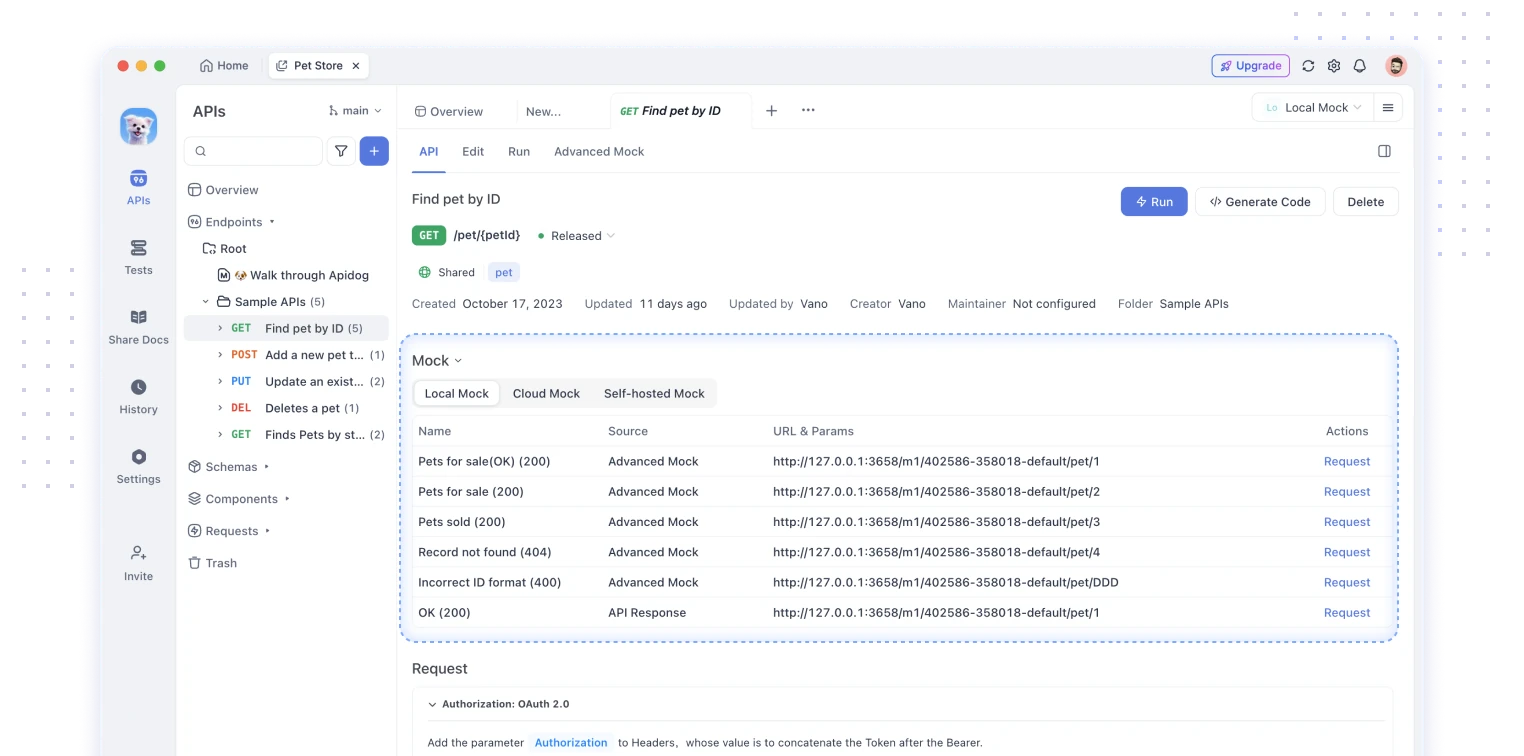
Apidog generates a mock server straight from your API design. You define an endpoint and its schema, and Apidog serves realistic responses at a live URL, with smart mock rules that produce plausible data from field names and types. No test harness, no per-test setup, no language lock-in. Anyone with the URL gets the same responses.
| nock | Apidog mock server | |
|---|---|---|
| Where it runs | In your Node test process | Hosted server with a real URL |
| Best for | Unit tests, error simulation | Integration, manual testing, cross-team work |
| Who can reach it | Code in the same process | Any client with the URL |
| Setup | Code in each test file | Generated from your API schema |
| Languages | Node.js only | Any client, any language |
| Realistic data | You write each response | Smart mock from schema and field names |
| Sharing | Not shareable | Shared across the whole team |
To be clear about scope: Apidog does not replace nock inside your Jest or Mocha unit tests. If you need to intercept a fetch call in a single test and assert on the result, nock is still the right tool. Apidog steps in when the mock needs an address other people and other tools can hit. For a hands-on look at the server side, see the practical guide to mocking an API for testing. You can download Apidog and spin up a mock from an existing OpenAPI file in a few minutes.
Other alternatives to nock
nock isn’t the only library in this space, and the right pick depends on where your code runs.
- MSW (Mock Service Worker) intercepts requests at the network level using a service worker in the browser and a Node interceptor on the server. The same mock definitions work in both, which is why a lot of teams now default to it for full-stack JavaScript. The official MSW docs explain the model.
- Jest manual mocks let you replace a module like
axioswith a fake. This is simpler than nock for a small case but ties you to one HTTP client. The Jest mocking tutorial covers the pattern. - Built-in test doubles in Node’s own test runner or libraries like Sinon can stub the function that makes the call, though you lose nock’s HTTP-level matching.
The deciding question is always the same. Are you testing logic inside one process, or do you need a fake API that lives on the network? nock and MSW answer the first. A hosted mock server answers the second.
Frequently asked questions
Is nock free?
Yes. nock is open source under the MIT license and free to install from npm. You add it as a dev dependency and use it in your test suite at no cost.
Does nock work with fetch and axios?
Yes. Because nock intercepts at Node’s http/https layer, it works with any client built on top of those modules, including the native fetch, axios, got, and node-fetch. You write the same interceptor regardless of which one your code uses.
Can I use nock in the browser?
No. nock is Node.js-only because it patches Node’s HTTP modules, which don’t exist in the browser. For browser-side mocking, use MSW or point your front end at a hosted mock server. This overview of mock APIs in JavaScript walks through the browser options.
What’s the difference between nock and a mock server?
nock intercepts requests inside your test process and never opens a real port. A mock server listens on an actual URL that any client can call. Use nock for unit tests; use a mock server when the front end, QA, or other teams need to reach the same fake responses.
Wrapping up
nock is the dependable choice for HTTP mocking in Node.js unit tests. It intercepts outgoing requests in-process, returns the responses you define, and makes your test suite fast and deterministic, including the error paths you can’t trigger against a live API. Keep using it for that.
When the mock needs to leave your test file, when the front end, QA, or another team has to hit the same endpoint, reach for a shared mock server instead. Apidog generates one from your API schema and serves realistic data at a live URL, so everyone builds against the same contract before the backend is ready. Download Apidog and turn your OpenAPI spec into a working mock in minutes.