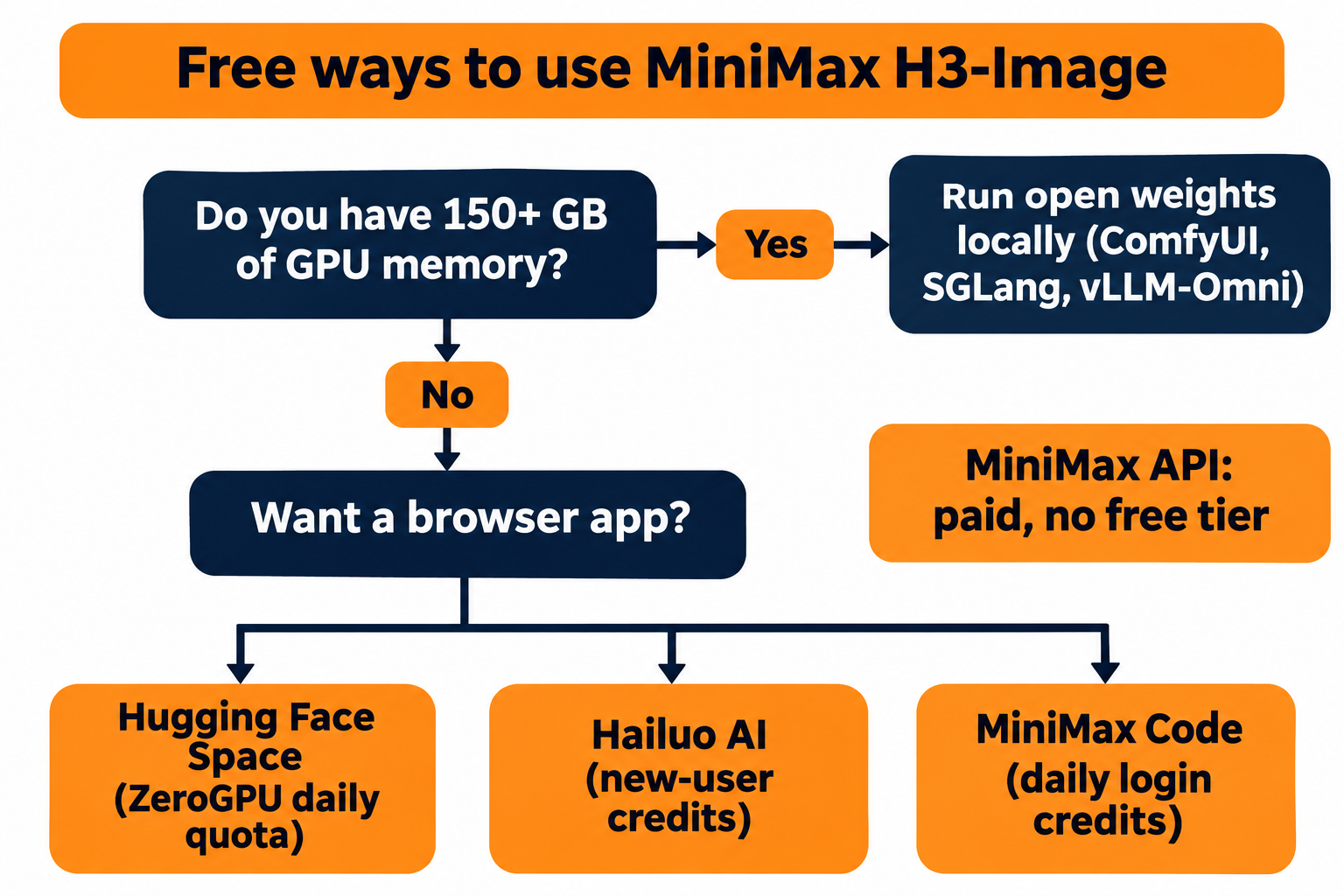
You can use MiniMax H3-Image for free in four ways: the official Hugging Face Space (a few images a day on ZeroGPU’s free quota), Hailuo AI’s new-user credits, MiniMax Code’s daily login credits, or the open weights on your own GPUs. The MiniMax API itself has no free tier. Each route has a real limit, and the license matters more than usual here.
MiniMax launched H3-Image on November 10, 2026, as an open-weight model for text-to-image and image editing. MiniMax says it renders 16-megapixel (4K) images in about 10 seconds; that’s their claim, not our benchmark.
New to the model? Read what MiniMax H3-Image is. Ready to pay? The MiniMax H3-Image API guide covers requests and pricing.
Free MiniMax H3-Image routes at a glance
Four routes cost $0 today. The table below compares them on what you pay instead of money.
| Route | What’s free | Main limit | Account needed | Checked |
|---|---|---|---|---|
| Hugging Face Space (official) | ZeroGPU daily quota | 2 min/day anonymous, 5 min/day free account; the Space uses the 2x-cost GPU size | Optional (free HF account gives 2.5x the quota) | 2026-11-11 |
| Hailuo AI web app | New-user sign-up credits | Credit amount and per-image cost [VERIFY] | Yes | 2026-11-11 |
| MiniMax Code | Daily login credits | Credit amount and per-image cost [VERIFY] | Yes | 2026-11-11 |
| Open weights, local | Unlimited images | About 153 GB of GPU memory in BF16, about 127 GB of disk, license territory limits | Hugging Face (download) | 2026-11-11 |
| MiniMax API | Nothing | Pay as you go; launch discount only | Yes | 2026-11-11 |
Route 1: The official Hugging Face Space
The fastest free way to try MiniMax H3-Image is the official MiniMax-H3-Image Space. It runs in your browser, needs no install, and supports both text-to-image and editing with up to 8 reference images.
How to use it:
- Open the Space and sign in to Hugging Face (optional, but it more than doubles your quota).
- Type a prompt. Leave “enhance” on for short prompts.
- Pick an aspect ratio and 4 MP, 8 MP or 16 MP.
- Optionally add reference images, then generate.
The limit is GPU time, not image count. Hugging Face’s ZeroGPU documentation lists these daily quotas:
| Account type | Daily GPU quota | Queue priority |
|---|---|---|
| Unauthenticated | 2 minutes | Low |
| Free account | 5 minutes | Medium |
| PRO account | 40 minutes | Highest |
The quota resets 24 hours after your first GPU use. The Space’s code requests the “xlarge” GPU size, which ZeroGPU bills at 2x quota. It also reserves roughly 49 seconds of GPU time for a 4 MP image and about 140 seconds for a 16 MP image, by the formula in its app.py. So one 4 MP image costs about 98 seconds of quota and one 16 MP image about 280 seconds, and ZeroGPU refuses a call when your remaining quota is below the requested time. A free account (300 seconds) gets about three 4 MP images or one 16 MP image a day. Signed out (120 seconds), you get one 4 MP image and no 16 MP image.
Community Spaces with similar names aren’t run by MiniMax; stick to the MiniMaxAI one.
Route 2: Hailuo AI new-user credits
Hailuo AI is MiniMax’s consumer web app, and its homepage now lists “MiniMax H3 Image” as a tool. The sign-up banner says new users receive free credits; the banner shows 150 [VERIFY: confirm the credit amount and how many credits one H3-Image generation costs].
Create an account on Hailuo AI, claim the credits from the banner and open the H3 Image tool. The honest limit: as far as the homepage shows, these are one-time welcome credits, not a recurring free plan. Once they run out, you’re on a paid plan.
Route 3: MiniMax Code daily credits
MiniMax Code is MiniMax’s desktop, web and terminal agent for coding and office work. Its about page lists “Log in daily to claim free credits,” and the launch post names MiniMax Code as one of three places H3-Image is available.
That makes it the only route with a recurring daily allowance besides the Hugging Face Space. The page doesn’t say how many credits you get per day or how many an H3-Image generation costs [VERIFY]. Paid plans start at $11 per month during the current offer (listed at $22), so treat the free credits as a trial, not a production budget.
Route 4: Run the open weights locally
The open weights are the only route with no quota. You pay in hardware instead. The model card on Hugging Face lists what you download:
| Component | Size |
|---|---|
| Diffusion transformer (33.1B parameters, BF16) | 66.28 GB |
| Image VAE (FP32) | 2.34 GB |
| Text encoder (loaded from the MiniMax-H3 repo) | 66.7 GB |
| Optional prompt expander (NVFP4) | 17.9 GB |
The vLLM-Omni recipe puts the BF16 footprint at about 153 GB of GPU memory and about 127 GB of disk. Its tested configurations are data-center class: one H200, two or four RTX Pro 6000 cards, or AMD MI325X and MI350X. The recipe also lists a 16 GB configuration with offloading [VERIFY: the offload mode and how much system RAM it needs]. Community quantizations exist on Hugging Face, but we haven’t tested their quality.
Pick one of the four frameworks MiniMax recommends:
# Download the weights and the text encoder
hf download MiniMaxAI/MiniMax-H3-Image
hf download MiniMaxAI/MiniMax-H3 --include "text_encoder/*"

# Serve with SGLang on one GPU
sglang serve --model-path MiniMaxAI/MiniMax-H3-Image \
  --host 0.0.0.0 --port 30000 --warmup-mode off

# Or with vLLM-Omni
vllm serve MiniMaxAI/MiniMax-H3-Image --omni --host 0.0.0.0 --port 8000
If you prefer a node graph, ComfyUI has an official tutorial with text-to-image and edit templates.
The local server takes JSON on /v1/images/generations and returns the PNG in data[0].b64_json. Three rules from the model card trip people up: num_inference_steps must be omitted or 6, guidance_scale must be omitted or 1, and negative_prompt is rejected. The model also expects a long, detailed English prompt. MiniMax’s API expands short prompts for you; locally, run the optional prompt expander or write detailed prompts yourself.
Read the license before you run it
“Open weight” doesn’t mean “use anywhere.” The MiniMax-H3-Image Community License grants rights only within its “Applicable Territory,” which excludes the European Union, the United Kingdom, South Korea and the United States. If you’re in one of those regions, the license doesn’t authorize you to run the weights or use their outputs; MiniMax invites you to contact it for a separate license.
Inside the territory, you also need separate written permission if your annualized revenue tops $1 million or you offer the model as a hosted service to others. Commercial products must display “MiniMax-H3-Image” in their UI. You also can’t use the outputs to train other models.
What isn’t free: the MiniMax API
The MiniMax API has no free quota on its pricing page as of November 11, 2026. It bills per million tokens:
| Model | Input text | Input image | Output image |
|---|---|---|---|
| MiniMax-H3-Image | $2.30 | $1.50 | $3.80 |
| MiniMax-H3-Image-Highspeed | $2.30 | $3.00 | $7.60 |
The launch offer cuts the whole request cost by 50% when the delivered image has at least 16,600,000 pixels. It runs until November 17, 2026, at 16:00 UTC. That’s a discount, not a free route.
In return you get up to 16 reference images, 1 to 10 images per request and server-side prompt enhancement, per MiniMax’s image generation guide.
Test your H3-Image endpoint with Apidog CLI
Here’s the useful part of the local route: your SGLang server and the paid MiniMax API share the same path, /v1/images/generations. Write one test, run it free against your own GPU, and point the same test at the paid API only when you’re ready. Let your coding agent build it with Apidog CLI instead of clicking through a UI.
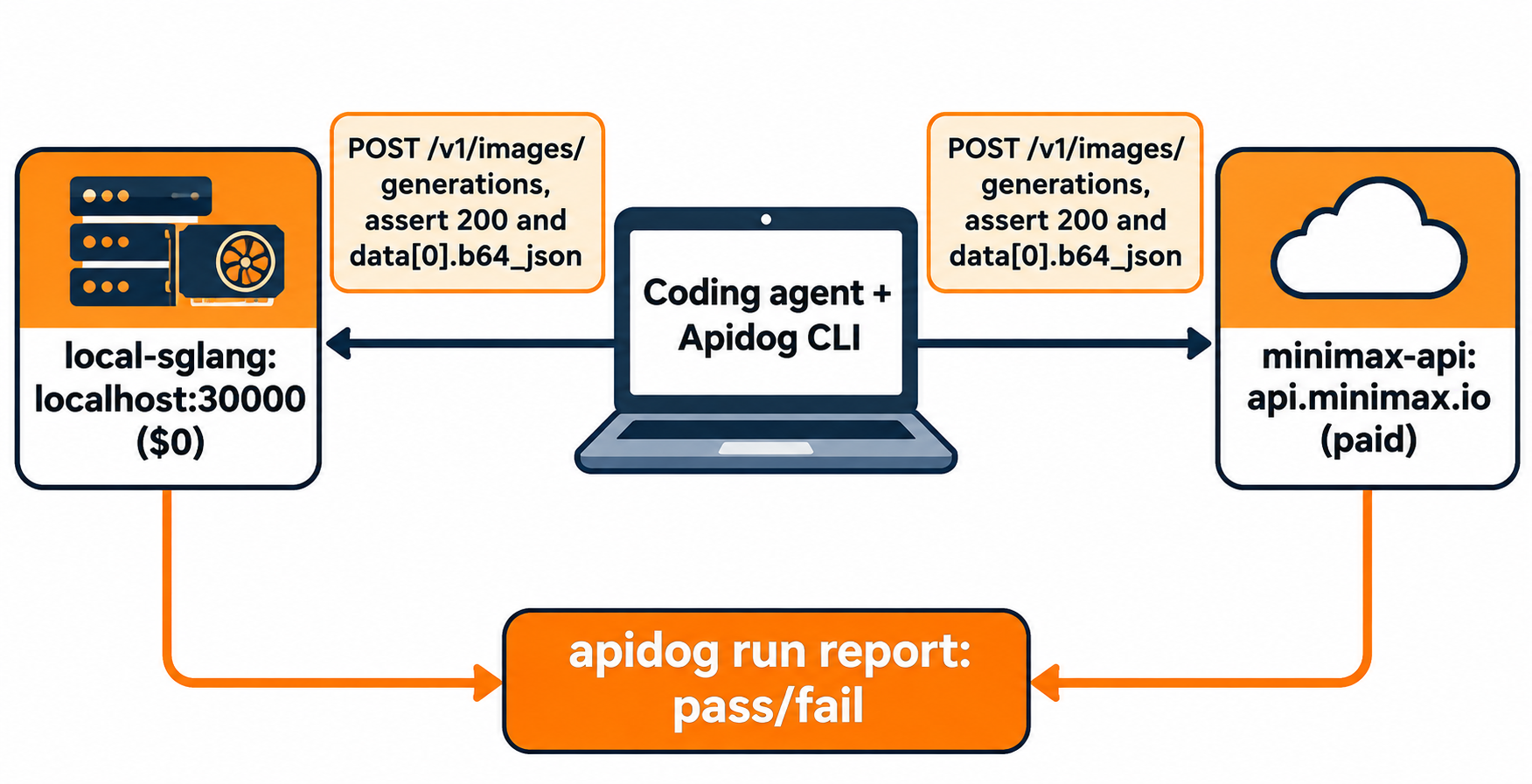
Set up the CLI once:
npm install -g apidog-cli@latest
apidog auth login --with-token <YOUR_APIDOG_TOKEN>
apidog skill install
Then give your agent (Claude Code, Codex, Cursor or another) one prompt:
In Apidog project <projectId>, create a POST /v1/images/generations endpoint
for MiniMax H3-Image with body fields prompt, size, seed and response_format.
Create two environments: local-sglang (http://localhost:30000) and
minimax-api (https://api.minimax.io, Bearer token from MINIMAX_API_KEY).
Add a test case that sends size 2048x2048 with response_format b64_json and
asserts status 200 and that data[0].b64_json is a non-empty string.
Run it against local-sglang and summarize any failures.
The agent checks each payload shape before it writes anything, then creates and runs:
apidog cli-schema get endpoint-create
apidog cli-schema validate endpoint-create --file endpoint.json
apidog endpoint create --project <projectId> --file endpoint.json

apidog environment create local-sglang --project <projectId> --base-url http://localhost:30000
apidog environment create minimax-api --project <projectId> --base-url https://api.minimax.io

apidog cli-schema get test-case-create
apidog cli-schema validate test-case-create --file case.json
apidog test-case create --project <projectId> --file case.json

apidog run --test-case <caseId> --project <projectId> -e <localEnvId> -r cli,json
The CLI report shows each assertion’s pass or fail, the status code and response time. Add --upload-report to see the run in the Apidog app. When the local test passes, rerun with -e <apiEnvId> to spend API credits only on a request you already know is valid. Our Apidog CLI agent workflow guide and Apidog CLI in Claude Code walk through the setup in more detail. Apidog’s Free plan covers up to 4 users.
Which free route should you pick?
Match the route to what you have:
- Just curious: use the Hugging Face Space. Sign in for 5 minutes of daily GPU time.
- Want a full creative app: spend Hailuo AI’s welcome credits.
- Want images inside agent tasks: claim MiniMax Code’s daily credits.
- Have data-center GPUs and live in the licensed territory: run the weights. It’s the only unlimited route.
- Need 16 references or batch output: pay for the API.
Comparing models? Read MiniMax H3-Image vs Nano Banana 2.1, or see Nano Banana 2.1 and Qwen-Image 2.1.
FAQ
Is MiniMax H3-Image free? The weights are free to download under MiniMax’s community license, and three hosted routes give free usage: the Hugging Face Space, Hailuo AI and MiniMax Code. The API is paid.
Can I use MiniMax H3-Image in the US or EU? Not under the community license for the weights: it excludes the US, EU, UK and South Korea. MiniMax says people in those regions can contact it about a separate license. Hosted apps such as Hailuo AI fall under their own terms.
How much GPU memory does MiniMax H3-Image need? The vLLM-Omni recipe lists about 153 GB in BF16, so a single consumer GPU won’t run it without offloading or quantization. Plan for about 127 GB of disk.
Does MiniMax H3-Image support negative prompts? No. The local server rejects negative_prompt, and it only accepts 6 sampling steps and a guidance scale of 1.
How long does the launch discount last? MiniMax’s pricing page says 50% off 16.6-megapixel-plus images until November 17, 2026, at 16:00 UTC.
Is 10 seconds per 4K image realistic on free routes? That’s MiniMax’s claim for its own service. The free Space has a queue and local speed depends on your hardware.