A headless API mock tool spins up a working fake of your API from a spec or config, then runs it from the command line with no window to click through. That’s exactly what you need inside a CI pipeline, a Docker container, or a frontend dev script. This guide explains what “headless” means for mocking, shows the real headless options (Prism, WireMock, Mockoon CLI), and covers where Apidog fits. If you want the concept first, start with what a mock API is.
What “headless” means for an API mock
A mock server answers HTTP requests with fake-but-realistic responses, so a frontend or a test suite can run before the real backend exists. “Headless” just means the mock runs without a graphical interface. You start it with a command, point it at a spec or data file, and it listens on a port.
This matters because the places you most want a mock are places with no screen:
- A CI job that needs a stable backend to test against.
- A Docker container in a
docker-composestack. - A teammate’s terminal who wants the mock running in the background.
- An ephemeral preview environment spun up per pull request.
A GUI mock tool is fine for designing responses on your laptop. But the moment you need that mock in a pipeline, you need a headless mode: a CLI flag, a Docker image, or a hosted URL that any job can hit.
Spec-driven vs config-driven mocks
Headless mock tools split into two camps, and the difference shapes your whole workflow.
Spec-driven tools read your OpenAPI document and serve responses straight from it. The schema is the source of truth. Add a field to the spec, and the mock returns it. This keeps the mock honest because it can’t drift far from the contract.
Config-driven tools store responses in their own format (JSON files, recorded stubs, hand-written rules). They’re flexible and good for edge cases the spec doesn’t cover, but you maintain that config by hand, and it can drift from the real API.
Most teams want spec-driven for the happy path and config-driven overrides for the weird cases. The best API mocking setups support both.
The headless mock options, honestly
Here are the tools worth knowing. Each one runs without a GUI, and each has real strengths.
Prism (Stoplight)
Prism turns an OpenAPI 2/3 or Postman Collection file into a mock server from one command:
prism mock openapi.yaml
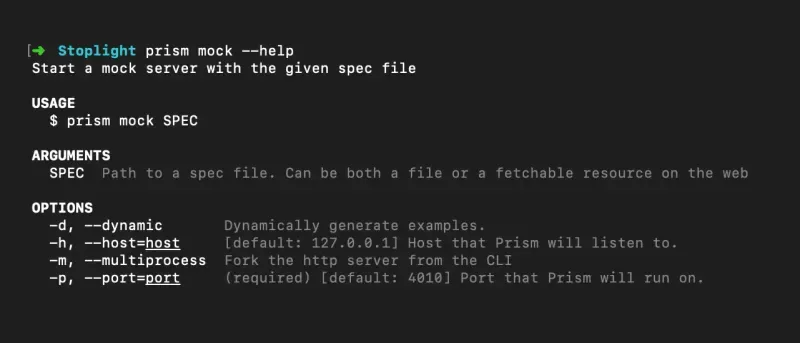
It listens on http://127.0.0.1:4010 by default. By default it returns static examples from your spec. Add -d (dynamic) and Prism generates random-but-valid data from the schema, with Faker support via the x-faker extension. It’s open source, lightweight, and genuinely spec-first. If your contract lives in a single OpenAPI file and you want a pure CLI mock, Prism is a strong pick.
WireMock
WireMock is a mature, Java-based HTTP mock server. You run the standalone jar:
java -jar wiremock-standalone-3.x.x.jar --port 9099
Its core model is stubbing: you define request-matching rules and the responses they return, over a JSON API or JSON files. It also records and plays back traffic from a real service, which is handy when you don’t have a spec but you do have a working backend to capture. WireMock shines for complex request matching, stateful scenarios, and JVM-heavy stacks.
Mockoon CLI
Mockoon is a desktop app with a companion CLI for headless use. The CLI runs the mock environments you build, on servers, in CI, or anywhere you can’t open the desktop app:
mockoon-cli start --data ./environment.json --port 3000
It ships an official Docker image and a dockerize command that generates a Dockerfile for a self-contained mock image. Mockoon is config-driven (you build environments in the GUI, then run them headless), with templating, response rules, and proxy mode. Good fit if you like designing visually and deploying headless.
Apidog mock server
Apidog is an all-in-one API platform, and its mock server is schema-driven by default. When you define or import an API, Apidog generates a mock with no extra setup. Its Smart Mock reads field names and types to produce realistic data: it recognizes things like email, avatar, username, phone, date, and IP, and fills them with sensible values instead of string placeholders. For full control, you can use Faker.js expressions like {{$person.fullName}} or {{$number.int(min=1,max=100)}}, plus custom mock rules for specific request conditions.
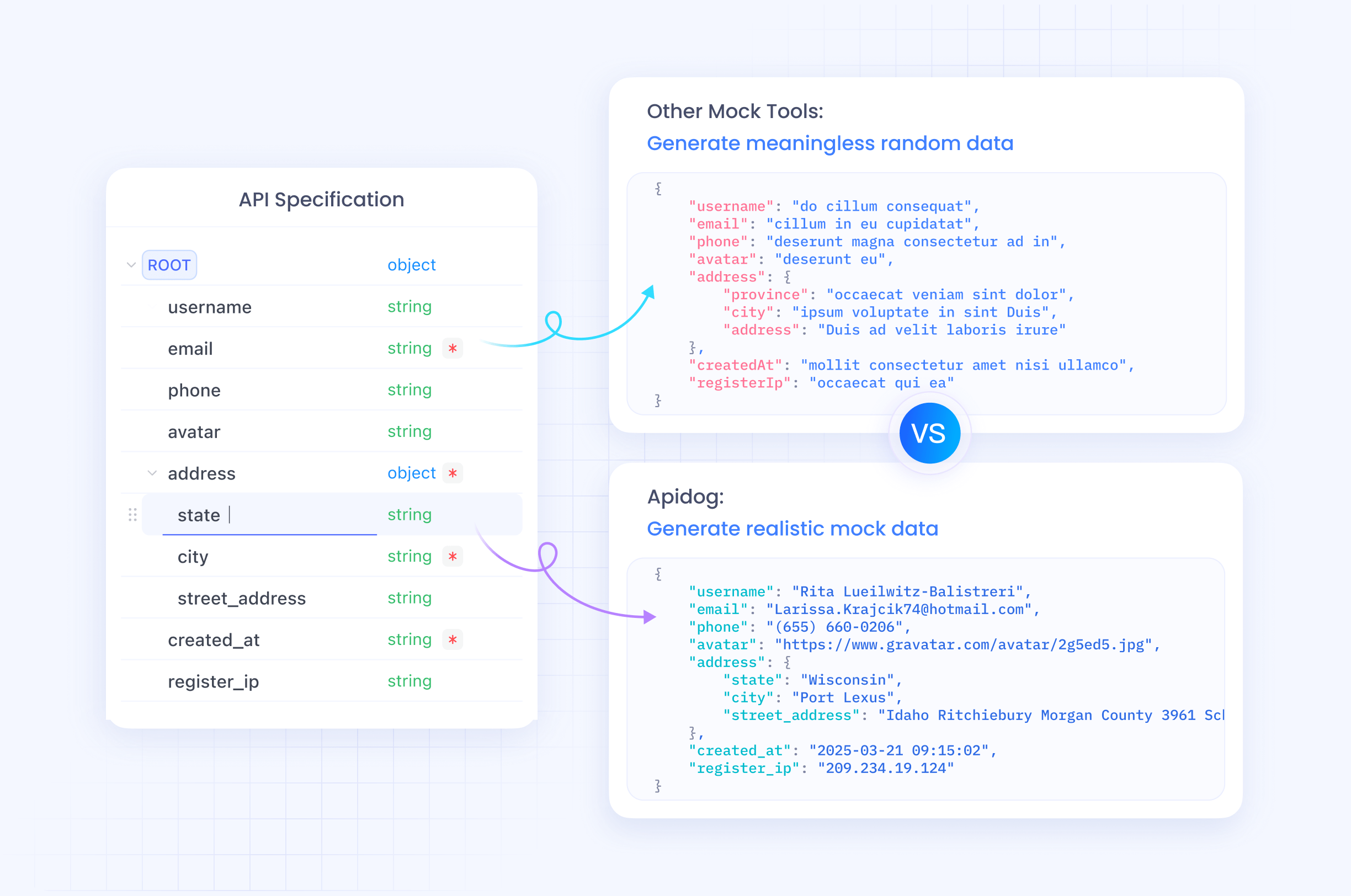
For headless use, Apidog exposes a Cloud Mock URL (https://mock.apidog.com/...) that any CI job or teammate can hit without running anything locally. A local mock also runs on 127.0.0.1, and you can bind it to your intranet IP so other machines reach it. Because the mock derives from the same project that holds your API design, docs, and tests, it stays aligned with the contract instead of drifting into a separate config file.
Comparison
| Tool | Source of truth | Headless run | Realistic data | Best for |
|---|---|---|---|---|
| Prism | OpenAPI / Postman file | prism mock spec.yaml |
Dynamic mode (-d) + x-faker |
Pure spec-first CLI mocking |
| WireMock | Stub rules / recordings | Standalone jar | Response templating | Complex matching, JVM stacks, record/replay |
| Mockoon CLI | GUI-built environments | mockoon-cli start + Docker |
Templating helpers | Visual design, headless deploy |
| Apidog | API schema in the project | Cloud Mock URL + local server | Smart Mock + Faker.js | Schema-driven mocks tied to design, docs, and tests |
There’s no single winner. Prism is the cleanest if your whole API is one OpenAPI file. WireMock wins on request-matching depth. Mockoon is great if you prefer building visually. Apidog fits teams who want the mock, the contract, the docs, and the tests in one place so they don’t drift apart. For a wider field, see our roundup of the best API mock tools.
Running a headless mock in CI
The pattern is the same across tools. You start the mock, point your tests at it, and tear it down.
A spec-first CLI mock looks like this in a pipeline step:
# start the mock in the background
prism mock ./openapi.yaml &
MOCK_PID=$!

# run your frontend or API tests against http://127.0.0.1:4010
npm test

# clean up
kill $MOCK_PID
With Apidog, you can skip running anything by pointing tests at the Cloud Mock URL, or run a local mock the same way. The mock answers from your current schema, so when the contract changes, the mock changes with it.
The natural next step is testing against that mock from the command line. Apidog’s CLI (apidog-cli) is itself headless: apidog run executes your test scenarios in CI, supports data-driven runs from CSV or JSON, and writes CLI, HTML, or JSON reports. The walkthrough in test a REST API from the command line shows the full loop, and the complete CLI guide covers the flags. If you’ve used Newman, the Apidog CLI vs Postman CLI comparison maps the concepts across.
Mocks and AI coding agents
If you write code with Cursor, Claude, or VS Code, your agent benefits from knowing the API contract behind a mock. The Apidog MCP server lets an AI agent read your API specs directly, so it can scaffold client code that matches the schema your mock is already serving. That keeps the agent’s output and your mock responses pointed at the same contract.
Frequently asked questions
Is a headless mock the same as a mock server?
Yes, with one detail. A mock server is any process that answers requests with fake responses. “Headless” specifies that it runs without a GUI, started by a command or hosted at a URL, so it works in CI, Docker, and scripts. Every tool here can run headless.
Can I generate a headless mock from my OpenAPI spec?
Yes. Prism reads OpenAPI directly, and Apidog generates a mock from the schema in your project. Spec-driven mocks save effort and stay closer to the contract, since the mock reflects what the spec says rather than a separately maintained config. See our API mocking guide for the full workflow.
How do headless mocks return realistic data instead of placeholders?
Each tool has a data engine. Prism’s dynamic mode and x-faker generate values from the schema. Apidog’s Smart Mock matches field names like email or phone to sensible values, and you can drop in Faker.js expressions for finer control. Without one of these, mocks tend to return empty strings and zeros.
Do I need to run a server, or can I use a hosted mock URL?
Both work. WireMock, Prism, and Mockoon CLI run a process you manage. Apidog adds a hosted Cloud Mock URL that any CI job or teammate can call with no local setup, which removes one moving part from the pipeline.
Conclusion
A headless API mock tool is the difference between a mock that helps you click around locally and one that actually runs in your pipeline. Prism, WireMock, and Mockoon CLI each do this well for their style of work. If you want the mock to stay tied to your API design, docs, and tests instead of living in its own config that drifts, Apidog keeps all of it in one project, with a schema-driven mock that runs locally or from a hosted URL. Download Apidog to spin up a mock from your spec and point your CI at it.