
You found a curl command in some documentation. You want to run it, tweak a header, and see what the API returns. But you do not want to install anything. That is the exact moment ReqBin earns its place.
ReqBin is a free, browser-based API client. You open a tab, paste or build a request, hit send, and read the response. No download, no account required to start, no setup. This guide explains what ReqBin is, who it serves well, what it does, where its limits sit, and when teams tend to reach for something more permanent.
What is ReqBin?
ReqBin is an online HTTP, REST, and SOAP API client that runs entirely in your browser. You compose a request, send it to a live endpoint, and inspect the response without any local software.
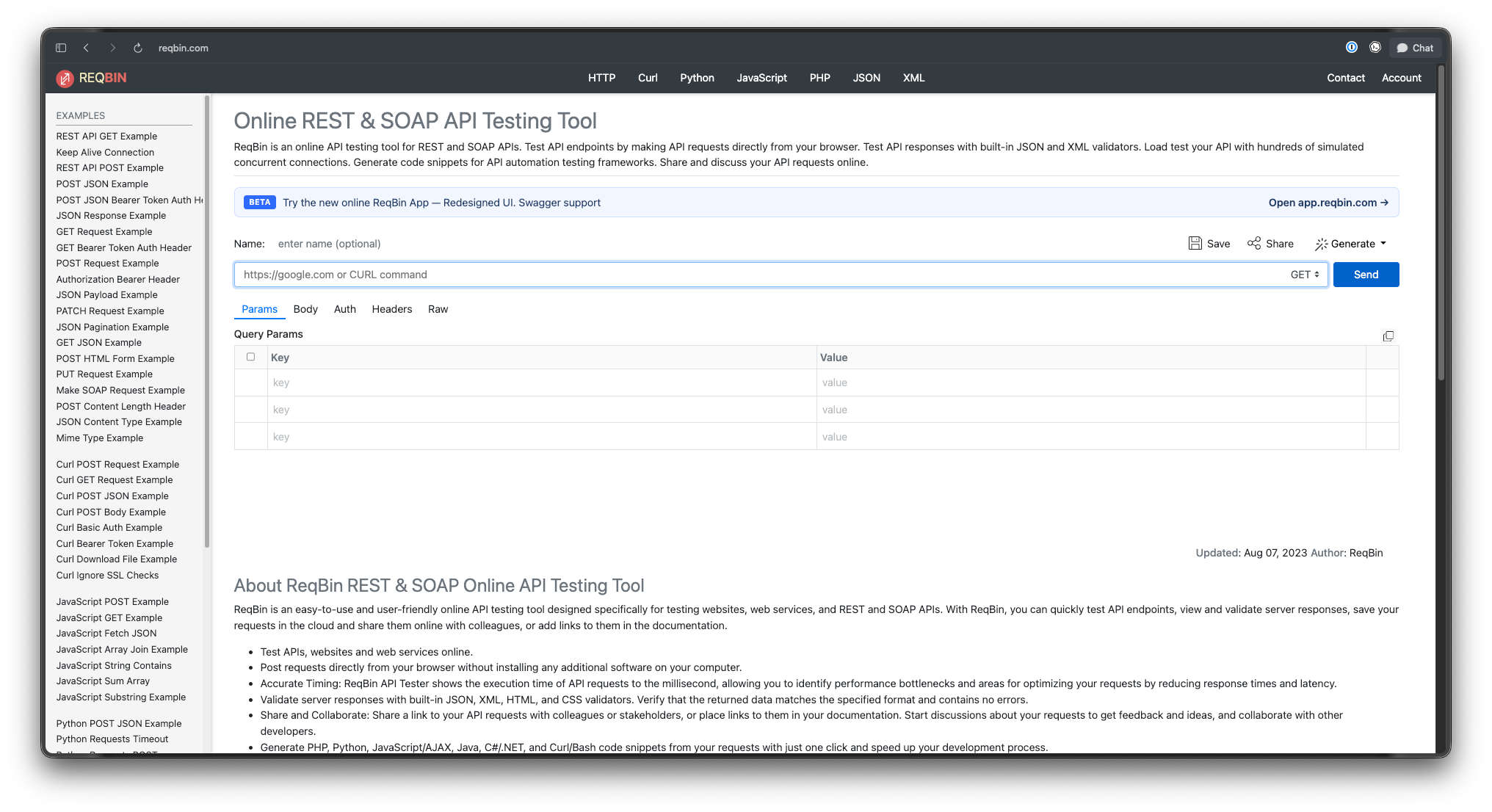
The tool positions itself around speed and zero friction. You do not configure an environment or manage a workspace before your first call. You land on the page, fill in a URL and method, and you are testing within seconds.
That browser-only design shapes everything about ReqBin. It is a fast, shareable scratchpad for API requests, not a desktop application that lives on your machine. Understanding that distinction tells you most of what you need to know about when it fits.
Who is ReqBin for?
ReqBin suits people who need to send a request right now and move on.
- Developers debugging a single endpoint. You want to confirm an API returns the JSON you expect before you write the client code.
- Anyone running a curl command. ReqBin has a dedicated online curl runner, so you can paste a curl string and execute it in the browser.
- People on locked-down machines. If you cannot install software at work, a browser tab is the workaround.
- API providers sharing examples. You can save a request and link to it from your docs so readers see a real, runnable call.
- Learners and reviewers. Someone new to APIs can experiment without committing to a toolchain.
If you live in API work all day and manage dozens of endpoints across projects, ReqBin will feel thin. That is a different job, and we cover it below. For a quick, throwaway test, the lack of setup is the whole appeal. If you want a broader survey of the category, see our roundup of web-based API clients.
Core features of ReqBin
ReqBin keeps a tight feature set focused on composing, sending, and reading single requests.
Request building
You can send requests with any standard HTTP method, including GET, POST, PUT, DELETE, and PATCH. You set custom headers, add a request body in JSON, XML, form-encoded, or raw formats, and configure authentication. ReqBin supports common auth schemes, including Basic, Bearer token, API key, and OAuth-style credentials. That covers the majority of public and internal APIs you will hit.
Response formatting and validation
When the response comes back, ReqBin formats it for you. Its built-in JSON and XML formatters pretty-print the payload, and they validate the structure and highlight errors. So if an API returns malformed JSON, you see the problem instead of a wall of text. The tool also reports millisecond-accurate timings for the request and response, which helps when you are eyeballing latency.
Code generation
This is one of ReqBin’s genuinely handy touches. After you build a request, it generates a code snippet in several languages with one click. You get curl/Bash, Python, JavaScript, Java, C#/.NET, and PHP. So you can prototype a call in the browser, then copy working code straight into your project. That shortens the gap between testing and writing.
Save, fork, and share
You can save a request to the cloud and get a shareable URL. Send that link to a teammate and they see the same request, ready to run. ReqBin also lets you fork a saved request, so a colleague can take your call, change one parameter, and keep their own version. This is useful for collaborative debugging and for embedding live examples in documentation.
Chrome extension
ReqBin offers a Chrome extension, the ReqBin HTTP Client. Its main value is reaching endpoints the public web app cannot. The extension can send requests to localhost and to servers on your local network, which a pure website cannot do because of browser sandboxing. If you are testing an API running on your own machine, the extension is the way.
Curl runner
ReqBin includes a dedicated online curl client. You paste a curl command and execute it directly in the browser, which removes the need to open a terminal for a one-off check. For people who think in curl, this is the fastest path.
Load testing add-on
ReqBin also offers a load-testing feature that fires hundreds of simulated concurrent connections at an endpoint. It is a secondary capability rather than the main draw, and it is no substitute for a dedicated load-testing platform. Treat it as a quick stress sniff test, not a performance lab.
The free and limits model
ReqBin is free to use, and you can start sending requests at no cost. That is the headline, and it is the reason the tool spreads through documentation and Stack Overflow answers.
A few practical limits come with the browser-only model. The public web app runs your requests through ReqBin’s own test nodes, located in the US and EU. That is great for comparing latency across regions, but it also means your traffic passes through a third party. For requests carrying real credentials or sensitive data, that routing matters, and you should think before sending production secrets through any hosted tester. The Chrome extension sidesteps this for local endpoints, since it sends from your browser directly.
Saved requests live in the cloud. That makes sharing trivial, but it also means your test history sits on someone else’s service rather than in a local project file you control.
Honest limitations of ReqBin
ReqBin is good at what it does. It is also deliberately narrow, and the gaps are worth naming so you choose the right tool.
It is browser-only, with no native CLI. ReqBin runs in a tab. There is no command-line binary you can drop into a script or a CI pipeline. If you need to run API tests as part of an automated build, ReqBin is not built for that. For a sense of why some teams prefer software they run locally, see our guide to the best offline API client.
No persistent projects or collections. You save individual requests, but ReqBin does not give you the structured collections, folders, and shared project state that a desktop API client offers. Managing a real API surface across many endpoints gets awkward fast.
No design, mock, or documentation layer. ReqBin tests requests against an API that already exists. It does not help you design an API contract first, mock endpoints before the backend is ready, or generate interactive documentation from your spec. Those are separate jobs that a stateless tester does not touch.
Routing and data residency. As noted, public requests travel through ReqBin’s nodes. For internal or regulated work, that is a real consideration.
None of this makes ReqBin bad. It makes ReqBin a single-purpose tool. The trouble starts when a quick tester becomes the place a team tries to do everything.
When teams outgrow a stateless browser tester
A pattern shows up as projects mature. The instant browser tester is perfect on day one. By month six, the same team is juggling 40 endpoints, several environments, and a contract that the frontend and backend both need to agree on. A stateless tab cannot hold that.
At that point teams usually move to a full platform that designs, tests, mocks, and documents the API in one place. Apidog is one such platform. It runs as a desktop app on Windows, Mac, and Linux, plus a web app, so your work lives in real projects with collections, environments, and team sync rather than scattered shareable links.
Where ReqBin sends ad-hoc requests, Apidog covers the wider lifecycle. You design an API contract with a visual OpenAPI editor, generate dynamic mock data with no code, build automated test scenarios with visual assertions, and publish interactive documentation. For automation, the Apidog CLI runs your saved test scenarios in CI with reporters such as CLI, HTML, JSON, and JUnit, which is exactly the build-pipeline use case ReqBin cannot serve. It supports REST, GraphQL, gRPC, WebSocket, SOAP, and Socket.IO.
To be clear about scope: Apidog owns the API-quality layer, design, test, mock, and document the contract. It is not a load generator, an API gateway, or a CMS. If you only ever need to fire a single request and read the result, ReqBin does that well and stays out of your way. If your API work has grown into a project that several people maintain over time, a platform makes more sense. We compare leading options in our Postman alternatives guide, and survey the broader field of REST API clients.
ReqBin vs other API clients
It helps to place ReqBin on the map.
- Versus Postman and desktop clients. Postman and similar tools are heavier, with collections, environments, scripting, and team features. ReqBin is lighter and instant but holds far less state. See our Postman alternatives for API testing for the trade-offs.
- Versus other web testers. ReqBin competes with browser-based tools that share the zero-install model. It stands out for its curl runner and one-click code generation.
- Versus free desktop tools. If you want no-cost software you install locally, a free API client gives you persistent collections that ReqBin lacks.
The right pick depends on whether you value instant access or durable structure. For one-off checks, instant wins. For ongoing work, structure wins.
FAQ
Is ReqBin free?
Yes. ReqBin is free to use, and you can start sending API requests without paying. You can run requests right away in the browser.
Do I need to install anything to use ReqBin?
No. The core ReqBin tool runs in your browser with no install. There is an optional Chrome extension if you need to reach localhost or local-network endpoints, which the public web app cannot access.
Does ReqBin support SOAP APIs?
Yes. ReqBin handles HTTP, REST, and SOAP requests. It also formats and validates both JSON and XML responses.
Can ReqBin generate code from a request?
Yes. After you build a request, ReqBin generates a snippet with one click in curl/Bash, Python, JavaScript, Java, C#/.NET, and PHP, so you can paste working code into your project.
Does ReqBin have a command-line tool?
No. ReqBin is browser-only and has no native CLI. If you need to run API tests inside a CI pipeline from the command line, you will want a tool built for that, such as a platform with a dedicated CLI.
Is ReqBin good for managing a full API project?
Not really. ReqBin saves individual requests but does not offer structured collections, environments, mocking, design, or documentation. Teams managing many endpoints usually move to a full API platform once a tab stops being enough.
The bottom line
ReqBin is a clean, free, browser-based API client. It shines at the quick job: paste a request, send it, read a formatted response, and copy generated code into your work. The curl runner, the shareable links, and the zero install make it a natural fit for debugging a single endpoint or sharing a live example.
Its limits follow directly from that design. No CLI, no persistent collections, and no design, mock, or documentation layer. When your API work grows past a scratchpad into a project a team maintains, a full platform such as Apidog covers the wider lifecycle that a stateless tester was never meant to handle. Pick the tool that matches the size of the job in front of you.