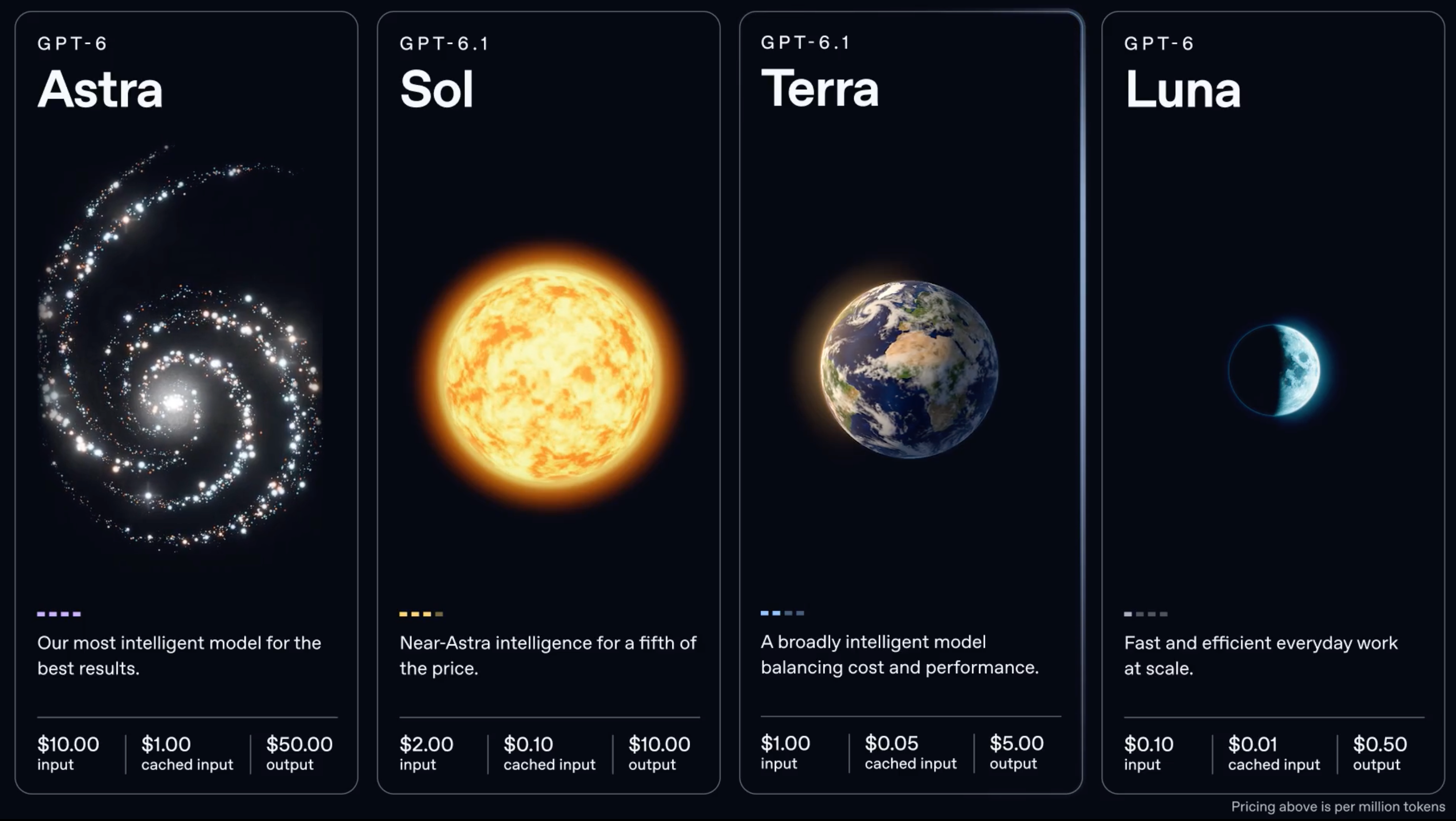
GPT-6.1 Terra is available on the OpenAI API as gpt-6.1-terra, from October 26, 2026. It works on the Responses API, Chat Completions and Batch, costs $1 per million input tokens and $5 per million output tokens, and accepts up to 922,000 input tokens and 128,000 output tokens. If you already call GPT-5.6 Terra, switching is mostly a one-line model change, with a few settings worth checking first.
This guide covers getting a key, your first request in curl, Python and Node, the six reasoning effort levels, computer use and other tools, the cost controls, and what to test when you migrate from gpt-5.6-terra. For the model overview, see what GPT-6.1 Terra is.
What the API supports
| Feature | GPT-6.1 Terra |
|---|---|
| Model ID | gpt-6.1-terra (one snapshot) |
| Endpoints | Responses, Chat Completions, Batch |
| Not supported | Realtime, Live, Assistants, fine-tuning, predicted outputs |
| Input | Text and image |
| Output | Text |
| Context window | 1,050,000 tokens (922,000 input, 128,000 output) |
| Reasoning effort | none, low, medium (default), high, xhigh, max |
| Features | Streaming, structured outputs, function calling, prompt caching |
| Tools (Responses only) | web_search, file_search, computer_use, code_interpreter, hosted_shell, apply_patch, skills, mcp, tool_search, image_generation |
Source: OpenAI’s GPT-6.1 Terra model page. Hosted tools need the Responses API, so use it for new work.
Step 1: get an API key
Create a key in the OpenAI platform dashboard and add billing. There’s no free tier for Terra: a ChatGPT Plus or Pro plan gives you Terra inside ChatGPT Work and Codex, but not an API key. Our guide on whether GPT-6.1 Terra is free explains the difference.
Export it so the examples below can read it:
export OPENAI_API_KEY="sk-..."
Rate limits depend on your usage tier. The model page lists 5,000 requests and 1 million tokens per minute on the Build tier, 10,000 and 4 million on Launch, and 15,000 and 40 million on Grow.
Step 2: send your first request
With curl, against the Responses API:
curl https://api.openai.com/v1/responses \
  -H "Authorization: Bearer $OPENAI_API_KEY" \
  -H "Content-Type: application/json" \
  -d '{
    "model": "gpt-6.1-terra",
    "reasoning": { "effort": "low" },
    "input": "Summarize the difference between PUT and PATCH in two sentences."
  }'
In Python with the official SDK:
from openai import OpenAI

client = OpenAI()

response = client.responses.create(
    model="gpt-6.1-terra",
    reasoning={"effort": "low"},
    input="Summarize the difference between PUT and PATCH in two sentences.",
)

print(response.output_text)
print(response.usage)
In Node:
import OpenAI from "openai";

const client = new OpenAI();

const response = await client.responses.create({
  model: "gpt-6.1-terra",
  reasoning: { effort: "low" },
  input: "Summarize the difference between PUT and PATCH in two sentences.",
});

console.log(response.output_text);
console.log(response.usage);
Print usage from the start. It tells you input, cached and output tokens, and reasoning tokens bill as output.
Step 3: pick a reasoning effort
Terra supports six effort levels. The default is medium.
| Effort | Use it for |
|---|---|
none |
Classification, extraction, formatting; deterministic output |
low |
Short answers, simple tool calls, most chat-style work |
medium |
The default; general coding and agent steps |
high / xhigh |
Harder multi-step reasoning |
max |
The benchmark setting; hardest tasks, slowest and most expensive |
Two points stand out.
none is supported. GPT-6.1 Sol removed it, so this is one of the practical differences between the two. A developer on OpenAI’s community forum reports that with reasoning.effort: "none", Terra accepts temperature and top_p again. For a pipeline that labels or extracts data at volume, none gives you the lowest cost per call and repeatable output.
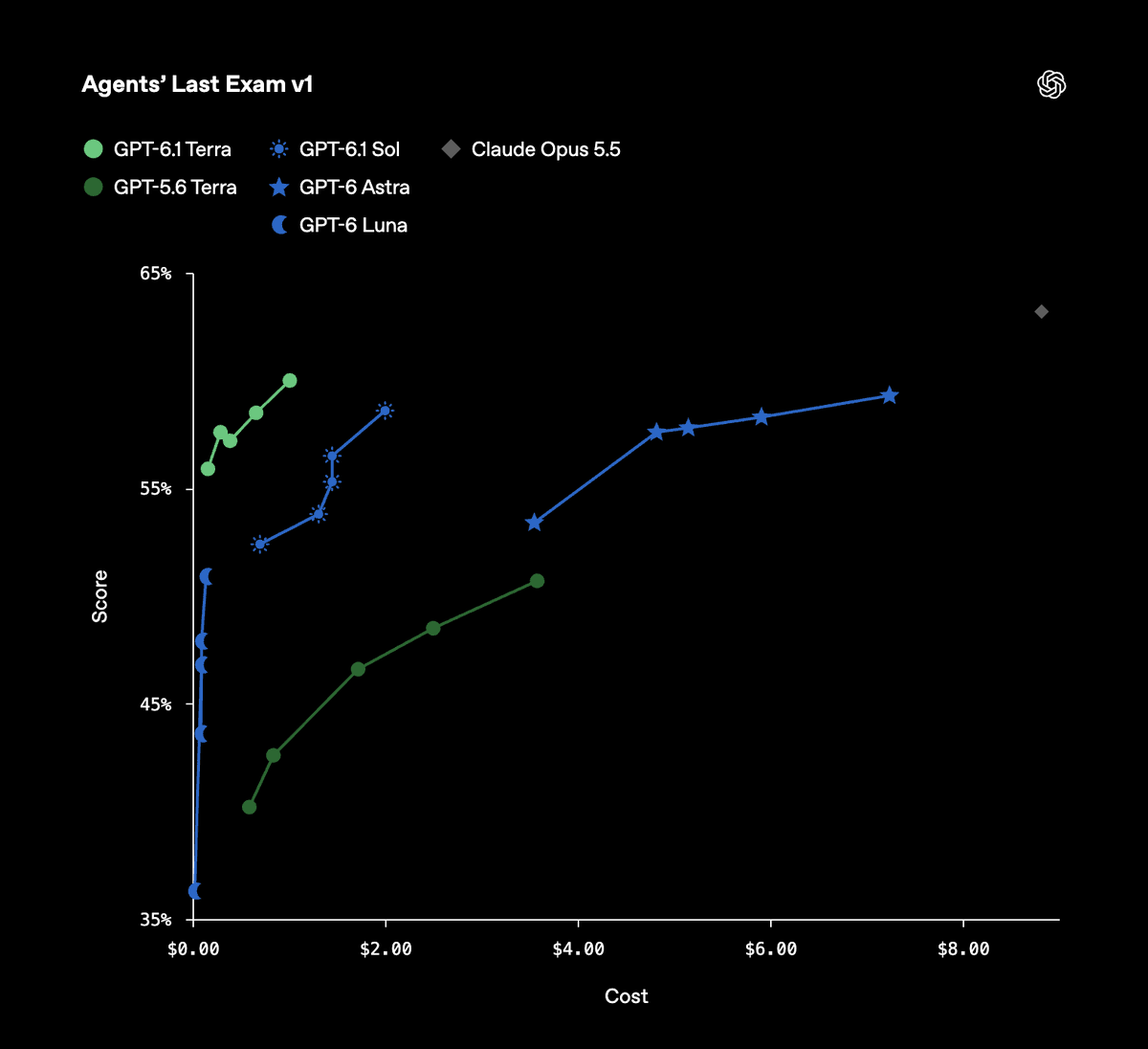
Low effort improved most. On OpenAI’s internal factuality test, Terra’s error rate at low effort fell from 53.6% on GPT-5.6 Terra to 16.7%. Artificial Analysis also measured larger gains over GPT-5.6 Terra at lower effort levels (7 to 13 points) than at max (6 points). If you ran GPT-5.6 Terra at high to get acceptable quality, try low or medium on 6.1 Terra before assuming you need the same setting.
Step 4: use tools, including computer use
OpenAI pitched this release around “fast and capable computer use at a lower price.” Computer use, web search, file search and the other hosted tools are available on the Responses API. A web search call looks like this:
response = client.responses.create(
    model="gpt-6.1-terra",
    reasoning={"effort": "low"},
    tools=[{"type": "web_search"}],
    input="What changed in the latest OpenAPI Specification release?",
)
print(response.output_text)
Function calling and structured outputs work as they do on other GPT-6 models: define your function schemas in tools, or pass a JSON schema in the text format setting, and validate what comes back. For a deeper look at computer use against a real app, our GPT-6 Astra computer use guide applies to Terra too, at a tenth of Astra’s per-token price.
Step 5: control cost
Terra’s rates are already low, and four settings cut them further:
- Prompt caching is automatic. Cached input costs $0.05 per million against $1 for fresh input. Keep stable content (system prompt, tool schemas, reference docs) at the front of the prompt. Cache writes cost $1.25 per million for 30-minute retention, or $2.50 for 12 hours. See our GPT-6 prompt caching guide.
- Batch halves every rate for asynchronous jobs: $0.50 input, $2.50 output. Our OpenAI Batch API guide shows the full flow.
- Flex gives the same half rate on normal requests with
service_tier: "flex", in exchange for slower responses and occasional 429s. - The 272K line. Prompts above 272K input tokens bill the whole request at 2x input and cache rates and 1.5x output. If you’re close, trim retrieved context rather than crossing it.
Fast mode goes the other way: 2x the Standard rate ($2 input, $10 output) for quicker responses. The GPT-6.1 Terra pricing guide has every rate in one table.
Migrating from gpt-5.6-terra
The model ID change is one line. These are the things to check around it:
- Price. Input drops from $2 to $1, cached input from $0.20 to $0.05, output from $12 to $5. Update any cost dashboards or budget alerts that hard-code rates.
- Effort setting. Retest at a lower effort. Quality at
lowmoved the most. - Knowledge cutoff. Terra’s is June 1, 2026. Prompts that assume an older cutoff, or tests with date-sensitive expected answers, may change.
- Output length and format. A new model can write longer or shorter answers. Check
usage.output_tokensand any parser that expects a fixed format; use structured outputs where the shape matters. - Speed. OpenAI says Terra finishes tasks more than 3x faster on average than Astra and GPT-6.1 Sol. Timeouts tuned for slower models are fine, but retry and polling logic built around long waits may now be wasteful.
- Codex. If your team uses Codex, Terra needs Codex CLI 0.159.0 or later:
codex -m gpt-6.1-terra.
OpenAI hasn’t announced a retirement date for GPT-5.6 Terra, so you can run both side by side while you compare.
Let your coding agent prove the migration with Apidog CLI
Steps 1 to 6 are exactly the kind of checks you shouldn’t do by hand. Point your coding agent at Apidog CLI and it can build the test, run it on both models and tell you what changed.
Set up once:
npm install -g apidog-cli@latest
apidog auth login --with-token <YOUR_TOKEN>
apidog skill install
Then give Claude Code, Codex or Cursor one prompt:
In Apidog project <id>, add POST https://api.openai.com/v1/responses as an endpoint.
Create a test case that sends my production prompt with model {{MODEL}} and reasoning
effort low, and asserts: status 200, output_text not empty, output matches our JSON
schema, usage.output_tokens under 3000. Run it with MODEL=gpt-5.6-terra and again with
MODEL=gpt-6.1-terra against the <env> environment, then compare tokens and failures.
The agent reads each schema, validates its payload and runs the case twice:
apidog cli-schema get endpoint-create
apidog endpoint create --project <id> --file endpoint.json
apidog cli-schema validate test-case-create --file case.json
apidog test-case create --project <id> --file case.json
apidog run --test-case <caseId> --project <id> -e <envId> --env-var "MODEL=gpt-5.6-terra" -r cli,json
apidog run --test-case <caseId> --project <id> -e <envId> --env-var "MODEL=gpt-6.1-terra" -r cli,json
Keep your OpenAI key in the Apidog environment. When the Terra run passes, add it to CI with -r junit so a later prompt or model change can’t break the contract silently; our Apidog CLI CI/CD guide has the pipeline file, and Apidog CLI in Codex covers the Codex setup.
FAQ
What is the GPT-6.1 Terra model ID? gpt-6.1-terra. There’s one snapshot, and it’s also the default.
Does GPT-6.1 Terra work with Chat Completions? Yes. It supports Responses, Chat Completions and Batch. Hosted tools such as web search and computer use need the Responses API.
Can I set temperature on GPT-6.1 Terra? A community report says yes with reasoning.effort: "none". At other effort levels, check the model page before sending sampling settings.
Does GPT-6.1 Terra support the Realtime API? No. Realtime, Live, Assistants and fine-tuning aren’t supported.
What’s the GPT-6.1 Terra rate limit? It depends on your tier: from 5,000 requests and 1 million tokens per minute on Build up to 15,000 and 40 million on Grow.
Next step
Swap the model ID on one endpoint, retest at a lower effort, and let your agent compare the two runs with Apidog CLI. If the numbers hold, roll it out. Not sure whether Terra or Sol fits your workload? Read GPT-6.1 Terra vs GPT-6.1 Sol.