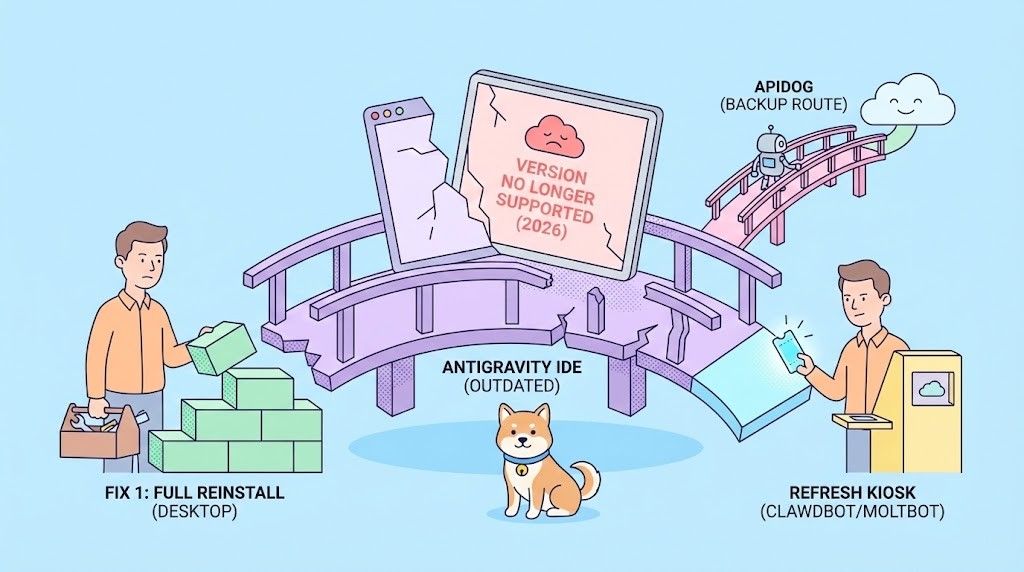
You open Antigravity, ready to test your APIs and continue development, but instead of your familiar workspace, you're greeted with a frustrating error message: "This version of Antigravity is no longer supported. Please update to receive the latest features!"
This error has affected thousands of developers using Google's Antigravity IDE since early 2026, causing workflow disruptions, lost productivity, and mounting frustration. According to recent reports on the Google AI Developers Forum, the issue stems from backend compatibility problems between newer Antigravity versions and Google's feature management services.
Understanding the Antigravity Version Error
What Is Antigravity?
Google Antigravity is an experimental, agent-first IDE powered by Gemini 3 Pro, launched in late 2025. Unlike traditional coding assistants, Antigravity uses autonomous AI agents to plan, code, test, and deploy entire applications with minimal human intervention.
Key features include:
- Mission Control dashboard for monitoring parallel agents
- Autonomous testing where agents debug their own code
- Multi-agent workflows coordinating editor, terminal, and browser
- Real-time API response processing for dynamic development
However, as an experimental platform, Antigravity has experienced significant stability issues, particularly around version management and backend service compatibility.
The Version Error Explained
The "This version of Antigravity is no longer supported" error occurs when:
- Backend API incompatibility: Your local Antigravity client version doesn't match the expected version on Google's backend services
- Feature flag mismatches: The feature management service (
antigravity-unleash.goog) rejects your client version - Forced deprecation: Google pushes updates that immediately deprecate older versions without graceful migration periods
- Account entitlement bugs: Subscription status conflicts between free and paid tiers
Common Error Variations
You might see these related errors:
- "Agent execution terminated due to error"
- "Antigravity server crashed unexpectedly. Please restart to fully restore AI features"
- "Your current account is not eligible for Antigravity"
- HTTP 504 (Gateway Timeout) or 503 (Service Unavailable) errors
All of these stem from the same root cause: version compatibility issues between your client and Google's backend infrastructure.
How to Fix Antigravity Version No Longer Supported Error
Method 1: Full reinstall (desktop / standalone app)
If you're using the Antigravity app itself and the message won't go away after a normal update, do a clean reinstall:
Step 1: Uninstall the current app completely
Remove Antigravity so no old files or config are left behind.
Step 2: Download the latest version
Go to the official download page: https://antigravity.google/download/
Step 3: Follow the official steps
Complete steps 1, 2, and 3 on that page (download, install, and any sign-in or setup they describe).
Step 4: Sign in again
Use your Google account when prompted so the new install gets fresh credentials.
Many people report that this clears the "no longer supported" message when a simple in-app update does not.
Method 2: Update and re-authenticate (clawdbot / Moltbot / daemon)
If the error appears in a bot or daemon (e.g. clawdbot, Moltbot), the process is different: update the code, restart the daemon, and re-run Google Antigravity OAuth if needed.
Step 1: Update code and restart the daemon
Often the message goes away after pulling the latest code and restarting:
cd ~/moltbot-ref && git pull

clawdbot daemon restart
Replace ~/moltbot-ref with your actual bot repo path if it’s different.
Step 2: If the message persists — re-authenticate with Antigravity
The OAuth tokens used by the bot may have expired or been invalidated. Re-run the Google Antigravity OAuth flow:
clawdbot configureFollow the prompts to sign in again with Google and complete the Antigravity OAuth flow. When it’s done, restart the daemon:
clawdbot daemon restartAfter that, the bot should be using new tokens and the "no longer supported" message should stop.
Conclusion
The "This version of Antigravity is no longer supported" message is frustrating but fixable. For desktop users, a full uninstall followed by a fresh install from the official Antigravity download page and signing in again usually resolves it. For bot or daemon setups (e.g. clawdbot, Moltbot), pull the latest code, restart the daemon, and re-run clawdbot configure to refresh Antigravity OAuth tokens if the error persists.
Until version compatibility and backend stability improve, having a reliable API tool like Apidog in your stack helps you stay unblocked. Fix the Antigravity error using the steps above, then get back to building.