DeepSeek put the DeepSeek-V4.1-Flash weights on Hugging Face under an MIT license on September 10, 2026, the same day the model went GA on the API. That is unusual timing. Most labs ship the hosted endpoint first and release weights weeks later, if at all.
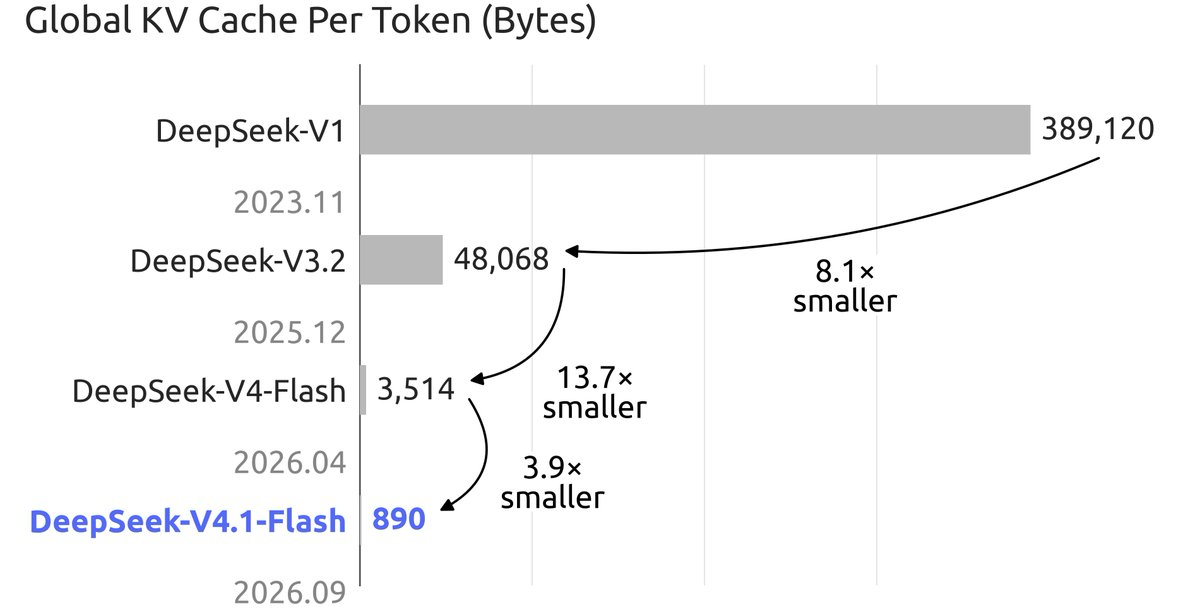
The headline number will scare off most readers: 552 billion parameters in the backbone, 763 billion with the vision encoder. But the design underneath is friendlier to self-hosting than the size suggests. Only 8B parameters are active during prefill and 16B during decode, and the new FP4 KV cache costs 890 bytes per token, roughly a quarter of what V4-Flash needed. Compute is cheap. Memory is the wall.
People will try anyway. This guide gives you the memory math, the realistic paths at each hardware tier, the generic setup commands, and a way to test a local OpenAI-compatible endpoint against the hosted API in Apidog. If you want the model overview first, read What is DeepSeek-V4.1-Flash? and come back.
TL;DR
- Weights: 552B MoE backbone, MIT license. About 552 GB at 8-bit, about 280 GB at 4-bit, backbone only.
- KV cache: 890 bytes per token. A full 1M-token context needs about 0.9 GB. That part is solved.
- Realistic 4-bit serving needs 4 to 8 GPUs in the 80 GB class. Everything below that is CPU or SSD offload, and slow.
- The hosted API charges $0.15 per 1M cache-miss input tokens off-peak. For most teams that beats the electricity bill alone.
What you are downloading
The model card describes a 552B-parameter Mixture-of-Experts backbone with a new Causal Encoder-Decoder layout: 40 layers, split 20 encoder and 20 decoder. Each layer routes across 384 experts plus 1 shared expert. The DeepSeek-ViT vision encoder pushes the full checkpoint to 763B parameters, and you download the whole thing even if you only need text.
Three details matter for local inference:
- Active parameters are small. 8B active during prefill, 16B during decode. Per-token FLOPs look like a mid-size dense model. The problem is that every one of the 552B parameters has to live somewhere the forward pass can reach.
- The KV cache is FP4. The release note says the cache uses 1/4 the HBM and 1/8 the SSD storage of the previous generation. At 890 bytes per token, long context is no longer the memory problem it used to be.
- Attention is sparse by design. Compressed Sparse Attention 2 with three static modes was trained at 64K context and extended to 1M late in the 45T-token run. That is why the KV numbers stay small at 1M.
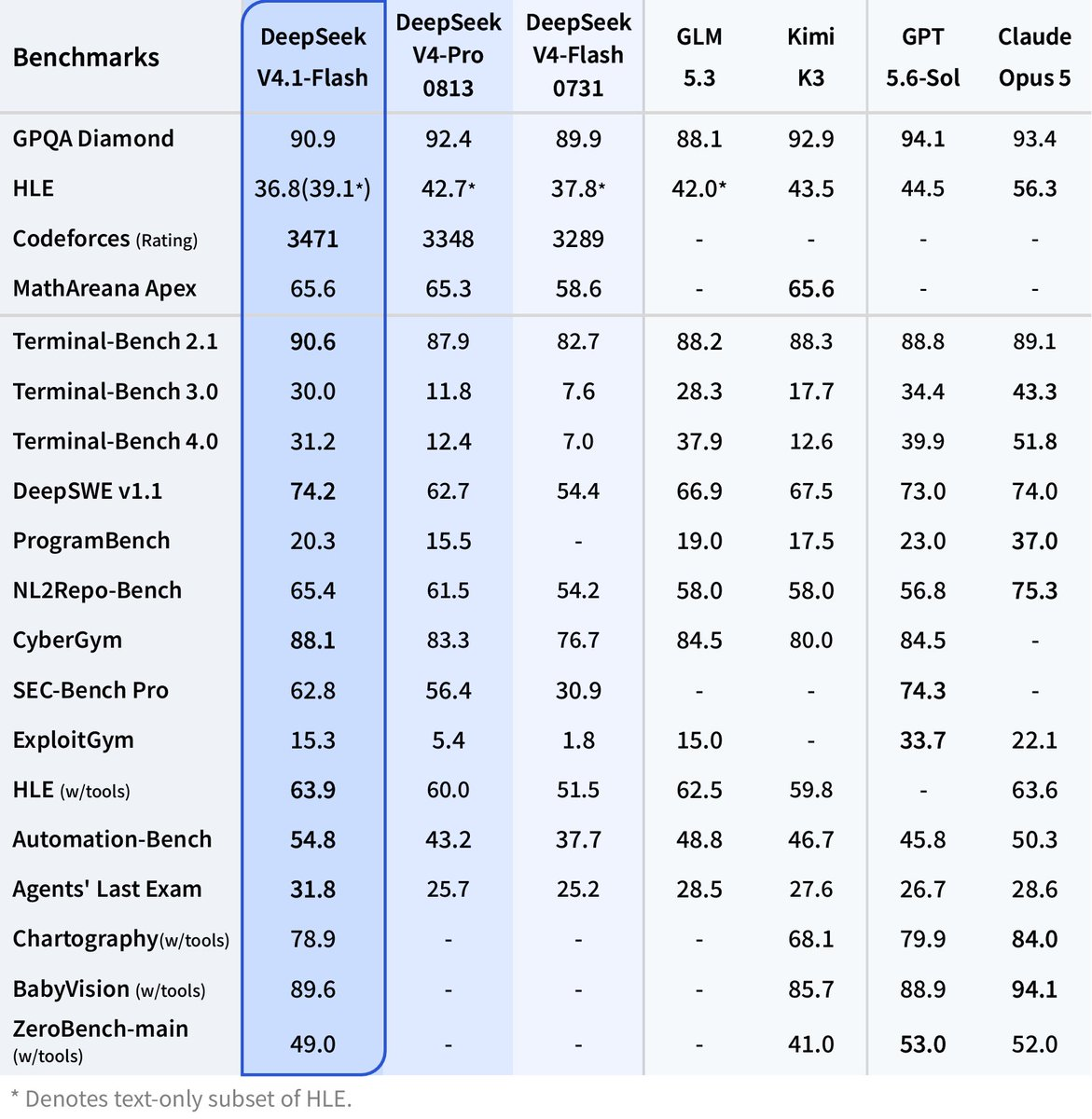
The tech report covers the architecture in full. Every benchmark figure on the card is DeepSeek-reported; treat them as claims.
The memory math
The numbers below are straight multiplication, not measurements, and they exclude engine overhead, activations, and the vision encoder.
| Component | Size | How it is calculated |
|---|---|---|
| Backbone weights, 8-bit | ~552 GB | 552B params x 1 byte |
| Backbone weights, 4-bit | ~280 GB | 552B params x 0.5 byte |
| KV cache, per token | 890 bytes | From the model card |
| KV cache at 128K context | ~0.11 GB | 890 x 128,000 |
| KV cache at 1M context | ~0.89 GB | 890 x 1,000,000 |
Two things jump out. First, the KV cache is a rounding error. A 1M-token session fits in under a gigabyte, so you can hold dozens of long sessions resident without touching the weight budget. Second, the weights are the entire problem. No quantization trick makes 552B parameters fit on a single consumer GPU, and the 8B-active design does not help, because MoE routing still needs every expert loaded and addressable.
That is also why offloaded setups feel lopsided. Prefill batches across the whole prompt and stays compute-bound. Decode pages 16B active parameters in from RAM or SSD for every token. Bandwidth, not FLOPs, sets your tokens per second.
Realistic hardware tiers
No throughput numbers here. Nobody outside DeepSeek has had the weights long enough to publish trustworthy benchmarks.
Tier 1: multi-GPU server, 4 to 8 cards in the 80 GB class. Four 80 GB cards give you 320 GB, enough for 4-bit weights with a thin margin for KV cache and engine overhead. Eight cards give you 640 GB, enough for the 8-bit checkpoint or a comfortable 4-bit deployment with large batches. This is the only tier where “run it locally” means production-grade serving with tensor parallelism, and it is a five- or six-figure purchase or a multi-dollar-per-hour cloud rental.
Tier 2: single high-memory workstation with CPU offload. A box with 512 GB or more of system RAM and one or two GPUs can hold the 4-bit weights in RAM and stream expert layers to the GPU on demand. It works, and it is slow, because decode bandwidth is your DDR5 bus instead of HBM. Use it for batch jobs and overnight evals, not interactive chat.
Tier 3: Apple Silicon with SSD streaming. The hobbyist path. A 512 GB Mac Studio holds the 4-bit weights in unified memory, which is a real option if you already own one. Below that, you are in Kimi K3 HN thread territory: weights split across external SSDs, mmap doing the heavy lifting, roughly 1 token per second. It proves the model runs, not that it is useful on that machine. Our guide to running Kimi K3 locally covers the same trade-offs on a bigger model, and how to run DeepSeek V4 locally covers the previous generation.
The setup path
With the hardware in place, the flow is: download, serve behind an OpenAI-compatible endpoint, test.
pip3 install -U "huggingface_hub[cli]"
huggingface-cli download deepseek-ai/DeepSeek-V4.1-Flash \
  --local-dir ./models/deepseek-v4.1-flash \
  --max-workers 8
On a 1 Gbps line, every 100 GB takes roughly 15 minutes at full speed. Budget an hour or more.
Serving is where the caveat lives. Day-0 support in vLLM, SGLang, llama.cpp, and Ollama for the CED architecture and CSA2 attention is [VERIFY]; a new layer type usually needs an engine patch before the weights load, and the release note does not name specific engines. Search each project’s changelog for “DeepSeek-V4.1” before you commit to a download. Once support exists, serving with vLLM across 8 GPUs looks like this:
vllm serve ./models/deepseek-v4.1-flash \
  --tensor-parallel-size 8 \
  --max-model-len 131072 \
  --served-model-name deepseek-flash \
  --port 8000
A llama.cpp llama-server or an Ollama model exposes the same http://localhost:8000/v1-style endpoint once a GGUF conversion exists, so any OpenAI SDK client works by changing one line:
from openai import OpenAI

client = OpenAI(base_url="http://localhost:8000/v1", api_key="local")

response = client.chat.completions.create(
    model="deepseek-flash",
    messages=[{"role": "user", "content": "Summarize this incident report and list the three root causes."}],
    temperature=1.0,
    top_p=0.95,
)
print(response.choices[0].message.content)
The temperature=1.0 and top_p=0.95 values match the model card’s recommended settings. For Ollama, our Ollama guide covers the Modelfile flow, and the vLLM guide covers multi-GPU flags in depth.
The pragmatic alternative: the hosted API
Off-peak, the pricing page lists deepseek-flash at $0.15 per 1M cache-miss input tokens, $0.003 per 1M cache-hit input tokens, and $0.60 per 1M output tokens. Peak hours double those. So 1 billion input tokens plus 200 million output tokens per month costs about $270 off-peak and $540 at peak, before cache hits pull the input side down further. An 8-GPU server in the 80 GB class costs more than that per month in electricity and cooling alone under sustained load, before you amortize the hardware or pay someone to babysit it. Unless you have a data-residency rule or hardware already sitting idle, the API wins on cost. The switch is one base_url change; our DeepSeek-V4.1-Flash API guide walks through it.
Local wins when the constraint is not money: air-gapped environments, prompt data you cannot send anywhere, or research that needs to modify the weights.
Test a local endpoint against the hosted API in Apidog
Whichever path you pick, prove the local server behaves like the reference before you point traffic at it. Quantization drift, a wrong chat template, or a missing stop token all show up as subtle output differences. Here is the workflow in Apidog:
- Create two environments. One named
localwithbase_urlset tohttp://localhost:8000/v1, one namedhostedwithbase_urlset tohttps://api.deepseek.comand your real key. Every request uses{{base_url}}/chat/completionsandBearer {{api_key}}. - Save a small prompt set as requests. Five to ten prompts that represent your workload: a JSON extraction, a code fix, a long-context summary. Set
modeltodeepseek-flashin all of them; it works on both servers. - Add assertions. For the JSON task, assert the response parses and a required key exists. For every request, assert
finish_reasonequalsstop, which catches truncation from a bad context setting. - Run the set against both environments. Switch the environment dropdown from
hostedtolocaland rerun the same test scenario. A failure that appears only onlocalis your quantization or template problem, isolated in one click. - Watch streaming. Set
stream: trueand use the SSE view to see events arrive one by one. A local server that buffers the whole response before sending looks fine on a non-streaming call and wrong here. - Put it in CI. Run the scenario with
apidog-clion every engine upgrade, so a broken chat template fails a pipeline instead of a user.
Download Apidog and the whole flow runs from one project.
FAQ
Can I run DeepSeek-V4.1-Flash on a laptop? Not usefully. The 4-bit backbone is about 280 GB. A laptop can stream it from SSD the way the Kimi K3 experiment did, at around 1 token per second, which is a demo, not a workflow. Use the API or one of the options in how to use DeepSeek-V4.1-Flash for free.
Does 8B active parameters mean I only need 8 GB of VRAM? No. Active parameters set the compute per token, not the memory. MoE routing can pick any of the 384 experts per layer for any token, so all 552B parameters must be loaded and reachable.
How much memory does the 1M context need? About 0.89 GB of KV cache at 890 bytes per token. That is the cheap part of this model. The weights are the expensive part.
Is the license safe for commercial use? Yes. The weights are MIT, per the Hugging Face model card.
Where this leaves you
DeepSeek-V4.1-Flash is open in the way that matters legally and technically: MIT weights, a public tech report, and a KV cache design that makes 1M-token sessions nearly free in memory. It is not open in the way that lets you run it on the machine under your desk. For most teams, the right move is the hosted API at $0.15 per 1M input tokens off-peak, with local deployment reserved for data that cannot leave the building.
Either way, test before you trust. Point Apidog at both endpoints, run the same saved requests, and let the assertions tell you whether your local build matches the reference.