
DeepSeek-V4.1-Flash went GA on the API today, September 10, 2026. The release note is short, but it changes three things for anyone calling the DeepSeek API: there is one model id to use from now on, deepseek-flash; the per-token rates dropped again; and in four days, on September 14, every request to deepseek-v4-pro gets rerouted to this model and billed at Flash prices.
That last point is why this guide exists. If you have production code on V4-Pro, you don’t get to pick a migration date. If you’re on V4-Flash, you’re already being served by the new model under the old name. Either way, the parameters you send today are worth checking.
This post covers the practical side: model id, base URLs, a first call in three languages, reasoning effort, image input, streaming, and pricing. For the architecture and benchmark story, read What is DeepSeek-V4.1-Flash first.
Before wiring anything into code, you’ll want a fast way to send requests and compare responses. Apidog handles that: point it at https://api.deepseek.com, store the key as a variable, and save each working call as a rerunnable test. The workflow is near the end.
TL;DR
- Model id:
deepseek-flash. Legacy namesdeepseek-v4-flashanddeepseek-v4-flash-vision-expstill work but resolve to V4.1-Flash. - Base URLs unchanged:
https://api.deepseek.com(OpenAI-compatible) andhttps://api.deepseek.com/anthropic(Anthropic-compatible). deepseek-v4-proreroutes to V4.1-Flash on September 14, 2026 at 04:00 UTC.- Context 1M tokens, max output 384K, concurrency limit 2,500.
- Off-peak pricing per 1M tokens: $0.003 cache hit, $0.15 cache miss, $0.60 output. Peak is double.
- Vision is native. Images go in the
contentarray asimage_urlparts.
What changed for API callers
Here is the delta, drawn from the release note and the changelog.
One model id. The canonical name is now deepseek-flash, with no version in it. Pin your prompts and tests to behavior, not to a version string, because the next Flash release will land under the same name.
Legacy names still route. deepseek-v4-flash and deepseek-v4-flash-vision-exp are accepted for now, but the models behind them, V4-Flash and V4-Flash-Vision-Exp, are retired. Requests to those names are served by V4.1-Flash. Nothing breaks, but you’re not running the model you think you are. Rename when you can.
The beta name is gone. The two-day beta from September 8 ran as deepseek-v4.1-flash-expires-on-0910. It expired as promised. Switch to deepseek-flash.
Base URLs and formats are unchanged. OpenAI-compatible calls go to https://api.deepseek.com, Anthropic-compatible calls go to https://api.deepseek.com/anthropic, and the Responses API format that the Flash line already supported carries over. Your SDK config doesn’t move.
V4-Pro has four days. From September 14, 2026 at 04:00 UTC (12:00 Beijing), every deepseek-v4-pro request is routed to V4.1-Flash and billed at V4.1-Flash rates. DeepSeek’s stated reason is that V4.1-Flash “has comprehensively surpassed V4 Pro in performance, cost, speed, and total time”, citing tests by multiple parties. That is a vendor claim. The V4-Pro retirement migration guide shows how to check it on your own prompts before the switch happens for you.
Step 1: get a key
Sign in at the DeepSeek platform, open API Keys, and create one. Keys start with sk-. Export it instead of pasting it into source:
export DEEPSEEK_API_KEY="sk-your-key-here"
No DeepSeek-specific SDK is needed. The OpenAI and Anthropic client libraries both work once you change the base URL.
Step 2: make your first call
curl first, because it removes every variable except the API itself:
curl https://api.deepseek.com/chat/completions \
  -H "Content-Type: application/json" \
  -H "Authorization: Bearer ${DEEPSEEK_API_KEY}" \
  -d '{
    "model": "deepseek-flash",
    "messages": [
      {"role": "system", "content": "You are a support engineer for a payments API."},
      {"role": "user", "content": "A customer gets HTTP 402 on /v1/charges. List the three most likely causes."}
    ],
    "stream": false
  }'
The same call through the OpenAI Python SDK:
# pip install openai
import os
from openai import OpenAI

client = OpenAI(
    api_key=os.environ["DEEPSEEK_API_KEY"],
    base_url="https://api.deepseek.com",
)

response = client.chat.completions.create(
    model="deepseek-flash",
    messages=[
        {"role": "system", "content": "You are a support engineer for a payments API."},
        {"role": "user", "content": "A customer gets HTTP 402 on /v1/charges. List the three most likely causes."},
    ],
)

print(response.choices[0].message.content)
And Node:
// npm install openai
import OpenAI from "openai";

const client = new OpenAI({
  baseURL: "https://api.deepseek.com",
  apiKey: process.env.DEEPSEEK_API_KEY,
});

const completion = await client.chat.completions.create({
  model: "deepseek-flash",
  messages: [
    { role: "user", content: "Write a Postgres migration that adds a nullable refunded_at timestamp to invoices." },
  ],
});

console.log(completion.choices[0].message.content);
If you set up against the previous release by following the V4-Flash API guide, the only diff is the model string.
Step 3: reasoning effort and thinking mode
The model card describes reasoning effort as “continuously controllable” on a 1 to 100 scale. That is a departure from the low/medium/high presets most APIs expose, and it means you can tune cost and latency per endpoint instead of per tier.
The parameter shape that carries that 1 to 100 value is [VERIFY] against the API docs. Until they confirm it, start from the V4-Flash pattern: reasoning_effort plus a thinking object passed through extra_body:
response = client.chat.completions.create(
    model="deepseek-flash",
    messages=[{"role": "user", "content": "Our Redis cluster drops 2% of SETs under load. Plan the investigation."}],
    reasoning_effort="high",
    extra_body={"thinking": {"type": "enabled"}},
)
Recommended sampling settings from the model card: temperature 1.0, top_p 0.95 or 1.0, and max_tokens of 256K or more for long reasoning traces. Max output is 384K tokens.
A practical split: thinking off for autocomplete, classification, and anything a user is waiting on; thinking on at high effort for agent loops, multi-file refactors, and debugging. Then measure. Effort you can’t see in the output is effort you’re paying for anyway.
Step 4: send an image
V4.1-Flash is natively multimodal, trained on a 45T-token multimodal corpus with a DeepSeek-ViT encoder trained from scratch. The request format carries over from V4-Flash-Vision-Exp: images are parts of the user message content array.
response = client.chat.completions.create(
    model="deepseek-flash",
    messages=[{
        "role": "user",
        "content": [
            {"type": "text", "text": "Extract every line item and the total from this receipt as JSON."},
            {"type": "image_url", "image_url": {"url": "https://cdn.example-shop.com/receipts/48213.png"}},
        ],
    }],
)
For a local file, encode it as a base64 data URL:
import base64

with open("receipt.png", "rb") as f:
    data_url = "data:image/png;base64," + base64.b64encode(f.read()).decode()

# then pass {"url": data_url} in the image_url part
Limits: base64 data URLs up to 32 MiB, external URLs up to 8,192 characters, or a file ID. An optional detail field is accepted. DeepSeek reports DocVQA 95.6, which is the document-reading case above. The vision API guide covers multi-image prompts, detail levels, and what images cost per request.
Step 5: stream the response
Set stream=True and the endpoint returns server-sent events. Reasoning content and answer content arrive as separate deltas, which matters when you’re rendering a “thinking” state in a UI.
stream = client.chat.completions.create(
    model="deepseek-flash",
    messages=[{"role": "user", "content": "Explain idempotency keys in one paragraph."}],
    stream=True,
)

for chunk in stream:
    delta = chunk.choices[0].delta
    if delta.content:
        print(delta.content, end="", flush=True)
If SSE is new to you, streaming LLM responses with server-sent events explains the wire format and the reconnect edge cases.
Pricing at a glance
From the official pricing page, effective September 10, 2026 at 04:00 UTC, in USD per 1M tokens:
| deepseek-flash off-peak | deepseek-flash peak | |
|---|---|---|
| Input, cache hit | $0.003 | $0.006 |
| Input, cache miss | $0.15 | $0.30 |
| Output | $0.60 | $1.20 |
Three things to know:
- Peak windows are Monday to Friday, 01:00 to 04:00 and 06:00 to 10:00 UTC (9:00 to 12:00 and 14:00 to 18:00 Beijing). Off-peak is half price. Batch jobs that can wait should wait.
- Cache hits are automatic. A hit costs 50x less than a miss, so a stable system prompt at the front of every request is the cheapest optimization available. What is prompt caching explains how prefix matching works.
- Versus V4-Flash, the cut is about 57% on cache-hit input, 32% on cache-miss input, and 9% on output. A V4-Pro workload rerouted on September 14 pays $0.30 instead of $1.32 per 1M cache-miss input at peak, and $1.20 instead of $3.96 for output.
Test the API in Apidog
Once the first call works, the question is whether it keeps working. deepseek-flash carries no version, so the next upgrade will be silent. Here’s an Apidog workflow that catches it:
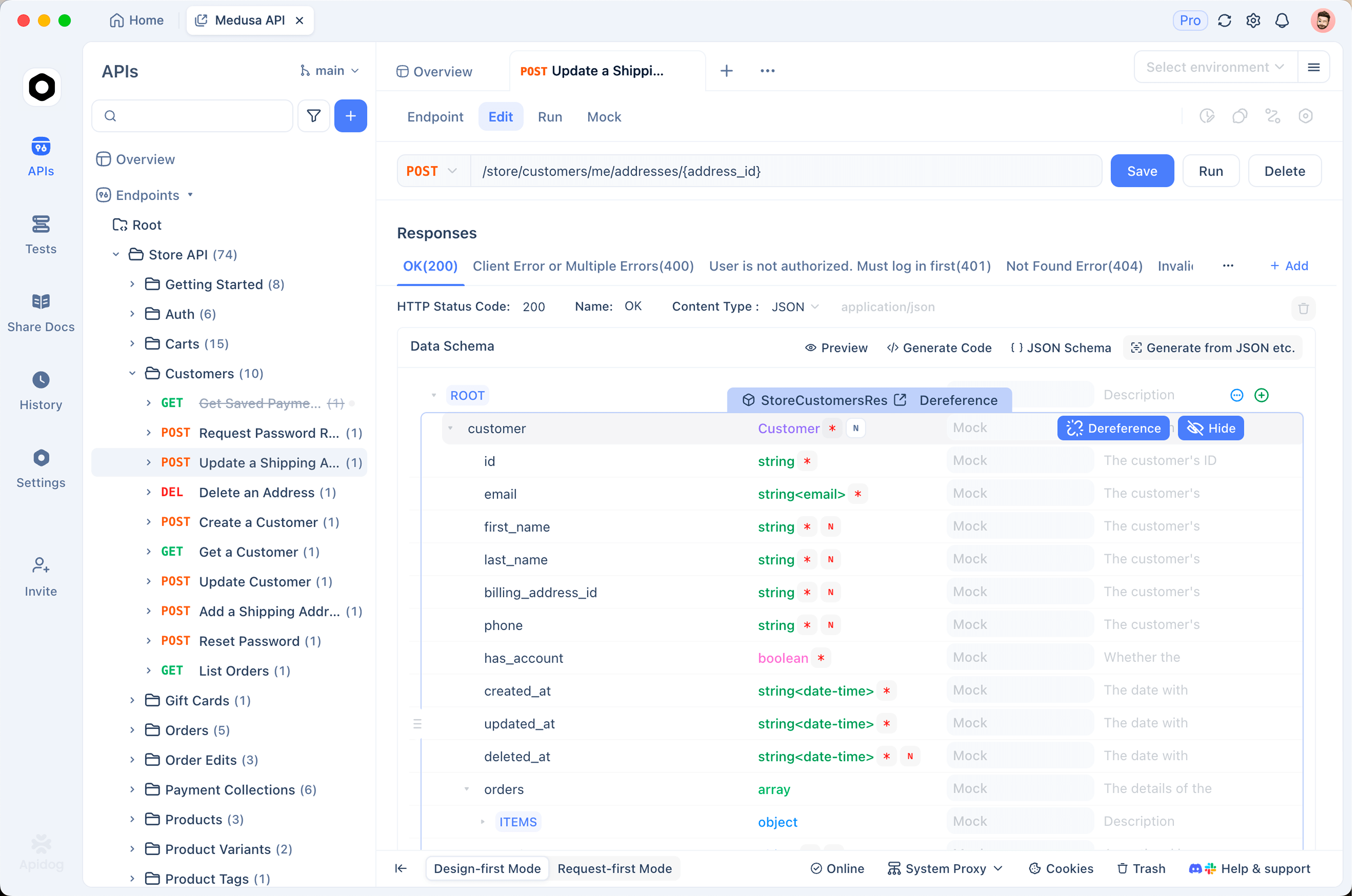
- Add the endpoint. Create
POST https://api.deepseek.com/chat/completions, or import an OpenAI-compatible OpenAPI spec so every route arrives at once. - Store the key as an environment variable. Put
DEEPSEEK_API_KEYin an Apidog environment and set the header toBearer {{DEEPSEEK_API_KEY}}. Switching between a personal key and the production key becomes a dropdown. - Save one request per effort level. Duplicate the base request into variants: thinking off, thinking on at low effort, thinking on at high effort. Same prompt, different parameters. Send all three and compare token usage and latency side by side.
- Watch the stream. For
stream: true, Apidog renders SSE events as they arrive, so reasoning deltas and content deltas show up as separate lines instead of a wall ofdata:prefixes. - Turn the variants into a test scenario. Add assertions on the status code, on the cache-hit count in
usagebeing above zero on the second run, and on the response containing the fields your app parses. Rerun the scenario after every model update, and on September 14 when the V4-Pro reroute goes live. - Run it in CI.
apidog-cliexecutes the same scenario from a pipeline, so a silent model change fails a build instead of a customer.
Download Apidog and the whole setup takes about ten minutes.
FAQ
Do I have to rename deepseek-v4-flash to deepseek-flash? Not today. The legacy name still routes to V4.1-Flash. But V4-Flash itself is retired, and DeepSeek hasn’t said when the alias goes. Rename in your next deploy.
What happens to my V4-Pro code on September 14? Nothing breaks. Requests to deepseek-v4-pro are answered by V4.1-Flash and billed at Flash rates from 04:00 UTC. Your outputs can change, though, so run your evaluation set before that date. The migration guide has a checklist.
Does the Anthropic-compatible endpoint support the new model? Yes. https://api.deepseek.com/anthropic is unchanged; use deepseek-flash as the model name there too.
Is there a free tier? The API is pay-as-you-go with no permanent free tier. Weights are MIT-licensed on Hugging Face if you want to self-host. Current options are collected in how to use the DeepSeek V4 API for free.
How fast is it? DeepSeek hasn’t published a tokens-per-second figure. One X user reported “almost 400 t/s” in video tests, which is an anecdote, not a spec. Measure on your own prompts during a peak window.
Before the reroute
The API surface barely moved: same base URLs, same request format, one new model id. What moved is the price and, on September 14, the routing of every V4-Pro call. Rename deepseek-v4-flash to deepseek-flash, pick an effort level per endpoint, and run your prompts through the new model before DeepSeek does it for you.
Save those prompts as tests while you’re at it. Apidog reruns them in one click, and the next silent Flash upgrade will show up as a failed assertion instead of a support ticket.


