DeepSeek’s vision support stopped being a side project on September 10, 2026. With the GA release of DeepSeek-V4.1-Flash, image input lives in the main model behind one id, deepseek-flash. There is no separate vision build and no “Exp” suffix. The release note retires both deepseek-v4-flash and deepseek-v4-flash-vision-exp; requests to either name now land on V4.1-Flash.
That matters if you built on the experimental endpoint three weeks ago. The request format you wrote against V4-Flash-Vision-Exp still works, but the model reading your images is new: 763B parameters, with a vision encoder trained from scratch alongside the text backbone. This guide covers what “native multimodal” means in practice, the three ways to deliver an image, the detail parameter, what images cost, and how to build a repeatable vision test in Apidog that proves the old name and the new one behave the same way.
TL;DR
- Model id:
deepseek-flash. The legacydeepseek-v4-flash-vision-expname still resolves but is served by V4.1-Flash. - Images go in the user message
contentarray: a base64 data URL (up to 32 MiB), an external URL (up to 8,192 characters), or a file ID. - Optional
detailfield:low,high(aliasoriginal), orauto. - Vision benchmarks, as reported by DeepSeek: MMMU-Pro 56.5, CVBench 77.9, DocVQA 95.6, RefCOCO 86.0.
- Pricing is the standard Flash rate: $0.15 per 1M cache-miss input tokens off-peak, $0.30 peak.
- Context is 1M tokens, max output 384K, same as text-only calls.
What “native multimodal” means here
Vision-Exp attached an image encoder to a finished text model. V4.1-Flash does it the other way around. According to the model card, images were part of the 45T-token pre-training corpus from the start, and the encoder is a new DeepSeek-ViT trained from scratch instead of borrowed from an existing vision model. The backbone is a 552B-parameter mixture of experts; with the encoder attached the total reaches 763B. Only 8B parameters are active during prefill and 16B during decode, which is how a model this large still runs at Flash speed and Flash prices. V4-Flash, the text-only model in the V4-Flash API guide, was the base that Vision-Exp extended.
DeepSeek reports these four vision scores in the model card. They’re the vendor’s own measurements, so treat them as claims until you’ve pushed your own documents through the API.
| Benchmark | What it measures | V4.1-Flash |
|---|---|---|
| MMMU-Pro | College-level questions that need both the image and the text to answer | 56.5 |
| CVBench | Counting, depth ordering, and spatial relations in natural photos | 77.9 |
| DocVQA | Question answering over scanned documents and forms | 95.6 |
| RefCOCO | Locating the object a phrase refers to inside an image | 86.0 |
For API users, DocVQA and RefCOCO are the rows to watch. Document QA is the score behind invoice and form extraction. RefCOCO is grounding: given “the Submit button below the email field”, can the model find it? That skill turns screenshots into agent actions. The architecture overview covers the text side and the tech report in more depth.
The request format: three ways to deliver an image
Nothing about the wire format changed. Call the Chat Completions endpoint at https://api.deepseek.com with the OpenAI SDK, put text and image parts in the same content array, and set the model to deepseek-flash. Here’s a full call that turns an invoice into JSON:
import base64, json
from openai import OpenAI

client = OpenAI(api_key="YOUR_DEEPSEEK_KEY", base_url="https://api.deepseek.com")

with open("invoice-2026-0912.png", "rb") as f:
    image_b64 = base64.b64encode(f.read()).decode()

schema_hint = (
    "Return only JSON with keys: invoice_number (string), issue_date (YYYY-MM-DD), "
    "vendor (string), currency (string), line_items (array of {description, quantity, "
    "unit_price, amount}), subtotal, tax, total (numbers)."
)

response = client.chat.completions.create(
    model="deepseek-flash",
    messages=[{
        "role": "user",
        "content": [
            {"type": "text", "text": schema_hint},
            {
                "type": "image_url",
                "image_url": {
                    "url": f"data:image/png;base64,{image_b64}",
                    "detail": "high",
                },
            },
        ],
    }],
    temperature=1.0,
    max_tokens=2048,
)

invoice = json.loads(response.choices[0].message.content)
print(invoice["invoice_number"], invoice["total"])
print(response.usage.prompt_tokens, "prompt tokens")
That’s option one, base64 inline: self-contained, capped at 32 MiB per image, and right for one-off calls or files that never leave your network.
Option two is an external URL. If the image already has a public link on a CDN or in object storage, skip the encoding and pass the link (up to 8,192 characters). This curl request reads a hosted pricing chart:
curl https://api.deepseek.com/chat/completions \
  -H "Authorization: Bearer $DEEPSEEK_API_KEY" \
  -H "Content-Type: application/json" \
  -d '{
    "model": "deepseek-flash",
    "messages": [{
      "role": "user",
      "content": [
        {"type": "text", "text": "List every plan name and its monthly price from this chart as a JSON array."},
        {"type": "image_url", "image_url": {"url": "https://assets.example-saas.com/pricing/plans-q3.png", "detail": "auto"}}
      ]
    }]
  }'
Option three is a file ID. Upload the image once through DeepSeek’s Files API, then reference it with a file part instead of re-sending the bytes:
{"type": "file", "file": {"file_id": "file-api-xxxxxxxxxxxxxxxx"}}
Pick file IDs whenever the same image appears in more than one request, such as a reference screenshot every test in a suite compares against. The full parameter walkthrough is in the V4.1-Flash API guide.
The detail parameter and request limits
detail is optional and lives inside the image_url object. The three values carried over from Vision-Exp:
"low"downscales to 512x512. Cheapest and fastest; fine for “is this a dashboard or a receipt” questions."high"(alias"original") keeps the source resolution. Use it for dense documents, small print, and UI screenshots where a 12px label matters."auto"lets the API choose.
The ceilings you’ll meet first:
| Constraint | Value |
|---|---|
| Inline base64 image | up to 32 MiB |
| External URL length | up to 8,192 characters |
| File ID reference | supported through the Files API |
| Context window | 1M tokens |
| Max output | 384K tokens |
detail values |
low, high/original, auto |
The Vision-Exp guide listed further ceilings on image count, body size, and pixel dimensions. Those were published for the experimental model; check the API changelog before you depend on them for V4.1-Flash. One rule hasn’t changed: images belong in user messages. Put one in a system or assistant message and you get a 400.
What images cost on deepseek-flash
There’s no separate vision price. Images bill as input tokens at the Flash rate from the pricing page, effective September 10, 2026 at 04:00 UTC:
| deepseek-flash, per 1M tokens | Off-peak | Peak |
|---|---|---|
| Input, cache hit | $0.003 | $0.006 |
| Input, cache miss | $0.15 | $0.30 |
| Output | $0.60 | $1.20 |
Peak hours are Monday to Friday, 01:00 to 04:00 and 06:00 to 10:00 UTC; off-peak is half price. On Vision-Exp, each image was billed at no more than 384 input tokens. Whether that cap carries over unchanged to V4.1-Flash is [VERIFY] against the docs. Every response’s usage.prompt_tokens reports the real count, which is why the Python example prints it.
If the 384-token cap holds, one image costs about $0.000115 at peak cache-miss rates and half that off-peak, so a thousand invoices come to roughly $0.12 of image input. Output dominates any real pipeline: 400 tokens of JSON per invoice costs about four times more than the image itself at peak. The lever is a tight response schema, not image downscaling. The peak, off-peak, and cache-hit math is worked through in DeepSeek-V4.1-Flash pricing explained; the short version is that cache-miss input is 32% cheaper than Vision-Exp charged in August.
Three use cases worth a pilot
Document extraction. Invoices, receipts, delivery notes, insurance forms. Prompt for a fixed JSON schema, send at detail: "high", and check that line items sum to the subtotal before you trust a record.
UI screenshots to test assertions. Capture a page after a deploy, ask whether the expected elements are present and where, and turn the answer into a pass/fail. RefCOCO is the relevant benchmark: the job is finding named elements.
Chart reading. Pull series names, axis labels, and plotted values out of a chart image into a table. Overlapping lines or unlabeled axes call for a human spot check.
Testing the vision endpoint in Apidog
Vision requests are painful to iterate on by hand: a base64 blob makes the JSON body unreadable, and comparing detail settings means juggling near-identical payloads. Here’s a loop that stays readable and reruns in one click.
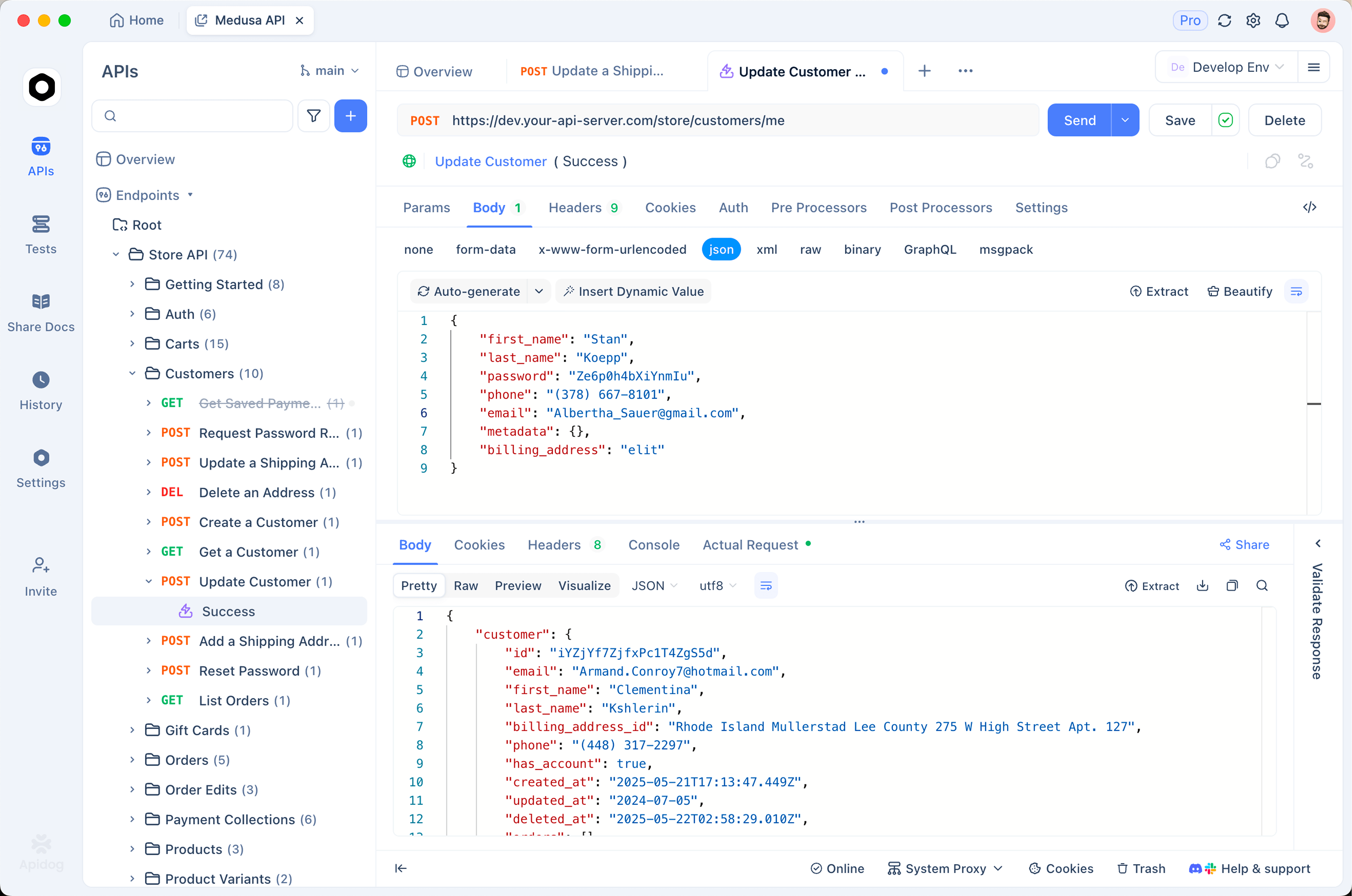
- Set up an environment. Create variables for
base_url,api_key,model(deepseek-flash), anddetail(high). Switching the detail level later is a dropdown change, not a payload edit. - Encode the image in a pre-request script. Instead of pasting base64 into the body, let a pre-request script encode the sample file and write the result to an
image_b64variable. The visible body stays a few lines long, and swapping the test image means changing one path. - Save the request body with variables. Use
"model": "{{model}}","detail": "{{detail}}", and"url": "data:image/png;base64,{{image_b64}}". Save it as a test case so it’s reusable. - Assert on the JSON shape. Assert that the response parses as JSON,
invoice_numberis a non-empty string,line_itemsis a non-empty array,totalis a number, andusage.prompt_tokenssits below a threshold you choose. That turns “looks fine” into a pass/fail. - Confirm the legacy name routes to the same model. Duplicate the saved request, set
modeltodeepseek-v4-flash-vision-exp, and run both in one test scenario against the same image. Compare the extracted fields and theusage.prompt_tokenscount. Matching results confirm what the release note states: both names hit V4.1-Flash, so you can rename in your config with confidence. - Run it in CI. Run the scenario with
apidog-clion every prompt change, so a schema regression surfaces before production.
Download Apidog and the rig takes about fifteen minutes to build. Apidog tests the API layer, not the model host, so the same scenario works against any OpenAI-compatible endpoint you route through later.
Where this leaves you
The experimental endpoint proved the request format and the price point. V4.1-Flash keeps both and swaps in a model that saw images from its first training token. Point your client at deepseek-flash, keep detail in a variable, assert on the JSON you get back, and run the legacy name through the same Apidog scenario once to confirm the rerouting. After that, the only question left is accuracy on your own documents, and you now have a test that answers it.