Your API workspace lives in a GUI. Your workday lives in a terminal. Every context switch between the two costs seconds and focus, and in a CI pipeline or an AI agent session, the GUI isn’t even an option. The Apidog CLI closes that gap: it brings the whole Apidog platform, tests, endpoints, schemas, environments, mock expectations, and docs, to the shell prompt you already have open.
One honest definition before anything else. The Apidog CLI is not another curl. If you want to fire a one-off GET and eyeball the JSON, curl and HTTPie already do that well, and the terminal and TUI REST clients roundup covers the interactive side. The Apidog CLI is a client for your API workspace itself: it runs the test scenarios you’ve built, reads and updates the API contract, and moves specs in and out of the project, all from commands a script or an agent can call.
What “lives in your terminal” means here
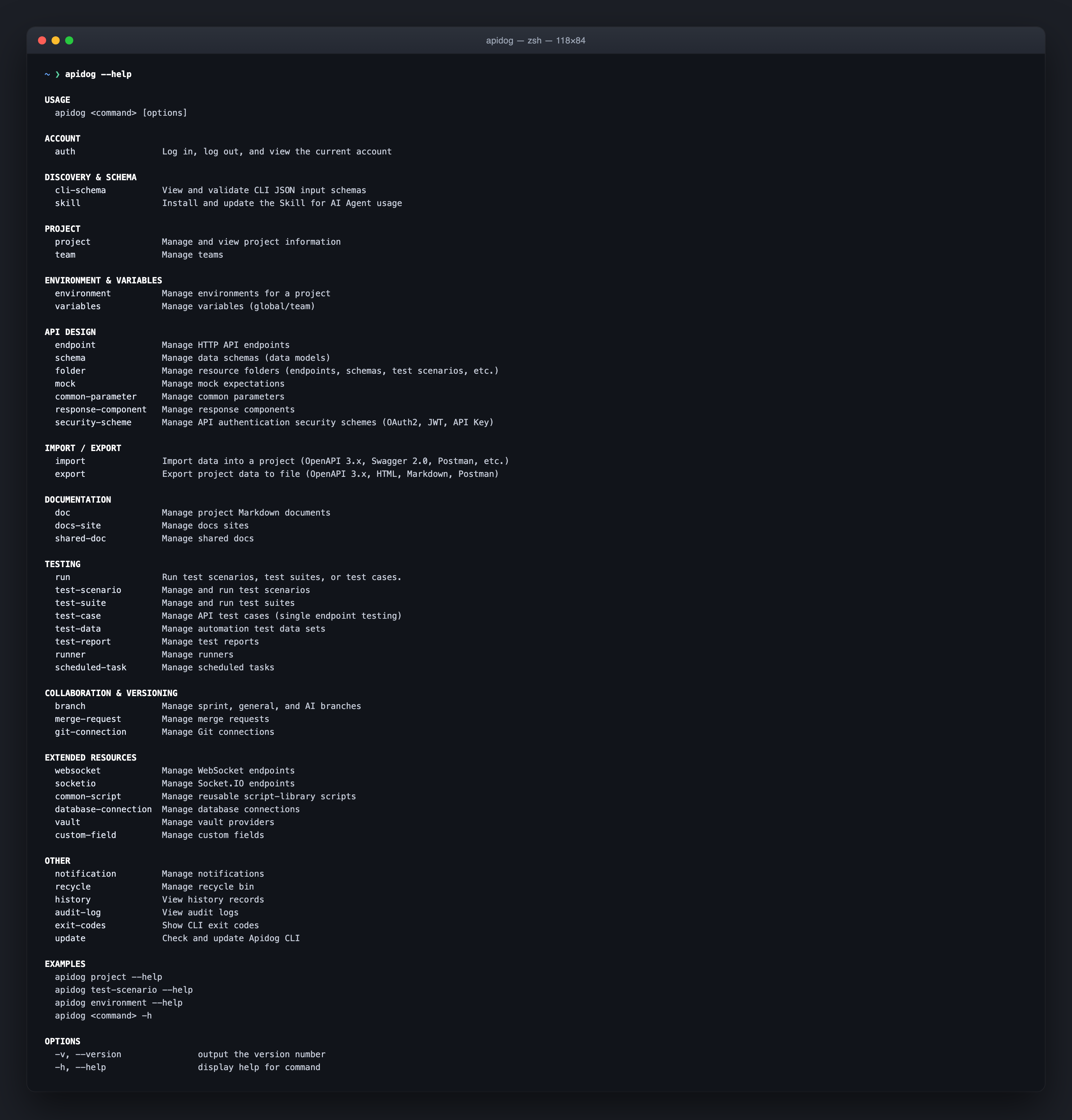
Terminal HTTP tools handle one request at a time. The Apidog CLI operates at the project level. Its command surface spans more than forty groups, and they cluster into five jobs:
| Job | Commands |
|---|---|
| Run tests | run, test-scenario, test-suite, test-case, test-data, test-report |
| Manage the contract | endpoint, schema, folder, common-parameter, response-component, security-scheme |
| Ship docs and mocks | doc, docs-site, shared-doc, mock |
| Configure and connect | environment, variables, vault, database-connection, websocket, socketio |
| Operate as a team | branch, merge-request, runner, scheduled-task, audit-log, import, export |
Every command supports --help, output is structured JSON, and most responses include agentHints.nextSteps telling you (or your agent) what to run next. That last detail sounds small. It changes how the tool feels: the CLI guides the workflow instead of assuming you memorized it.
Install it in one command
The CLI ships as an npm package (apidog-cli) and runs on macOS, Linux, and Windows. It needs Node.js 16 or later.
npm install -g apidog-cli
apidog --version
Then sign in with an API access token. Grab it from the Apidog app: click your avatar, open Account Settings, and copy the token under API Access Token.
apidog login --with-token <YOUR_TOKEN>
The token lands in ~/.apidog/config.toml, so keep it out of your repos and logs; in CI, pass it per-run with --access-token from a secret instead. Four global flags cover most context: --project picks the project, --branch picks the branch, --access-token overrides the saved login, and --api-base-url points the CLI at a self-hosted Apidog deployment. The Apidog CLI authentication guide walks through tokens for CI in detail.
Run the tests you built visually
Here’s the workflow the CLI was built around. You author a test scenario in Apidog’s visual editor: chained requests, variables extracted from one response and injected into the next, assertions on status and body. Then you run it anywhere a shell exists.
# Copy this command, IDs included, from the scenario's CI/CD tab
apidog run -t <scenario_id> -e <env_id> -r cli
The command exits 0 when every assertion passes and non-zero when anything fails, so a pipeline gates on it with no extra glue. Swap -e to point the same scenario at dev, staging, or production environments. Feed it a CSV or JSON file and it iterates the scenario over every row, which is how data-driven testing works without duplicating steps. If you’re starting from zero, the step-by-step REST API walkthrough goes from install to first green run.
Reports come out in four formats: cli prints step-by-step results to the terminal, while html, json, and junit land in apidog-reports/ for dashboards and CI artifacts. Combine them freely, as in -r cli,junit. The test reports guide shows what each format looks like.
For runs that shouldn’t depend on your laptop, the runner and scheduled-task commands manage self-hosted runners and timed executions, the same machinery behind scheduled API tests in Apidog.
Manage the API contract without opening the app
This is the part no other terminal testing tool carries. The same CLI that runs your tests can read and write the API definition itself:
apidog endpoint list --project <project_id>
apidog schema get <schema_id>
apidog environment list
apidog mock list
Endpoints, data schemas, folders, environments, variables, security schemes, and reusable components are all queryable and editable. The mock command manages mock expectations, the fixed request-and-response pairs your mock server returns. The doc and docs-site commands touch published documentation. WebSocket and Socket.IO endpoints have their own groups, and database-connection covers the database configs your test scenarios read.
Import and export speak the formats that matter: OpenAPI 3.x and Swagger 2.0 (the specification most toolchains standardize on), plus Postman collections. That makes the CLI a bridge in migration scripts: pull a spec from one system, push it into Apidog, and version the whole exchange.
apidog import openapi.json --project <project_id>
apidog export --format openapi
Built so AI agents can drive it
The 2026 releases of the CLI lean hard into one idea: an AI coding agent should be able to operate your API workspace as safely as a person. Four pieces make that work.
First, structured output. Every command returns JSON an agent can parse, and agentHints.nextSteps tells it what to do after each result, including how to recover from errors.
Second, a published input schema. apidog cli-schema list and apidog cli-schema get expose the exact JSON shape every write command expects, and apidog cli-schema validate checks a payload before anything touches the project. The safe write ritual is always the same: get the schema, generate the JSON, validate it, and only then run create or update.
Third, a packaged skill. The skill command ships the CLI’s operating knowledge in a form agents load directly, which is the story behind why we built the Apidog CLI skill. In our own measurements, agents working through the CLI schema used about 30% fewer tool calls and 25% fewer tokens than agents guessing at payloads; the numbers are broken down in this analysis.
Fourth, permission gates. By default, AI-sourced writes to a branch are blocked until a human enables External AI Edit Permissions (in Apidog client 2.8.32 or later, under Project Settings, Feature Settings, AI Feature Settings). The alternative is an AI branch: an isolated branch where an agent imports the resources it needs, makes its edits, and hands the result back as a merge request for review. Untouched AI branches auto-archive after 24 hours, so experiments don’t pile up. Your API contract stays reviewable even when an agent writes the first draft.
What the Apidog CLI is not
Three limits, stated plainly, because picking tools on honest information beats discovering the gaps later.
It’s not an interactive request client. There’s no command that types out an ad-hoc POST and pretty-prints the response; curl, HTTPie, and the TUI clients own that job, and they’re better at it.
It’s not open source. The package is proprietary, npm is the only install channel, and doing anything beyond --help requires an Apidog account. The free tier covers the full workflow described here, but if an auditable license is a hard requirement, an open-source runner is the honest recommendation.
It’s not standalone. The CLI is the terminal arm of the platform: scenarios, endpoints, and environments live in your Apidog project, not in local files. That’s the trade that buys you one source of truth across design, testing, mocking, and docs.
Where it fits in the terminal toolbox
Against other runners, the difference is where authoring happens. Newman and the Postman CLI run collections authored in Postman; Hurl and Bruno run tests authored as text files; the Apidog CLI runs scenarios authored in a visual editor that also holds your contract, mocks, and docs. The Apidog CLI vs Newman comparison goes deeper, and the full field is ranked in the top terminal-based API testing tools roundup.
A working setup for most teams: keep curl or xh in muscle memory for pokes, and let apidog run carry the suites in CI. The GitHub Actions walkthrough has a copy-paste pipeline to start from.
FAQ
Is the Apidog CLI free to use? Yes. The package installs free from npm, and Apidog’s free tier covers building scenarios and running them through the CLI. Paid plans add team-scale features, not basic CLI access.
Does it replace curl or HTTPie? No, and it doesn’t try to. Those tools send ad-hoc requests; the Apidog CLI runs saved test scenarios and manages project resources. Most terminals end up with both.
Can it run fully headless in CI? Yes. Authenticate with --access-token from a CI secret, run apidog run with your scenario ID, and gate the build on the exit code. No desktop app is needed on the runner.
What formats can it import and export? OpenAPI 3.x, Swagger 2.0, and Postman collections, in both directions. That covers migrations in and integrations out.
How do AI agents use it safely? Through the schema-validate-write ritual and permission gates: cli-schema validate catches malformed payloads before they land, and AI branches keep agent edits isolated until a human merges them. See it working inside an agent in how to use the Apidog CLI in Claude Code.
The terminal is where your tests already run and where your agents already work. Putting the API client there too removes the last context switch. Download Apidog, install the CLI from npm, and run one scenario end to end; the Apidog CLI page has the full command reference when you’re ready to go past run.