Headless API testing means validating an API with no graphical interface in the loop. You drive the tests from the contract, run them in a terminal or a CI pipeline, and read the results as text or structured reports. If you’ve ever run Apidog CLI tests in a build, or used a runner like Newman to execute a collection from the command line, you’ve already done headless testing. This guide explains what the term means, why it matters when the API is the product, and where the CLI fits.
Headless API testing, defined
“Headless” borrows from browser testing, where a headless browser runs without a visible window. Apply that idea to APIs and you get the same shape: tests run without a GUI, with no human clicking buttons or watching a screen.
A headless API test has three traits:
- No GUI in the execution path. The test runs in a shell, a container, or a CI job. Nobody opens an app to start it.
- Driven by the contract. The test is defined against the API’s request and response shape, often an OpenAPI spec or an exported collection. The contract is the source of truth.
- Machine-readable output. Results come back as exit codes, console text, JUnit XML, or JSON. A pipeline can act on them without a person reading a dashboard.
That’s the whole idea. An API has no screen of its own, so testing it through a screen was always a layer you didn’t need. Headless testing removes that layer.
Why it matters when the API is the product
For a growing number of teams, the API isn’t a supporting actor. It’s the thing customers pay for. When your API is the product, every endpoint is a promise, and a broken endpoint is a broken product.
That changes how you test. You can’t wait for someone to manually click through a UI before each release. You need tests that run on every commit, every merge, and every deploy, without a human in the loop. Headless testing is what makes that possible.
It also matches who consumes APIs now. Other services call your API. Mobile clients call it. AI agents call it. None of them use a GUI, so testing through one tells you little about how real consumers behave. A headless test speaks the same language as the caller: a request goes out, a response comes back, and an assertion checks the contract.
There’s a practical payoff too. Headless tests are repeatable. The same command produces the same run, whether it fires on your laptop or in a Jenkins job at 2 a.m. That reproducibility is the foundation of solid CI/CD for API testing.
How it differs from GUI and manual testing
Manual testing and GUI-driven testing aren’t wrong. They’re good for exploration, for one-off debugging, and for designing a request before you automate it. The difference is where each approach belongs.
| Aspect | Manual / GUI testing | Headless API testing |
|---|---|---|
| Trigger | A person clicks or sends | A command, hook, or pipeline stage |
| Where it runs | A desktop or web app | Terminal, container, CI runner |
| Repeatability | Depends on the person | Identical every run |
| Output | On-screen, visual | Exit codes, logs, JUnit/JSON reports |
| Fits CI/CD | Hard to wire in | Built for it |
| Best for | Exploring, first-time debugging | Regression, gates, scheduled runs |
The honest take: you’ll use both. You explore and design in a GUI, then you promote the test you built into a headless run that guards every release. The GUI is where a test is born. The CLI is where it lives.
The role of the CLI
The command line is what makes a test headless. A CLI runner takes your test definition, executes it against a target environment, and returns a result a machine can read. No window, no clicks.
A capable headless runner usually handles a few things:
- Pointing at an environment. You pass a base URL, variables, or an environment id so the same tests run against staging, then production.
- Data-driven runs. You feed a CSV or JSON file so one test iterates over many input rows. This is how you cover edge cases without copy-pasting test cases. See parameterized testing for the pattern.
- Reports. The runner emits output your pipeline can store or fail on, in formats like console text, HTML, or JSON.
- An exit code. A non-zero exit code fails the build. This single behavior is what turns a test into a gate.
Plenty of tools live in this space, and each has real strengths. Newman runs Postman collections from the command line and supports CLI, JSON, and JUnit reporters out of the box. Hurl runs plain-text HTTP files and is excellent for lightweight, version-controlled checks. Prism and WireMock and Mockoon’s CLI lean toward mocking and stubbing rather than assertion-heavy test runs. The right pick depends on where your contracts already live.
Where Apidog fits
Apidog CLI is headless test execution. The apidog run command runs test scenarios, scenario folders, test suites, or local exported files with no GUI involved. That makes it a natural fit for CI/CD, scheduled jobs, and any pipeline stage that needs a pass or fail.
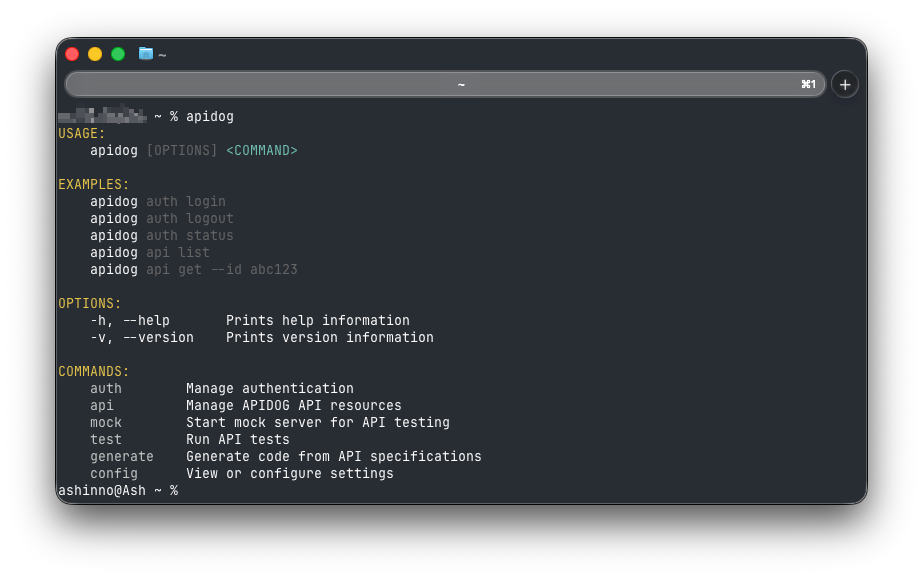
It covers the headless essentials directly:
- Data-driven testing. Pass
-d(or--iteration-data) with a CSV or JSON file to iterate a test over many input rows, and-nto set the iteration count. - Reporters. Use
-rto choose report types. The defaults includecli,html, andjson, so you can print to the console and write an HTML report in the same run, for example-r html,cli. - Environments and branches. Point a run at a specific environment with
-e, or a project branch with--branch, so the same tests cover staging and production.
The link back to design is what makes this different from a bare runner. With Apidog, the tests you run headless come from the same contract you designed, documented, and mocked. There’s no separate collection drifting away from the spec. You can also run Apidog’s mock server in CI, so a consumer can be tested against a mocked dependency before the real one exists. To see the command end to end, the Apidog CLI guide walks through a full run.
There’s an AI-native angle too. Apidog’s MCP server lets an AI agent or IDE like Cursor or Claude read and work with your API specs directly, which is handy when an agent is generating or maintaining the tests that later run headless. The piece on visual debugging with the Apidog MCP client shows how that connection works in practice.
Frequently asked questions
Is headless API testing the same as automated testing?
They overlap but aren’t identical. Automated testing means a test runs without a person triggering each step. Headless API testing is automated testing that also has no GUI in the execution path. Most modern automated API testing is headless, because the cleanest way to automate is to drop the screen and drive everything from a command.
Do I still need a GUI tool if I test headless?
Usually yes, for a different job. A GUI is where you design a request, inspect a response, and debug something new. Once a test is stable, you promote it to a headless run that guards every build. Many teams design in the app and execute in the pipeline, which is the model behind Apidog CLI testing from the command line.
How does headless testing fit into CI/CD?
A headless runner returns an exit code, so a non-zero result fails the build. You add the run as a pipeline stage, point it at the right environment, and let it gate merges and deploys. That’s the core mechanic behind running API tests in CI without any manual step.
Can headless testing cover mocked APIs too?
Yes. You can run tests against a mock server while the real backend is still being built, which is a common API mocking pattern. A headless mock that runs in CI lets a frontend or a consumer service validate the contract before the live dependency exists.
Wrapping up
Headless API testing is testing without a screen: contract-driven, terminal-run, machine-readable, and built for CI. It matches how APIs are actually consumed and how modern teams ship. When the API is the product, headless testing is how you keep the product working on every commit.
If you want to try it, download Apidog, design or import your API, and run your tests headless with apidog run. The same contract you design powers the tests that guard your pipeline, all from Apidog.