Quick answer: Gemini Omni 1.2 Flash is Google’s generally available video generation and editing model, released November 5, 2026. It makes clips of 3 to 15 seconds with native audio, costs about $0.07 per second at 720p, and runs on the Interactions API under the model ID gemini-omni-1.2-flash. On December 3, 2026, requests to 1.1 start routing to it.
That last date is why this release matters if you already ship video. Your 1.1 code keeps working, but a different model will answer it in under a month.
If you’re new to the family, start with what Gemini Omni is. For the 1.1 launch details, see our Omni 1.1 Flash post. This guide covers what 1.2 means for someone building today.
What Gemini Omni 1.2 Flash does
Gemini Omni 1.2 Flash takes text, images and video as input and returns video with sound. It generates new clips, edits clips across turns and extends them, all through one API. You choose duration in one-second steps, and you set resolution per request.
The announcement lists five capabilities worth knowing:
- Reference adherence. Character, product and style images help faces, garments, packaging and brand colors hold across angles. You get up to 6 reference images, with up to 3 per character for up to 2 characters.
- Consistency. Google says characters, objects and scenes hold better from first frame to last, including first and last keyframe interpolation.
- Multi-turn editing. Swap a product, change the weather or change the aspect ratio in a follow-up turn, without starting over.
- Speech. Google claims more natural dialogue, clearer lip-sync and distinct multi-speaker conditioning.
- Camera control. FPV flythroughs and orbits, with fewer unwanted jump cuts.
The quality claims above are Google’s. It published no benchmarks, so treat them as a reason to test, not as results.
What changed from Gemini Omni 1.1 Flash
Three things touch your code: clip length, price and prompt syntax. Both models run on the Interactions API, so moving over is a model string change plus a retest.
| Omni 1.1 Flash | Omni 1.2 Flash | |
|---|---|---|
| Status | Previous generation | Generally available |
| Model ID | gemini-omni-1.1-flash |
gemini-omni-1.2-flash |
| Longest single clip | 10 seconds | 15 seconds |
| Video output price | $17.50 per 1M tokens | $12.00 per 1M tokens |
| 720p cost per second | about $0.10 | about $0.07 |
| Input price | $1.50 per 1M tokens | $1.50 per 1M tokens |
| Reference images when extending | Not supported | Up to 2, on Agent Platform |
| Gemini API free tier | Not available | Not available |
The 15-second ceiling comes with exceptions. First and last frame interpolation stays at 3 to 10 seconds, and asking for more returns an invalid argument error. Reference videos also shrink: 3-to-10-second outputs take up to 3 clips, while 11-to-15-second outputs take 1. Each clip can run up to 3 seconds. So a single duration slider that goes to 15 can break your keyframe mode.
The docs also warn against control tags such as <FIRST_FRAME> and <IMAGE_REF_0> in prompts. Google calls them deprecated and unsupported in future models. Describe each input’s role in plain language instead.
Gemini Omni 1.2 Flash pricing by resolution
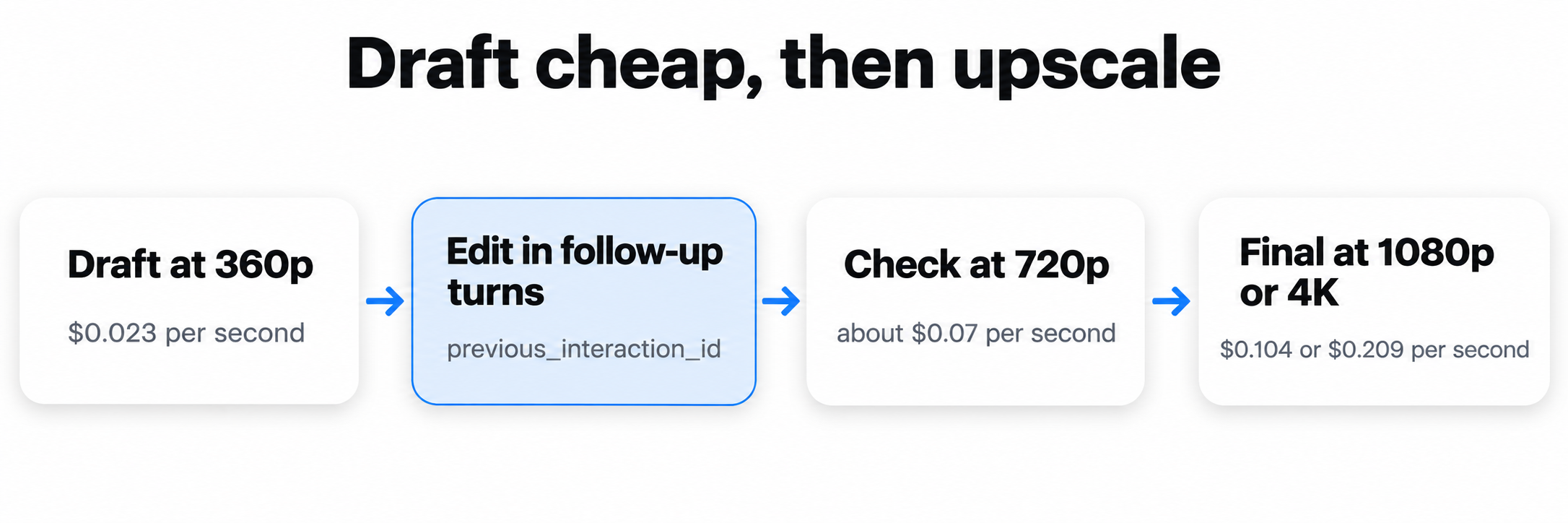
Omni bills by output token, and Google’s pricing page converts that to per-second rates. A 720p second is 5,792 tokens. These are output costs only, and input tokens add a small amount on top.
| Resolution | Per second | 5-second clip | 15-second clip |
|---|---|---|---|
| 360p | $0.023 | $0.12 | $0.35 |
| 720p | about $0.07 | about $0.35 | about $1.04 |
| 1080p (upsampled) | $0.104 | $0.52 | $1.56 |
| 4K (upsampled) | $0.209 | $1.05 | $3.14 |
Google’s suggested workflow is to draft at 360p or 720p, fix problems with follow-up edits rather than fresh generations, and move to 1080p or 4K last. The numbers back that up. Nine 15-second drafts at 360p cost about the same as one 15-second 4K render.
Two caveats for your budget. No Batch pricing is listed for this model. And we didn’t run a paid upscale, so confirm how a finished draft bills at 1080p or 4K before you plan around it. For the token math in more detail, see our Omni 1.1 pricing breakdown and swap in the $12.00 rate.
Where you can call Gemini Omni 1.2 Flash
You can reach the model through two APIs and four Google apps. The developer routes are:
- Gemini API. Use
POST https://generativelanguage.googleapis.com/v1beta/interactionswith an API key from Google AI Studio. - Vertex AI Studio and Gemini Enterprise Agent Platform. Use the global
interactionsendpoint with a Google Cloud project and access token. Google’s extension docs show the request shape.
The app routes need no code:
- Flow: multi-turn scene editing.
- Google Vids: 15-second clips at no additional cost with a Google account or Workspace subscription.
- Gemini app: 15-second videos, rolling out to Google AI Ultra subscribers.
- Google Ads: video campaigns.
A minimal Gemini API call looks like this:
curl -X POST "https://generativelanguage.googleapis.com/v1beta/interactions" \
  -H "x-goog-api-key: $GEMINI_API_KEY" \
  -H "Content-Type: application/json" \
  -d '{
    "model": "gemini-omni-1.2-flash",
    "input": "A marble rolling fast along a chain reaction track, one smooth shot.",
    "response_format": {
      "type": "video",
      "duration": "3s",
      "resolution": "360p",
      "delivery": "uri"
    }
  }'
The response is an interaction object with id, status and a steps array. The video sits in a model_output step as video/mp4. By default it arrives as base64 in data. Set "delivery": "uri" for anything over 4MB, then poll the Files API until the file is ACTIVE. One trap: a later GET on the interaction returns inline base64 even if you asked for a URI, so save the URI from the creation response. The Omni docs have samples in Python, JavaScript, Java, Go and REST, and our Omni 1.1 API guide walks through the same request flow.
To edit a clip, pass previous_interaction_id with a new prompt. Don’t set store to false on a clip you plan to edit, because that blocks later turns. Our extension guide covers chaining. If you’re still choosing a provider, read Omni 1.2 Flash or Veo.
What the December 3 reroute means for your app
From December 3, 2026, Google routes every request to gemini-omni-1.1-flash to gemini-omni-1.2-flash and bills it at 1.2 rates. Nothing errors out. Your 720p second gets about 30% cheaper, and a different model starts answering your existing prompts.
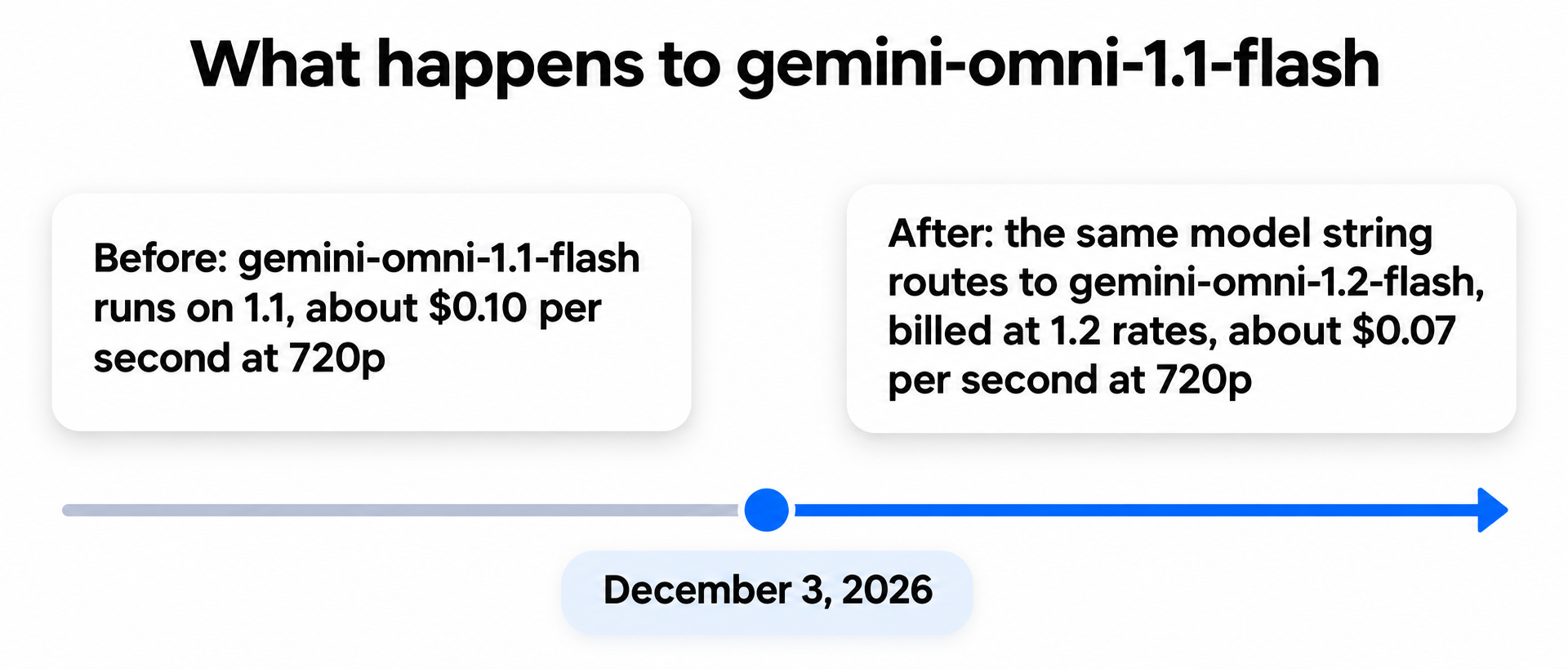
The risk is silent change, so move on your own schedule:
- Switch the model string now. Pick your own test date instead of inheriting Google’s.
- Rerun your saved prompts. Compare clips side by side, especially anything with speech or a brand asset.
- Update your cost estimates. Any hardcoded $0.10 per second is wrong after the switch.
- Cap durations per mode. Allow 15 seconds for plain generation and 10 for keyframes.
- Replace control tags. Rewrite any prompt that still uses
<IMAGE_REF_0>style tags. - Use URI delivery for long clips. A 15-second output is more likely to pass the 4MB inline limit.
That notice appears on the Gemini API pricing page. If you call through Agent Platform, check that surface’s model page for its own schedule.
What Gemini Omni 1.2 Flash still gets wrong
Google names three weak spots: fast sports action, rapid script changes and complex physics. If your product depends on any of them, test those prompts first.
The docs add hard limits:
- No prompt controls. System instructions, temperature,
top_p, stop sequences and negative prompt fields aren’t supported. Write exclusions into the prompt. - Regional blocks. Editing or extending uploaded videos isn’t available in the EEA, Switzerland or the UK.
- Append only. Extension adds to the end of a clip. It can’t prepend or change the middle.
- Language. English is fully supported. Google calls other languages untested.
- Provenance. Every output carries an imperceptible SynthID watermark.
Google’s own pages also disagree in three places, so test on the surface you ship on:
- Extended length. The Gemini API docs say 30 seconds total. The Agent Platform docs say up to 40.
- Audio. The announcement mentions audio cues as a reference input. The Gemini API docs list audio inputs as unsupported.
- Provisioned Throughput. The announcement says it’s available for enterprise customers. The Gemini API docs list it as unsupported, so expect it on the enterprise side only.
Let your coding agent test it with Apidog CLI
A reroute is the kind of change a contract test should catch. Your coding agent can write that test against the Interactions API and run it from the terminal, while you review the result. Set up Apidog CLI once:
npm install -g apidog-cli@latest
apidog auth login --with-token <YOUR_TOKEN>
apidog skill install
Then give Claude Code, Codex or Cursor one prompt:
In Apidog project <id>, create an endpoint for POST /v1beta/interactions on
generativelanguage.googleapis.com, sending x-goog-api-key from {{GEMINI_API_KEY}}.
Add a test case that requests gemini-omni-1.2-flash at 3s, 360p, delivery uri.
Assert HTTP 200, object is "interaction", status is "completed", and steps holds
a model_output entry of type video with mime_type video/mp4 and a uri.
Run it and summarize any failures.
The agent reads each schema, validates its payload, writes the case and runs it:
apidog cli-schema get endpoint-create
apidog cli-schema validate endpoint-create --file omni.json
apidog endpoint create --project <id> --file omni.json
apidog test-case category --project <id>
apidog cli-schema get test-case-create
apidog cli-schema validate test-case-create --file case.json
apidog test-case create --project <id> --file case.json
apidog run --test-case <caseId> --project <id> -e <envId> \
  --env-var "GEMINI_API_KEY=$GEMINI_API_KEY" \
  --timeout-request 300000 -r cli,json
Each run bills real video, and this fixture costs about $0.07, so schedule it nightly rather than on every commit. To cover the reroute, ask the agent to clone the case with the 1.1 model string and run both before December 3. The same apidog run line with -r junit drops into a pipeline, as our Apidog CLI CI/CD guide shows, and Apidog CLI in Claude Code covers the agent setup. Apidog Free covers up to 4 users.
FAQ
Is Gemini Omni 1.2 Flash free? Not on the API. Google lists the Gemini API free tier as “Not available” for both input and output. Google Vids offers 15-second clips at no additional cost with a Google account or Workspace subscription.
What’s the model ID? gemini-omni-1.2-flash, on the Interactions API rather than generateContent.
How long can a Gemini Omni 1.2 Flash video be? A single clip runs 3 to 15 seconds in one-second steps, defaulting to 10. Extension adds 3 to 10 seconds per turn. The maximum extended length is 30 seconds in the Gemini API docs and up to 40 in the Agent Platform docs.
What happens to my Omni 1.1 code on December 3? It keeps running. Requests to gemini-omni-1.1-flash route to gemini-omni-1.2-flash and bill at 1.2 rates, so retest your prompts before then.
Does Gemini Omni 1.2 Flash generate audio? Yes, native audio comes with the clip. You can’t upload audio files as input through the Gemini API, and audio in reference videos is ignored.
Are there benchmarks for 1.2 against 1.1? No. Google published none, so run your own prompts through both before December 3.