
Quick answer: To extend a video with Gemini Omni 1.2 Flash, send your clip and a short continuation prompt to the Interactions API. Each turn adds 3 to 10 seconds and returns the longer clip. The Gemini API stops at 30 seconds total. Google Cloud’s Agent Platform reaches 40, but only if you plan each step so it doesn’t trim your opening.
For prompt-writing advice, see our guide to Omni 1.1 scene extension. This guide covers what’s new: the requests, the chaining math and the cost of a 40-second clip.
How Gemini Omni 1.2 Flash video extension works
Video extension generates a continuation at the end of a clip. The model reads up to the last 10 seconds of your input as context, writes 3 to 10 new seconds, and joins them to the clip. It only appends: you can’t prepend footage or extend the middle.
Google documents different limits depending on where you call the model:
| Gemini API | Agent Platform (Google Cloud) | |
|---|---|---|
| Auth | API key | Project and access token |
| Total length | 30 seconds | 40 seconds |
| Input length | No separate limit stated | Any duration |
| Reference images | Up to 6 on Omni | Up to 2 per extension |
| Extension mode | Prompt first, task as a fallback |
task: "extend" in every sample |
| Seed and labels | Not in the Omni docs | generation_config.seed, labels |
| Stored results | 55 days on the paid tier | Up to 7 days |
Sources: the Gemini API Omni docs and the Agent Platform extension docs.
On Agent Platform, the model reads up to the last 10 seconds, then concatenates the new segment onto up to the last 30 seconds of the input. Google’s example extends a 60-second input by 10 seconds and returns 40 seconds, so the first 30 seconds are gone.
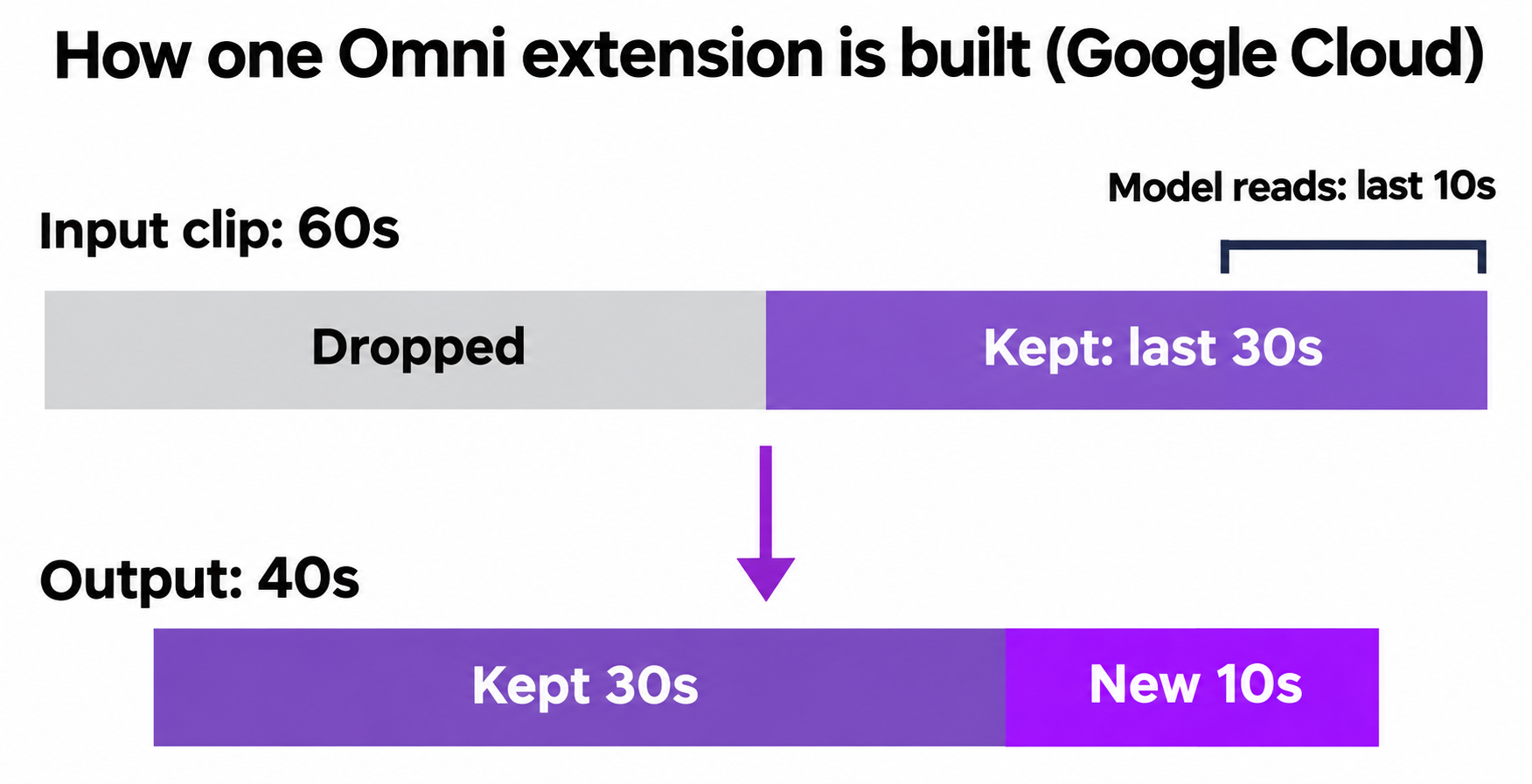
You don’t stitch anything yourself, since the output includes the earlier footage. Google does edit some final frames of your input to smooth the transition.
What changed for extension in 1.2
- 15-second starting clips. 1.1 stopped at 10. Each extension turn is still capped at 10 seconds.
- Reference images, seed and labels on Agent Platform extension requests.
- New prompt syntax. Google deprecated tags such as
<IMAGE_REF_0>, which older guides use. Describe each image in plain language. - New input type. Current samples send
"type": "video", not thedocumenttype from 1.1 examples.
Extend a video step by step on the Gemini API
- Generate a clip, or upload one through the Files API. Uploaded files are deleted after 48 hours.
- Describe only what happens next.
- Set
durationfrom"3s"to"10s"(default 10). - Save the interaction ID for the next turn.
from google import genai

client = genai.Client()

first = client.interactions.create(
    model="gemini-omni-1.2-flash",
    input="A courier in a yellow jacket cycles through a rainy night market.",
    response_format={"type": "video", "duration": "15s"},
)

second = client.interactions.create(
    model="gemini-omni-1.2-flash",
    previous_interaction_id=first.id,
    input="The courier brakes at a red door. Keep the same yellow jacket.",
    response_format={"type": "video", "duration": "10s", "delivery": "uri"},
)
To extend your own footage, replace previous_interaction_id with an input array of {"type": "video", "uri": video_file.uri} and a text item.
- Skip
taskat first. Google says it adds strict constraints, so set"task": "extend"invideo_configonly as a fallback. - Use
delivery: "uri"above 4MB. Save the URI from the creation response. A laterGETreturns inline base64 even for URI requests. - Keep
storeon. Withstore: false, you can’t continue from that interaction ID.
Uploads have two more limits: no added dialogue where someone is talking, and no extending from the EEA, Switzerland or the UK. Multi-turn extension of generated video avoids both.
Request walkthrough on Agent Platform
Use this route for 40 seconds or a job queue. Generation can take over a minute, so POST this body to https://aiplatform.googleapis.com/v1beta1/projects/PROJECT_ID/locations/global/interactions with background on:
{
  "model": "gemini-omni-1.2-flash",
  "background": true,
  "input": [
    { "type": "text", "text": "The courier opens the red door and steps inside." },
    { "type": "video", "uri": "gs://my-bucket/hop-1.mp4", "mime_type": "video/mp4" }
  ],
  "response_format": [
    {
      "type": "video",
      "delivery": "uri",
      "gcs_uri": "gs://my-bucket/out/",
      "aspect_ratio": "16:9",
      "duration": "5s"
    }
  ],
  "generation_config": {
    "seed": 4242,
    "video_config": { "task": "extend" }
  },
  "labels": { "campaign": "courier", "hop": "2" }
}
The call returns an interaction ID with status in_progress. Poll it with GET .../locations/global/interactions/INTERACTION_ID. When it completes, read the gs:// URI from the model_output step in steps. That URI becomes the input for your next hop.
Stateless (store: false), stateful (store: true) and streaming modes also exist. Stored and async results last up to 7 days, so copy anything you need.
[VERIFY] Not run: no Google Cloud project was available. Google’s sample body shows neitherseednorlabels, so confirm their placement.
Chaining to the 40-second limit
A hop only keeps all your footage if its input is 30 seconds or less. To land on 40 without losing anything, reach exactly 30 first.
| Hop | Planned duration |
Planned output | Naive duration |
Naive output |
|---|---|---|---|---|
| Start | 15s | 15s | 15s | 15s |
| 1 | 10s | 25s | 10s | 25s |
| 2 | 5s | 30s | 10s | 35s |
| 3 | 10s | 40s | 10s | 40s, first 5s dropped |
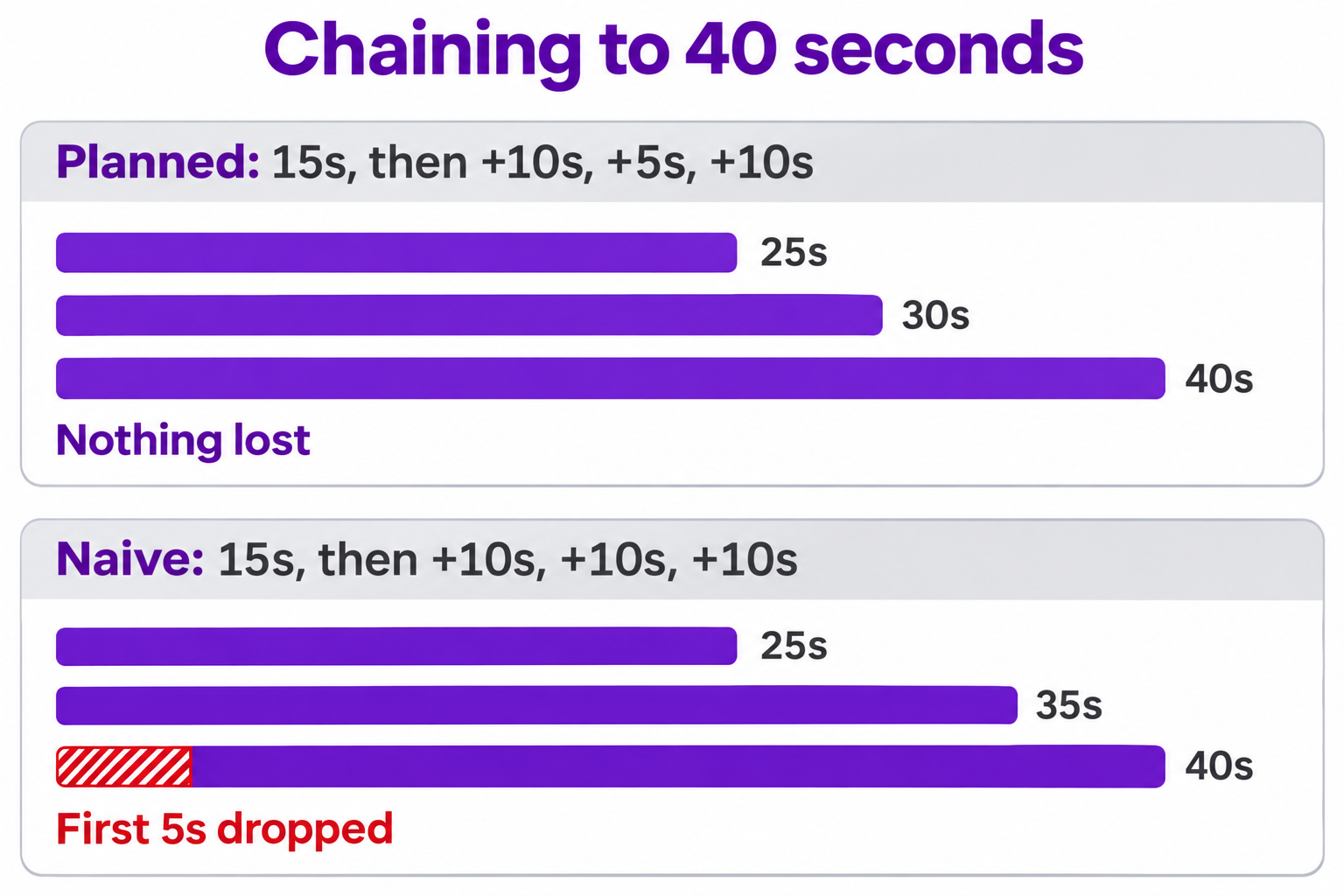
The naive chain buys 5 extra seconds, then throws away your opening. Clip length won’t warn you, because both chains return 40 seconds.
A 15-second start doesn’t save calls at 40 seconds: starting at 10 also takes three extensions. It helps elsewhere, since 25 seconds takes one extension instead of two, and 35 takes two instead of three.
On the Gemini API, stop after hop 2. Google doesn’t say what happens to a request past 30 seconds.
Keep characters steady with reference images and seed
A character who left the frame before the final 10 seconds is invisible to the model, even if those frames stay in the clip. Google’s fix: mention them again or pass a reference image in the same input array:
{ "type": "image", "uri": "gs://my-bucket/courier.png", "mime_type": "image/png" },
{ "type": "text", "text": "The courier from the reference image walks back into frame." }
- Reuse the same image on every hop that needs that character.
- Pick carefully on Agent Platform. Two images per extension covers only what’s most likely to drift.
- Don’t send reference videos. Google supports them for new generation only, not extension.
- Give timings from the new segment. 0s in your prompt means the start of the extended part, not the start of the clip.
Set generation_config.seed for reproducible results. It helps most when debugging: rerun a hop with the same seed to see whether a change came from your prompt. Google doesn’t promise a seed holds a character steady across different prompts, so rely on references for that. Use labels to track billing per hop.
How much a 40-second clip costs
Google’s pricing page bills Omni 1.2 video output at $12.00 per million tokens. It doesn’t say whether an extension bills only new seconds or every second returned. The planned chain generates 40 seconds but returns 15, 25, 30 and 40, which totals 110.
| Resolution | Per second | If only new seconds bill | If every returned second bills |
|---|---|---|---|
| 360p | $0.023 | $0.93 | $2.55 |
| 720p | About $0.07 | $2.78 | $7.65 |
| 1080p (upsampled) | $0.104 | $4.17 | $11.47 |
| 4K (upsampled) | $0.209 | $8.34 | $22.94 |
These are Gemini API rates, calculated from Google’s tokens per second. Input tokens ($1.50 per million) and thinking tokens ($9.00 per million) come on top.
Until you’ve checked, budget the right-hand column. To keep the bill down:
- Draft at 360p and validate the whole chain before paying for 720p.
- Choose resolution before you chain. The Agent Platform model page caps upscaling input at 15 seconds, so a finished 40-second clip won’t fit in one pass.
- Budget rerolls on hard shots. Google’s announcement names fast sports action, rapid script changes and complex physics as areas still improving.
Requests to gemini-omni-1.1-flash route to 1.2 from December 3, 2026 and bill at 1.2 rates.
Let your coding agent test the async flow with Apidog CLI
An async chain fails quietly: a poll that never ends, a run that finishes as failed, a response shape that changes. Let your coding agent build that test with Apidog CLI and run it for you.
npm install -g apidog-cli@latest
apidog auth login --with-token <YOUR_TOKEN>
apidog skill install
Then give Claude Code, Codex or Cursor one prompt:
In Apidog project <id>, create endpoints for POST and GET on the Omni
interactions URL. Build a test scenario named omni-extend-async: start a
3-second 360p extension with background set to true, save the interaction
ID, then loop with a 10-second delay on GET until status leaves in_progress.
Assert status is completed and a model_output step holds a video/mp4 item
with a uri or data. Run it and summarize any failures.
The agent validates its payload, then builds and runs the scenario:
apidog cli-schema get test-scenario-update
apidog test-scenario create --project <id> --name "omni-extend-async" --folder-id <folderId> --priority 1
apidog test-scenario import-steps <scenarioId> --project <id> --source endpoint --ids <postId>,<getId>
apidog cli-schema validate test-scenario-update --file scenario.json
apidog test-scenario update <scenarioId> --project <id> --file scenario.json
apidog run -t <scenarioId> --project <id> -e <envId> --timeout-request 300000 -r cli,junit --out-dir ./reports
Every run bills a real clip, so run it nightly, not on each commit. A 3-second 360p hop costs about $0.07 if only new seconds bill. The same line drops into a pipeline, as our Apidog CLI CI/CD guide shows, and the Claude Code setup guide covers the agent side. Apidog Free covers up to 4 users.
FAQ
How long can a Gemini Omni 1.2 Flash video be? A single generation runs 3 to 15 seconds. With extension, the Gemini API docs give 30 seconds total and the Agent Platform docs give 40.
Why did the start of my extended video disappear? On Agent Platform, only the last 30 seconds of input are kept. Any input over 30 seconds loses its opening. Plan your hops so the final one starts from exactly 30 seconds.
Can I extend a video I filmed myself? Yes, outside the EEA, Switzerland and the UK. Upload it through the Files API, or point to Cloud Storage on Agent Platform. You can’t add dialogue to an uploaded clip where someone is talking.
Can I extend a clip for free? Not through the API. Google lists the free tier as “Not available” for Omni 1.2 and 1.1, so even a test bills. A 3-second 360p extension is the cheapest one you can run.