
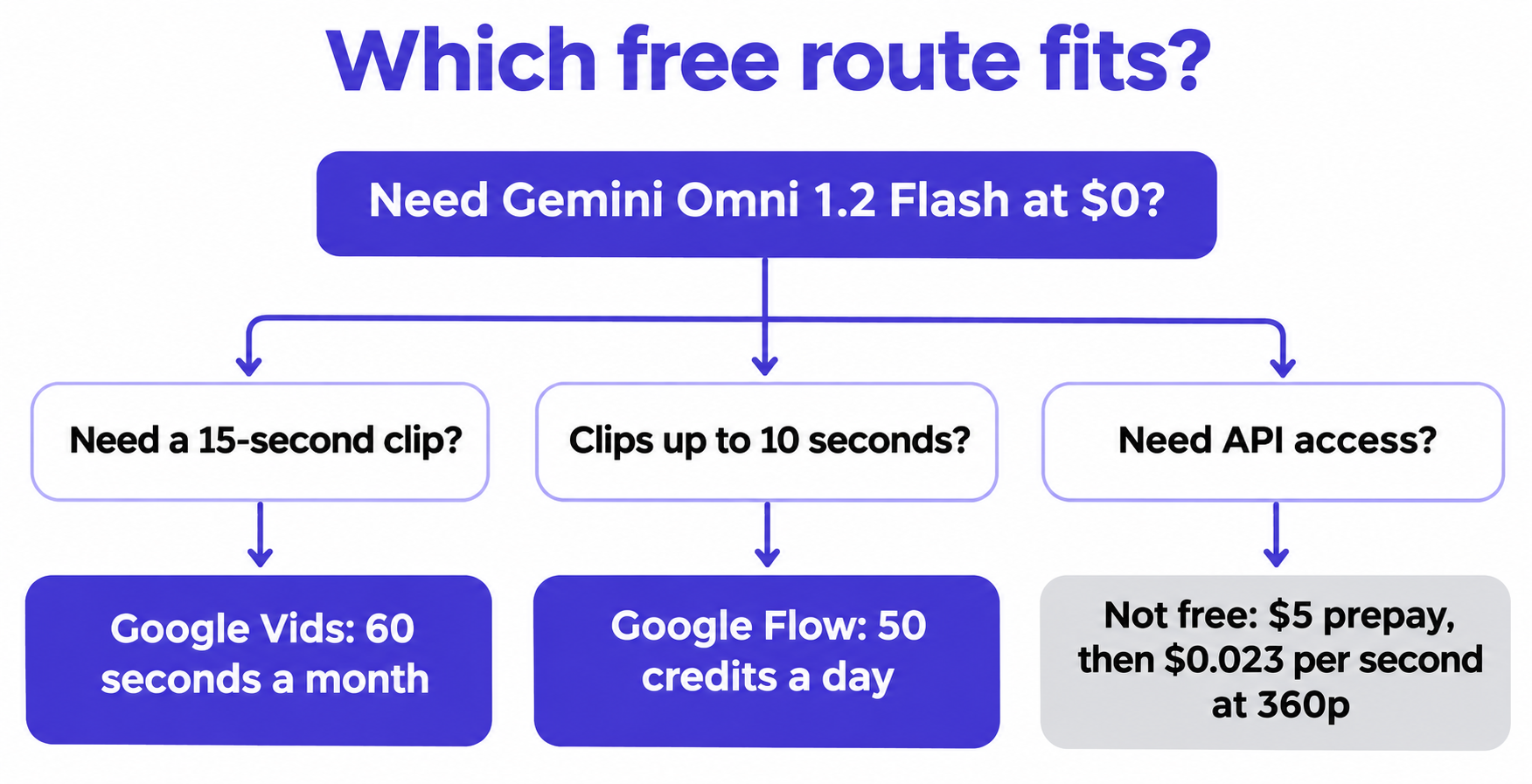
Quick answer: You can use Gemini Omni 1.2 Flash for free in two places: Google Flow (50 credits a day, clips up to 10 seconds) and Google Vids (60 seconds of clips a month on a personal account). The Gemini API has no free tier for this model. Every API call is paid, starting at about $0.023 per second at 360p.
This guide covers what you get on each route, what’s locked and the cheapest way to pay when free runs out. Every limit comes from Google’s official pages, read on November 6, 2026. Google says limits can change at any time, so check them before you plan around them.
If you want the earlier version’s routes, our Gemini Omni free guide covers YouTube Shorts and the student offer. Google’s 1.2 announcement doesn’t list either, so they aren’t counted here.
What’s free and what isn’t
Two routes cost $0, one is a credit, and three need a paid plan or a paid key.
| Route | Cost | What you get | Main limit |
|---|---|---|---|
| Google Flow | $0, no plan needed | 50 credits a day | 10-second clips, 360p or 720p |
| Google Vids | $0 with a Google account | 60 clip seconds a month | About four 15-second clips |
| Google Cloud trial | Credit, not free | $300 for 90 days | Payment method required |
| Gemini API | Paid | No free tier | $5 minimum prepay |
| AI Studio | Paid for this model | No documented free path | Assume a paid key |
| Gemini app | Paid | Video needs a Google AI plan | 15-second clips are rolling out to Ultra |
Use Gemini Omni 1.2 Flash free in Google Flow
Flow is the most generous free route. Google’s Flow credits page gives everyone 50 credits a day, with or without a subscription, and lists Omni Flash 1.2 generation and editing up to 10 seconds for all users.
- Open Google Flow and sign in with your Google account.
- Check the current credit costs under Settings, at the top right of the prompt box.
- Choose Omni Flash 1.2 and start at 360p.
- Move your best prompt to 720p once it works.
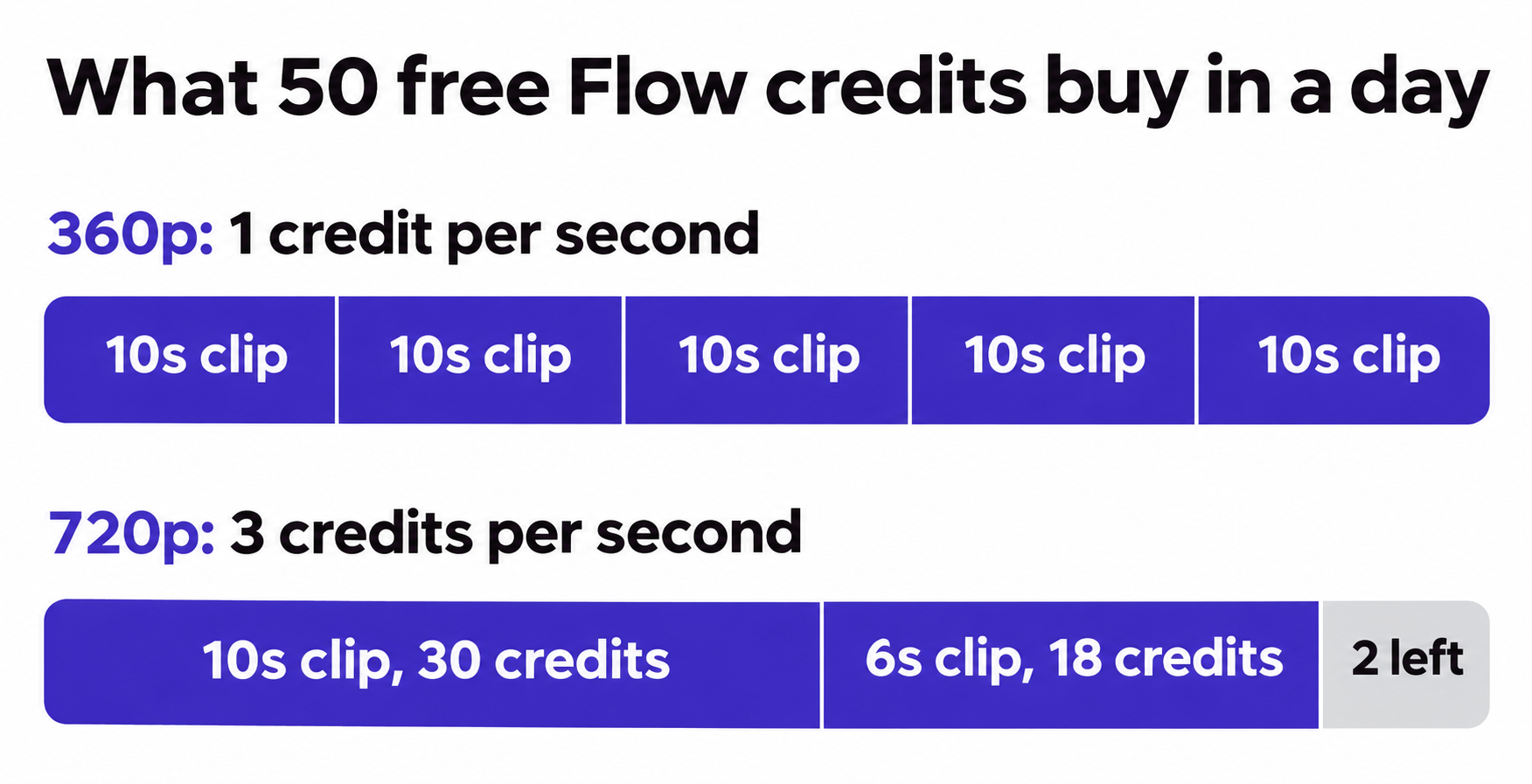
720p costs three times as much as 360p, so credits go fast:
| Clip | Credits | Clips per day |
|---|---|---|
| 5 seconds at 360p | 5 | 10 |
| 10 seconds at 360p | 10 | 5 |
| 5 seconds at 720p | 15 | 3 |
| 10 seconds at 720p | 30 | 1, plus 20 credits left |
Free accounts live with these limits:
- Peak hours. Between roughly 2 PM and 5 PM UTC, you may not be able to generate video without a subscription.
- No rollover. Unused credits disappear. Your first generation of the day starts the cycle, and the next 50 arrive the following day.
- No 15-second clips. Generation from 11 to 15 seconds is for Google AI Plus, Pro and Ultra subscribers.
- No extension. Extending by 3 to 10 seconds is subscriber-only too.
- No upscaling. 1080p and 4K are off, so 720p is your ceiling.
Google names fast sports action, rapid script changes and complex physics as areas it’s still improving. Don’t spend your 50 credits on those shots first, since a failed draft still costs credits to redo.
Flow retires Omni Flash 1.1 on December 5, 2026, so build new work on 1.2.
Use it free in Google Vids
Vids is the only $0 route with 15-second clips. The announcement says you can generate them “at no additional cost” with a Google account or Workspace subscription. Google’s Vids limits page sets the allowance:
| Account | AI video clips per month |
|---|---|
| Personal Google account | 60 seconds |
| Google AI Plus | 60 seconds |
| Workspace Individual | 60 seconds |
| Workspace Business Starter | 200 seconds |
| Workspace Business Standard or Plus | 500 seconds |
| Google AI Pro | 500 seconds |
Sixty seconds is about four 15-second clips, so treat them as finished shots. Draft the prompt in Flow first, then spend Vids seconds on the version you want to keep.
To start, open Vids, sign in and use its AI clip generation. Three details matter:
- Editing may be limited. Google says personal accounts “might have some restrictions on AI video editing.”
- Your work account may be better. A paid Workspace plan can carry 200 or 500 seconds at no extra cost, though your admin controls access.
- Coverage is wide. The features work wherever Google Workspace accounts are available.
Routes that aren’t free
Gemini API. Google’s pricing page lists the free tier as “Not available” for both input and output. The same goes for 1.1. Many other Gemini models have a free tier, so a key that works elsewhere won’t help here.
AI Studio. Google’s billing docs say AI Studio stays free until you link a paid key, but that free use covers only models with a free tier. Omni has a “Try it in Google AI Studio” button, yet no page documents a free allowance, so plan on a paid key.
Gemini app. Google’s plan table shows video generation on AI Plus, Pro and Ultra, not on the no-plan tier. The 15-second videos are rolling out to Ultra subscribers.
Google Cloud credit. New customers get $300 for 90 days with a payment method on file. It’s a credit, not a free tier, and it can’t pay for the Gemini API in AI Studio. Google’s Agent Platform page says the credit applies to generative model queries there, and Agent Platform pricing lists Omni 1.2. If it applies, $300 covers about 288 clips of 15 seconds at 720p.
The cheapest paid fallback
When free runs out, 360p on the API is the cheapest way to script a generation. Google prices video output by token, which works out like this:
| Resolution | Per second | 3 seconds | 10 seconds | 15 seconds |
|---|---|---|---|---|
| 360p | $0.023 | $0.07 | $0.23 | $0.35 |
| 720p | About $0.07 | $0.21 | $0.70 | $1.04 |
| 1080p (upsampled) | $0.104 | $0.31 | $1.04 | $1.56 |
| 4K (upsampled) | $0.209 | $0.63 | $2.09 | $3.13 |
Input tokens ($1.50 per million) come on top. For a fuller cost breakdown of the earlier model, see our Omni 1.1 pricing guide.
The paid tier starts with a $5 prepayment, which covers about 14 clips of 15 seconds at 360p. Prepaid credits are non-refundable and expire after 12 months. At a $0 balance, requests fail with HTTP 402.
Here’s the smallest real request, a 3-second clip at 360p:
curl -X POST "https://generativelanguage.googleapis.com/v1beta/interactions" \
  -H "Content-Type: application/json" \
  -H "x-goog-api-key: $GEMINI_API_KEY" \
  -d '{
    "model": "gemini-omni-1.2-flash",
    "input": "A paper boat drifts down a rainy street gutter.",
    "response_format": {
      "type": "video",
      "resolution": "360p",
      "duration": "3s",
      "delivery": "uri"
    }
  }'
Duration runs from "3s" to "15s", and a missing value defaults to "10s", so always set it. The default resolution is 720p, which triples the bill if you forget. See the Omni docs for polling and download steps.
If you’re already on 1.1, requests route to 1.2 from December 3, 2026 and bill at 1.2 rates. Our Omni 1.1 API guide covers the older setup.
Let your coding agent test against a mock first
On a paid API, every failed attempt costs money: a wrong field, a bad parser, a retry loop gone wild. Let your coding agent build the request in Apidog CLI and test it against a cloud mock, which bills nothing. Then it makes one real call.
npm install -g apidog-cli@latest
apidog auth login --with-token <YOUR_TOKEN>
apidog skill install
Then give Claude Code, Codex or Cursor one prompt:
In Apidog project <id>, create POST /v1beta/interactions for Gemini Omni
1.2 Flash, using the request body in Google's Omni docs. Add a mock
expectation that returns a completed interaction with a video URI. Build
a test scenario that asserts the request sends model, a 360p resolution
and a 3s duration, and that my parser finds the URI. Run it against the
cloud mock until it passes. Stop and show me the result before any call
to the real API.
The agent checks each payload against the schema, then builds and runs the test:
apidog cli-schema get mock-create
apidog cli-schema validate mock-create --file mock.json
apidog endpoint create --project <id> --file endpoint.json
apidog mock create --project <id> --file mock.json
apidog environment create omni-mock --project <id> --base-url <cloudMockUrl>
apidog test-scenario create --project <id> --name "omni-request" --folder-id <folderId> --priority 1
apidog test-scenario import-steps <scenarioId> --project <id> --source endpoint --ids <endpointId>
apidog run -t <scenarioId> --project <id> -e <mockEnvId> -r cli,json
Turn on Cloud Mock in your project settings first, then copy its URL. When the mock passes, run the same scenario once against a second environment that points at Google, with its x-goog-api-key header reading your key:
apidog run -t <scenarioId> --project <id> -e <googleEnvId> \
  --env-var "GEMINI_API_KEY=$GEMINI_API_KEY" --timeout-request 300000 -r cli,json
That real run bills one 3-second 360p clip, about $0.07. A mock proves your request and your parsing, not Google’s response, so the single real call still matters. Our Claude Code setup guide covers the agent side, and Apidog Free covers up to 4 users.
FAQ
Is Gemini Omni 1.2 Flash free? In Google Flow and Google Vids, yes, within limits. On the Gemini API, no: Google lists the free tier as “Not available.”
Can I get a free API key for it? You can create a key, but Omni calls need the paid tier. That means a linked billing account and a $5 minimum prepayment.
How many free videos do I get a day? In Flow, up to five 10-second clips at 360p, or one 10-second clip plus a shorter one at 720p. Video may be unavailable during peak hours.
Can I make a 15-second video for free? Yes, in Google Vids, up to your 60 seconds a month. Flow caps free accounts at 10 seconds.
Do free clips have a watermark? Google says outputs carry an imperceptible SynthID watermark. The announcement doesn’t describe an exception for any route.