
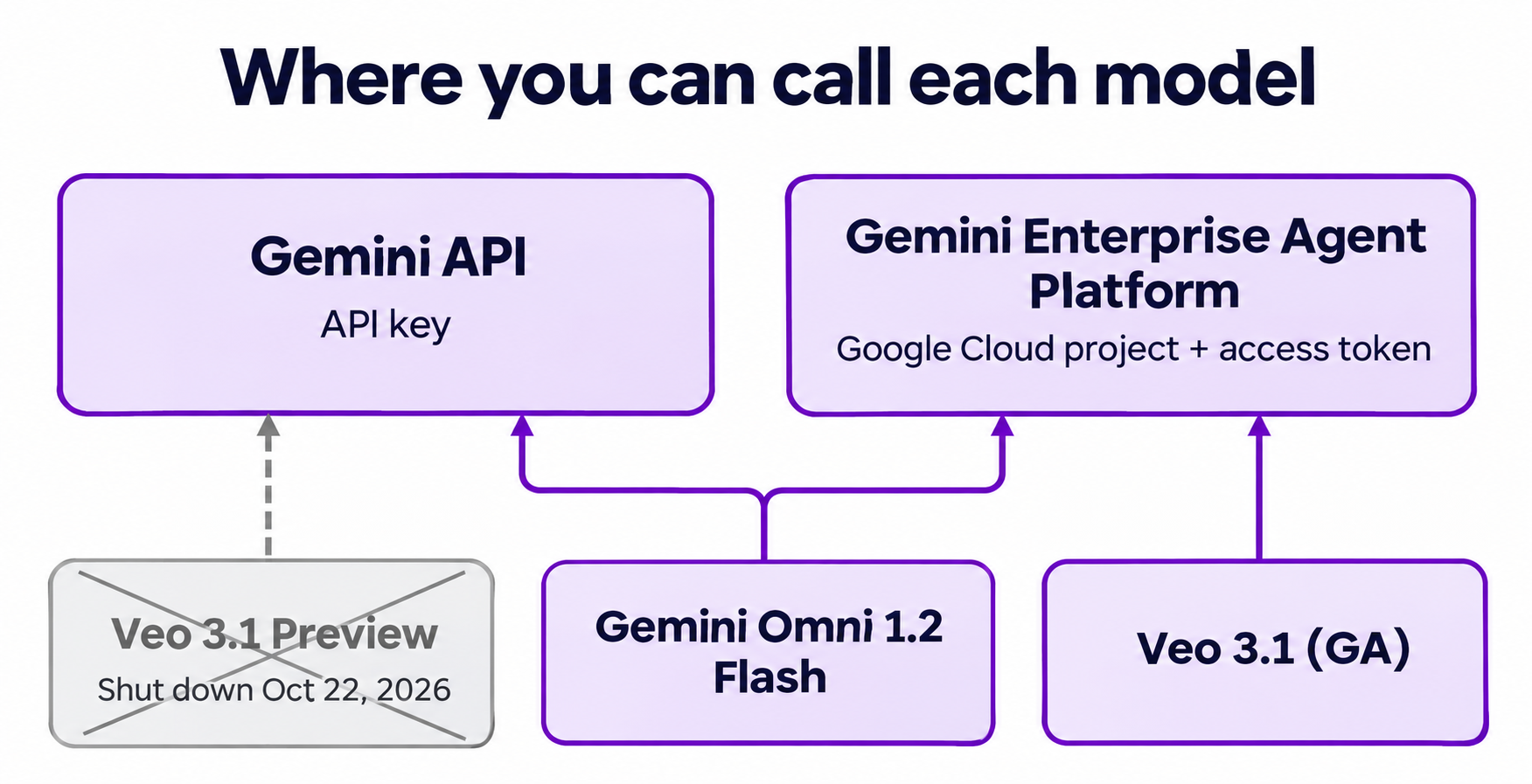
Quick answer: Build on Gemini Omni 1.2 Flash if you want one API key, conversational editing, or clips up to 15 seconds. Pick Veo 3.1 only if you already run on Google Cloud and need its request controls, such as up to four outputs per call. You can no longer call Veo from the Gemini API: its Preview models shut down on October 22, 2026.
That shutdown turns a model comparison into a platform decision. Our Omni 1.1 vs Veo 3.1 comparison covers the older specs. This guide answers a narrower question: which one do you build on now?
Google published no benchmarks for Omni 1.2, so nothing here ranks the two on looks. Specs and prices below come from Google’s docs, read on November 6, 2026.
Gemini Omni 1.2 Flash vs Veo 3.1 at a glance
| Gemini Omni 1.2 Flash | Veo 3.1 | |
|---|---|---|
| Status | Generally available | generate-001 and fast-generate-001 GA, lite-generate-001 Preview |
| Where you call it | Gemini API, Gemini Enterprise Agent Platform | Agent Platform only |
| Auth | API key (Gemini API) | Google Cloud project and access token |
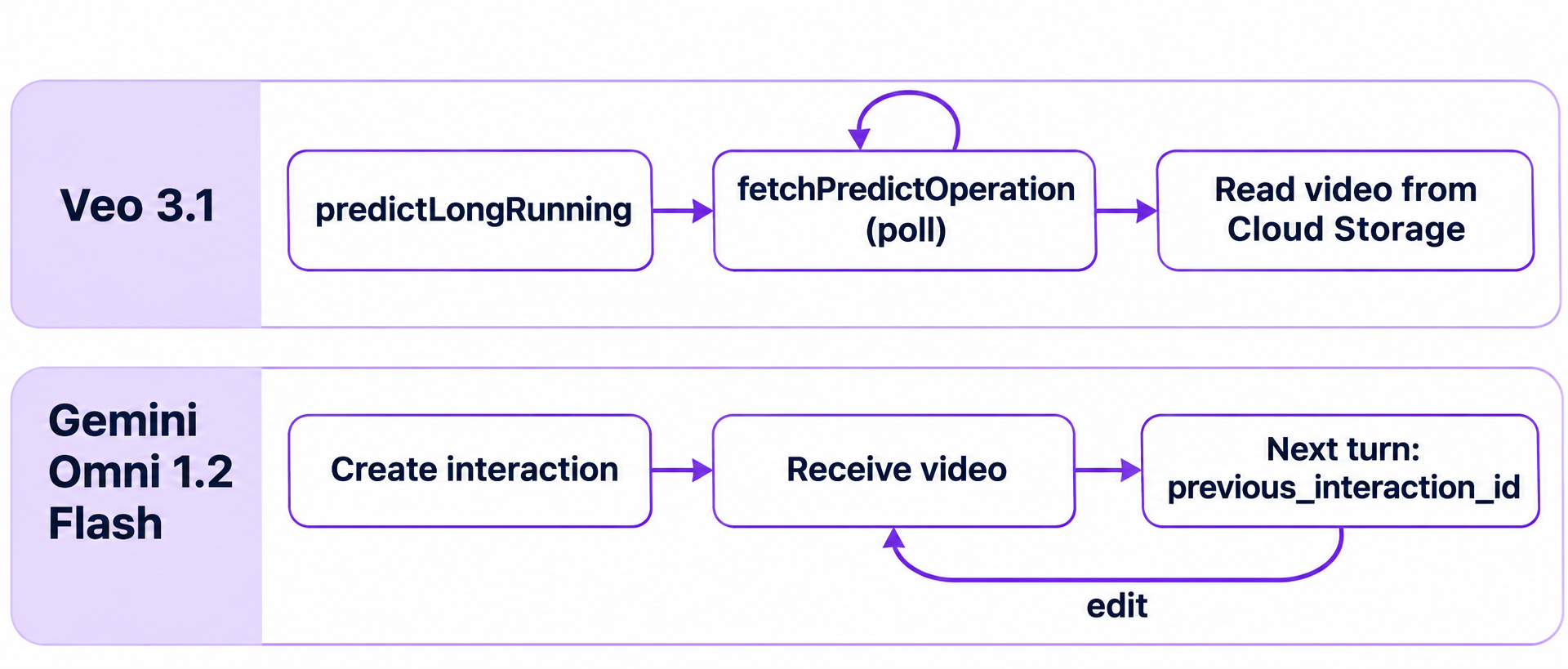
| Request shape | Interactions API | predictLongRunning, polled with fetchPredictOperation |
| Location | global on Agent Platform |
us-central1 |
| Clip length | 3 to 15 seconds, in one-second steps | 4, 6 or 8 seconds |
| Audio | Native | Sound generation supported |
| Resolutions | 360p, 720p, 1080p and 4K (upscaled) | 720p, 1080p, plus 4K on Veo 3.1 |
| Extension | 3 to 10 seconds per turn | 7 seconds per call, 37 seconds total |
| Multi-turn editing | Yes, with previous_interaction_id |
No equivalent in the docs we read |
| Outputs per request | One video per turn in the samples | sampleCount of 1 to 4 |
| Negative prompt | Not supported, write it into the prompt | negativePrompt parameter |
| Earliest retirement | None listed | May 4, 2027 or later (GA models) |
One conflict to plan around: Omni’s maximum extended length depends on the surface. The Gemini API docs say 30 seconds total. The Agent Platform extension docs say up to 40. If your product promises a length, test it on the surface you ship on.
What changed for Veo
The Gemini API video docs now state that the Veo 3.1 Preview in the Gemini API has been shut down. Three model IDs went with it on October 22, 2026:
veo-3.1-generate-previewveo-3.1-fast-generate-previewveo-3.1-lite-generate-preview
Google points you to two exits: Gemini Omni Flash, or the GA Veo models on the Gemini Enterprise Agent Platform (the successor to Vertex AI). We found no Veo newer than 3.1 in Google’s current Veo model page.
So an integration built on an AI Studio key and a Veo preview ID has already stopped working. A new model string won’t fix it, because the GA models live on a different platform with different auth. Older guides, including our own Veo 3.1 API walkthrough, were written for the preview route.
What each API costs per second
Omni bills output tokens. Veo uses a flat rate by resolution. These rates are for video with audio:
| Output | Omni 1.2 Flash | Veo 3.1 (GA) | Veo 3.1 Fast (GA) | Veo 3.1 Lite (Preview) |
|---|---|---|---|---|
| 360p | $0.023 | n/a | n/a | n/a |
| 720p | about $0.07 | $0.40 | $0.10 | $0.05 |
| 1080p | $0.104 | $0.40 | $0.12 | $0.08 |
| 4K | $0.209 | $0.60 | $0.30 | n/a |
Omni’s figures come from Google’s Gemini pricing page, which also lists input at $1.50 per million tokens. Its 1080p and 4K rates include upsampling. Veo’s figures come from the Agent Platform price list. That list shows them per “count” and doesn’t define the unit. They match the per-second rates reported at launch, so we read them as per second. Confirm against your first invoice. The list also prices 4K for Fast, though the model page shows 4K output for Veo 3.1 only.
An 8-second 720p clip costs about $0.56 on Omni, $3.20 on Veo 3.1, $0.80 on Fast and $0.40 on Lite. Lite is the only Veo model under Omni’s price with audio, and it’s still in Preview. Veo also lists video-only rates, such as $0.08 for Fast at 720p. For the token math, see our Omni 1.1 pricing breakdown, then swap in the new $12.00 per million video output rate.
Google lists Omni’s free tier as “Not available” on both 1.2 and 1.1.
Pick Gemini Omni 1.2 Flash if
- You don’t want a Cloud project in the path. An API key and one POST gets you a video.
- Users refine clips. Pass
previous_interaction_idwith a new prompt and each turn produces a new video. Google suggests adding “Keep everything else the same” when you change one element. - You need clips over 8 seconds in one call. Omni goes to 15. Veo stops at 8.
- You want cheap drafts. A 10-second 360p test costs about $0.23.
- You lean on reference images. Omni accepts up to 6, with up to 3 per character for up to 2 characters.
Know the limits first. Google names fast sports action, rapid script changes and complex physics as areas it’s still improving. Audio uploads aren’t supported. Editing or extending uploaded videos isn’t available in the EEA, Switzerland or the UK. Every output carries an imperceptible SynthID watermark.
Pick Veo 3.1 if
- You already run on Google Cloud. Projects, IAM and Cloud Storage are in place, so the extra setup costs you nothing.
- You want several takes per request.
sampleCountreturns up to 4 videos from one call. - You rely on
negativePrompt. Omni has no such field. - You need a dated model commitment. Google lists retirement as May 4, 2027 or later for the GA models, which gives you a date to plan around. Omni 1.1’s short notice is the counterexample: from December 3, 2026, requests to
gemini-omni-1.1-flashroute to 1.2 and bill at 1.2 rates. - You extend uploaded footage in the EEA, Switzerland or UK. Veo’s extension docs list no such limit. Confirm for your region before you build on that.
The trade-off: us-central1 only, a Google Cloud project, and a polling loop. Extension input must be MP4 at 24 fps, 1 to 30 seconds long. The extension page also lists Lite in its model table but leaves it out of the REST section, so treat Lite extension as unconfirmed.
Migrating a Veo integration to the Interactions API
Moving to Omni changes your request, polling and response parsing. Here’s a Veo extension call, following Google’s docs:
POST https://us-central1-aiplatform.googleapis.com/v1/projects/PROJECT_ID/locations/us-central1/publishers/google/models/veo-3.1-generate-001:predictLongRunning

{
  "instances": [{
    "prompt": "The drone keeps climbing above the harbor",
    "video": { "gcsUri": "gs://my-bucket/clip.mp4", "mimeType": "video/mp4" }
  }],
  "parameters": { "storageUri": "gs://my-bucket/out/", "sampleCount": 1 }
}
And the same job on Omni, through the Agent Platform:
POST https://aiplatform.googleapis.com/v1beta1/projects/PROJECT_ID/locations/global/interactions

{
  "model": "gemini-omni-1.2-flash",
  "store": false,
  "input": [
    { "type": "text", "text": "The drone keeps climbing above the harbor" },
    { "type": "video", "uri": "gs://my-bucket/clip.mp4", "mime_type": "video/mp4" }
  ],
  "response_format": [{
    "type": "video",
    "delivery": "uri",
    "gcs_uri": "gs://my-bucket/out/",
    "aspect_ratio": "16:9",
    "duration": "7s"
  }],
  "generation_config": { "video_config": { "task": "extend" } }
}
Map your fields like this:
| Veo | Omni |
|---|---|
instances[0].prompt |
input text item |
instances[0].video.gcsUri |
input video item uri |
parameters.storageUri |
response_format gcs_uri |
parameters.aspectRatio |
response_format aspect_ratio |
parameters.seed |
generation_config.seed |
parameters.negativePrompt |
A “Do not do X” line in the prompt |
parameters.sampleCount |
No field in the docs we read, send separate requests |
fetchPredictOperation |
background: true, then GET the interaction ID |
videos[].gcsUri |
steps entry of type model_output, video item |
Four details to watch:
- Response format shape. The Agent Platform sample wraps
response_formatin an array. The Gemini API docs describe a single object. Copy the shape for the surface you call. - Duration format. Omni wants a string such as
"7s", from"3s"to"15s", and"3s"to"10s"for extensions. - Lost URIs. On the Gemini API,
GET /v1beta/interactions/{id}returns inline base64 even if you asked for URI delivery. The URI is only guaranteed in the creation response or the stream, so save it there. - Editing needs storage. With
store: falseyou can’t edit that video in a later turn.
For a first Interactions call, our Omni 1.1 API guide still fits with the new model ID.
Let your coding agent test both with Apidog CLI
If you might swap providers later, or run both, you want one set of checks that doesn’t care which model answered. Hand that to your coding agent. It defines both endpoints with Apidog CLI, wraps each in a test scenario, and groups them in one test suite with the same assertions.
npm install -g apidog-cli@latest
apidog auth login --with-token <YOUR_TOKEN>
apidog skill install
Then give Claude Code, Codex or Cursor one prompt:
In Apidog project <id>, create endpoints for Gemini Omni 1.2 Flash
(POST /v1beta/interactions) and Veo 3.1 Fast (predictLongRunning plus
fetchPredictOperation). Build one test scenario per provider and put both
in a test suite named video-provider-contract. Poll Veo until done. Assert
the same things on each: the job finishes, the output is video/mp4, and a
video URI or data field is present. Run it and summarize any failures.
The agent reads each schema, validates its payload, then builds and runs the suite:
apidog cli-schema get endpoint-create
apidog cli-schema validate endpoint-create --file omni.json
apidog endpoint create --project <id> --file omni.json
apidog test-scenario create --project <id> --name "omni-contract" --folder-id <folderId> --priority 1
apidog test-scenario import-steps <scenarioId> --project <id> --source endpoint --ids <endpointId> --sync manual
apidog test-suite create --project <id> --name "video-provider-contract"
apidog test-suite update <suiteId> --project <id> --file suite.json
apidog run --test-suite <suiteId> --project <id> -e <envId> \
  --timeout-request 300000 -r cli,junit --out-dir ./reports
A provider swap then shows up as a failed assertion, not a broken player in production. Keep fixtures small, because every run bills real video: a 3-second 360p Omni clip plus a 4-second 720p Fast clip comes to about $0.47. Run that nightly, not on every commit. The same line drops into a pipeline, as our Apidog CLI CI/CD guide shows. Apidog Free covers up to 4 users.
FAQ
Can I still call Veo with a Gemini API key? No. The Veo 3.1 Preview models in the Gemini API shut down on October 22, 2026. The GA models run on the Gemini Enterprise Agent Platform, which uses a Google Cloud project and an access token.
Is there a Veo 4? Not that we could find. Google’s current Veo model page lists 3.1 models only, as of November 6, 2026.
What happens to my Omni 1.1 code? From December 3, 2026, requests to gemini-omni-1.1-flash route to gemini-omni-1.2-flash and bill at 1.2 rates. Your model string keeps working, but test your prompts on 1.2 before that date, since the model behind it changes.
Which one makes better-looking video? Google publishes no benchmarks here, so we won’t name a winner. Run the same prompts through both and judge the clips yourself.