Every Stripe integration starts with the same question: which key goes where? Stripe hands you a publishable key, a secret key, and the option to mint restricted keys, each in a test and a live flavor. Put the wrong one in the wrong place and you either leak the ability to move money or lose an afternoon to a 401. This guide covers what each Stripe API key does, where it lives, how to send a first test-mode request, and how to keep the live key out of anything shared. For the general concept first, start with what an API key is. Everything below follows Stripe’s API keys documentation, checked in September 2026.
Where your Stripe API keys live in the Dashboard
Open the API keys page at dashboard.stripe.com/apikeys. It sits under Developers in the Dashboard and shows the keys for whichever account or sandbox you’re viewing. A toggle switches between sandbox mode and live mode, and the key list changes with it.
The page has two lists:
- Standard keys hold your publishable key and your secret key.
- Restricted keys hold any keys you’ve created with scoped permissions.
Visibility differs by mode. In a sandbox you can reveal every key any time. In live mode, a secret key you create yourself is shown once, at creation. Copy it into your vault before closing the dialog; losing it means rotating it. Only the default keys Stripe generated can be revealed again in live mode.
One thing the page won’t show: webhook signing secrets. Those live under Webhooks, per endpoint, and aren’t API keys at all.
Publishable vs secret keys
The names describe the trust boundary.
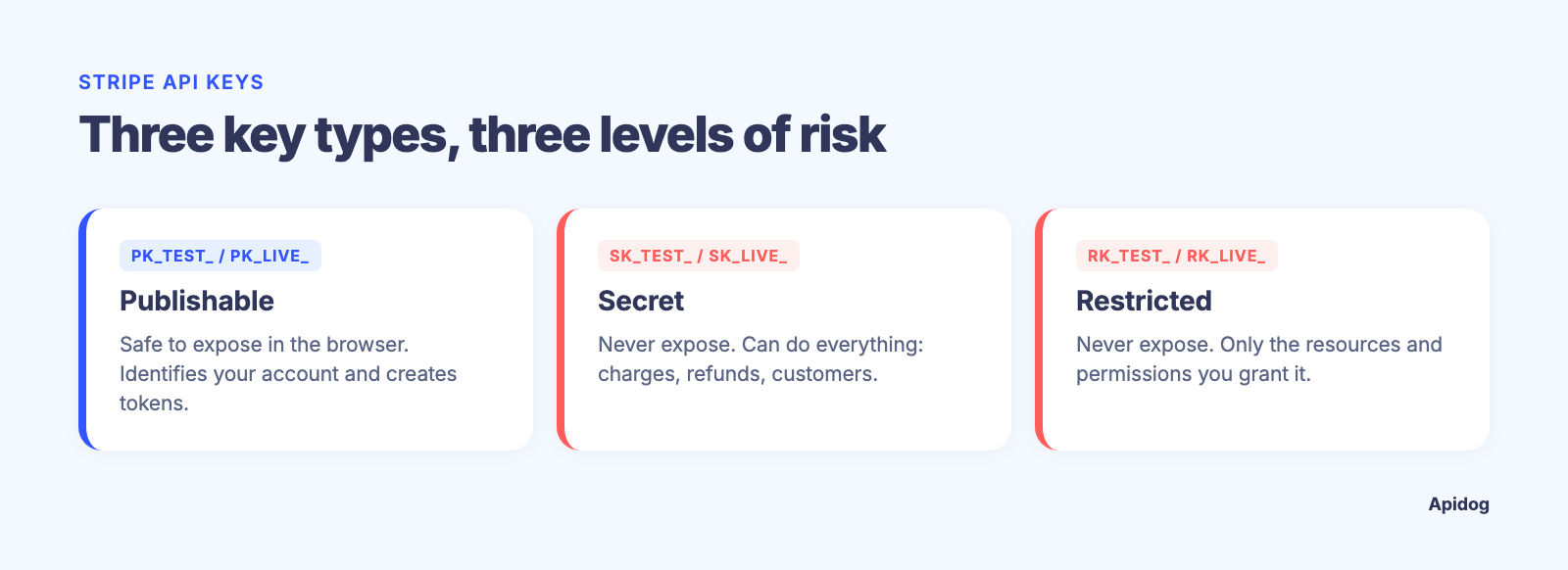
| Key | Prefix | Safe to expose | What it can do |
|---|---|---|---|
| Publishable | pk_test_ / pk_live_ |
Yes | Identify your account, create tokens and PaymentMethods from card details in Stripe.js, Elements, and mobile SDKs |
| Secret | sk_test_ / sk_live_ |
No | Everything: create charges, issue refunds, read customer data, trigger payouts |
| Restricted | rk_test_ / rk_live_ |
No | Only the resources and permissions you grant |
A publishable key belongs in the browser or mobile app. It turns a card number into a token and little else. It can’t create a charge or read account data, so shipping it in front-end code is expected.
A secret key belongs on your server and nowhere else. Stripe’s guidance has shifted: the docs now say they “don’t recommend using secret keys for new use cases” and point to restricted keys instead. The unrestricted secret key still works, but treat it as break-glass, not the default.
Test vs live mode keys
Stripe runs two separate worlds, each with its own key set. Test keys (newer docs call the test side a sandbox, though prefixes still say _test_) return simulated objects: fake customers, fake PaymentIntents, test cards that succeed or decline on command, no real money. Live keys hit card networks and move real funds.
The separation is strict. A customer created with sk_test_ doesn’t exist as far as sk_live_ is concerned, and vice versa. Stripe’s error code for crossing the streams, livemode_mismatch, says it plainly: “Test and live mode API keys, requests, and objects are only available within the corresponding mode.”
Two practical rules follow:
- Build and test entirely against
sk_test_orrk_test_. Stripe recommends a separate general sandbox for new integrations so its settings and data stay isolated. - Switching to live is a configuration change, not a code change. Your server reads the key from an environment variable or vault, and going live means changing that value.
Every API response includes a livemode boolean. Assert on it in your tests; it’s the cheapest guard against a wrong-key deploy.
Restricted keys and least privilege
A restricted API key (Stripe abbreviates it RAK) is a secret key with a permission mask. When you create one, you pick a permission for each resource group: None, Read, or Write. Everything defaults to None. Write includes Read, and the mapping to HTTP is simple: GET needs Read, POST and DELETE need Write.
To create one, click Create restricted key on the API keys page, pick a preconfigured permission set or start from zero, name it, set permissions, and complete the two-factor prompt. As with a self-created secret key in live mode, you see the value once.
The restricted keys guide suggests one key per service: a billing service gets Write on Invoices and Customers, a reporting job gets Read on Charges and Disputes. If one service is compromised, the attacker is boxed into that key’s permissions. A read-only disputes key can’t create a charge or touch a payout.
Give a new key broad permissions in a sandbox, run your test suite, then open the key’s request logs (overflow menu, View request logs) and prune every permission that saw no traffic. Stripe also lets you tag keys meant for autonomous AI agents so they fall under approval rules for payouts and refunds; use that path instead of a plain secret key.
Your first request with curl and Python
Stripe authenticates with HTTP Basic Auth: the key is the username and the password is empty. The trailing colon tells curl not to prompt:
export STRIPE_API_KEY=sk_test_...   # your sandbox secret key

curl https://api.stripe.com/v1/payment_intents \
  -u "$STRIPE_API_KEY:" \
  -d amount=2000 \
  -d currency=usd \
  -d "automatic_payment_methods[enabled]=true"
The response is a PaymentIntent with an id starting pi_, status: "requires_payment_method", and livemode: false. That last field confirms you used a test key.
Stripe also accepts -H "Authorization: Bearer $STRIPE_API_KEY", which is the form Apidog and most HTTP clients use. Both carry the same key; if you’re unsure which style fits your stack, our comparison of API keys and bearer tokens covers the tradeoffs. Requests must go over HTTPS; plain HTTP fails outright, per the authentication reference.
In Python, the current SDK pattern is a StripeClient that reads the key from the environment:
import os
import stripe

client = stripe.StripeClient(os.environ["STRIPE_API_KEY"])

intent = client.v1.payment_intents.create({
    "amount": 2000,
    "currency": "usd",
    "automatic_payment_methods": {"enabled": True},
})
print(intent.id, intent.livemode)  # pi_..., False
No key string appears in the file. The same code runs against test or live depending on what the environment supplies.
Let your coding agent test the Stripe key with Apidog CLI
Curl proves the key works once. Your coding agent can turn it into a repeatable check through Apidog CLI and keep the key out of the shared project. Set it up once (the token is under Account Settings, API Access Token):
npm install -g apidog-cli@latest
apidog login --with-token <YOUR_TOKEN>
npx -y skills add https://apidog.com   # pick your agent when prompted
Then give the agent one prompt:
Use Apidog CLI on project <id>. Create a "Stripe Test" environment with base URL
https://api.stripe.com. Add POST /v1/payment_intents with Bearer auth from
{{stripe_secret_key}} and a form-urlencoded body: amount=2000, currency=usd.
Create a test case asserting status 200, an id starting with pi_ and
livemode false, then run it and summarize any failures.
The commands it runs, checked against Apidog CLI 2.2.7:
apidog environment create "Stripe Test" --project <id> --base-url https://api.stripe.com
apidog cli-schema get endpoint-create
apidog endpoint create --project <id> --file payment-intents.json
apidog cli-schema validate test-case-create --file pi-case.json
apidog test-case create --project <id> --file pi-case.json
apidog run --test-case <caseId> --project <id> -e <envId> \
  --env-var "stripe_secret_key=$STRIPE_API_KEY" -r cli,json
The prompt names form encoding because Stripe’s v1 endpoints don’t take JSON. The livemode assertion is your tripwire: if anyone runs the case with a live key, it fails before a second request goes out. In CI, the same apidog run line reads the key from your pipeline’s secret store; our Apidog CLI CI/CD pipeline guide has a copy-paste version. The request definition is shared; the live credential never is.
Rotating keys and what to do if one leaks
Stripe’s own key-handling guide is blunt: assume anything committed to a repo, pasted in chat, or printed in a log is compromised, even if you’re not sure anyone saw it.
Rotation is built into the Dashboard. From a key’s overflow menu choose Rotate key, set an expiration for the old key, and copy the replacement. Both work during the grace period, up to 7 days, so you can roll out gradually and watch request logs for stragglers. Now revokes the old key immediately.
If a secret or restricted key leaks:
- Rotate it immediately with a short expiration.
- Update every server that used it, confirm traffic in the request logs, then let the old key expire.
- Review recent activity in Workbench for anything your integration wouldn’t do: unrecognized connected accounts, payouts you didn’t initiate, new bank accounts.
- Pause suspicious payouts, reverse any already sent, and refund fraudulent charges fast to head off disputes.
- Rotate your other keys too. If one leaked, assume the channel that leaked it saw more.
Stripe scans for exposed keys and will notify you, sometimes deactivating the key proactively, but detection isn’t guaranteed. Searching your repos and CI config for sk_live_ and rk_live_ is a five-minute audit, and a secret scanner in a pre-commit hook stops the next one landing. Stripe never asks for your secret key, so any message requesting it is phishing.
Common Stripe API key errors
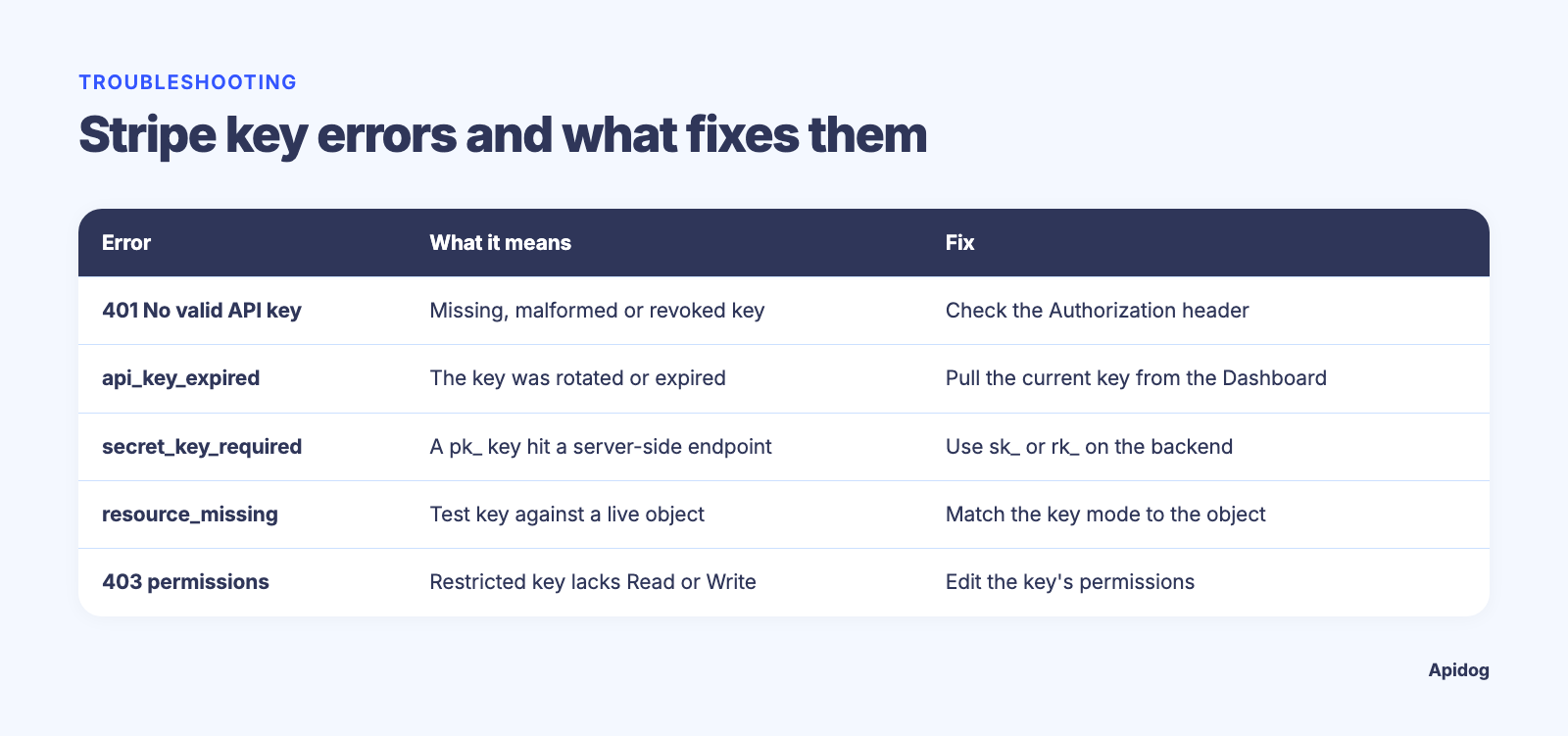
| Symptom | What it means | Fix |
|---|---|---|
401 “No valid API key provided” |
Missing, malformed, or revoked key | Check the header; confirm the key wasn’t rotated |
api_key_expired |
The key was rotated or expired | Pull the current key from the Dashboard |
secret_key_required |
You sent a pk_ key to a server-side endpoint |
Use sk_ or rk_ on the backend |
resource_missing on an id you know exists |
Wrong mode: test key against a live object, or the reverse | Match key mode to object |
403 “doesn’t have permissions to perform the request” |
Restricted key lacks Read or Write on that resource | Edit the key’s permissions; the error body names what’s missing |
livemode_mismatch |
Mixing test and live keys or objects in one request | Keep each environment fully in one mode |
The 401 and 403 cases map to stripe.AuthenticationError and stripe.PermissionError in the Python SDK, per the errors reference, so you can catch them specifically. One less obvious case: a live key that hasn’t created transfers or payouts for 180 days gets limited for those actions, with a Restore access option on the key.
FAQ
Is it safe to put a Stripe publishable key in my frontend code?
Yes. A pk_ key tokenizes card details but can’t create charges, read customers, or move money. Only secret and restricted keys stay server-side.
Can I use a restricted key in test mode?
Yes. Restricted keys exist in both modes (rk_test_ and rk_live_). Stripe recommends tuning the test version first, then creating a live key with matching permissions.
Is the webhook signing secret the same as my API key?
No. Signing secrets are issued per webhook endpoint and only verify an incoming event came from Stripe. They live under Webhooks, not the API keys page. If you’re wiring those up, see how to test Stripe webhooks in CI.
What happens if I use a test key in production?
Requests succeed but no card is charged and no money moves. Since livemode comes back false on every object, an assertion on that field catches the mistake before customers do.
The short version
Publishable keys go in the client, secret and restricted keys stay on the server, test and live never mix, and restricted beats secret whenever you can scope it. Keep the live key in a vault, pass the test key to Apidog CLI at run time, and keep a livemode assertion in every test case your agent writes.