The Claude Files API lets you upload a file once to https://api.anthropic.com/v1/files, get back a file_id, and reference that ID in any Messages request instead of re-sending the content every time. As of August 20, 2026, it’s generally available on the Claude Platform: no beta header, 1 TB of storage per organization, and rate limits five times higher than the beta. Anthropic announced the change in its production agents post, alongside GA for computer use, the browser tool, and the Skills API.
This guide covers the full lifecycle: uploading, referencing files in messages, downloading generated outputs, expiration, the workspace security model, and the limits you’ll hit in production. Since every step here is an HTTP call, your coding agent can turn the whole flow into an Apidog CLI test scenario instead of a pile of one-off curl commands.
What the Files API does
The Files API is a create-once, use-many-times storage layer for the Claude API. It solves a specific cost: if your app asks questions about the same 40-page PDF across hundreds of requests, re-uploading that PDF in every request wastes bandwidth and complicates your client code. With the Files API you:
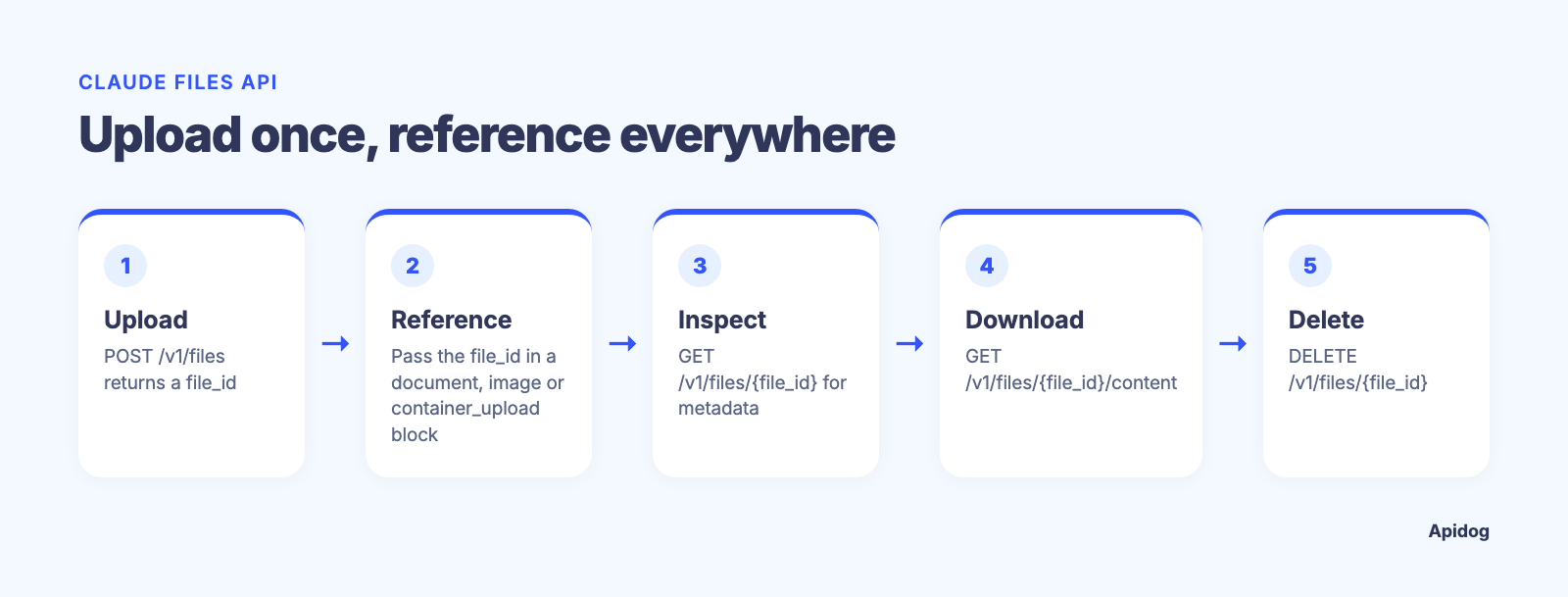
- Upload a file to Anthropic’s storage and receive a unique
file_id - Reference that ID in Messages requests through a content block
- Download files that skills or the code execution tool generate (charts, spreadsheets, decks)
- Manage everything with list, retrieve-metadata, and delete operations
The endpoint surface is small:
| Operation | Endpoint |
|---|---|
| Upload a file | POST /v1/files |
| List files | GET /v1/files |
| Get file metadata | GET /v1/files/{file_id} |
| Download file content | GET /v1/files/{file_id}/content |
| Delete a file | DELETE /v1/files/{file_id} |
All of it works with the standard x-api-key and anthropic-version: 2023-06-01 headers. If you’re new to the Messages API itself, our Claude Opus 5 API guide covers the basics of auth and request shape.
What changed at GA
The Files API spent months in beta behind a header. The August 20, 2026 GA release changed four things that matter for production planning:
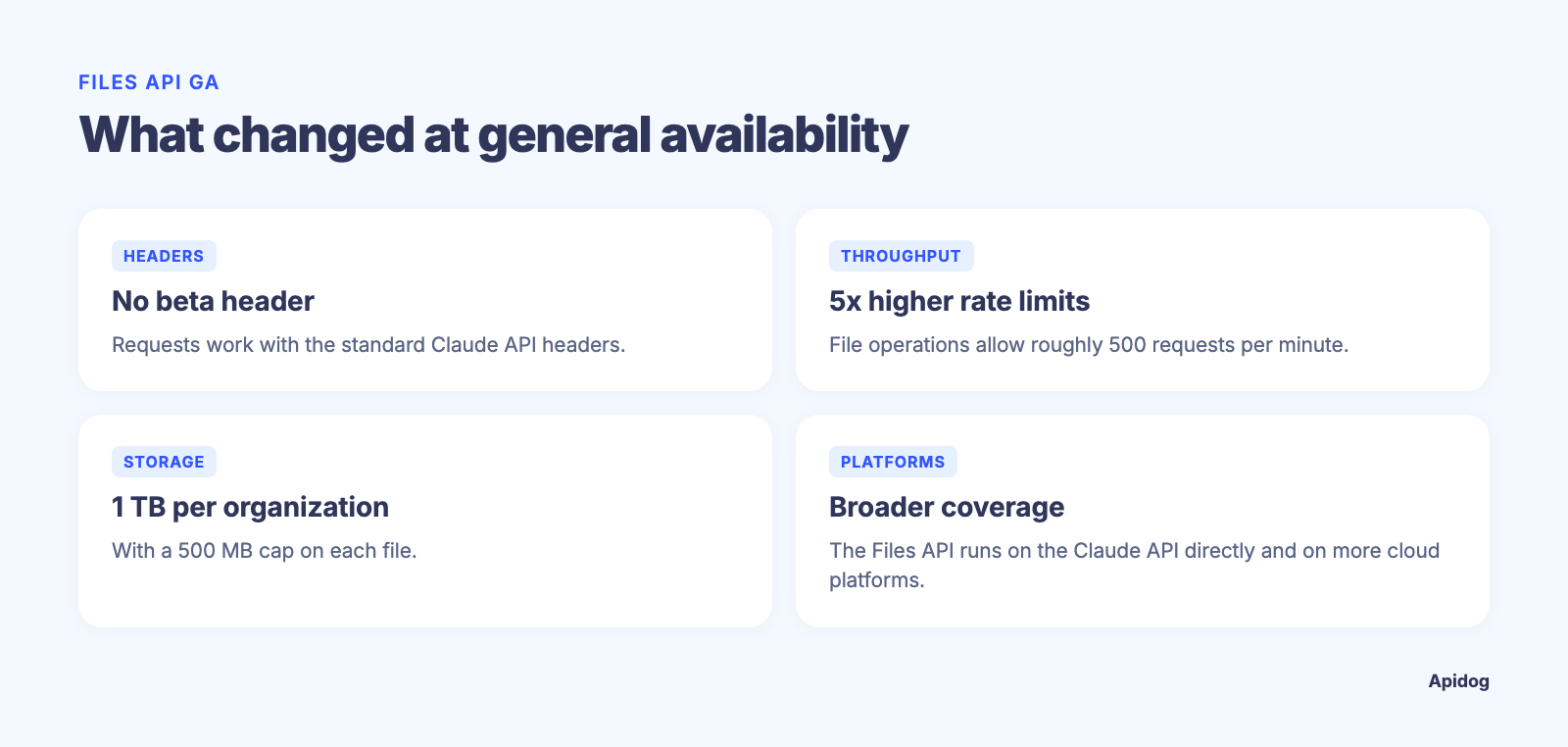
- No beta header. Requests work with standard headers on the Claude API.
- 5x higher rate limits. File operations now allow roughly 500 requests per minute, with higher limits available through sales.
- 1 TB of storage per organization, with a 500 MB cap per file.
- Broader platform coverage. The Files API runs on the Claude API directly, on Claude Platform on AWS in beta, and on Microsoft Foundry when using a Hosted on Anthropic deployment. It is not available on Amazon Bedrock or Google Cloud Vertex AI, and it is not eligible for zero-data-retention agreements. Plan accordingly if you’re on a strict retention policy.
Uploading a file
Uploads are multipart form requests, not JSON:
curl -X POST https://api.anthropic.com/v1/files \
  -H "x-api-key: $ANTHROPIC_API_KEY" \
  -H "anthropic-version: 2023-06-01" \
  -F "file=@/path/to/report.pdf"
The response gives you everything you need to reference the file later:
{
  "id": "file_011CNha8iCJcU1wXNR6q4V8w",
  "type": "file",
  "filename": "report.pdf",
  "mime_type": "application/pdf",
  "size_bytes": 1024000,
  "created_at": "2026-08-24T00:00:00Z",
  "downloadable": false,
  "expires_at": null
}
Two fields deserve attention. downloadable is false for anything you upload; only files Claude generates through skills or code execution can be pulled back down. And expires_at is null unless you set an expiration at upload time (more on that below).
In the Apidog CLI test further down, the upload step saves id as a variable, so every downstream request references {{claude_file_id}} instead of a hardcoded string.
Referencing files in messages
Once uploaded, the file plugs into a Messages request through one of three content block types, depending on the file:
| File type | MIME type | Content block |
|---|---|---|
| PDF, plain text | application/pdf, text/plain |
document |
| Images | image/jpeg, image/png, image/gif, image/webp |
image |
| Datasets and everything else | varies | container_upload (code execution tool) |
A PDF summarization request looks like this:
curl -X POST https://api.anthropic.com/v1/messages \
  -H "x-api-key: $ANTHROPIC_API_KEY" \
  -H "anthropic-version: 2023-06-01" \
  -H "content-type: application/json" \
  -d '{
    "model": "claude-opus-5",
    "max_tokens": 1024,
    "messages": [{
      "role": "user",
      "content": [
        {"type": "text", "text": "Summarize this document."},
        {"type": "document", "source": {"type": "file", "file_id": "file_011CNha8iCJcU1wXNR6q4V8w"}}
      ]
    }]
  }'
The document block also accepts optional title, context, and citations fields, so you can enable citation output against the uploaded file. For images, swap the block type to image with the same source shape. For spreadsheets, CSVs you want analyzed rather than read, or any format the document block doesn’t take, use container_upload to hand the file to the code execution tool.
One format note: .docx and .xlsx aren’t supported by the document block directly. Convert Word files to PDF to keep image parsing and citations, or extract plain text and send it inline.
Downloading generated files
The download endpoint exists for output, not input. When Claude builds a chart with code execution or produces a spreadsheet through a skill, the response includes a file_id inside the bash_code_execution_tool_result block. That ID is downloadable:
curl "https://api.anthropic.com/v1/files/$FILE_ID/content" \
  -H "x-api-key: $ANTHROPIC_API_KEY" \
  -H "anthropic-version: 2023-06-01" \
  --output chart.png
Trying to download a file you uploaded returns a 400. Check the downloadable flag in metadata before wiring retry logic around this; it saves a support ticket. This upload-in, generate-out loop is the backbone of the newly GA’d Skills API workflow, where skills produce Office documents you pull down through this same endpoint. Our guide to Claude Skills covers what skills are and how they execute.
Expiration and file lifecycle
Files persist until you delete them or until an expiration you set at upload:
- Pass
expires_in_secondsas a form field on upload. Valid range: 3,600 (1 hour) to 7,776,000 (90 days). It’s set once and can’t be changed later. - After
expires_atpasses, content downloads return 404 and any Messages request referencing the file fails before inference. - Metadata stays readable for up to 30 days after expiration, and expired files still appear in list responses during that window. Compare
expires_atagainst the current time when filtering. - Deleting a file removes it immediately and can’t be undone. Expired content is released from your storage quota but may be retained briefly for safety review, so expiration is a lifecycle tool, not a guaranteed-deletion control.
The security model: files are workspace-scoped
This is the sharpest edge in the whole API. Uploaded files are accessible to your entire workspace, not scoped to an end user, conversation, or session. Any API key in the same workspace can read any file uploaded there, and all keys share your organization’s Default Workspace unless you assign them elsewhere.
The practical rules:
- Never accept
file_idvalues from end users. A user-supplied ID would let one user of your app read another user’s uploads. Treat file IDs as server-side references and keep the user-to-file mapping in your own database. - Building multi-tenant? One workspace per tenant. The workspace is the isolation boundary. Each organization gets up to 100 workspaces, and Anthropic’s account teams can raise that.
If you’re already tracking per-tenant API keys for cost attribution (a topic we dig into in how to cut your Claude API bill), the same workspace layout gives you file isolation for free.
Limits and billing
The numbers to build against:
| Limit | Value |
|---|---|
| Max file size | 500 MB |
| Org storage | 1 TB |
| File API rate limit | ~500 requests/minute |
| Filename length | 1 to 255 characters |
| Expiration range | 1 hour to 90 days |
Billing is friendly: uploading, downloading, listing, and deleting files are all free. You pay only when file content enters a Messages request, where it’s priced as ordinary input tokens. A 100-page PDF referenced in ten requests costs the same input tokens ten times; the Files API saves you bandwidth and client complexity, not token spend. To save on the token side, pair file references with prompt caching.
Watch for these errors: 413 when a file exceeds 500 MB, 400 when your org hits the 1 TB ceiling, 400 when a file’s type doesn’t match its content block (an image in a document block, for example), and 404 for IDs outside your workspace.
Let Claude Code test the Files API with Apidog CLI
The Files API is a multi-step, stateful flow, so it deserves a regression test, not shell history. Claude Code, or any coding agent, can build and run that test through Apidog CLI. Set it up once:
npm install -g apidog-cli@latest
apidog login --with-token <YOUR_TOKEN>
npx -y skills add https://apidog.com   # pick your agent when prompted
The token comes from Apidog under Account Settings, API Access Token. Then give the agent one prompt:
Use Apidog CLI on project <id>. Add the Files API endpoints (upload, list,
metadata, download, delete) and POST /v1/messages, with x-api-key from
{{ANTHROPIC_API_KEY}} and the anthropic-version header. Build a test scenario:
upload with expires_in_seconds=3600 and assert expires_at is set, save the id
as claude_file_id, reference it in a Messages call and assert 200, delete it,
then assert the metadata call returns 404. Run it and summarize any failures.
The commands it runs, checked against Apidog CLI 2.2.7:
apidog cli-schema get endpoint-create
apidog endpoint create --project <id> --file files-upload.json
apidog test-scenario create --project <id> --name "Files API lifecycle" --priority 1
apidog test-scenario import-steps <scenarioId> --project <id> --source endpoint \
  --ids <uploadId>,<messagesId>,<deleteId>,<metadataId> --sync manual
apidog cli-schema validate test-scenario-update --file lifecycle.json
apidog test-scenario update <scenarioId> --project <id> --file lifecycle.json
apidog run -t <scenarioId> --project <id> -e <envId> \
  --env-var "ANTHROPIC_API_KEY=$ANTHROPIC_API_KEY" -r cli,json
The agent repeats endpoint create for each endpoint, then writes the variable extraction and assertions into the scenario before it runs. Switching test files later means changing one upload step, not every request. Ask for a mock of the upload response too (apidog mock create), and the frontend team gets the JSON shape before your backend proxy exists. The same apidog run line with -r junit drops into CI; our Apidog CLI in Claude Code guide covers the agent setup end to end.
FAQ
Do I still need a beta header? No. Since the August 20, 2026 GA, the Files API works on the Claude API with the standard x-api-key and anthropic-version headers. If your SDK or proxy still pins the old files beta header, remove it when you upgrade.
Can I update a file’s content? No. Files are immutable after upload. Upload a new file, point your references at the new ID, and delete the old one.
Does the Files API work on Bedrock or Vertex AI? No. It’s on the Claude API, Claude Platform on AWS (beta), and Microsoft Foundry with a Hosted on Anthropic deployment. On Bedrock and Vertex you still need inline base64 content.
Is the Files API the same thing the Skills API uses for outputs? Yes. Skills and the code execution tool write their generated documents into the same file store, and you download them through GET /v1/files/{file_id}/content. The Skills API side of that workflow pairs well with automated testing.
Wrapping up
The Files API going GA removes the last excuse for base64-stuffing the same document into every request. Upload once, reference by ID, set an expiration, and keep tenant files in separate workspaces. The API surface is five endpoints, and every one of them is testable in minutes: have your coding agent script the flow with Apidog CLI, chain the file_id through a variable, and check the whole lifecycle into CI before your users find the edge cases for you.