HTTPie earned its 38,000-plus GitHub stars by fixing curl’s ergonomics. Type http PUT pie.dev/put hello=world and you get a readable request, colorized JSON output, and sensible defaults, with none of curl’s flag archaeology. If you’re searching for an HTTPie alternative, the reason is usually not that the CLI got worse. It’s the day a one-off request stopped being enough: you needed the same 40 requests organized and shared with a team, a mock server for the frontend, docs a consumer could visit, or a test suite in CI, and a single-request tool had no answer.
Here’s the direct answer: Apidog is the best HTTPie alternative for developers who have outgrown one-off requests and need a persistent API workflow. It keeps local request execution and adds an OpenAPI-centered workspace with schema-aware mocking, visual test orchestration, published documentation, and real-time team collaboration, with a free plan that covers small teams. And its own CLI keeps the terminal story alive for CI runs. This article covers what HTTPie does well, where the single-request model stops, and what changes when you switch.
What HTTPie gets right
Credit first, because HTTPie’s core ideas are good ones:
- The friendliest HTTP syntax in any terminal.
key=valuefor JSON,key==valuefor query params,key:valuefor headers. Compared to the equivalent curl incantation, an HTTPie command reads like what it does; we mapped the two syntaxes side by side in curl to HTTPie: a translation guide. Sessions, plugins, and built-in auth round out the CLI, all covered in HTTPie’s docs. - Genuinely open source. The CLI on GitHub is free, actively used, and installable everywhere Python runs. The latest release on PyPI is 3.2.4.
- A growing app family. HTTPie now ships HTTPie for Web and Desktop, graphical clients that share a release line (2025.2.0 added export/import and path parameters, per the HTTPie changelog). There is no public pricing page today; everything HTTPie offers is free to use.
The gaps in HTTPie are not bugs. They’re the natural boundary of a tool built to send one request beautifully, and whether that boundary matters depends on what your API work looks like next week.
Where the one-off request model runs out
Requests are ephemeral by default
The HTTPie CLI executes a command and exits. Sessions can persist headers and cookies between calls, but there is no collection, no folder structure, and no shared library of your API’s endpoints. The knowledge of how to call your API lives in shell history and README snippets. The web and desktop apps add saved requests and spaces, which helps, but the request is still the atom. There is no API spec underneath it, so nothing else can be derived from it.
No test suites, no CI story
You can chain HTTPie commands in a shell script and grep the output, and plenty of teams do exactly that. What you can’t do is build an ordered scenario (create user, extract the ID, update, assert, delete) with assertions that aren’t hand-rolled, run it on a schedule, or get a report a teammate can read. HTTPie has no test runner. When the smoke-test script breaks at 2 a.m., the output is whatever your set -e left behind.
No mock server
When the frontend needs endpoints that don’t exist yet, HTTPie has nothing to offer; it’s a client, not a server. The workaround is standing up JSON Server or WireMock beside it, each with config of its own to maintain. That’s the same toolchain-sprawl trap we documented across the CLI landscape in the top terminal API testing tools: every missing feature becomes another tool.
No docs, no team surface
HTTPie produces no documentation. There’s no hosted reference for your API, no “try it” console for a consumer, and no real-time shared workspace where a teammate’s change shows up as they make it. HTTPie for Web is multiplayer in the sense that a browser is, but there is no schema-first source of truth for a team to collaborate on. An AI assistant was announced on the HTTPie blog, but it isn’t part of the current product pages. [VERIFY: whether HTTPie AI is generally available or still waitlisted]
The answer: Apidog
Apidog is an API development platform used by over 500,000 developers. It covers design, debugging, testing, mocking, and documentation in one workspace, with the OpenAPI spec as the single source of truth.
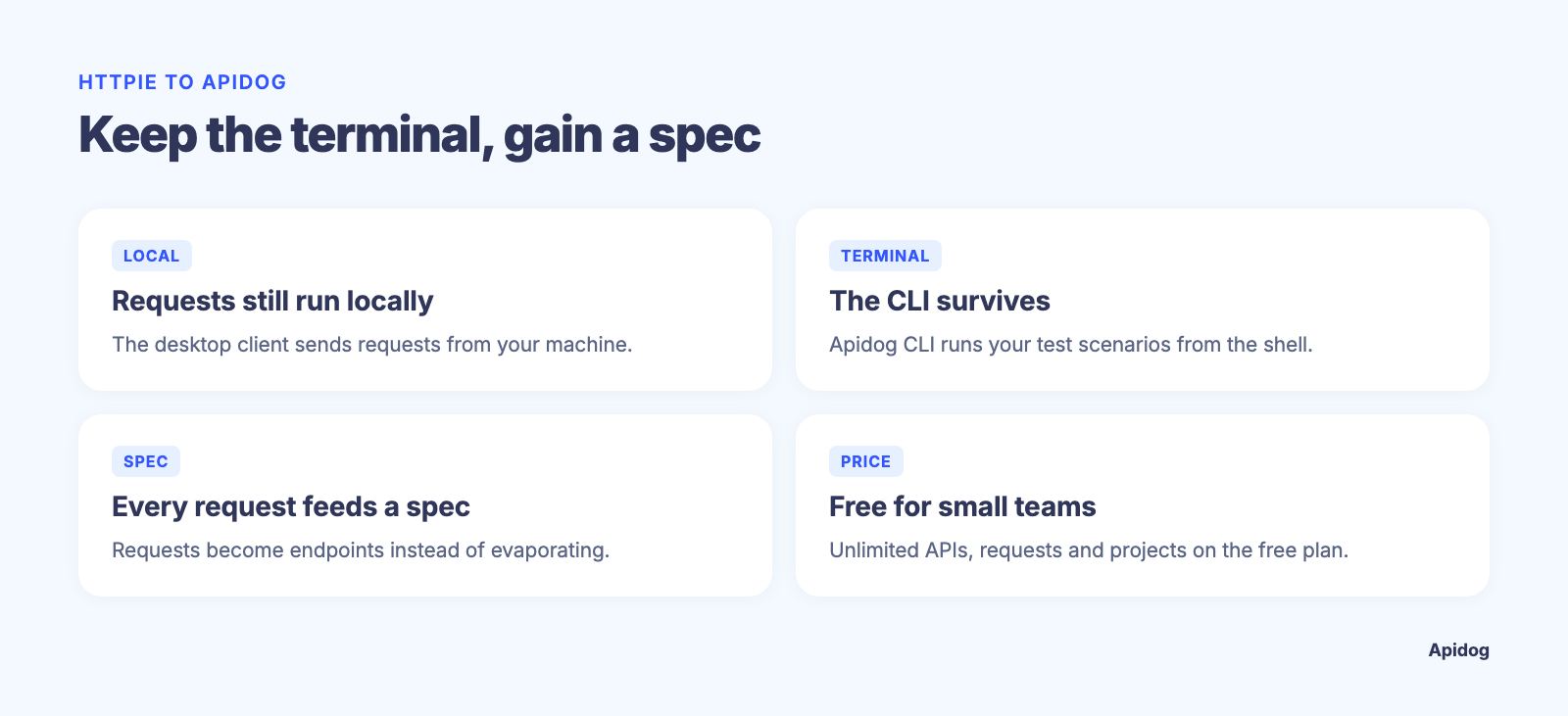
For someone leaving HTTPie specifically, four points matter most:
- Requests still execute locally. The Apidog desktop client sends requests from your machine, so localhost services and APIs behind a VPN work exactly as they did from your terminal. You don’t trade local execution for platform features.
- The terminal story survives. The Apidog CLI runs test scenarios built in the platform from any shell or CI runner and outputs an HTML report per run. You lose the one-liner aesthetic for ad-hoc pokes; you gain repeatable suites.
- Every request feeds a spec. Instead of evaporating after execution, requests live under endpoint definitions. Mocks, docs, and tests derive from the same schema automatically.
- The free plan covers small teams, with unlimited APIs, requests, projects, and test runs. Paid tiers price per user.
What you gain when you switch
A persistent home for your API
In Apidog you define endpoints once, with parameters, auth, and response schemas. Debugging a request updates the definition; the definition powers everything downstream. The shell-history problem disappears because the API’s shape is stored, versioned, and visible to the whole team in a real-time workspace.
A mock server that reads your schema
Apidog’s smart mock engine generates realistic responses straight from the response schema with zero configuration. A field named email returns an email address; a field named created_at returns a timestamp. Point the frontend at the mock URL and UI work starts before the backend exists. Self-hosted mock deployment is available when data can’t leave your network.
Tests with orchestration, schedules, and reports
The visual test builder chains endpoints into scenarios, passes values between steps, and adds assertions without glue code. Scenarios run on a schedule, produce shareable online reports, and execute inside CI through the Apidog CLI:
npm install -g apidog-cli
apidog run scenario --scenario-id 12345 --env staging
That replaces the shell-script-and-grep pipeline with something a teammate can read the morning after a failed run. Test runs are unlimited on every plan, including free.
Responses checked against the spec automatically
An HTTPie workflow asserts on whatever your script checks. Apidog additionally validates every response against the endpoint’s schema: status codes, required fields, data types, enums, and unexpected properties, with no custom code. When the backend drifts from the contract, you find out on the next request, not in a bug report.
Documentation someone can actually visit
Apidog publishes interactive API docs from the same spec you test against: custom domain, versioning, Markdown pages, and a built-in “try it” console. When the spec changes, the docs change. No more pasting HTTPie commands into a wiki that goes stale.
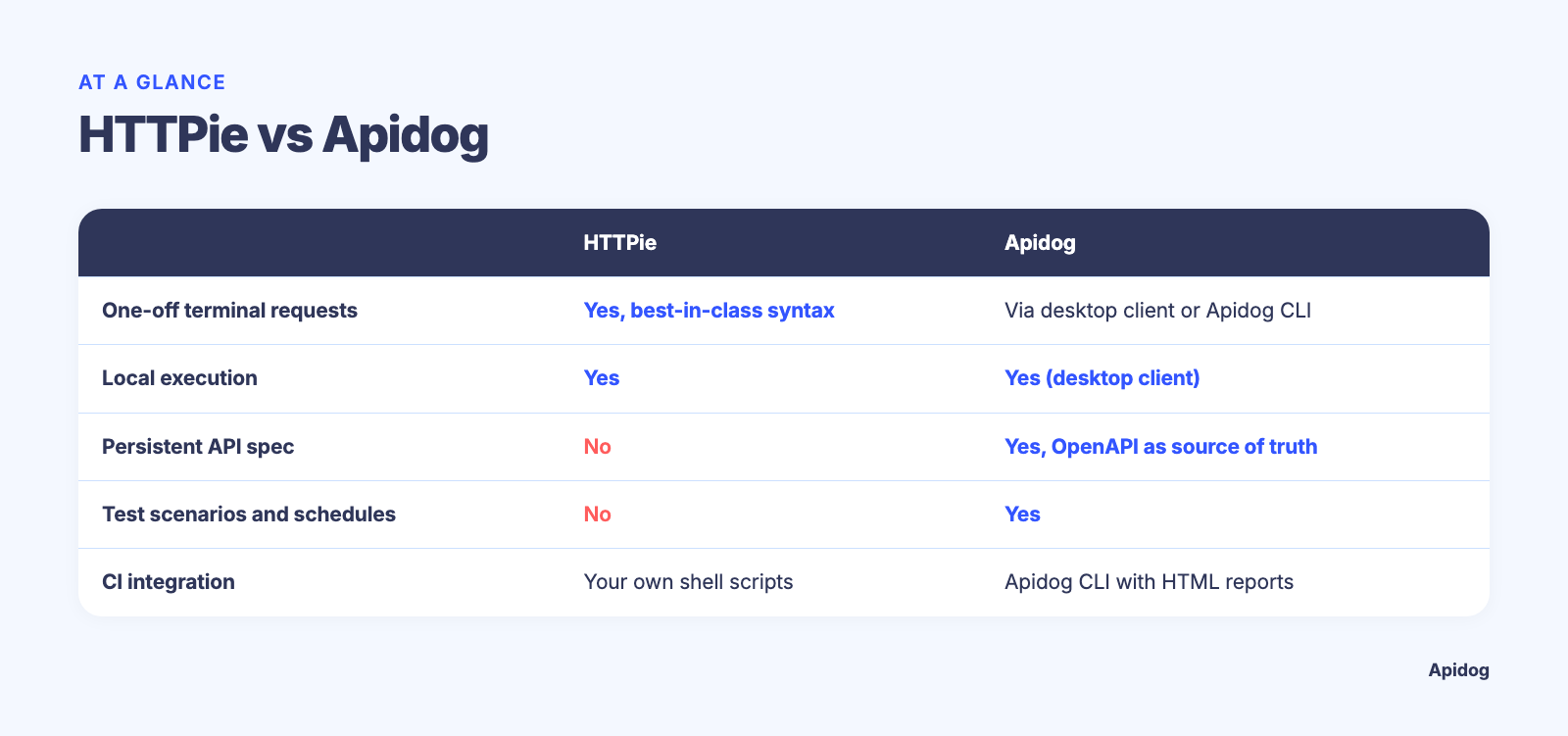
HTTPie vs Apidog at a glance
| HTTPie | Apidog | |
|---|---|---|
| Price | Free (open-source CLI; web and desktop apps free, no public paid tiers) | Free plan covers small teams; paid tiers price per user |
| One-off requests from the terminal | Yes, best-in-class syntax | Via the desktop client or Apidog CLI (scenario runs, not ad-hoc one-liners) |
| Local request execution | Yes | Yes (desktop client) |
| Persistent endpoint definitions / API spec | No (saved requests only, in web/desktop) | Yes, OpenAPI as source of truth |
| Test scenarios, schedules, online reports | No | Yes |
| CI integration | Shell scripts you write yourself | Apidog CLI with HTML reports |
| Built-in mock server | No | Yes, schema-aware, self-hostable |
| Hosted docs with custom domain | No | Yes |
| Real-time team workspaces | No | Yes |
| Response validation against a schema | No | Yes, automatic |
Two honest notes on this table. HTTPie’s price row is unbeatable: there is no cheaper option than free and open source, and no seat math to do at all. And for the single job of firing a readable request from a terminal, HTTPie remains the nicer tool; Apidog’s CLI is built for running saved test scenarios in CI, not for replacing http GET as your daily one-liner. The switch is about everything that happens after the request returns.
Migrating from HTTPie
There’s no HTTPie-collection importer because classic HTTPie has no collection format to import. The practical paths:
- Start from the contract if you have one. Import your OpenAPI or Swagger file and Apidog builds the full endpoint tree, schemas included. This is the fastest route and the one that unlocks mocking and docs immediately.
- Import your curl history if you don’t. Apidog imports curl commands directly, and every HTTPie user can produce curl equivalents of their go-to requests (the mapping is mechanical, as our curl to HTTPie guide shows in reverse). Paste them in, and Apidog turns them into endpoint definitions you can then annotate with schemas.
- Rebuild the smoke-test script as a scenario. Chain the requests in the visual builder, add assertions, and wire the Apidog CLI into the same CI job that ran your shell script.
Most of the mechanical work fits in an afternoon. The bigger change is that a request stops being a throwaway command and starts being part of a spec that mocks, docs, and tests stay synced to.
When HTTPie still makes sense
If your API work is genuinely one-off (poking a third-party endpoint, debugging a webhook, teaching HTTP to a junior), HTTPie is the best tool for the job and switching would be overhead. If you live in the terminal and your whole requirement is beautiful request syntax, keep it; our how to use HTTPie guide exists because we think it’s worth knowing. And nothing about adopting Apidog requires uninstalling HTTPie: plenty of developers keep it for quick pokes while the team’s persistent API workflow lives in Apidog. The switch pays off at the moment you need organized endpoints, mocking, published docs, scheduled tests, or a team workspace; those are the features a one-shot HTTP client was never designed to have.
Frequently asked questions
Is Apidog free like HTTPie?
HTTPie’s CLI is open source and free forever, and its web and desktop apps currently list no paid tiers. Apidog’s free plan covers small teams with unlimited APIs, requests, and test runs; paid tiers price per user. For a solo developer, both are $0. The difference is what $0 includes: request ergonomics on the HTTPie side, mocking, docs, and test orchestration on the Apidog side.
Can Apidog import my HTTPie requests?
Not directly, because classic HTTPie stores no collection to export. Apidog imports OpenAPI/Swagger files and raw curl commands, so the route is to convert your saved HTTPie one-liners to curl form and paste them in. If you mostly send JSON bodies, the patterns in HTTPie POST JSON examples all have direct curl equivalents.
Does Apidog have a CLI like HTTPie?
Yes, with a different job. The Apidog CLI runs test scenarios defined in the platform, from your shell or CI, and generates an HTML report per run. It’s an automation surface rather than an ad-hoc request tool, so it complements HTTPie’s one-liners instead of imitating them.
Does HTTPie have a test runner or mock server?
No. HTTPie sends requests; assertions, scheduling, reports, and mocking are outside its scope, which is why teams end up bolting shell scripts and a separate mock tool onto it. Those four jobs are built into Apidog.
What about HTTPie for Web and Desktop?
They’re free graphical clients that add saved requests, spaces, and recent features like export/import (version 2025.2.0). They make HTTPie multiplayer-ish, but there’s still no API spec underneath, so no schema-aware mocking, no generated docs, and no automated test suites.
Try it with your ten most-used requests
The fastest way to evaluate the trade is to recreate the requests you run every week. Download Apidog, import your spec or paste the curl versions of your HTTPie one-liners, and turn on the mock server. If having those requests organized, validated against a schema, and runnable as a scheduled suite saves you more time than the terminal one-liner was saving, the decision makes itself.