To run Qwen 3.8 27B locally, install Ollama and run ollama pull qwen3.8:27b, then ollama run qwen3.8:27b. The default build is an 18 GB 4-bit download, so you want a GPU with 24 GB of VRAM or a Mac with 32 GB of unified memory. The weights are Apache-2.0, so the model itself costs nothing. Your only cost is hardware and electricity.
That’s the short version. The rest of this guide covers the four runners worth using (Ollama, LM Studio, llama.cpp and MLX), how much memory each quant needs, what speed to expect on real hardware, and how to have your coding agent test the local endpoint with Apidog CLI once it’s up.
New to the family? What Qwen 3.8 is covers the 2.4T-parameter Max flagship. This guide is about its small, dense sibling that fits on your desk.
What is Qwen 3.8 27B?
Qwen 3.8 27B is a dense 27-billion-parameter vision-language model from Alibaba’s Qwen team, released in August 2026 under Apache-2.0. It reads text, images and video, thinks before answering by default, and has a native 262,144-token context window that stretches to 1 million tokens with YaRN scaling.
The official model card lists these specs:
| Spec | Qwen 3.8 27B |
|---|---|
| Parameters | 27B dense (the Hub lists 28B including the vision encoder) |
| Layers | 64, a hybrid of Gated DeltaNet and Gated Attention blocks |
| Context | 262,144 native, up to 1,000,000 with YaRN |
| Inputs | Text, image, video |
| Thinking | On by default, reasoning_effort of xhigh, medium or low |
| Extras | Multi-token prediction (MTP) layers |
| License | Apache-2.0 |
On Qwen’s own benchmark table it scores 61.7 on SWE-bench Pro, 73.0 on Terminal Bench 2.1 and 89.2 on GPQA Diamond. Those are vendor numbers. Our Qwen 3.8 benchmarks breakdown explains how to read that table, including which rows Qwen built in-house.
Why it matters locally: a 27B dense model at 4-bit fits on one consumer GPU, with tool calling, vision and thinking in the same file.
How much RAM and VRAM do you need for Qwen 3.8 27B?
Plan for the file size of your quant plus 3 to 6 GB for the KV cache and runtime. For the default Q4_K_M, that means 24 GB of VRAM on a GPU or a 32 GB Mac.
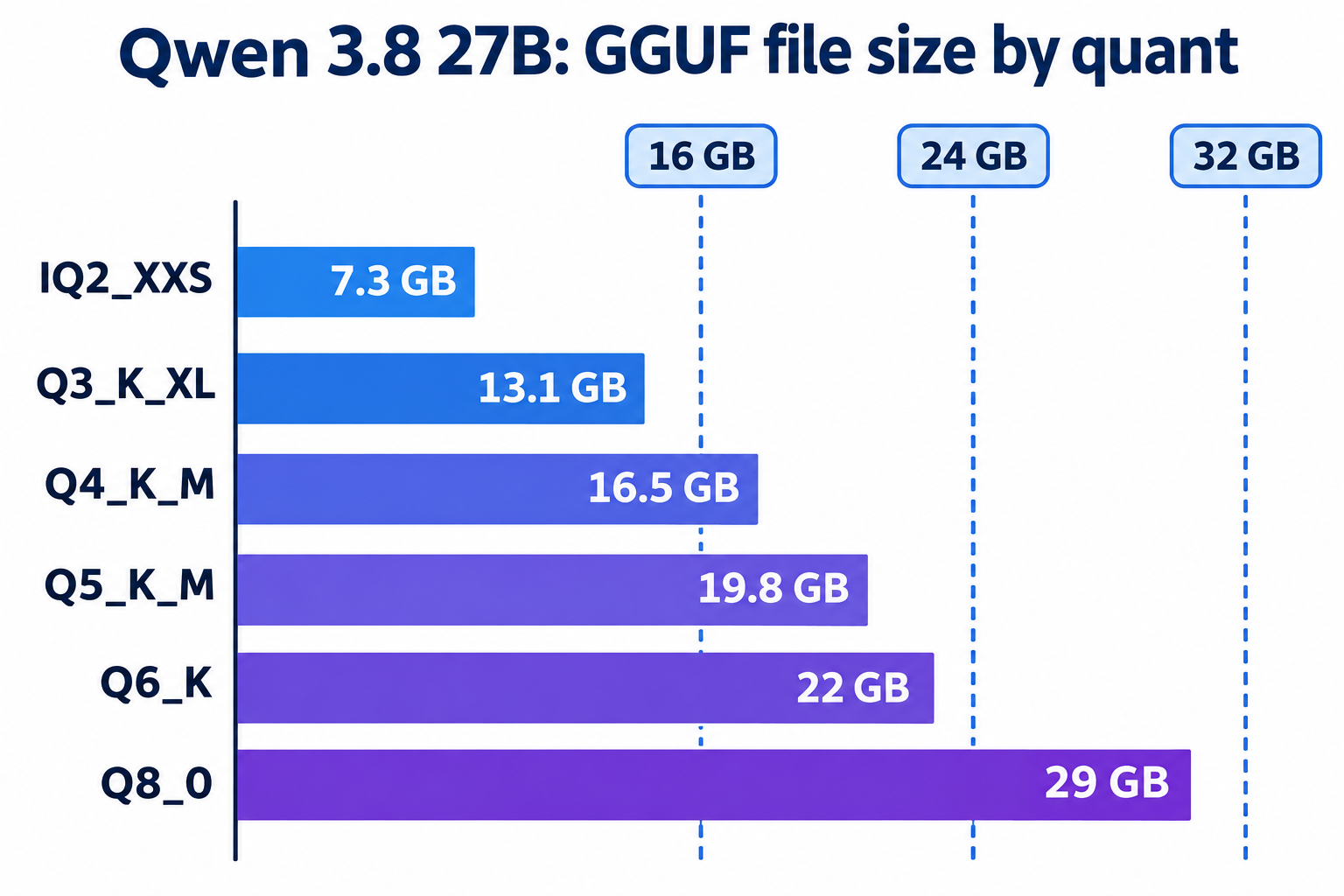
Here are the GGUF file sizes from unsloth’s quant repo, checked November 9, 2026:
| Quant | File size | Realistic hardware |
|---|---|---|
| UD-IQ2_XXS | 7.27 GB | 16 GB Mac or 12 GB GPU, noticeable quality loss |
| UD-Q3_K_XL | 13.1 GB | 16 GB GPU, 24 GB Mac |
| UD-Q4_K_M | 16.5 GB | 24 GB GPU, 32 GB Mac (the sweet spot) |
| UD-Q5_K_M | 19.8 GB | 24 GB GPU with short context, 32 GB Mac |
| UD-Q6_K | 22 GB | 32 GB GPU, 48 GB Mac |
| Q8_0 | 29 GB | 48 GB GPU, 64 GB Mac |
The vision projector (mmproj-F16.gguf) adds 928 MB if you want image input. Ollama’s default qwen3.8:27b tag is 18 GB because it bundles vision.
Context length is the hidden cost. llm-speed’s planning calculation puts Q4_K_M at about 21.9 GB with a 32,000-token context. That’s why 24 GB cards are the practical floor for Q4, and why you shouldn’t load the full 262K window unless you have memory to burn.
On Macs, remember macOS keeps part of unified memory for the system. A 24 GB Mac can technically load Q4_K_M, but you’ll have little room left for context or your browser. We’d pick Q3_K_XL there.
How fast does Qwen 3.8 27B run locally?
Expect about 38 to 44 tokens per second on an RTX 3090 or 4090 at Q4_K_M with llama.cpp, and 65 to 75 on an RTX 5090. A Mac Studio with M3 Ultra decodes around 25 to 27 tokens per second.
We didn’t benchmark this ourselves. These are measured runs published by llm-speed, with the hardware and runtime they stated:
| Hardware | Quant / runtime | Decode tok/s | Prefill tok/s |
|---|---|---|---|
| RTX 3090 24 GB | Q4_K_M, llama.cpp | 38.6 (short chat, 4K ctx) | 482 |
| RTX 4090 24 GB | Q4_K_M, llama.cpp | 43.4 (short chat, 4K ctx) | 448 |
| RTX 5090 32 GB | Q4_K_M, llama.cpp | 75.2 (short chat, 4K ctx) | 563 |
| L40S 45 GB | Q4_K_M, llama.cpp | 34.3 (short chat) | 569 |
| M3 Ultra 96 GB | Q4_K_M, llama.cpp | 25.2 (short chat) | 45 |
| M3 Ultra 96 GB | 4-bit, MLX 0.31.3 | 27.3 (short chat) | 12 |
Decode speed barely drops with context on GPUs: the 4090 still did 39.0 tok/s after a 33,133-token prompt. Prefill is where Macs fall behind. On an 11,827-token prompt the M3 Ultra processed about 283 tok/s, against roughly 2,000 to 3,000 on the 4090, so a large codebase means tens of seconds before the first token.
Thinking also eats your time budget. When Simon Willison asked a local Qwen 3.8 27B to identify games from raw model weights, one answer took 46 minutes and 43,506 reasoning tokens. For everyday tasks, drop reasoning_effort to low or turn thinking off.
Run Qwen 3.8 27B with Ollama
Ollama is the fastest path on any OS. Install it from ollama.com, then:
ollama pull qwen3.8:27b
ollama run qwen3.8:27b
On Apple Silicon, try the qwen3.8:27b-mlx tag, which uses the MLX backend at the same 18 GB.
Ollama’s default context is small, which breaks long agent sessions. Raise it before starting the server:
OLLAMA_CONTEXT_LENGTH=32768 ollama serve
Ollama also exposes an OpenAI-compatible API at http://localhost:11434/v1, so any OpenAI SDK works by changing the base URL:
curl http://localhost:11434/v1/chat/completions \
  -H "Content-Type: application/json" \
  -d '{"model": "qwen3.8:27b",
       "messages": [{"role": "user", "content": "Write a Python function that validates an email address."}]}'
Want it inside a coding agent? Ollama ships launch shortcuts: ollama launch claude --model qwen3.8 starts Claude Code against the local model, and ollama launch opencode --model qwen3.8 does the same for OpenCode.
Run it with LM Studio
LM Studio is the pick if you want a GUI and per-model load settings. Search for Qwen 3.8 27B, download the lmstudio-community/Qwen3.8-27B-GGUF build at Q4_K_M (16.8 GB), and load it.
One setting matters: raise the context length when you load the model. Simon Willison found the default 8,192-token context failed with errors on his long prompt and had to load a larger window.
Then open the Developer tab and start the local server, or run lms server start from a terminal. The OpenAI-compatible endpoint lives at http://localhost:1234/v1.
Run it with llama.cpp
llama.cpp gives you the most control and powers most of the benchmark runs above. On macOS or Linux:
brew install llama.cpp

llama-server -hf unsloth/Qwen3.8-27B-GGUF:UD-Q4_K_M \
  --jinja -c 32768 -ngl 99 \
  --temp 1.0 --top-p 0.95 --top-k 20 \
  --port 8080
-hf downloads the quant straight from Hugging Face, --jinja applies the model’s chat template (needed for tool calls and thinking), -c sets context and -ngl 99 puts every layer on the GPU. The sampling values are Qwen’s recommendations for thinking mode. For non-thinking mode, the model card suggests temperature 0.7, top_p 0.8, top_k 20 and presence_penalty 1.5.
To turn thinking off for one request, send "chat_template_kwargs": {"enable_thinking": false} in the body.
Run it with MLX on a Mac
MLX is Apple’s own array framework and is usually the quickest runtime on Apple Silicon for decode. Install mlx-lm and use the mlx-community 4-bit conversion:
pip install mlx-lm

mlx_lm.generate --model mlx-community/Qwen3.8-27B-4bit \
  --prompt "Explain the difference between a mutex and a semaphore." \
  --max-tokens 1024

mlx_lm.server --model mlx-community/Qwen3.8-27B-4bit --port 8080
mlx_lm.server exposes an OpenAI-compatible /v1/chat/completions route. The mlx-community org also publishes 8-bit, mxfp4 and MTP variants if you want to trade memory for quality or speed.
Let your coding agent test the local endpoint with Apidog CLI
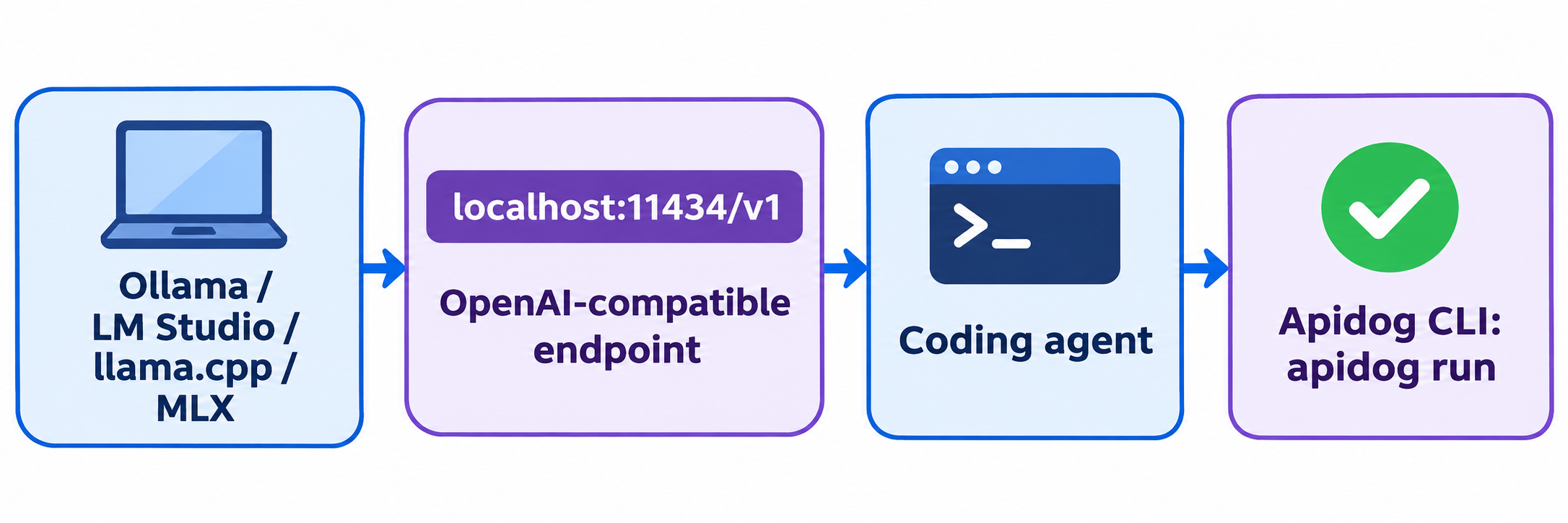
Every runner serves the same OpenAI-compatible shape, but each handles thinking blocks, tool calls and timeouts differently. Before you point an app at localhost, have your coding agent build a repeatable test with Apidog CLI, so a broken template or context cap shows up in seconds, not mid-task.
Set it up once:
npm install -g apidog-cli@latest
apidog login --with-token <YOUR_TOKEN>
npx -y skills add https://apidog.com   # pick your agent when prompted
Then give Claude Code, Codex or Cursor one prompt:
In Apidog project <projectId>, create an environment "qwen-local" with base URL
http://localhost:11434/v1. Add a POST /chat/completions endpoint for model
qwen3.8:27b, then a test case that asserts status 200, a non-empty
choices[0].message.content, usage.completion_tokens > 0, and a second request
with a tools array that returns a tool_calls entry. Run it and summarize failures.
The agent reads each payload schema, validates its JSON, creates the resources and runs the case:
apidog environment create qwen-local --project <projectId> --base-url http://localhost:11434/v1
apidog cli-schema get endpoint-create
apidog cli-schema validate endpoint-create --file endpoint.json
apidog endpoint create --project <projectId> --file endpoint.json
apidog cli-schema get test-case-create
apidog test-case create --project <projectId> --file case.json
apidog run --test-case <caseId> --project <projectId> -e <envId> -r cli,json --timeout-request 300000
The long --timeout-request matters here: a 27B model in thinking mode can take minutes on a Mac. Switch the base URL to http://localhost:1234/v1 or :8080/v1 and the same case checks LM Studio, llama.cpp or MLX. For more agent setups, see Apidog CLI in Claude Code and the apidog run command reference. Apidog’s Free plan covers up to 4 users.
Local vs the hosted Qwen 3.8 API
Running locally keeps prompts on your machine, works offline and costs nothing per token. The trade is speed and scale: a hosted endpoint serves the much larger Qwen 3.8-Max with a 1M context and no prefill wait. If you need the flagship, read our Qwen 3.8 API guide or the free access routes. For agentic coding with either size, Qwen 3.8 for coding compares harness setups.
FAQ
Is Qwen 3.8 27B free to run locally? Yes. The weights are Apache-2.0 on Hugging Face, and Ollama, LM Studio, llama.cpp and MLX are free. You pay only for hardware and power.
Can I run Qwen 3.8 27B on a 16 GB Mac? Only at 2-bit quants like UD-IQ2_XXS (7.27 GB) with a short context, and quality drops noticeably. A 32 GB Mac running Q4_K_M is the comfortable setup.
Does Qwen 3.8 27B run on an RTX 3090? Yes. Q4_K_M fits in 24 GB with room for a 16K to 32K context, and llm-speed measured about 38 tokens per second on llama.cpp.
How do I turn off thinking mode? Send "chat_template_kwargs": {"enable_thinking": false} on llama.cpp or vLLM, or lower reasoning_effort to low. Qwen recommends temperature 0.7 and top_p 0.8 for non-thinking mode.
Does the local model support images? Yes. Ollama’s 18 GB tag includes vision. With llama.cpp, download the mmproj-F16.gguf file alongside the model.
What’s the difference between Qwen 3.8 27B and Qwen 3.8-Max? Max is a 2.4T-parameter mixture-of-experts flagship served through Alibaba’s API. 27B is a dense model small enough for one GPU or a 32 GB Mac.