
Moonshot AI built Kimi K3 for coding work that doesn’t fit in a single prompt. The pitch is long-horizon engineering: point a model at a large repository, let it read files, run tools, execute tests, read the logs and screenshots that come back, and iterate until the task is done. That’s a different job from autocomplete, and it needs a coding agent wrapped around the model. Moonshot ships one called Kimi Code. This guide covers how to run K3 inside it, what a real agentic loop looks like, where it fits next to Claude Code and Cursor, and where it honestly falls short.
TL;DR: running Kimi K3 for coding
Kimi K3 is Moonshot AI’s flagship model, launched July 16, 2026, with a 1 million token context window and an architecture tuned for repository-scale work. You code with it through Kimi Code, Moonshot’s terminal and IDE coding agent: select the model with a /model command and hand it a task. K3 is strong at navigating large codebases, using tools, debugging, and iterating against images, logs, tests, and runtime feedback. It’s cheap on cache-heavy loops thanks to a reported 90%-plus cache-hit rate, but it isn’t the fastest at roughly 62 tokens per second, and Moonshot itself says it still trails Claude Fable 5 and GPT-5.6 Sol on raw capability. When K3 builds an API for you, Apidog is the fastest way to hit the endpoints it generates and confirm they behave. For the model background, start with what is Kimi K3.
What Kimi Code is
Kimi Code is Moonshot’s coding agent. It runs in your terminal (and integrates with your IDE), reads and writes files, executes shell commands, and drives a full engineering session on your behalf instead of just answering a question. Open it inside a project directory, describe what you want, and it plans, edits, runs, and checks its own work in a loop. The model on its own is a text-and-tool engine; Kimi Code is the harness that gives it a file system, a shell, test output, and screenshots to work against. That harness turns “a model that’s good at code” into “an agent that can close a ticket.”
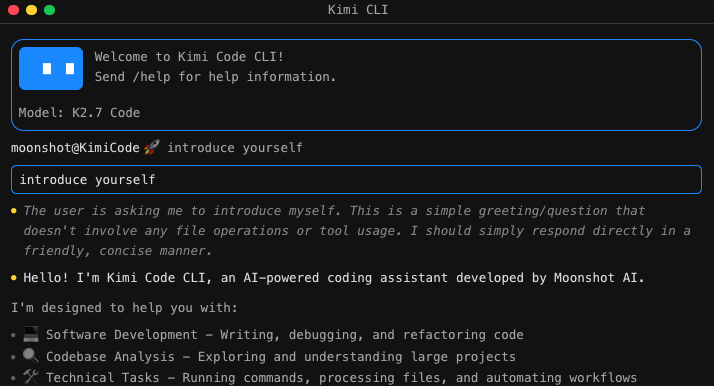
Kimi Code isn’t new with K3; the earlier Kimi K2 line ran in the same agent. Our Kimi Code CLI guide covers the ground-up install walkthrough, and how to use Kimi CLI is the broader command-line reference. This piece assumes the CLI is installed and focuses on driving K3.
Getting Kimi K3 running in Kimi Code
The exact install command and flags change as Moonshot updates the tool, so treat the steps below as the shape of the workflow and confirm precise syntax in the official Kimi documentation or our Kimi Code CLI guide. The commands are representative, not exact.
1. Install the agent and authenticate. Install the command-line tool once, then sign in so it can reach the Kimi API. You’ll need a Kimi account and an API key from the Kimi developer platform. Store the key as an environment variable rather than pasting it into a config file you might commit by accident.
# Representative, not exact. Check the official docs for current syntax.
export KIMI_API_KEY="your-key-here"
kimi-code   # launches the agent in the current directory
2. Open it inside your project. Change into the repository and start the agent there. Kimi Code treats the current directory as its working root and reads the project structure to build context, so where you launch it matters.
3. Select K3 as the model. Inside the session, switch the active model with the /model command and pick kimi-k3. This is the same mechanism you’d use to move between K3 and older models like the coding-focused Kimi K2.7 Code on the same task.
/model kimi-k3
4. Set the reasoning effort. K3 exposes a configurable reasoning effort, including a “max” setting. For hard debugging or a large refactor, more thinking helps; for quick edits, dial it down so you’re not paying for depth you don’t need.
Once the model is selected and the agent points at your repo, you’re ready to give it work. To try K3 without installing Kimi Code, or at zero cost, how to use Kimi K3 for free covers the no-cost paths.
A practical agentic coding workflow
The pattern is the same whether you’re fixing a bug or shipping a feature: give K3 a concrete task, let it gather context, and make it prove the result against something objective.
Point it at the repository and give a clear task
Vague instructions produce vague work. Instead of “improve the auth module,” give the agent a task it can verify: “The /login endpoint returns a 500 when the password field is empty. Reproduce it, find the cause, fix it, and add a test that covers the empty-password case.” A specific, testable goal is the single biggest lever on output quality: it gives the agent a finish line to check itself against.
K3’s 1M token context is what makes “point it at the whole repo” realistic: the agent holds a large slice of your codebase at once, tracing a call from the route handler through the service layer without you spoon-feeding it the right files. Moonshot cites large-repo navigation as a core K3 strength.
Let it use tools and read the feedback
This is where an agent earns its keep. K3 supports tool calls, so inside Kimi Code it can run your test suite, grep the codebase, execute a build, or hit a running service, then read what comes back:
- The agent reads the relevant files and forms a hypothesis.
- It makes an edit.
- It runs the tests or the app.
- It reads the failing output, the stack trace, or the log line.
- It revises and repeats until the checks pass.
Moonshot calls K3 “particularly strong at navigating large repositories, using tools, debugging, and iterating against images, logs, tests, and runtime feedback.” That loop is the heart of the workflow: you’re not asking the model to be right on the first guess, but to run, observe, and correct like a human engineer.
Iterate against images and runtime output
The feedback isn’t limited to text. Moonshot highlights visual reasoning as part of K3’s range: the agent can read a screenshot to confirm a frontend change rendered correctly, or use a captured image to guide game-development and CAD work. So a UI loop is: change the CSS, render, screenshot, adjust. For backend work the feedback is a test report, log stream, or HTTP response, and the loop is the same.
Keep the loop honest with tests
Tests keep an autonomous loop from drifting. With a passing suite to aim at, the agent has a clear “done” and “broken” signal; without one, a long run can wander and quietly break something three files away. Write the test first, then let K3 iterate until it’s green.
Kimi K3 vs Claude Code and Cursor for coding
K3 in Kimi Code isn’t the only agentic coding setup. Here’s an honest side-by-side of the three most common ways to run an agent against your codebase in mid-2026.
| Dimension | Kimi Code (Kimi K3) | Claude Code (Fable 5) | Cursor |
|---|---|---|---|
| Form factor | Terminal and IDE coding agent | Terminal coding agent | Full AI-native code editor |
| Default model | Kimi K3, swappable via /model |
Claude Fable 5, plus other Claude models | Bring-your-own or built-in frontier models |
| Context window | 1M tokens | Large, model-dependent | Depends on selected model |
| Repo navigation | Strong; built for large-repo, long-horizon work | Strong; agentic file and shell access | Strong in-editor indexing and retrieval |
| Tool use | Tool calls, shell, tests, screenshots | Tool calls, shell, MCP | In-editor tools, terminal, MCP |
| Cost lever | Cheap on cache-heavy loops (90%+ cache hit) | Priced per Claude token | Subscription plus model usage |
| Open weights | Expected around July 27, 2026 | Closed | Editor is proprietary; models vary |
| Best for | Long, repo-scale agent runs on a budget | Top-tier reasoning and reliability | Developers who want the agent inside their editor |
A few takeaways. For the highest raw reliability on a hard task, Fable 5 in Claude Code is the model Moonshot itself concedes sits ahead of K3. If you want the agent inside a polished editor, Cursor and Cline-style tools fit better, and you can run other open models through them, as our GLM-5.2 in Claude Code, Cline, and Cursor guide shows. K3’s edge is a very large context, strong repo navigation, and pricing built for the long, repetitive loops that run up a bill on a per-token frontier model. Once the weights ship, it’s the only one of the three you can self-host.
Strengths and honest limits
What K3 is good at
Repository-scale context. The 1M token window lets the agent hold a large codebase in view at once, reducing the “which files do I even give it” problem that trips up smaller-context models on monorepo work.
Tool use and long-horizon autonomy. K3 was tuned to sustain extended engineering sessions with minimal hand-holding, orchestrating terminal tools and correcting itself against real output. That’s what separates closing a ticket from suggesting a snippet.
Cost on cache-heavy loops. Agentic coding resends the same context (file tree, system prompt, instructions) on every step. K3’s cache-hit input price is $0.30 per million tokens versus $3.00 on a miss, a 10x gap, and Moonshot’s Mooncake inference reportedly hits a cache-hit rate above 90% on coding workloads. So the pattern that makes agent loops expensive elsewhere is where K3 stays cheap. Full numbers are in the Kimi K3 pricing breakdown.
Where K3 falls short
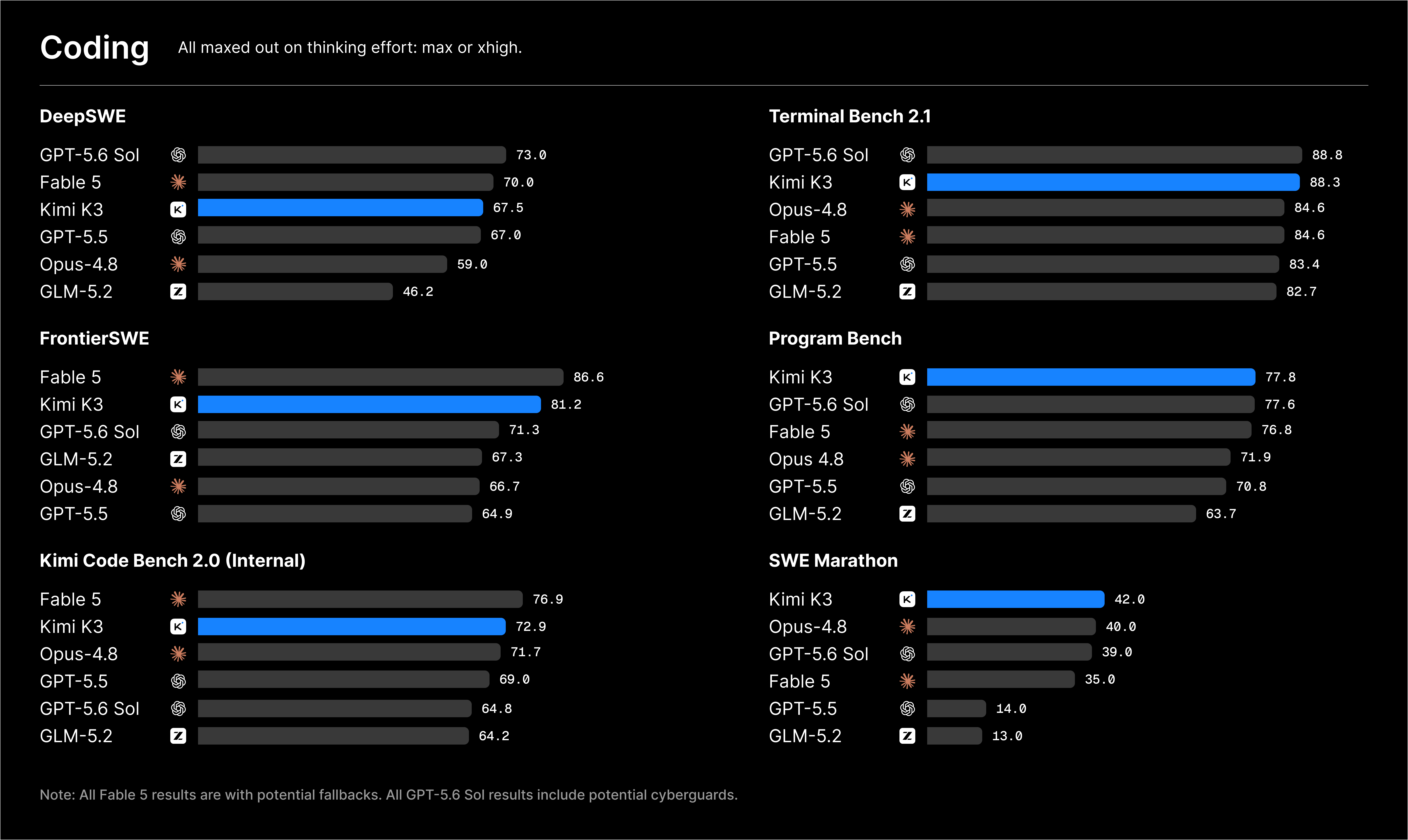
It isn’t the frontier, and Moonshot says so. The launch post states plainly that K3 “still trails the most powerful proprietary models, Claude Fable 5 and GPT-5.6 Sol.” On the coding benchmarks Moonshot published, the picture is close but consistent: on Terminal Bench 2.1, K3 scores 88.3 against GPT-5.6 Sol’s 88.8, and on DeepSWE it posts 67.5 against Fable 5’s 70.0 and GPT-5.6 Sol’s 73.0. Competitive, not first. See the Kimi K3 benchmarks analysis for the full picture.
It isn’t fast. On the Artificial Analysis listing, K3 outputs around 62 tokens per second, below the median for its price tier, and its default leans toward maximum thinking effort. In an interactive loop where you watch output stream, that’s noticeable. If speed matters more than the last few points of quality, benchmark a faster model first.
“Open” is a scheduled event. The full weights are expected around July 27, 2026, not on launch day. If your plan depends on self-hosting, that’s a date to watch rather than a switch you can flip now.
For the head-to-heads, see Kimi K3 vs Claude Opus 4.8, Kimi K3 vs GPT-5.6 Sol, and Kimi K3 vs Kimi K2.7 Code, which covers the upgrade from the previous coding champion in the lineage.
Real-world use cases
K3 shines on the jobs the workflow above is built for: large refactors across a monorepo, where the 1M context shows the whole blast radius at once so it can grind through the edits until the build is green; long debugging sessions, where it reproduces a failure, reads the stack trace, patches, and re-runs without you babysitting; and building an API, where it scaffolds the handler, route, and often the tests, then hands off to a dedicated API tool for verification.
Verifying the APIs K3 builds
When K3 builds or modifies an API inside Kimi Code, its own tests tell you the code runs. They don’t tell you the endpoint behaves the way a real client expects: correct status codes, the right response shape, sane error handling, auth that rejects a bad token. That’s an API testing job.
This is where Apidog slots in. Send real requests to the generated endpoint, inspect the response body and headers, and add assertions on the status code and JSON shape. If the agent produced an OpenAPI spec, import it and Apidog builds the request collection for you, so you validate against the contract rather than guessing. Keep your keys in Apidog environment variables so they never leak into a shared collection.
Because Apidog exposes an MCP interface, you can also wire your API tooling directly into an agent’s context; our guide on visual debugging with Apidog’s MCP client shows how, and Apidog in VS Code keeps the test loop next to the code K3 writes. Download Apidog to verify the model’s output the moment it lands, instead of trusting a green test run alone.
Where this leaves you
Kimi K3 is a genuinely capable coding agent in Kimi Code when you lean into what it’s built for: large repositories, long autonomous loops, and constant iteration against tests, logs, and screenshots. The 1M context and cache-hit pricing make it practical for exactly the grinding, multi-step work that gets expensive fast elsewhere. It’s not the outright best coder available, and Moonshot deserves credit for saying so, but for a lot of real work the gap is small and the cost and openness advantages are real. Start with a concrete, testable task, let K3 iterate, and verify the APIs it produces with Apidog before you ship. For the model background, the what is Kimi K3 pillar and the Kimi K3 API guide pick it up from there.
Frequently asked questions
How do I use Kimi K3 for coding? Run it inside Kimi Code, Moonshot’s terminal and IDE coding agent. Install the agent, open it in your project directory, select the model with /model kimi-k3, then give it a concrete, testable task and let it read files, run tools, and iterate. The full install walkthrough is in our Kimi Code CLI guide.
Is Kimi K3 good for agentic coding? Yes. It’s tuned for exactly what agentic coding needs: navigating large repositories, using tools, debugging, and iterating against tests, logs, and runtime feedback over a 1M token context. It’s competitive on coding benchmarks, though it trails Fable 5 and GPT-5.6 Sol slightly.
Does Kimi K3 support tool calling for agent workflows? Yes. The K3 API supports tool calls, tool-choice constraints, JSON mode, structured output, internet search, dynamic tool loading, and configurable reasoning effort, which is what lets it run tests, execute shell commands, and orchestrate a full agent loop inside Kimi Code. The Kimi K3 API guide covers the developer-side details.
Can I test the APIs Kimi K3 writes? Yes, and you should. The agent’s own tests confirm the code runs, but not that the endpoint returns the right status codes, response shape, and auth behavior a real client expects. Send real requests to the generated endpoints in Apidog, add assertions, and import any OpenAPI spec the agent produced to validate against the contract.