Moonshot AI shipped Kimi K3 on July 16, 2026, and it landed as the world’s first open 3T-class model: a 2.8 trillion parameter mixture-of-experts system with a 1 million token context window. The specs are big, but the first question most people ask is smaller: can you run this without paying? Yes, through several paths, and each comes with real limits worth understanding first.
This guide walks through every honest free route to Kimi K3, what “free” really means for each, and where the ceilings sit. If you tested the previous generation through our guide on how to use Kimi K2.7 Code for free, much of this will feel familiar: Moonshot kept the same distribution shape. The models changed, the free doors did not move much.
TL;DR
- The fastest free path is the Kimi app or Kimi.com free tier. Sign in, chat, and use Kimi Code and Kimi Work within whatever daily usage the free account allows. Rate limits apply and can change.
- OpenRouter exposes
moonshotai/kimi-k3behind an OpenAI-compatible API. Watch for a free or low-cost route, and pay cents on the dollar with prompt caching when you do spend. - Self-hosting is a near-future option, not a launch-day one. Moonshot says full weights ship by July 27, 2026. A 2.8T MoE needs serious GPUs, so most people will wait for quantized community builds.
- Trial or promo credits on the Kimi API may exist. Check the current offer in the Kimi console rather than trusting a fixed number you read online.
- Once you hold any free key, wire
kimi-k3into Apidog to test calls in a proper API client instead of burning app quota on trial-and-error.
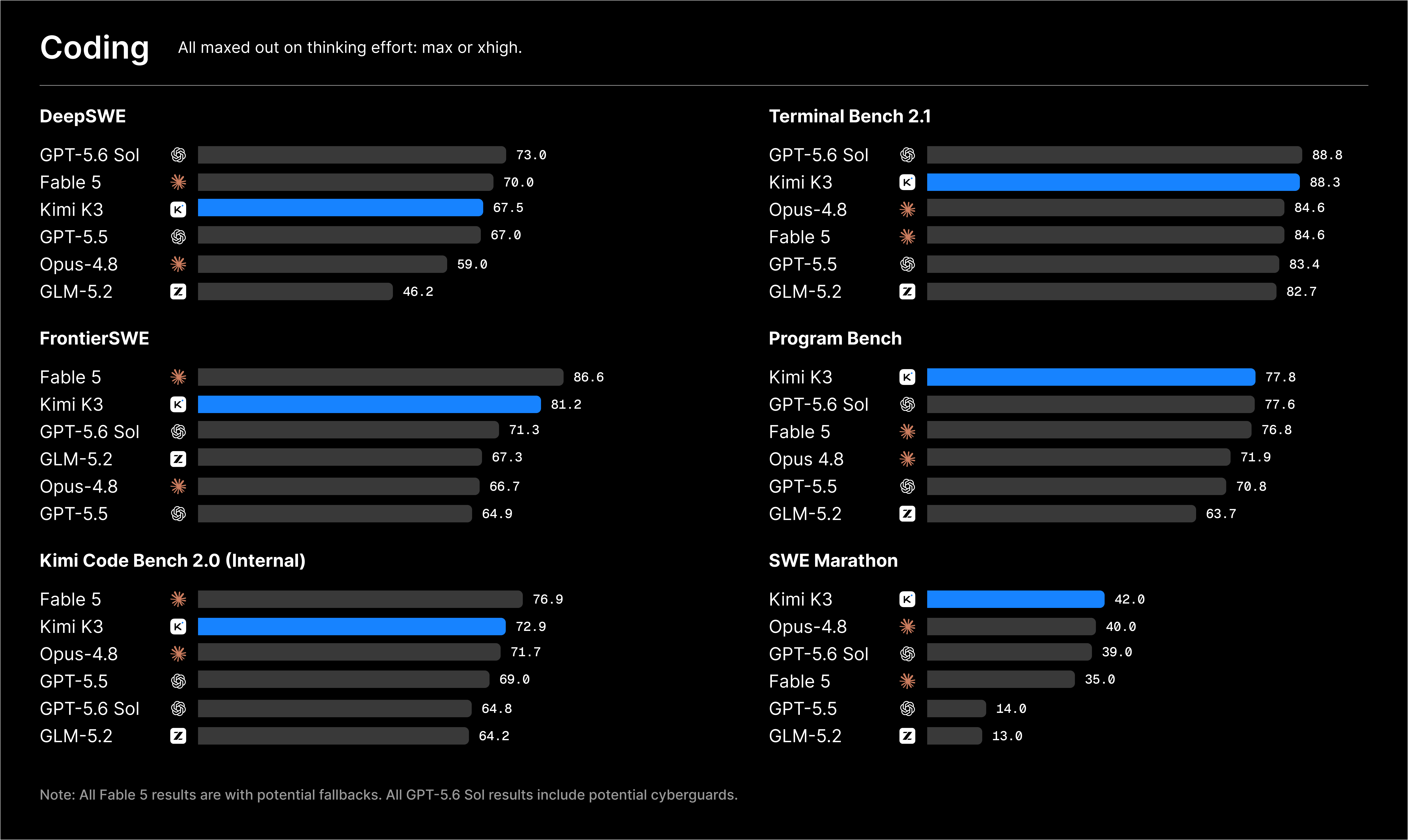
One honesty note up front. Moonshot’s own launch post is candid that K3, while strong, still trails Claude Fable 5 and GPT-5.6 Sol on their evaluation suite. It scores an Intelligence Index of 57 on Artificial Analysis, fourth of 189 models tracked: excellent for an open model, and not the outright frontier. Keep that framing as you weigh the free tiers below.
What “free” actually means here
“Free” for a large language model almost never means unlimited. It usually means one of four things, and the trade-offs matter more than the price tag.
- Rate-limited. You get a daily or hourly ceiling on messages or tokens; hit it and you wait or pay. This is how the Kimi app free tier works.
- Subsidized routing. A third party like OpenRouter fronts the cost on a promotional variant, or the per-token price is low enough to feel free for light use. A route that is free today may carry a small charge next month.
- Your own hardware. Once open weights land, running the model yourself has no per-token fee, but you pay in GPU rental or electricity, and a 2.8T model is not cheap to serve.
- Trial credits. A provider hands you a starter balance that runs out. Useful for a first look, not a long-term plan.
One more thing to weigh: data use. Free consumer tiers often reserve the right to use your conversations to improve the product, so if you are pasting proprietary code or customer data, read the current terms first and prefer an API path, where retention terms tend to be clearer. For more on the model, our explainer on what Kimi K3 is covers the architecture and positioning.
Method 1: The Kimi app and Kimi.com free tier
This is the front door, and the one most people should try first. Moonshot ships K3 across a full surface of consumer entry points, and the baseline account costs nothing to create.
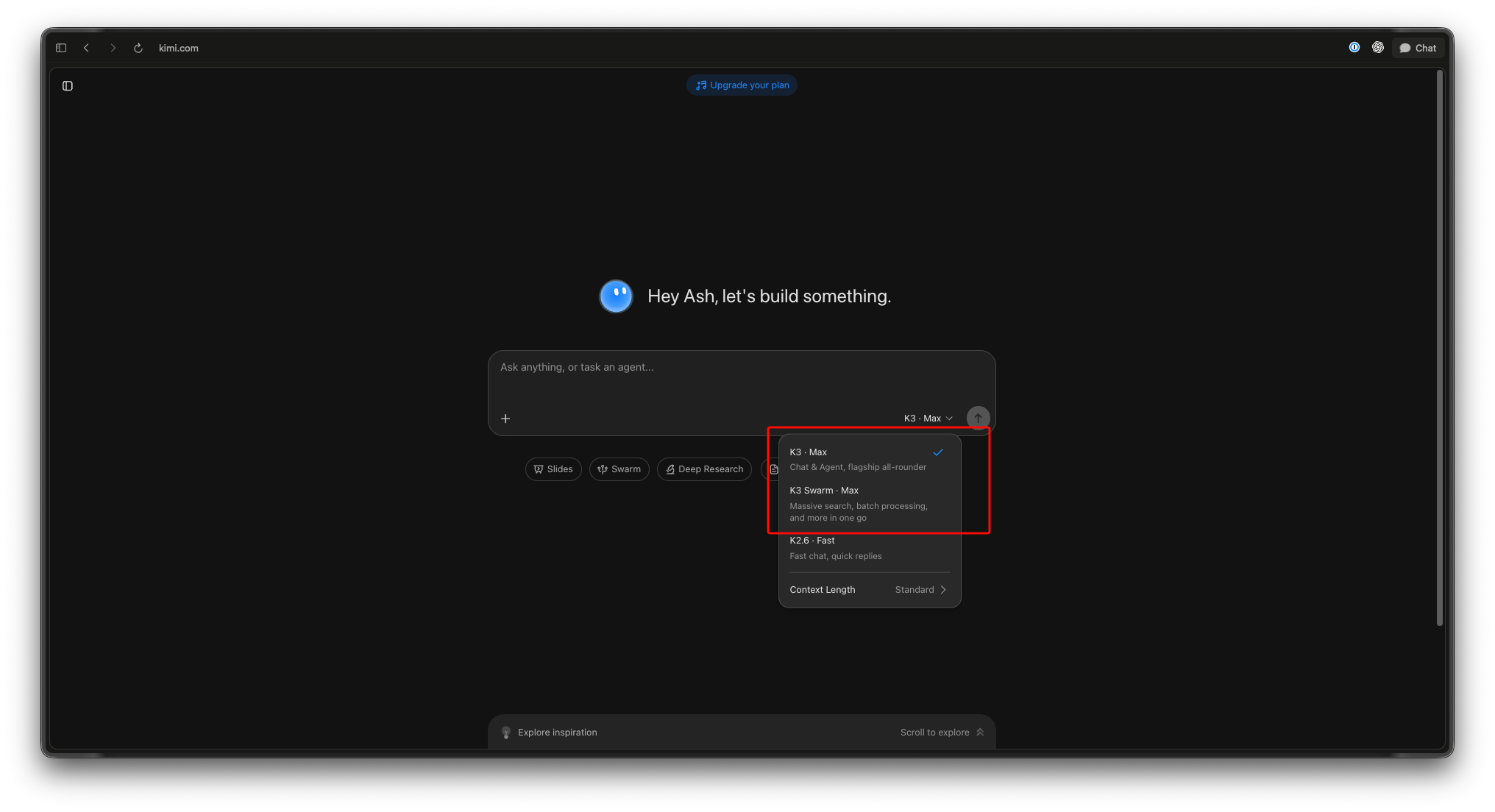
Where to get it. Download or update the Kimi app from your mobile store; it runs on iOS, Android, and HarmonyOS. On the web, go to kimi.com and sign in. Both give you K3-backed chat.
What you get. The free tier covers general chat plus two focused surfaces:
- Kimi Code brings the model into your terminal for coding work. You pick the model with the
/modelcommand inside the tool. If you have used a terminal coding agent before, the flow is close to what our Kimi CLI walkthrough describes. - Kimi Work is the desktop productivity app. It needs version 3.1.0 or later and runs on Windows and Apple silicon Macs. Some of the richer Kimi Work and Kimi Code capabilities sit behind paid usage, so read the in-app limits rather than assuming everything is free.
The honest limits. Moonshot does not publish a fixed free-tier token quota, and that is the point: it can move. Do not trust a specific “X messages per day” figure from a third-party post. Open the app, check your usage indicator, and treat it as the source of truth. Heavy agentic sessions, long-context work, and back-to-back coding runs burn through a free allowance fast, because a 1M context window is expensive to serve.
Best for. Trying the model, everyday chat, and light coding before any API wiring. It asks nothing of you technically, which is its strength and why it caps out first.
Method 2: OpenRouter routing to moonshotai/kimi-k3
When you want K3 behind an API instead of a chat box, OpenRouter is the shortest route. It aggregates providers and exposes the model under a single slug, moonshotai/kimi-k3, through an OpenAI-compatible endpoint. Most SDKs work by swapping the base URL and dropping in your OpenRouter key.
The free angle. OpenRouter regularly lists free or heavily discounted routes for popular models, especially right after a launch when providers want traffic. Check the model page for a free variant or promotional price. Even with no zero-cost route, the paid pricing is far below the first-party API for light use, and prompt caching can cut real spend to a fraction of list price.
A minimal call. Because the endpoint is OpenAI-compatible, the request looks like any other chat completion:
curl https://openrouter.ai/api/v1/chat/completions \
  -H "Authorization: Bearer $OPENROUTER_API_KEY" \
  -H "Content-Type: application/json" \
  -d '{
    "model": "moonshotai/kimi-k3",
    "messages": [
      {"role": "user", "content": "Refactor this function for readability."}
    ]
  }'
The honest limits. Free routes on aggregators are the least stable form of free. Providers pull them, add daily caps, or throttle under load without much notice, so a route that answers instantly today can queue or error during a traffic spike. Treat any free OpenRouter route as a testing convenience, not production infrastructure. If your work depends on K3 being available, budget for the paid route or the first-party API. Our Kimi K3 API guide covers authentication, request shape, and the first-party endpoint in more detail.
Method 3: Self-host once the open weights drop
Kimi K3 is billed as the first open 3T-class model, but read the timing carefully. At launch on July 16, the weights were not yet downloadable. Moonshot’s post states that full model weights will be released by July 27, 2026, so self-hosting is a near-future path, not a launch-day one.
What to watch. When the release lands, the weights will almost certainly appear on Hugging Face under Moonshot’s organization. Keep an eye on the Moonshot AI page on Hugging Face and the official Kimi blog for the exact drop. Do not download “K3 weights” from any other source before the official release; anything claiming to be K3 weights right now is not the real thing.
The hardware reality. This is where “free” gets expensive in a different currency. K3 is a 2.8T parameter mixture-of-experts model. Even though it activates only 16 of 896 experts per token, you still need enough memory to hold the full parameter set, meaning a serious multi-GPU setup or a rented cluster. Running full precision at home is not realistic for almost anyone. The practical route for individuals will be quantized community builds, which usually arrive a little after release and shrink the memory footprint at some cost to quality. If you have done this with earlier Kimi models, our guide on running Kimi K2.5 locally covers the tooling and trade-offs, and K3 will rhyme with it once weights ship.
The honest limits. Self-hosting removes per-token fees and gives you full data control, the real draw for teams with privacy requirements. It replaces that cost with hardware, setup time, and ongoing operations. It is genuinely free only if you already own idle GPUs; for everyone else, rented compute for a model this size can cost more than just paying the API.
Method 4: Trial or promo credits on the Kimi API
The first-party Kimi API is a paid service. For reference, the current rates are $0.30 per million tokens for cache-hit input, $3.00 per million for cache-miss input, and $15.00 per million for output. That is the contrast baseline, not a free tier.
That said, providers often seed new accounts with a small starter balance or run launch promotions. This is the one method where specifics change most often and where invented numbers are most common online.
What to do. Sign in to the Kimi developer console and check your account balance and any active promotion when you create your key. If there is a trial credit, it will show up there. Do not plan around a dollar figure you read in a blog post, including this one; the only number to trust is the one your console displays today.
The honest limits. Trial credits are finite and usually expire. They are the right tool for a serious first evaluation, where you want the real first-party endpoint and the exact latency and behavior you would get in production, and the wrong tool for anything ongoing. When the credit runs out, you are on the paid rates above. For a full breakdown of what those rates mean at volume, see our Kimi K3 pricing analysis.
Comparing the free paths
Each route trades ease against control and stability.
| Method | Real cost | Setup effort | Stability | Best for |
|---|---|---|---|---|
| Kimi app / Kimi.com free tier | Free, rate-limited | None, just sign in | Reliable within your daily cap | First look, chat, light coding |
OpenRouter moonshotai/kimi-k3 |
Free or low-cost routes; caching cuts spend | Low, swap the base URL | Free routes can throttle or vanish | Prototyping against an API |
| Self-host (weights by ~July 27) | No per-token fee, high hardware cost | High, and not yet possible | You own it, you operate it | Privacy needs, teams with GPUs |
| Kimi API trial credits | Free until credit runs out | Low, create a key | Finite and expiring | A serious one-time evaluation |
The pattern is consistent: the easiest paths cap out fastest, and the most controllable costs the most in hardware or time. No route is simultaneously free, unlimited, and production-grade, which holds for every frontier-class model, not just K3.
Wiring a free key into Apidog to test calls
Here is a practical tip that saves your free quota. Once you have any working key, whether from OpenRouter or a Kimi API trial credit, do your request-shaping inside an API client rather than a chat box. You will iterate on prompts, headers, and parameters dozens of times dialing in a call, and every throwaway attempt in the app eats into your daily limit.
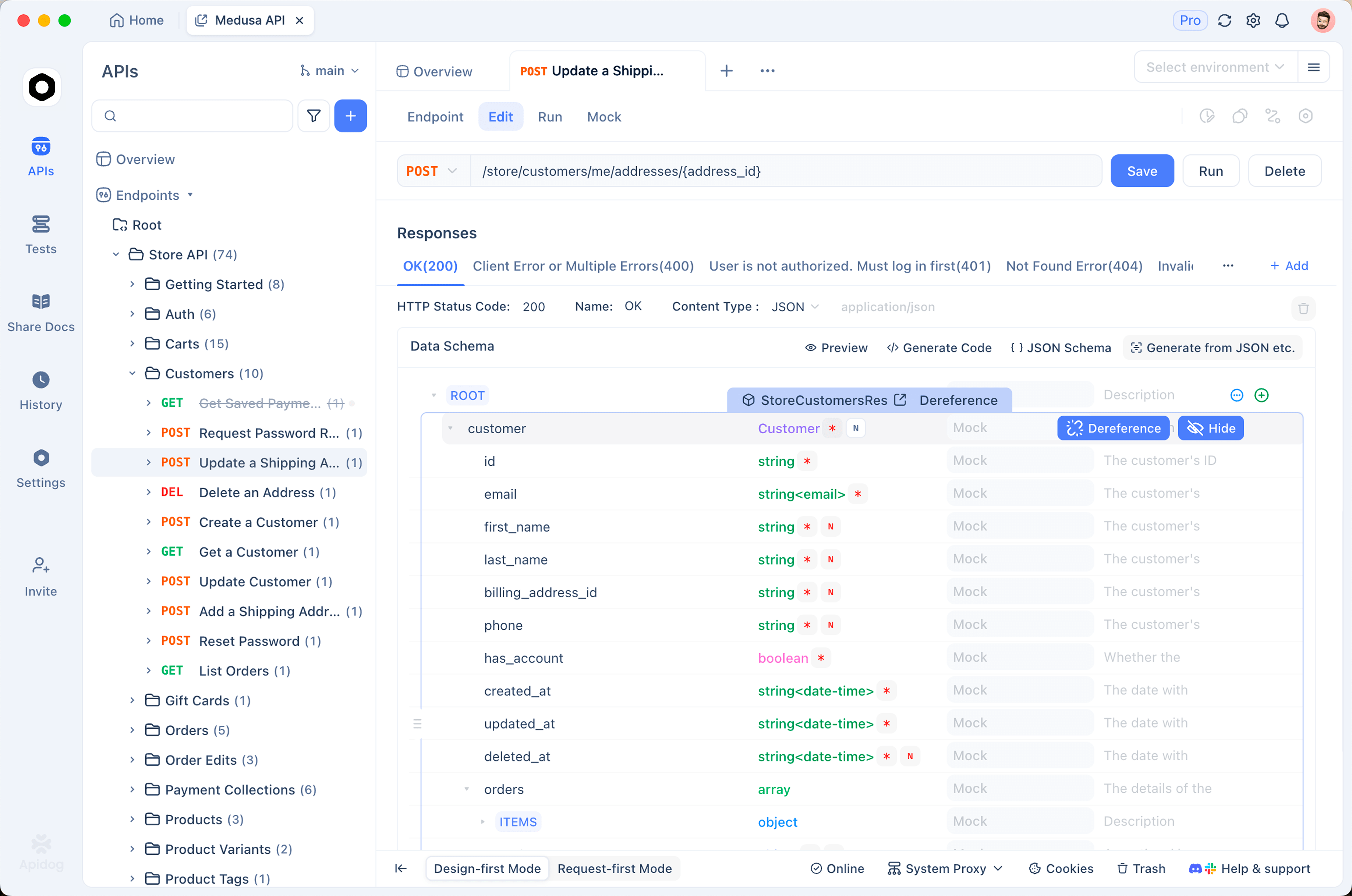
Apidog handles this cleanly. Because both OpenRouter and the Kimi API are OpenAI-compatible, you create a request pointed at the chat completions endpoint, set the Authorization header, and put kimi-k3 (or moonshotai/kimi-k3 on OpenRouter) in the model field. Save it as a reusable request and store the key as an environment variable so it never sits in plain text, and you can fire, tweak, and re-fire without touching your consumer quota. When a call works, Apidog turns it into shareable documentation and test cases, and the same setup works through the Apidog extension inside VS Code. A free key is scarce; spend it on real work. Download Apidog to follow along.
Conclusion
Kimi K3 gives you more genuinely free ways in than most models its size. If you just want to see what it can do, open the Kimi app and start typing. If you are building against it, get an OpenRouter key and shape your calls in Apidog. If data control is non-negotiable, mark the weight release around July 27 and get your GPU plan ready. And for a proper first-party evaluation, check the Kimi console for any trial credit first. Most people end up using two: the app for quick checks and an API route for real building. None is unlimited, and each carries an honest limit to respect: rate caps, unstable routing, hardware demands, or an expiring balance. Match the path to the job, and use Apidog to make every free token count. Download Apidog to test your first K3 call without spending your daily quota on setup.
FAQ
Is Kimi K3 free to use? There is a free tier through the Kimi app and Kimi.com that covers chat plus Kimi Code and Kimi Work usage, subject to rate limits Moonshot can change. There is no unlimited free access. The first-party Kimi API is paid, though it may carry trial credits on new accounts.
Can I download the Kimi K3 weights and run it myself right now? Not at launch. Moonshot says full weights will be released by July 27, 2026, so self-hosting is not possible until then. When they ship, watch the Moonshot page on Hugging Face and the official Kimi blog, and note that a 2.8T mixture-of-experts model needs serious GPUs. Most individuals will wait for quantized community builds.
How much does the Kimi K3 API cost if I outgrow the free tier? The first-party rates are $0.30 per million tokens for cache-hit input, $3.00 per million for cache-miss input, and $15.00 per million for output. Prompt caching lowers real spend, and OpenRouter often offers cheaper or promotional routes for light use.
How does Kimi K3 compare to the top proprietary models? It is strong but not the outright frontier. Moonshot’s own launch post says K3 trails Claude Fable 5 and GPT-5.6 Sol on their evaluation suite. On Artificial Analysis it scores an Intelligence Index of 57, fourth of 189 models. Test it on your real tasks to judge fit.
How is this different from using Kimi K2.7 for free? The free doors are largely the same shape, but the model changed. If you set up free access to the previous generation through our guide on how to use Kimi K2.7 Code for free, the flow carries over: swap the model id to kimi-k3 and expect the same kinds of rate limits and route trade-offs described above.