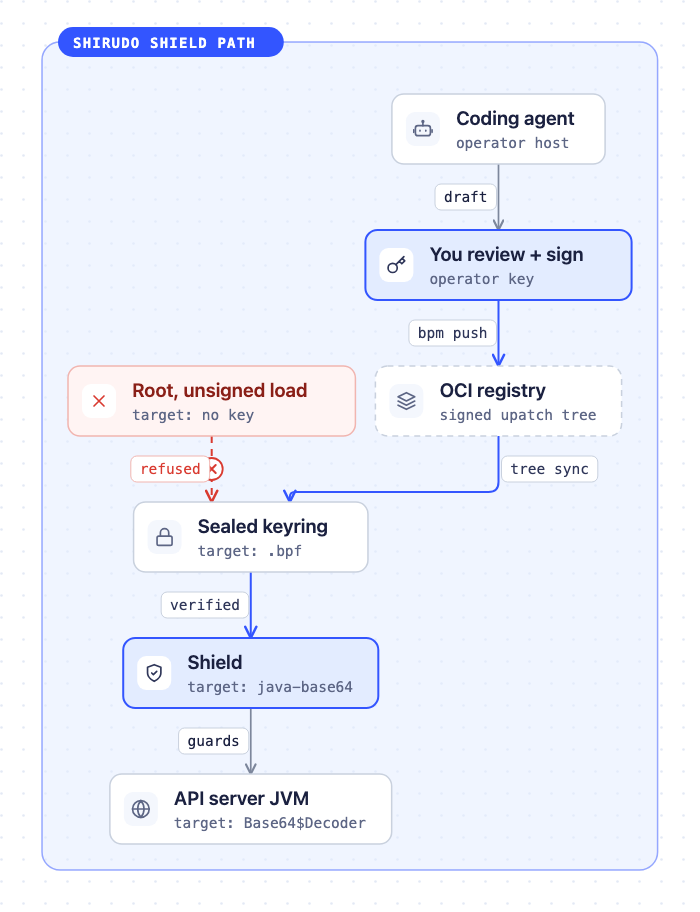
How to use Shirudo, in short: boot a target that runs Shirudo, pick or write a shield (Shirudo calls it a upatch) for the CVE, sign it on your operator machine, publish it to a signed tree, and let the target pull it. The shield blocks the exploit path on the running server, and you delete it from the tree once the real patch ships.
This guide runs that loop on a Java API server exposed to CVE-2026-114938, the JDK Base64 decoder flaw, using the shield that ships in the Shirudo repository. Every command comes from the project’s docs. Shirudo is pre-release and needs a patched kernel and a TPM, so treat this as a lab walkthrough.
What is Shirudo?
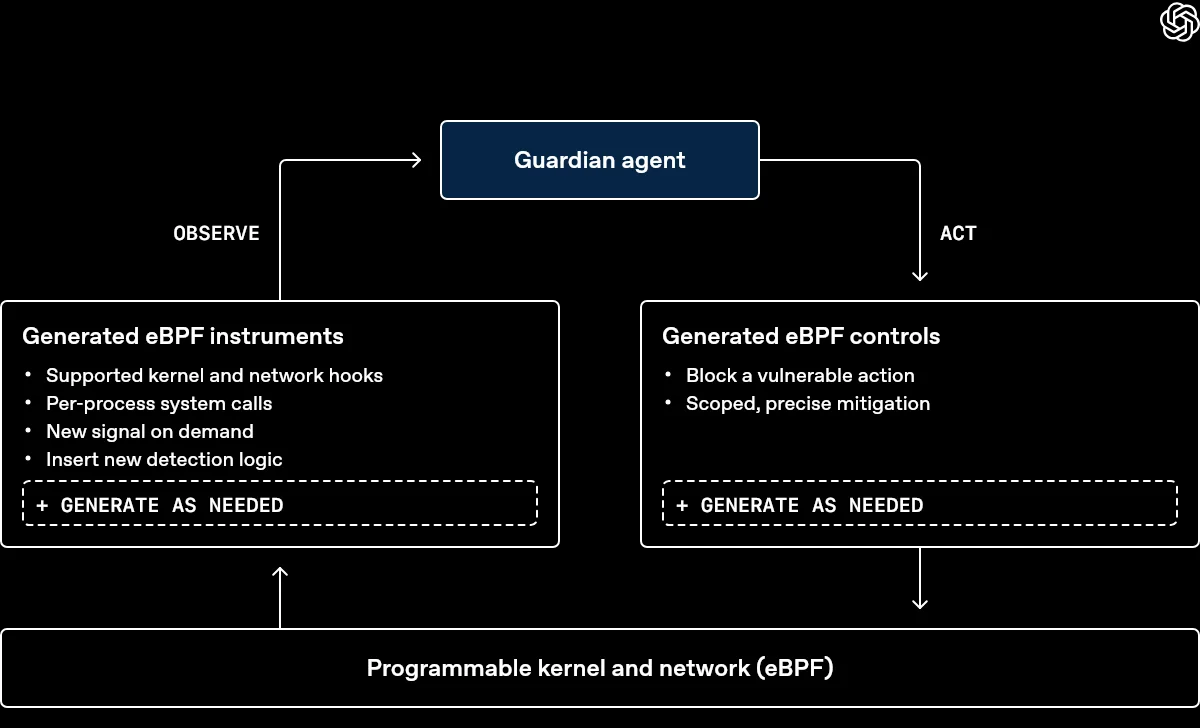
Shirudo is an open-source, BPF-based security runtime for Linux from OpenAI and Cisco. Operators ship small signed micropatches, called upatches, that block a vulnerable code path on a running system: at kernel hooks (BPF upatches) or inside the JVM (Java agent upatches). Each load is measured into the TPM, so you can prove what a target runs.
The name is Japanese for “shield”. Four properties matter for an API team:
- Signed or refused. The kernel loads BPF only through loaders signed by a key in a sealed
.bpfkeyring, so root on the target can’t load an unsigned shield. - Measured. Every load and unload extends a TPM register;
shirudo attestreturns evidence you verify offline. - Pulled. Targets follow a signed “upatch tree” in an OCI registry and sync it on a timer.
- Temporary. One more signed operation removes a shield once the fix is rolled out.
For background on why live kernel controls became an API-server topic, read our breakdown of OpenAI’s 948 Linux root exploits.
Which Shirudo shield fits your API server?
Shirudo has two upatch types, and only one of them reaches inside your application. Match the shield to your stack before you plan anything:
| Your API server | Shield type | What it can do today |
|---|---|---|
| Java (Spring Boot, Quarkus, Micronaut) | Java agent upatch | Guards a JDK or app method in-process, e.g. java-base64, java-sql-inj |
| Any stack, kernel CVE on the host | BPF upatch at an LSM hook | Refuses the exploit’s kernel path, e.g. the AF_ALG splice block for CVE-2026-31431 |
| Node.js, Python, Go, PHP app bug | BPF app-sandbox upatch |
Limits what an exploit does next: exec, outbound connections, file writes |
That last row is the honest limit. For a Node.js bug like the Node.js brotli RCE, there’s no in-process upatch type. The repo’s app-sandbox README says the sandbox “does not close the hole”: it stops the attacker’s code from starting programs, writing files or connecting out. You still upgrade the runtime.
One Java caveat: a JVM reads JAVA_TOOL_OPTIONS at start, so your API process needs one restart (not a JDK upgrade). For a JVM in a container, the java-base64 jar can attach to the running process with java -jar java-base64.jar <pid>.
Step 1: Boot a Shirudo test target
The Shirudo quickstart boots a QEMU VM that enforces the production policy with a software TPM. You need a Linux host with KVM (Lima on a Mac), clang and LLVM 23, OpenSSL 3.5+, Docker or Podman, and ulimit -l unlimited. To skip the install, use the online getting-started lab.
git clone https://github.com/shirudo-dev/shirudo && cd shirudo
testing/vm/kernel-artifact.sh fetch          # CI kernel with the signed-loader ABI
make && make shirudo-build                    # target binary + operator signing helper
export PATH="$PWD:$PWD/tools/shirudo-build:$PATH"

make stack-up && make vm VM_NAME=quickstart   # local registry/backend + test target
. build/test-vm/stack/env
make vm-enroll VM_NAME=quickstart
make vm-ssh VM_NAME=quickstart                # root shell on the target
On the target, shirudo status should print Status: ok with every condition OK. Scripts read shirudo status --json; --check exits 1 on tampered.
Signing code lives only in the operator helper shirudo-build, never on a target. That split makes “the agent drafts, you approve” real.
Step 2: Reproduce the CVE on the target
Prove the exposure before you shield it. The live-patching guide builds a small program that feeds the JDK Base64 decoder the crafted input:
operator$ upatches/test/build.sh
target#   sh /workspace/shirudo/testing/end2end/guarded-jvm.sh \
            /workspace/shirudo/upatches/test/badDecoder.jar
badDecoder: no guard, the JDK refused: Last unit does not have enough valid bits
status 1
The test VM’s JDK refuses the input itself; a vulnerable x86-64 JDK on the AVX-512 path writes past the destination array. In your API, that’s any endpoint that decodes Base64 from a request: uploads, image fields, webhook signatures.
Step 3: Let your coding agent draft the shield
The repo ships agent skills in .agents/skills/, which Codex reads directly and Claude Code reads through the .claude/skills link. The upatch skill covers writing, building, packaging and loading a upatch on a test target. For a CVE the repo already covers, use the shipped shield. For the next one, give your agent a scoped prompt:
Use the upatch skill in this repo. Write a Java agent upatch named
java-base64-api that rejects the input shape behind CVE-2026-114938 in
java.util.Base64$Decoder before it writes, modeled on upatches/java-base64.
Build it with the test VM's throwaway keys only, load it on the quickstart
target, and show me badDecoder.jar refused and a valid Base64 payload
accepted. Do not touch my production keys or the production tree.
The agent builds and tests with the VM’s throwaway key. Only your production key adds an operation to the tree your fleet follows. Review the guard like any patch: it should reject the exploit shape only and log without the input bytes, as the shipped agent does.
Step 4: Sign, publish and append the shield
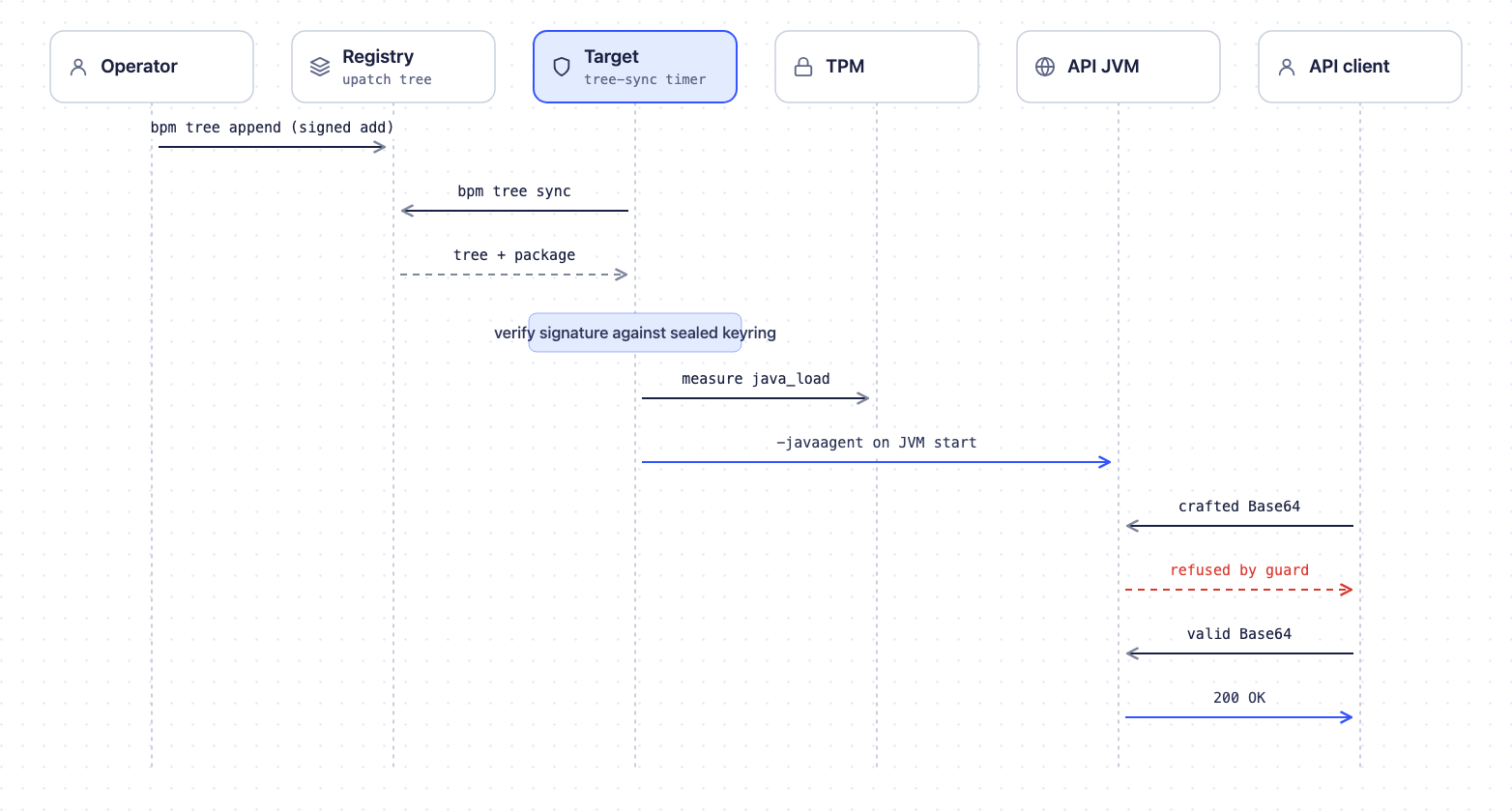
Once you approve the code, sign and publish from the operator host. tools/put-shields runs shirudo bpm build and shirudo bpm push and writes a catalog with the manifest digest:
KEYS=/tmp/shirudo-test-vm-private-$(id -u)/operator-keys/keys
tools/put-shields --version 1.0.0 --keys-dir "$KEYS" \
  --catalog build/tutorial/shields.json \
  --new-index oci://127.0.0.1:15444/live-patching upatches/java-base64

JAVA_DIGEST=$(jq -r 'first(.shields[] | select(.package == "java-base64")).manifest_digest' build/tutorial/shields.json)

shirudo bpm tree append oci://127.0.0.1:15444/live-patching/java-base64:1.0.0 \
  --package-digest "$JAVA_DIGEST" "$TREE" --tree-id local-tree --keys-dir "$KEYS"
The Beefile declares fixes = ["CVE-2026-114938"] and selects x86_64 targets only. A package reaches a target only through the tree.
Step 5: Confirm the endpoint stays up
Within one sync (at most 10 seconds on the test VM), the target’s shirudo-bpm-tree-sync.timer fetches the tree, verifies its signature against the sealed keyring and loads the shield. You run nothing on the target:
target# shirudo upatch list
  NAME          LOADED  TYPE  KIND  PAYLOAD
  java-base64   yes     load  java  fea9e483dd384ec7..

target# sh /workspace/shirudo/testing/end2end/guarded-jvm.sh \
          /workspace/shirudo/upatches/test/badDecoder.jar
Base64 guard installed on java.util.Base64$Decoder.decode0
Base64 guard rejected candidate: length=66, padding=1, remainder=2, alphabet=standard
badDecoder: refused by the guard
status 0
The guard refuses the input before the decoder sees it; the JDK and application jar stay unchanged. A blocked call throws IllegalArgumentException, so your API returns its normal bad-input error. Now prove legitimate traffic still works.
Let your coding agent regression-test the API with Apidog CLI
A shield that also breaks real uploads is an outage you caused. After it loads, have Claude Code or Codex run your API tests through Apidog CLI.
Setup is one install and a login: npm install -g apidog-cli, then apidog auth login. Then give your agent one prompt:
The java-base64 Shirudo shield just loaded on staging. List the POST
endpoints in my Apidog project, run the regression scenario against the
Testing environment, and tell me which requests that carry Base64 bodies
failed. Upload the report.
apidog run is flag-only: -t picks the scenario, -e the environment, -r the reporters, and --upload-report sends the overview to Apidog for your team:
apidog endpoint list --project 1314366 --method post
apidog run -t <scenarioId> --project 1314366 -e 6334890 -r cli,json --upload-report
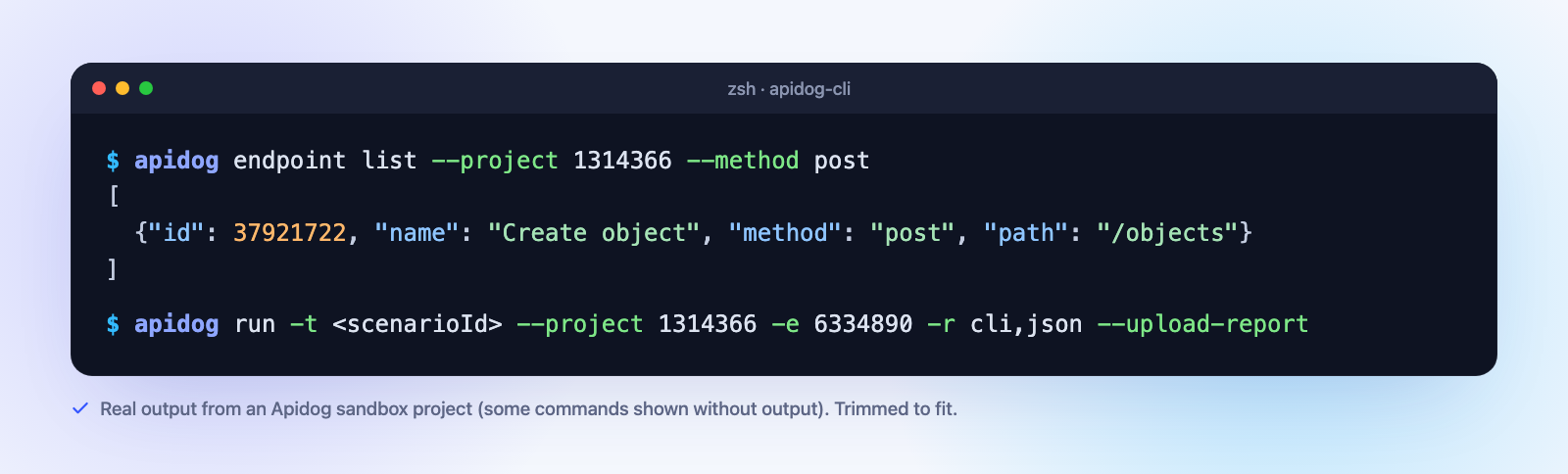
If a valid payload now fails, the guard is too broad: send the failing request back to the Step 3 agent and rebuild. Our guides to Apidog CLI in Claude Code and Apidog CLI in Codex cover the agent setup in detail.
Once a team runs this loop on every CVE, the agent work multiplies: one agent drafting the shield, one running the regression suite, a human signing. Sharkly is a board where you hand those runs out as tasks to the coding agents on your own computers (Claude Code, Codex and others) and review what they produce before anything ships. It’s free to start.
Step 6: Take the shield back after the patch
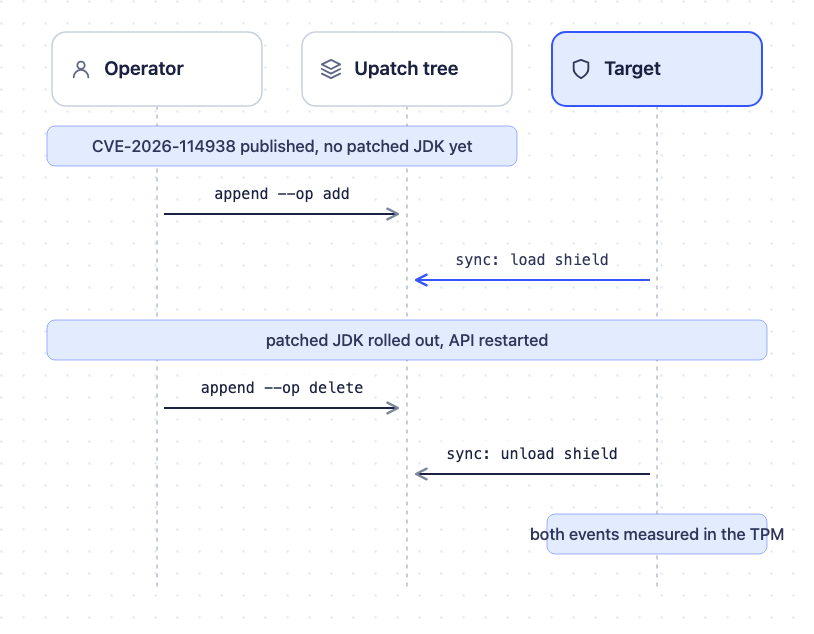
Shields are temporary. Once the patched JDK is rolled out and your API restarted on it, append a delete:
shirudo bpm tree append oci://127.0.0.1:15444/live-patching/java-base64:1.0.0 \
  --package-digest "$JAVA_DIGEST" "$TREE" --tree-id local-tree \
  --keys-dir "$KEYS" --op delete
The tree only grows: the delete is one more signed operation, with the add still on record. After the next sync, shirudo upatch list prints none, and the unload is measured into the TPM like the load.
What Shirudo won’t do for you
Be clear-eyed about the limits before you pitch this to your platform team:
- It needs a custom kernel today. Production targets need a kernel with the signed-loader ABI and Shirudo’s kernel patches, plus TPM 2.0. A stock distro image on your cloud VM won’t run it yet. See the system requirements.
- It doesn’t fix app-logic bugs. An auth bypass such as the Next.js middleware bypass is a logic flaw in your code; a shield can’t know which requests should have been rejected.
- Agent-written kernel code needs review. Launch pushback centred on agents writing live kernel controls. The signing split helps only if a human reads the upatch.
FAQ
Is Shirudo free to use? Yes. It’s open source under BSD-2-Clause, with BPF programs dual-licensed BSD/GPL. It’s pre-release, so expect changes.
Does Shirudo require a reboot to apply a shield? No reboot for BPF upatches: the target loads them on the running kernel. Java upatches reach JVMs started after the load, so your API process needs one restart, or you attach the agent jar to the running process.
Can AI agents write Shirudo shields? Yes. The repo ships an upatch skill that Codex and Claude Code read. The agent can build and test with throwaway keys; only your operator key publishes to the tree targets follow.
Does Shirudo work with Node.js or Python API servers? Not in-process. You can use BPF upatches for kernel CVEs on the host, and the app-sandbox upatch to limit what an exploit does next, but you still need to upgrade the runtime.
Is Shirudo a replacement for patching? No. A shield buys time while you test and roll out the real fix. Once the fix is live, you append a delete and the shield comes off.
Conclusion
Shirudo turns “we can’t patch until Thursday” into a signed, measured, removable shield. For a Java API exposed to CVE-2026-114938: load the shipped java-base64 shield through the tree, prove the exploit is refused and real traffic passes, then delete it when the patched JDK lands. Let your agent draft the next shield; keep the signing key with a human.