Claude artifact apps vs Electron is a question many developers started asking on November 24, 2026, when Anthropic added “Install as app” to Claude for Mac and Windows. The quick answer: an installed artifact is enough for personal and team tools that run while you’re online and signed in to Claude. You still need an Electron or Tauri build when the app must work offline, reach users without a Claude account, run on Linux, or ship through your own signed release channel.
Below, the three are compared on what runs on the user’s machine, signing, permissions, updates and cost.
What are Claude artifact apps?
A Claude artifact app is an artifact you’ve installed from the Share menu of Claude for Mac or Windows. It gets its own icon and window, can call Claude and your connectors, and updates when you edit the artifact. There’s no packaging, signing or API key: it runs on your Claude account, and you must be online and signed in to open it.
Anthropic’s Install as app announcement lists the ground rules:
- It’s a beta on all plans, rolling out in the Mac and Windows apps.
- Requests the app makes to Claude count toward your plan’s usage limits.
- Team plans have it on by default with full access off. Enterprise has it off until an owner turns it on.
- HIPAA-ready organizations and hybrid deployments can’t use it, and Claude Docs, Slides and Sheets can’t be installed.
Anthropic staff have already built a layered image editor, a file manager and a terminal this way, so the comparison with Electron and Tauri is a fair one.
Claude artifact apps vs Electron vs Tauri at a glance
| Claude artifact app | Electron | Tauri | |
|---|---|---|---|
| What you write | A prompt, then the artifact Claude builds | Web UI plus a Node.js main process | Web UI plus a Rust core |
| Runtime on the user’s machine | Claude for Mac or Windows | Bundled Chromium and Node.js | The OS’s own webview |
| Platforms | Mac and Windows | macOS, Windows, Linux | macOS, Windows, Linux, plus mobile |
| Works offline | No, must be online and signed in | Yes | Yes |
| Users need a Claude account | Yes | No | No |
| Packaging and code signing | None | You sign, and notarize on macOS | You sign, and notarize on macOS |
| Updates | Automatic when the artifact changes | Your update service | Updater plugin with required signatures |
| Permission model | Default, App permissions, Full computer access | Whatever your code does; you harden it | Capabilities grant commands per window |
| Who pays for AI calls | The user’s Claude plan limits | You, through your own API keys | You, through your own API keys |
What runs where: three architectures
An artifact app is not a binary you hand to someone. It lives inside Claude for Mac or Windows, and every launch depends on the user’s Claude session. An Electron app carries its own browser engine: the Electron project says it “embeds Chromium and Node.js to bring JavaScript to the desktop.” A Tauri app goes the other way and borrows the webview the OS already has.
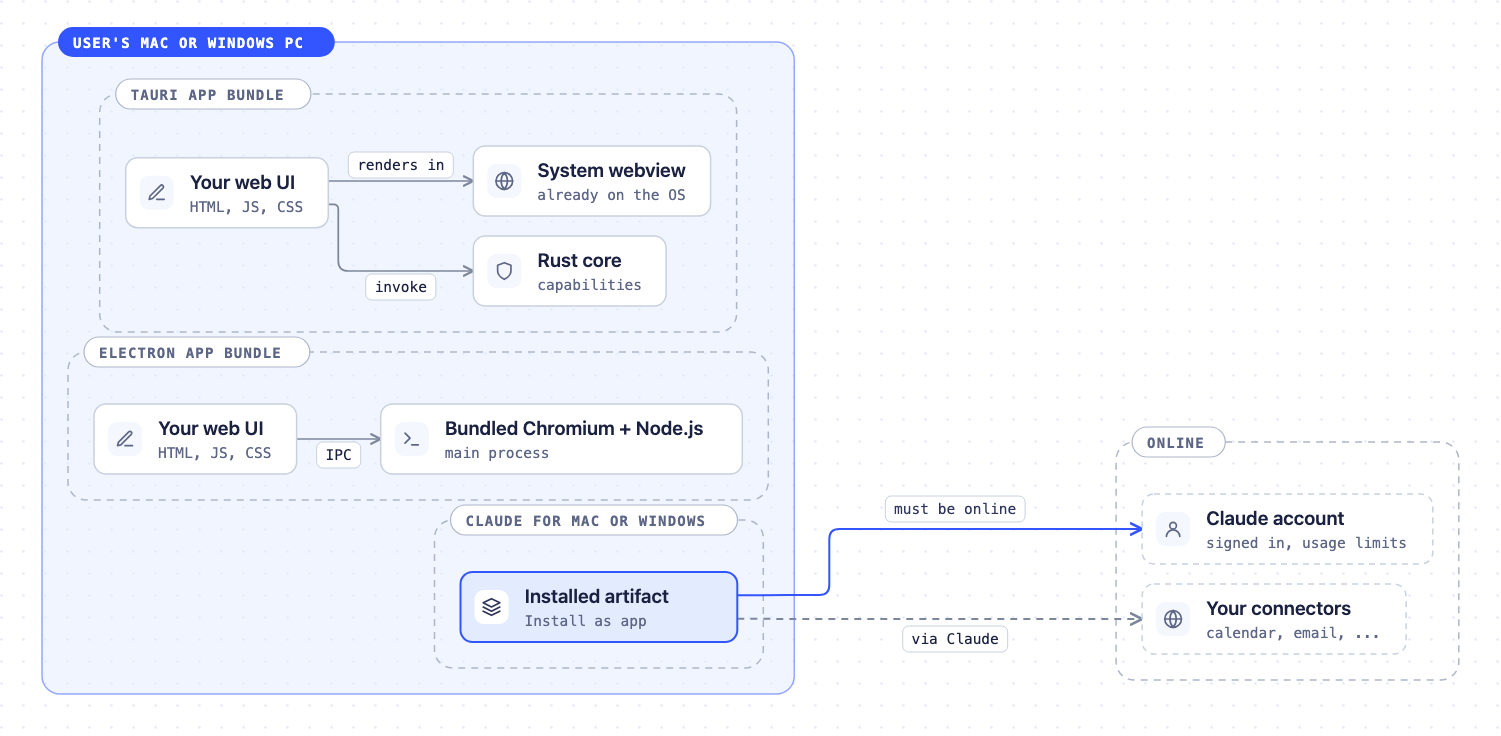
That choice shows up in size. The Tauri docs say a minimal Tauri app “can be less than 600KB in size” because it doesn’t bundle a browser engine. An Electron app ships Chromium with every install, so it’s larger, but it renders the same everywhere because every user runs the same engine.
Updates, signing and permission prompts
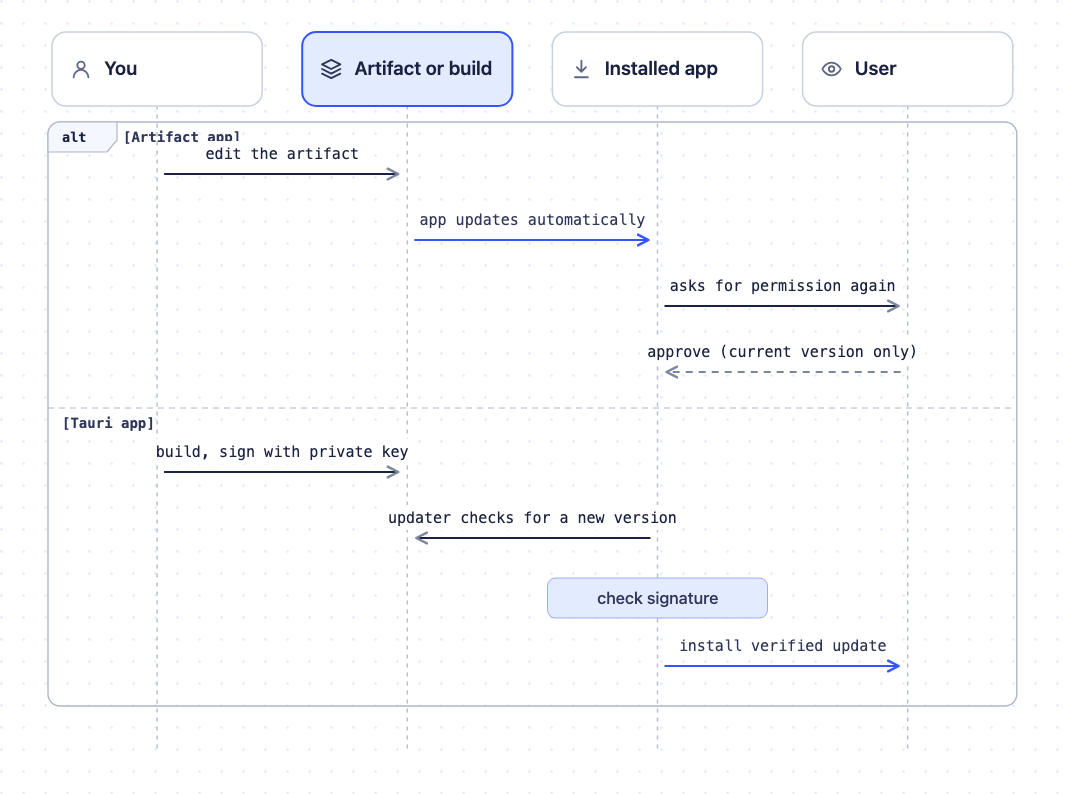
Claude artifact apps. You edit the artifact and the installed app updates. Permission covers only the current version, so Claude asks again after every update, including your own edits. One gap to know: if part of the app loads from another website, that part can change without a new prompt. Full computer access is limited to apps you made or, on Team and Enterprise, apps made by people in your organization. Anthropic doesn’t review apps before install.
Electron. The Electron code signing guide is blunt: “Both Windows and macOS prevent users from running unsigned applications.” On macOS you sign, then notarize with Apple, which needs an Apple Developer Program membership with an annual fee and a Mac with Xcode. For updates, the free update.electronjs.org service works if your app runs on macOS or Windows, has a public GitHub repository, publishes builds to GitHub Releases and signs its macOS builds.
Tauri. You sign for the OS the same way. Tauri’s macOS signing guide notes that a free Apple account can’t notarize, so the app still shows as unverified. On Windows, signing avoids the SmartScreen warning and is required for the Microsoft Store. Tauri’s updater plugin adds its own layer: every update needs a signature, “This cannot be disabled,” and if you lose the private key you can’t ship updates to existing installs.
For permissions, Tauri’s capabilities system decides which commands each window or webview may call, and potentially dangerous plugin commands are blocked until you grant them. Electron leaves more to you: its security checklist covers context isolation and process sandboxing, both on by default in current versions.
When a Claude artifact app is enough
Pick the artifact route when all of these hold:
- The users are you or your team, and every one of them has a Claude account on a plan that allows it.
- The app is used while online. No field work, flights or air-gapped machines.
- Claude usage limits are acceptable. A dashboard that asks Claude a few questions an hour is fine. A batch job that calls Claude thousands of times will burn through the plan.
- You don’t need Linux or a mobile build.
- You trust the source. For full computer access, the app was made by you or someone in your organization.
When you still need a real desktop build
Reach for Electron or Tauri when any one of these is true:
- Offline is a requirement. The artifact app won’t open without a network and a signed-in session.
- Your users aren’t Claude customers. You can’t ask a customer to buy a Claude plan to open your product.
- You own the AI bill. In a packaged app you call a model API with your own keys, pick the model, and control rate limits and spend, instead of drawing on each user’s plan.
- You ship to Linux, mobile or an app store. The Microsoft Store, for example, requires a signed build.
- Your organization can’t use it. HIPAA-ready orgs and hybrid deployments are excluded, and Enterprise admins may keep it off.
- You need a fixed, audited release. Security teams can review a signed, versioned build. An artifact that changes with every edit is harder to pin down.
Electron or Tauri: choosing the real build
If you need a binary, three questions decide between the two:
- Team skills. Electron keeps everything in JavaScript and npm. Tauri asks for some Rust in the core, though its docs say you can lean on the framework without being a Rust expert.
- Size and rendering. Tauri wins on download size. Electron wins on consistent rendering, since every user runs the same bundled Chromium.
- Security defaults. Tauri’s capabilities make you grant each command. Electron gives you more freedom and expects you to apply its checklist.
Test the API behind your desktop app with Apidog CLI
Most of these apps are thin front ends on an API: your backend, a model API, or both. Once you ship a signed binary, a broken endpoint means a new build, a new signature and a new update for every user. So test the API before you cut the release, and let your coding agent run that check with Apidog CLI instead of clicking through requests by hand.
Set it up once in Claude Code, Codex or whichever agent you use:
npm install -g apidog-cli@latest
apidog login --with-token <YOUR_TOKEN>
npx -y skills add https://apidog.com   # pick your agent when prompted
Then give your agent one prompt:
In Apidog project <projectId>, list the endpoints my desktop app calls and the
environments we have. Then run the release test scenario against the Testing
environment with JUnit output and tell me whether it is safe to cut the build.
The agent maps the project first, then runs the scenario:
apidog endpoint list --project <projectId>
apidog environment list --project <projectId>
apidog run -t <scenarioId> --project <projectId> -e <envId> -r cli,junit
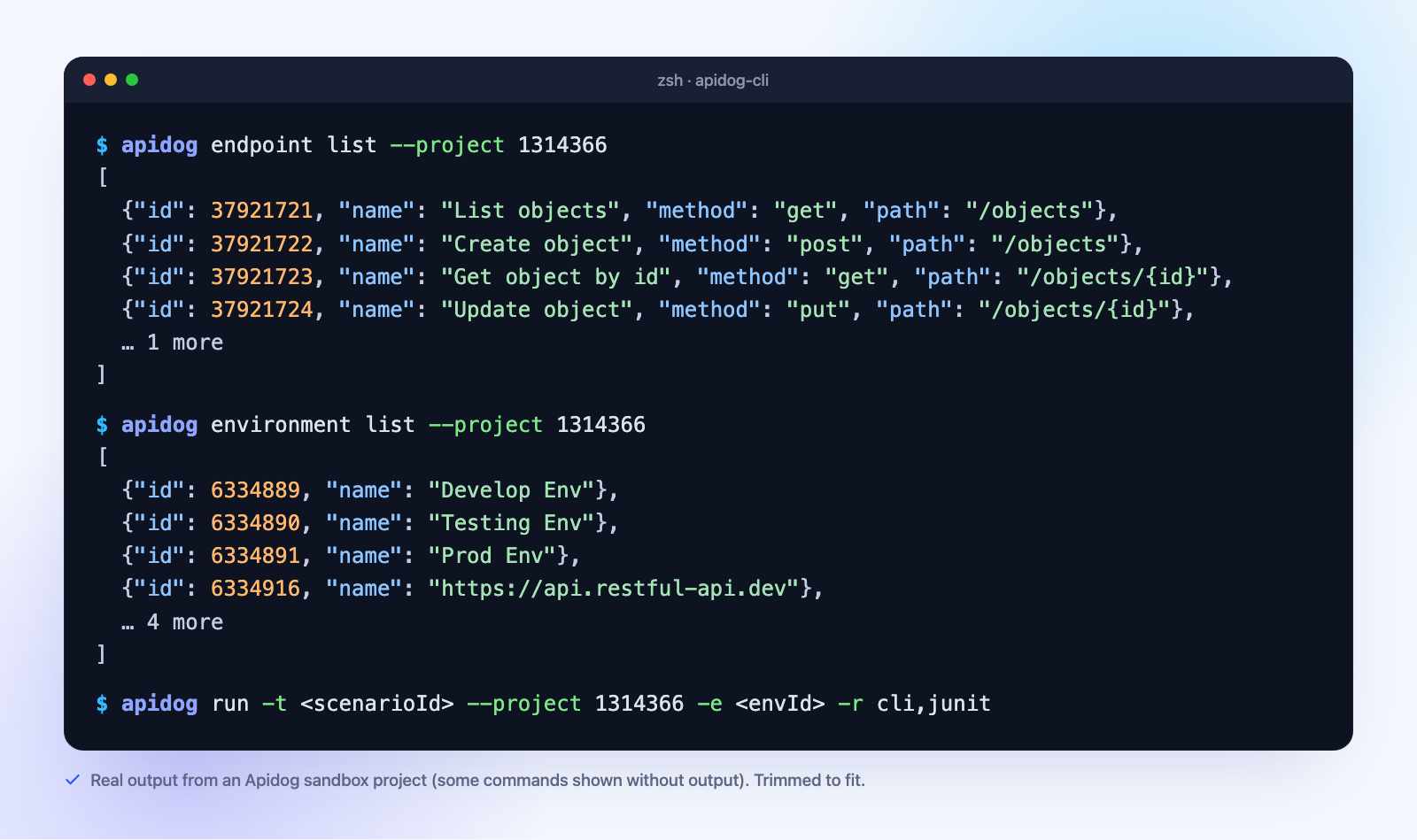
-r cli,junit prints results in the terminal and writes a JUnit file, so the same command can gate the signing job in your release pipeline. The Apidog CLI CI/CD guide shows the pipeline setup, and Apidog CLI in Claude Code covers the agent side. Apidog’s Free plan covers up to 4 users.
Once your agent runs these checks reliably, you can hand them out as tasks: Sharkly is a board where your team assigns work to coding agents like Claude Code or Codex running on your own computers, so release checks and the fixes they trigger get reviewed before they merge. It’s free to start.
A practical decision path
- Build the tool as an artifact and install it. That takes minutes, not a release pipeline.
- Use it for a week. Note each time someone needed it offline, on Linux, or without a Claude seat.
- Watch your usage limits. If the app’s Claude calls crowd out real work, it has outgrown the plan.
- If nothing on the “real build” list applies, keep the artifact. If something does, move the UI to Tauri or Electron, put an API you control behind it, and gate each signed release on an API test run.
FAQ
Can a Claude artifact app work offline? No. Anthropic’s announcement says you need to be online and signed in to Claude to open an installed app.
Do I need to sign or notarize a Claude artifact app? No. There’s no packaging or signing step and no API key, because the app runs inside Claude for Mac or Windows on your Claude account.
Can I give a Claude artifact app to customers? You can share it, but each person needs Claude for Mac or Windows, a signed-in account, and a plan where Install as app is available. Requests the app makes count toward their own usage limits. For customers, a packaged Electron or Tauri app is the safer route.
Is Tauri smaller than Electron? Usually. Tauri uses the system webview, and its docs say a minimal app can be under 600KB. Electron bundles Chromium and Node.js into every app.
What happens to permissions when I update an artifact app? Claude asks again. Permission covers only the current version, so every edit, including your own, triggers a new prompt. Parts loaded from another website can still change without one.