xAI shipped Grok 4.6 on August 12, 2026, and the pitch is aimed squarely at developers: a frontier-level model for long-running agents and multi-step coding work, priced at $2 per million input tokens and $6 per million output. The official docs cover the reference material, but nothing in the top search results walks you through actually calling the API end to end. This guide fixes that.
By the end, you’ll have an API key, a working request in curl, Python, and JavaScript, streaming output, and a repeatable setup for testing Grok 4.6 endpoints before they go anywhere near production. If you want to build and debug those requests visually instead of juggling terminal windows, Apidog handles the whole flow, download it free to follow along.
TL;DR
- Get an API key at console.x.ai, set it as
XAI_API_KEY, and callhttps://api.x.ai/v1/chat/completionswith modelgrok-4-6. - The API is OpenAI-compatible, so the official OpenAI SDKs work by swapping the base URL, no new client library to learn.
- Grok 4.6 gives you a 500,000-token context window and a knowledge cutoff of February 1, 2026.
- Pricing: $2 per million input tokens, $6 per million output. The faster variant costs twice as much.
- Besides the native API, Grok 4.6 is available through OpenRouter, Vercel, Cloudflare, Cursor, and Grok Build.
- Test requests, inspect streaming responses, and mock Grok endpoints for CI with Apidog.
What you’re working with
Before writing any code, here’s the spec sheet that matters for integration decisions:
| Spec | Grok 4.6 |
|---|---|
| Release date | August 12, 2026 |
| Context window | 500,000 tokens |
| Knowledge cutoff | February 1, 2026 |
| Input price | $2 / 1M tokens |
| Output price | $6 / 1M tokens |
| Fast variant | 2x price |
| API style | OpenAI-compatible REST |
| Availability | xAI API, OpenRouter, Vercel, Cloudflare, Cursor, Grok Build |
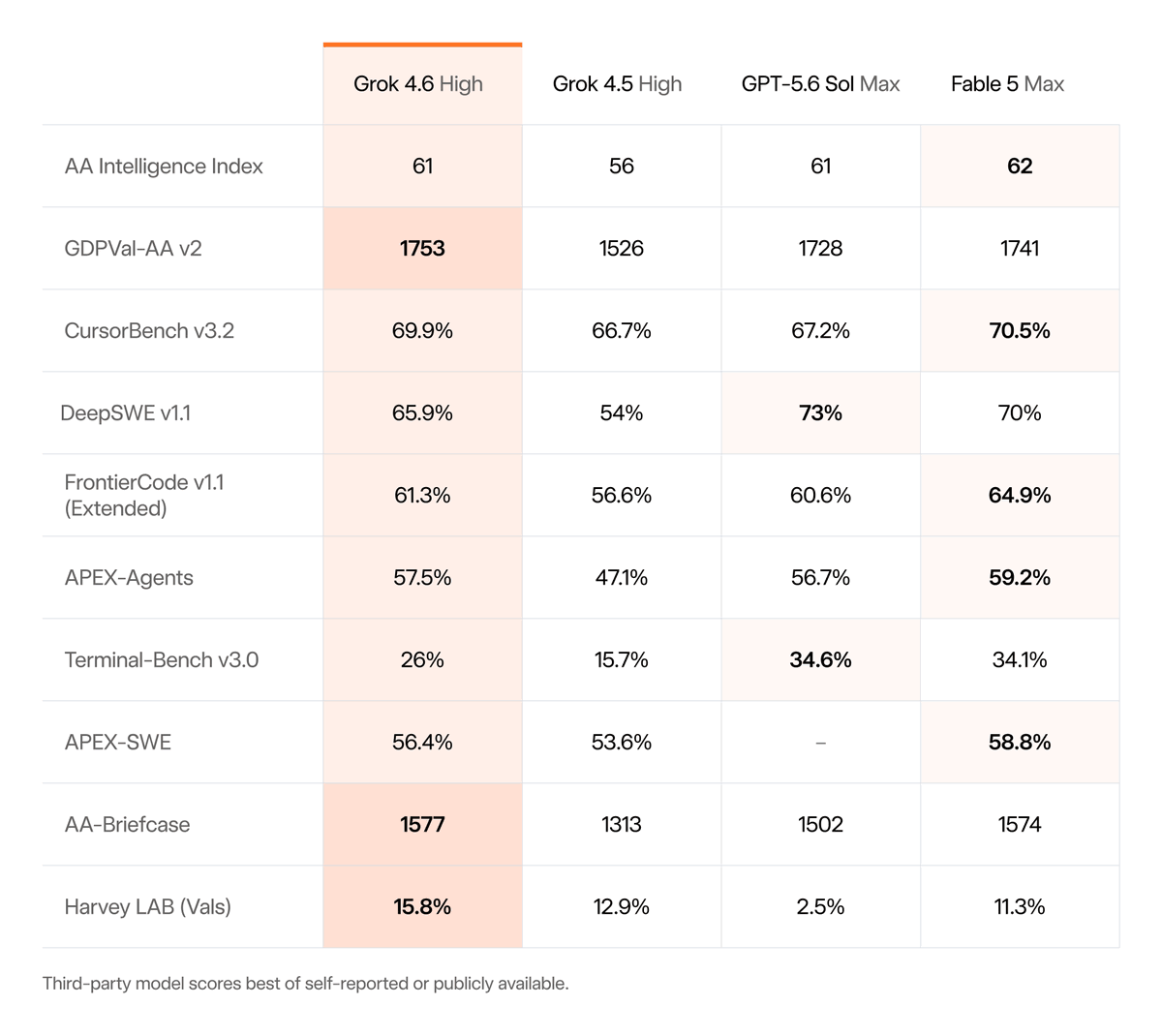
The headline improvements over Grok 4.5 are agentic: xAI reports the model checks its own work more often on long trajectories and produces stronger first passes on interactive and visual projects. On benchmarks, it jumped from 54% to 65.9% on DeepSWE v1.1 and from 47.1% to 57.5% on APEX-Agents. If you built against the Grok 4.5 API, the integration surface is unchanged, see our Grok 4.5 API guide for the baseline, then swap the model name.
Step 1: Get your API key
- Go to console.x.ai and sign in or create an xAI account.
- Open API Keys from the sidebar and click Create API key.
- Name the key for its environment (
grok-dev,grok-prod); you’ll thank yourself when rotating keys later. - Copy the key immediately. xAI shows it once.
Store it as an environment variable rather than pasting it into code:
export XAI_API_KEY="your-key-here"
One habit worth adopting on day one: keep separate keys for development and production, and never commit a key to version control. If a key leaks, revoke it in the console and issue a new one.
Step 2: Your first request with curl
The xAI API follows the OpenAI chat completions format. Here’s the minimal request:
curl https://api.x.ai/v1/chat/completions \
  -H "Content-Type: application/json" \
  -H "Authorization: Bearer $XAI_API_KEY" \
  -d '{
    "model": "grok-4-6",
    "messages": [
      {"role": "system", "content": "You are a concise technical assistant."},
      {"role": "user", "content": "Explain idempotency in REST APIs in two sentences."}
    ]
  }'
A successful response returns a choices array with the assistant message, plus a usage object counting input and output tokens. That usage block is your billing meter, log it from the start.
Tip: model IDs occasionally differ between the native API and resellers (OpenRouter lists it as x-ai/grok-4.6, for example). If you get a model not found error, list what your key can access:
curl https://api.x.ai/v1/models -H "Authorization: Bearer $XAI_API_KEY"
Step 3: Python and JavaScript
Because the API is OpenAI-compatible, the official OpenAI SDKs work with two changed lines: the base URL and the key.
Python:
from openai import OpenAI
import os

client = OpenAI(
    api_key=os.environ["XAI_API_KEY"],
    base_url="https://api.x.ai/v1",
)

response = client.chat.completions.create(
    model="grok-4-6",
    messages=[
        {"role": "system", "content": "You are a concise technical assistant."},
        {"role": "user", "content": "Write a Python function that validates an email address."},
    ],
)

print(response.choices[0].message.content)
print(response.usage)
JavaScript / TypeScript:
import OpenAI from "openai";

const client = new OpenAI({
  apiKey: process.env.XAI_API_KEY,
  baseURL: "https://api.x.ai/v1",
});

const response = await client.chat.completions.create({
  model: "grok-4-6",
  messages: [
    { role: "system", content: "You are a concise technical assistant." },
    { role: "user", content: "Write a TypeScript type guard for a User object." },
  ],
});

console.log(response.choices[0].message.content);
This compatibility also means migration in either direction is cheap. If you’re already running the GPT-5.6 API, you can A/B Grok 4.6 against it behind a single config flag.
Step 4: Streaming responses
For anything user-facing, stream. Grok 4.6 is tuned for long multi-step outputs, and making users stare at a spinner for a 2,000-token response is a bad trade.
stream = client.chat.completions.create(
    model="grok-4-6",
    messages=[{"role": "user", "content": "Refactor this function and explain each change: ..."}],
    stream=True,
)

for chunk in stream:
    delta = chunk.choices[0].delta.content
    if delta:
        print(delta, end="", flush=True)
Streaming responses arrive as server-sent events (SSE). They’re awkward to inspect in a terminal once you’re debugging, each chunk is a separate data: line, and malformed handling shows up as dropped tokens or stalled UIs. Apidog renders SSE streams in real time in its response panel, which makes it obvious whether a stall is the model thinking or your client buffering.
Step 5: Put the 500K context to work, carefully
A 500,000-token window fits an entire mid-sized codebase or several hundred pages of documents. Two cautions before you throw everything at it:
- Cost scales with input. At $2 per million input tokens, a full 500K-token prompt costs about $1 per request before the model writes a word. For repeated queries over the same corpus, cache aggressively or retrieve selectively instead of resending everything.
- Position matters. Like every long-context model, retrieval quality is strongest near the start and end of the prompt. Put instructions at the top and the question at the bottom; dump reference material in between.
The fast variant (2x price) is worth it for latency-sensitive paths like interactive coding assistants. For batch work, overnight analysis, bulk classification, the standard tier is the obvious choice. Full pricing math and comparisons with GPT-5.6 and Claude are in our Grok 4.5 pricing breakdown, which still applies structurally to 4.6.
Test the integration properly with Apidog
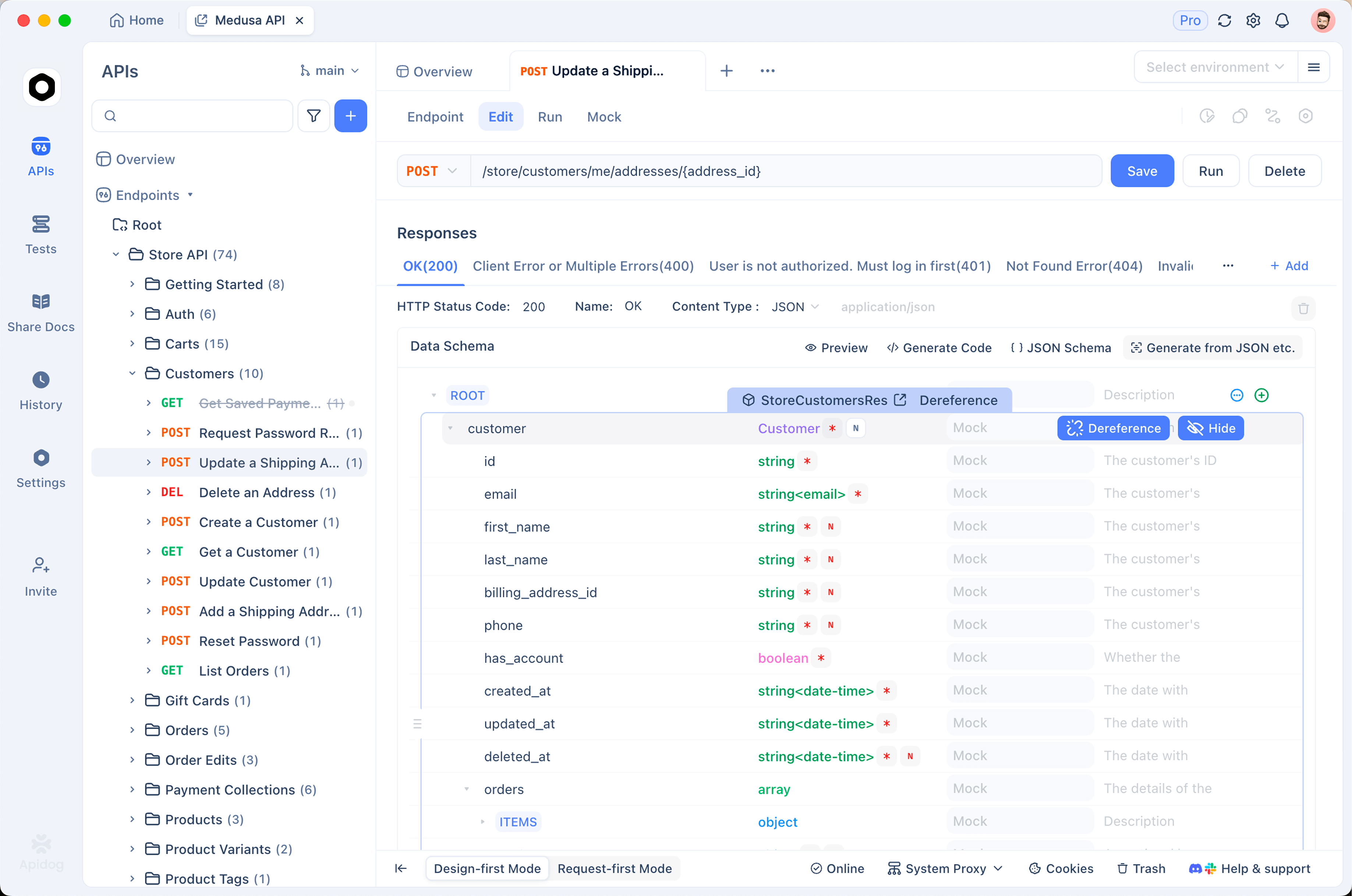
A working curl command is not an integration. Before Grok 4.6 touches production, you want a place where requests are versioned, environments are separated, and failures are reproducible. This is where Apidog earns its spot in the workflow:
- Create a project and add an environment with
base_url = https://api.x.ai/v1and yourXAI_API_KEYas an environment variable. Dev and prod keys stay cleanly separated. - Build the chat completions request once, with auth inherited from the environment. Every teammate now hits the same endpoint the same way.
- Inspect streaming visually. Apidog displays SSE chunks as they arrive, so you can watch token-by-token output and spot stalls or truncation immediately.
- Add assertions. Validate that
choices[0].message.contentis non-empty, thatusage.total_tokensstays under budget, and that response time meets your SLA, then run these as automated test scenarios in CI. - Mock the endpoint. Apidog’s smart mock returns realistic Grok-shaped responses, so frontend and agent code can develop against a stable fake while you iterate on prompts, without burning tokens.
That last point matters more than it sounds. Agent loops that call the model dozens of times per task get expensive to test against the live API. Mocking the happy path and testing the real thing separately keeps CI fast and your bill sane.
Common errors and quick fixes
| Error | Likely cause | Fix |
|---|---|---|
401 Unauthorized |
Missing or malformed Authorization header |
Check Bearer prefix and that the env var is set in the shell you’re using |
404 model not found |
Wrong model ID for your provider | List /v1/models; resellers use different IDs (e.g., x-ai/grok-4.6 on OpenRouter) |
429 Too Many Requests |
Rate limit or exhausted quota | Back off exponentially; check usage in console.x.ai |
| Truncated output | max_tokens set too low for a long agentic answer |
Raise the limit; Grok 4.6 is verbose on multi-step tasks by design |
| Stalled stream | Client buffering, proxy stripping SSE | Confirm stream: true, disable proxy buffering, test the raw stream in Apidog |
FAQ
Is the Grok 4.6 API OpenAI-compatible? Yes. The chat completions endpoint accepts the same request shape, and the official OpenAI SDKs work by pointing base_url at https://api.x.ai/v1.
How much does the Grok 4.6 API cost? $2 per million input tokens and $6 per million output tokens. The faster variant is double. There’s no separate charge for the 500K context, you pay for tokens you actually send.
Do I need a new integration if I’m on Grok 4.5? No. Swap the model name. The request format, auth, and endpoints are unchanged from Grok 4.5.
Can I use Grok 4.6 without an xAI account? Yes, through OpenRouter, Vercel AI Gateway, or Cloudflare, each with their own billing. The native API is typically the cheapest path at volume.