

OpenAI released GPT-5.6 to general availability on July 9, 2026, and API access is self-serve: any API account can call it today, with no waitlist and no plan gating. The limited preview that ran through early July is history. What changed for developers is the shape of the launch itself. Instead of one model, you get three: Sol, Terra, and Luna, each with its own price point, plus six reasoning effort levels and explicit prompt caching controls.
That is more decisions than a typical model swap, and the defaults you pick in week one tend to stick. This guide walks through the model IDs and when each one earns its spot, your first request in Python and curl, reasoning effort, caching setup, the new Responses API surface, and how to migrate from GPT-5.5 without surprises. If you want the full background on the flagship tier first, the GPT-5.6 Sol overview covers positioning and benchmarks; this piece stays hands-on.
By the end you will have working calls to all three tiers and a repeatable way to compare them on your own prompts in Apidog, so cost and quality decisions come from your data rather than the launch post.
TL;DR
- Three model IDs, one generation:
gpt-5.6-sol(deepest reasoning),gpt-5.6-terra(balanced),gpt-5.6-luna(fastest and cheapest). The bare aliasgpt-5.6routes to Sol. - API access is self-serve for any OpenAI API account. No gating remains.
- Pricing per 1M tokens: Sol $5 in / $30 out, Terra $2.50 / $15, Luna $1 / $6.
- Reasoning effort has six levels,
nonethroughmax. Pro mode is a setting (reasoning.mode: "pro") on all three models, not a separate model. - Explicit prompt caching arrived:
prompt_cache_options.mode: "explicit"plus attl. Writes bill at 1.25x, reads keep the 90% discount, and caches live at least 30 minutes. - Migrating from GPT-5.5 is a tuning pass: test one effort level lower and strip brevity directives from your prompts.
The three model IDs and when to pick each
GPT-5.6 breaks with OpenAI’s usual naming. The number is the generation; Sol, Terra, and Luna are durable capability tiers that will advance on their own cadence, as MarkTechPost’s launch coverage lays out. The tier you standardize on today keeps its meaning next generation.
| Model ID | Tier | Input / output per 1M tokens | Reach for it when |
|---|---|---|---|
gpt-5.6-sol |
Flagship | $5 / $30 | Deep reasoning, agent orchestration, hard debugging |
gpt-5.6-terra |
Balanced | $2.50 / $15 | Everyday product features, GPT-5.5-class work at lower cost |
gpt-5.6-luna |
Fast | $1 / $6 | Classification, extraction, routing, first-pass drafting |
Sol is the flagship. OpenAI reports it at roughly 53 on Agents’ Last Exam versus 46.9 for GPT-5.5, so treat that as a launch-day claim and verify on your own tasks. Terra is the pragmatic pick: OpenAI positions it as competitive with GPT-5.5 at roughly half the cost. Luna exists for high-volume, latency-sensitive work where you care about unit economics more than depth.
A sensible default: prototype on Terra, escalate to Sol only where Terra measurably fails, and push high-volume paths down to Luna once the prompt is stable. The GPT-5.6 pricing breakdown goes deeper on how these rates compare across generations and rivals.
One alias worth knowing: gpt-5.6 with no suffix routes to Sol. Pin the explicit tier IDs in production code so every call says exactly what it costs.
Your first request
The model IDs below match OpenAI’s developer docs verbatim. You need an OpenAI API key with billing enabled; nothing else.
Chat Completions works unchanged, so existing code needs only a model swap:
from openai import OpenAI

client = OpenAI()

response = client.chat.completions.create(
    model="gpt-5.6-sol",
    messages=[
        {"role": "system", "content": "You are a concise code reviewer."},
        {"role": "user", "content": "Review this for edge cases: def parse_price(raw): return float(raw.strip('$'))"}
    ]
)

print(response.choices[0].message.content)
The same call in curl:
curl https://api.openai.com/v1/chat/completions \
  -H "Content-Type: application/json" \
  -H "Authorization: Bearer $OPENAI_API_KEY" \
  -d '{
    "model": "gpt-5.6-sol",
    "messages": [
      {"role": "user", "content": "Explain idempotency keys in one paragraph."}
    ]
  }'
For new builds, target the Responses API instead. Every GA addition lives there, and it takes a reasoning block directly:
response = client.responses.create(
    model="gpt-5.6-terra",
    input="Summarize the trade-offs between webhooks and polling.",
    reasoning={"effort": "low"}
)

print(response.output_text)
Run the same prompt against all three tiers before you write another line of integration code. The differences in tone, length, and latency are easier to feel than to read about.
Choosing a reasoning effort
GPT-5.6 exposes six reasoning effort levels: none, low, medium, high, xhigh, and max.
none switches reasoning off. Use it when the task is mechanical and latency matters more than depth: reformatting, extraction against a clear schema, template filling. Luna at none behaves like a fast classical completion model, and that pairing is where its $1 input rate shines.
max sits at the other end. Reserve it for problems where a wrong answer costs more than a slow one: subtle concurrency bugs, architecture reviews, multi-step planning. Expect longer waits and a larger bill.
Most workloads land in the middle. Start at medium, move one level at a time, and measure quality before you accept the extra cost of going up. Moving down is often free: OpenAI’s own migration guidance says many GPT-5.5 workloads hold quality one level lower on GPT-5.6.
Pro mode is separate from effort. Set reasoning.mode: "pro" and the model prioritizes answer quality over speed. It works on all three tiers and it is a setting, not a different model ID, so there is no pro-specific slug to hunt for. Quality-first workloads such as legal summaries or incident postmortems are its lane. For the exact request shape and constraints, see OpenAI’s API reference.
Setting up prompt caching
GPT-5.6 adds explicit cache control. Set prompt_cache_options.mode to "explicit" and you decide what gets cached instead of relying on automatic prefix detection:
response = client.responses.create(
    model="gpt-5.6-luna",
    input=[
        {"role": "system", "content": SUPPORT_PLAYBOOK},
        {"role": "user", "content": ticket_text}
    ],
    prompt_cache_options={"mode": "explicit"}
)
A ttl field on the same options object sets how long the cached prefix stays warm; whatever you request, the floor is 30 minutes. Accepted ttl values and breakpoint placement rules are in OpenAI’s API reference.
The economics are simple. Cache writes bill at 1.25x the uncached input rate. Cache reads keep the 90% discount. So caching pays from the second hit: two uncached passes over a prefix cost 2.0x its token price, while one write plus one read costs 1.35x.
A worked example. Say a support bot sends a 40,000-token playbook on every Luna call. Uncached, that prefix costs $0.04 per call at Luna’s $1 per 1M input rate. With explicit caching, the first call writes for $0.05, and each read inside the ttl costs $0.004. Across a 100-call burst that is $0.45 instead of $4.00, roughly 89% off the static part of your bill. The 30-minute minimum life means bursty traffic with gaps under half an hour keeps hitting cheap reads too.
The rule of thumb: any prompt with a large static prefix that gets reused at least twice inside the ttl should run in explicit mode.
What’s new in the Responses API at GA
Three additions shipped with GA, all in the Responses API:
- Programmatic tool calling. Instead of the round-trip dance where the model emits one tool call, waits for your result, then emits the next, the model writes JavaScript that orchestrates your tools. That code runs in an isolated V8 runtime with no network access, so it can loop, branch, and combine tool results without your server shuttling messages back and forth.
- Multi-agent, in beta. A request can fan work out to subagents that execute in parallel, useful when a task splits into independent pieces.
- Persisted reasoning. Reasoning context carries across turns via
reasoning.context, so a multi-turn agent does not rebuild its chain of thought from zero on every call.
There are also new vision detail settings, original and auto, that preserve original image dimensions. Request shapes and parameters for all of these live in OpenAI’s API reference; the mechanisms above are what to design around.
Migrating from GPT-5.5
OpenAI’s guidance is blunt: treat migration as a tuning pass, not only a model-slug change. If your integration follows the workflow in our GPT-5.5 API guide, three adjustments matter.
First, test your current reasoning effort and one level lower. GPT-5.6 often holds quality a step down, which is a direct cost cut on the same traffic.
Second, expect shorter answers. GPT-5.6 writes notably tighter output with fewer generic intros. If your prompts carry directives like “be concise” or “skip the preamble”, remove them and re-test, because stacked brevity instructions can now overshoot. Simon Willison’s launch-day write-up is a useful independent read on how the family behaves in practice.
Third, watch cached-token usage in your responses while you tune, and benchmark a representative task set before flipping production traffic. Comparable output on Terra at half of GPT-5.5’s price is the outcome worth checking for first.
Testing the API in Apidog
Curl proves the endpoint works. Choosing between three tiers needs something repeatable. Download Apidog and set up a small comparison rig:
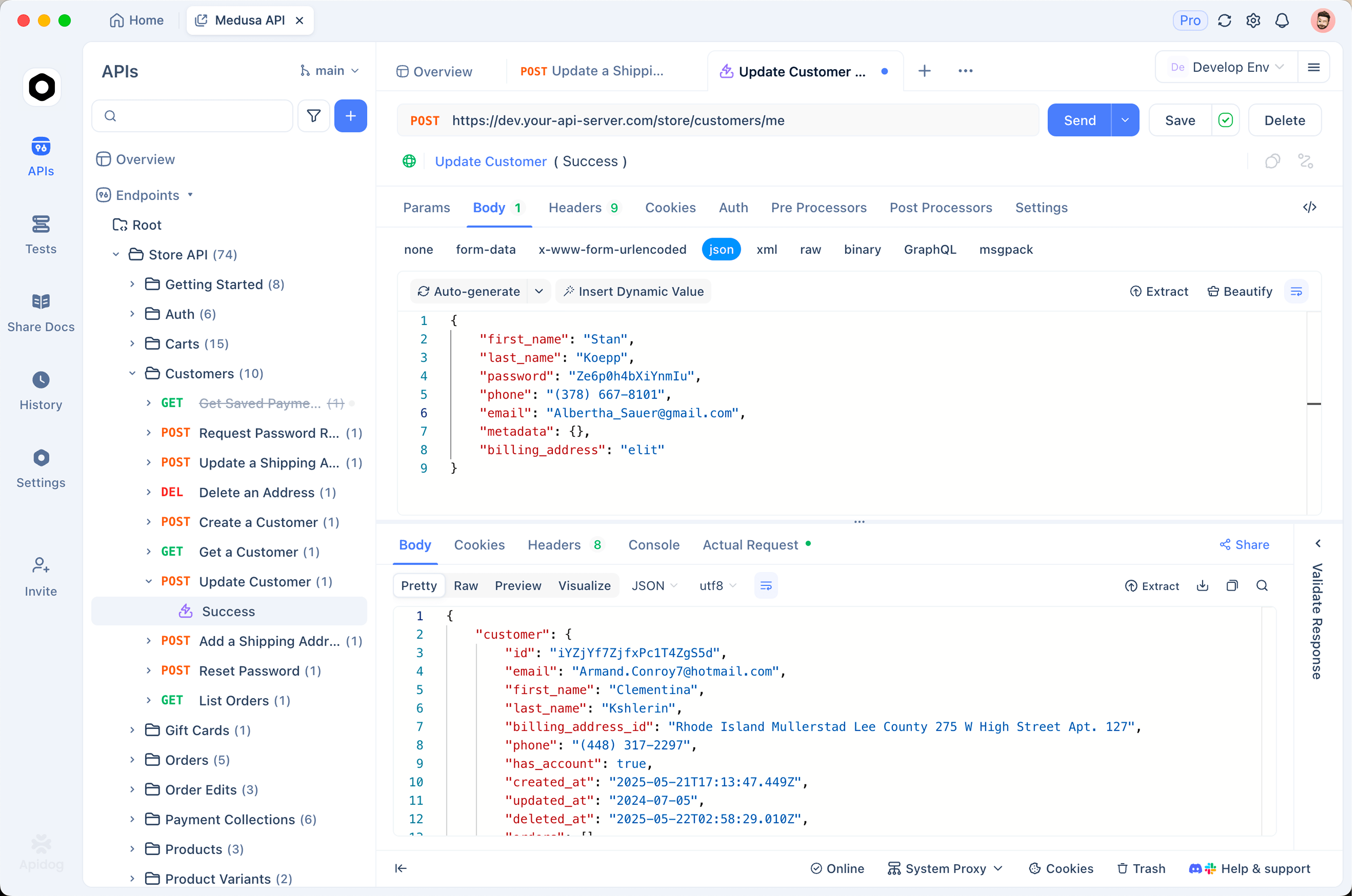
- Create an environment with your
OPENAI_API_KEYplus three variables:MODEL_SOL=gpt-5.6-sol,MODEL_TERRA=gpt-5.6-terra,MODEL_LUNA=gpt-5.6-luna. - Build one POST request to the API and reference
{{MODEL_SOL}}in the body, then duplicate it twice and swap in the other variables. - Send the same production-shaped prompt through all three and read the answers side by side.
- Check the usage block in each response. Multiply the token counts by each tier’s rate and you get a per-request cost projection grounded in your own prompts, not someone else’s benchmark.
The same rig earns its keep during effort tuning. Change the effort level on one saved request, re-send, and watch output tokens move; that number times the per-token rate is your quality-versus-cost curve, made visible one request at a time.
FAQ
Is the GPT-5.6 API available to everyone?
Yes. Since July 9, 2026, any OpenAI API account can call all three models self-serve. The pre-launch preview restriction was lifted before GA, and API access does not depend on your ChatGPT plan. Plan tiers only shape the chat product, where Free and Go users get Terra and paid plans unlock the full model picker.
What are GPT-5.6’s context window and knowledge cutoff?
Per early documentation coverage, the family carries a 1M-token context window, 128K max output, and a knowledge cutoff of February 16, 2026. OpenAI’s model page is the source of record; treat these as reported figures until you confirm them for your account.
What is the difference between pro mode and ultra?
Pro mode is an API setting (reasoning.mode: "pro") that works on all three models and trades speed for answer quality. Ultra is a multi-agent setting that runs four agents in parallel by default, and it lives in ChatGPT Work on Pro and Enterprise plans plus Codex from Plus upward. The GPT-5.6 ultra mode breakdown covers when the deliberate extra token spend is worth it.
Should I build on Chat Completions or the Responses API?
Existing Chat Completions code keeps working with a model-ID swap, so there is no forced rewrite. New builds should target the Responses API: programmatic tool calling, multi-agent, and persisted reasoning all shipped there, and OpenAI’s GPT-5.6 documentation centers on it.
Where this leaves you
You do not need a migration project to start. Pick Terra, run one real prompt from your product through it at medium effort, then move one level down and compare. Wire explicit caching if your prompts share a large static prefix; the 89% saving in the example above is typical of what a big system prompt gives back. Only then decide where Sol and Luna belong in your stack.
Keep the three-tier comparison rig around, too. Sol, Terra, and Luna will advance on their own cadences, so the next release is a re-run of saved requests rather than a research project. Apidog holds those requests, environments, and token counts in one place, which turns every future model launch into an afternoon of testing instead of a guess.


