
Your frontend team is blocked. The design is signed off, the screens are half-built, and the one thing standing in the way is an API that doesn’t exist yet. The backend is still a sprint out, so the UI has nothing real to call. The usual stopgap is a local mock, and it works right up until the moment you close your laptop. Then the endpoint your teammate in another time zone was hitting goes dark.
That’s the gap Apidog closes with Cloud Mock. Instead of a mock that lives and dies on one machine, you get a public URL hosted at mock.apidog.com that stays up around the clock. Frontend, QA, and partner developers can all hit realistic endpoints before a single line of backend code ships. If you want the broader picture of what mocking buys a team first, our primer on what an API mock is and when to use one sets the stage. For the mechanics of how a public mock URL fits into request handling, the MDN reference on the HTTP request/response model is a solid refresher.
What Cloud Mock is and why local mocks fall short
Apidog generates a mock endpoint for every API you design. By default that mock is a local mock: it runs off your Apidog instance and responds while your machine is on. The moment you shut down, the endpoint stops answering. That’s fine for solo debugging. It falls apart the instant someone else depends on the URL.
Cloud Mock is the fix. It’s a continuously available mock endpoint that persists independently of any individual machine. Your teammates’ computers can be asleep, your laptop can be in a bag, and the cloud mock keeps answering requests 24/7. The endpoint lives on Apidog’s hosted service, so availability isn’t tied to who’s online.
The practical payoff is a clean handoff. You design the contract, flip Cloud Mock on, and share one URL. The frontend builds against realistic data, QA writes test cases against real response shapes, and a partner integrating with you can start wiring their client immediately. Nobody waits on the backend, and nobody waits on you to keep a process running. If you’re coordinating this across regions, the patterns in sharing mock servers and environments with global teams go deeper on the workflow.
Enable Cloud Mock and get your public URL
Let’s walk through it with a realistic API. Say you’re building a users service with a GET /users endpoint that returns a list of customer records. Here’s how you turn that into a shareable cloud endpoint.
Step 1: turn on Cloud Mock
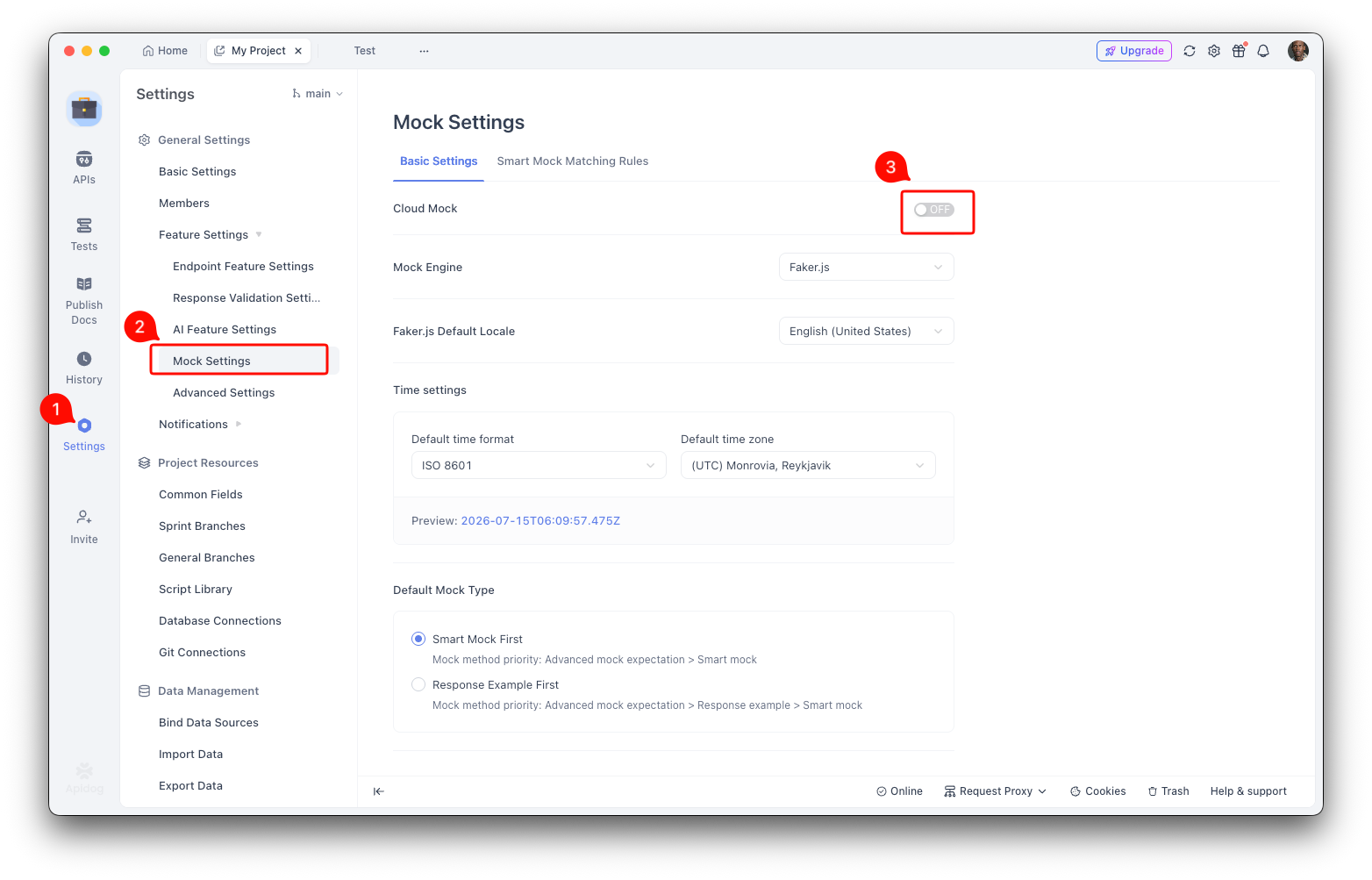
Open your project and go to Project Settings > Feature Settings > Mock Settings. Toggle on Cloud Mock. That’s the switch that tells Apidog to host your mocks on its always-on service instead of only serving them locally.
You only do this once per project. After it’s on, every endpoint in the project gets a cloud mock URL alongside its local one.
Step 2: copy the cloud mock URL
Open the endpoint you want to share, GET /users in this case. Go to its Mock tab and copy the Cloud Mock URL. You’ll get something shaped like this:
https://mock.apidog.com/m1/2689726-0-default/users?apidogToken=GdfNrEm6lxM9nDGGIMCWC1OPSiZ6hGOi
The path structure follows a pattern: mock.apidog.com/m1/<projectId>-<num>-<env>/<path>. Apidog builds it for you, so you don’t assemble it by hand. Note that the docs show this by example rather than publishing a fixed template, so treat the copied URL as the source of truth rather than trying to construct one yourself.
Step 3: test the mock instantly inside Apidog
Before you hand the URL to anyone, confirm it returns what you expect. On the same Mock tab, send a test request against the mock URL. Apidog fires the request and shows you the response right there. You get an instant read on whether the generated data looks right.
A GET /users mock might come back like this:
[
  {
    "id": 1,
    "name": "Amelia Turner",
    "email": "amelia.turner@example.com",
    "city": "Portland"
  },
  {
    "id": 2,
    "name": "Marcus Bell",
    "email": "marcus.bell@example.com",
    "city": "Austin"
  }
]
Those values aren’t hard-coded. Apidog reads your schema’s field names and types and generates plausible data to match, which is what makes the mock useful to a frontend rendering a real-looking table.
Step 4: open the URL in a browser
For a GET request, the cloud mock URL works straight in a web browser. Paste it into the address bar and you’ll see the JSON response. This is the fastest sanity check you can hand a non-technical stakeholder: no client, no curl, only a link that returns data.
For anything beyond a quick look, your frontend calls it like any other endpoint:
curl "https://mock.apidog.com/m1/2689726-0-default/users?apidogToken=GdfNrEm6lxM9nDGGIMCWC1OPSiZ6hGOi"
That’s the whole loop. Design the endpoint, enable Cloud Mock, copy the URL, and your team is unblocked.
Lock the mock down with token authentication
A public URL is convenient, and sometimes too convenient. If your mock reflects an unreleased feature or a partner integration you’d rather not expose, you can gate it.
Go to Project Settings > Feature Settings > Mock Settings and set access permission to Token Authentication. Once that’s on, every request must carry a valid apidogToken, and requests without it get rejected. You can supply the token three ways:
As a URL query-string parameter, which is what the copied URL already uses:
curl "https://mock.apidog.com/m1/2689726-0-default/users?apidogToken=GdfNrEm6lxM9nDGGIMCWC1OPSiZ6hGOi"
As a request header, which keeps the token out of the URL and out of server logs:
curl "https://mock.apidog.com/m1/2689726-0-default/users" \
  -H "apidogToken: GdfNrEm6lxM9nDGGIMCWC1OPSiZ6hGOi"
Or as a body parameter named apidogToken in a form-data or x-www-form-urlencoded request, which suits clients that post form bodies.
For frontend code, the header approach is usually cleanest. It keeps the token out of anything that logs full URLs, and it separates the credential from the resource path:
const res = await fetch(
  "https://mock.apidog.com/m1/2689726-0-default/users",
  { headers: { apidogToken: "GdfNrEm6lxM9nDGGIMCWC1OPSiZ6hGOi" } }
);
const users = await res.json();
One thing to plan for: if you enable Token Authentication after already sharing a plain URL, every consumer needs to add the token or their calls start failing. Coordinate the switch so QA and partners aren’t left staring at rejected requests.
Generate realistic, region-aware data with locales
A mock that returns "name": "string" for every record teaches your UI nothing. A mock that returns real-looking names, addresses, and phone numbers lets the frontend catch layout bugs, text overflow, and formatting issues before real data ever arrives. Apidog handles this with Faker.js under the hood, and the locale controls are where it gets genuinely useful for international products.
How the default locale works
By default, Faker follows your project’s language setting. That’s configured in Project Settings > Basic Settings, and whatever language you pick there becomes the default locale for all generated mock values. Set the project to French and your mock names and addresses come back French-flavored without any per-field work.
Override the locale for the whole project
If you want mock data in a specific locale that differs from the project language, you can override it. Go to Project Settings > Feature Settings > Mock Settings and pick a Faker locale from the dropdown. That override wins over the Basic Settings language default for every field in the project.
This is handy when you’re testing internationalization. Point the project locale at Japan and every generated address, name, and phone number reflects that region, so you can see how your UI holds up against non-Latin scripts and different address formats. Auto-generating this kind of schema-aware data is a topic in its own right, and the walkthrough on Apidog’s smart mock and how it reads your schema covers the generation side in detail.
Override the locale field by field
Sometimes you need one field in a different locale than the rest, say a customer list that mixes regions. You can set the locale right in the mock expression using the locale parameter:
{{$person.fullName(locale='ja')}}
That outputs Japanese names like 田中 太郎 for that field only, while the rest of the response follows the project locale. The precedence runs in three tiers: a field-level locale overrides the project-level locale, which overrides the Basic Settings language default. So you set a sensible project default and only reach for field-level overrides where you actually need the exception.
A quick honest note on scope: the docs show ja as the worked example and don’t publish a full list of supported locales, so confirm the exact code for your target region in the Apidog mock documentation before you rely on it. Faker’s own conventions are documented at the Faker.js locale reference.
Match the time zone too
There’s a parallel control for time. A project-level default lives in Project Settings > Feature Settings > Mock Settings, and you can override per field with the timeZone parameter inside a mock expression. If your UI renders timestamps, this keeps generated createdAt values consistent with the region you’re simulating rather than defaulting to wherever your server sits.
Between locale and time zone controls, you can stand up a mock that convincingly imitates a Japanese user base, a German one, or a mixed international cohort, all from the same endpoint schema. For the wider set of scenarios this unlocks, the roundup of practical API mocking use cases is worth a look.
Cloud Mock versus a self-hosted mock
Cloud Mock is Apidog’s hosted option, and it covers most teams. If your organization has data-residency rules or a policy against routing test traffic through a vendor’s cloud, Apidog also supports running the mock service on your own infrastructure. The trade-off is straightforward: the cloud option is zero-setup and always on, while self-hosting gives you control at the cost of running the service yourself. If that’s your situation, the guide to self-hosting the Apidog mock server walks through it. For teams weighing hosted options side by side, the comparison of online API mocking tools lays out the landscape.
On plan gating, one straight answer: the Cloud Mock and locale features documented here don’t state a specific plan requirement, so the honest move is to check current availability in your own account rather than take a number from a blog post. You can Download Apidog and try the flow end to end to see exactly what your workspace includes.
Automate the workflow with the Apidog CLI
Mocking in Apidog is a GUI and cloud capability. The mock responses are generated automatically from your endpoint schema, and served by Apidog’s hosted engine, not by anything you run in a terminal. So the honest framing is this: the Apidog CLI doesn’t start or serve a mock server. What it does is keep the inputs to your mock accurate.
The CLI and AI coding agents like Cursor or Claude Code can create and update the endpoints and schemas in your project. Because the cloud mock reads those schemas to generate data, keeping the spec current keeps the mock output honest as the API evolves. When you use an agentic tool to add a field, the mock reflects it without a manual edit.
Then, once the mock has unblocked frontend work and the real backend lands, the same project’s test scenarios run headlessly against it. The CLI’s execution command validates the live backend against the same contract the mock described:
apidog run -t <scenario_id> -e <env_id> -r cli
That single command runs a saved test scenario against an environment and reports results, so the mock that unblocked the UI and the tests that verify the backend both trace to one source of truth. Open your scenario in Apidog and copy the generated command with the -t scenario ID and -e environment ID already filled in, rather than assembling flags by hand. Wiring that into a pipeline is covered in the guide to running Apidog in a CI/CD pipeline.
FAQ
Does the cloud mock URL keep working when I close Apidog?
Yes, that’s the entire point of Cloud Mock. Unlike a local mock, which stops responding when the hosting machine shuts down, the cloud mock is served from Apidog’s infrastructure and stays available 24/7. Your teammates can hit it regardless of whether your computer is on.
Can I use the cloud mock URL directly in a browser?
For GET requests, yes. Paste the full URL, including the apidogToken query parameter, into your address bar and you’ll see the JSON response. For other methods or for keeping the token out of your URL history, call it with a tool like curl or your frontend client and pass the token as a header instead.
What happens to requests that don’t include the token?
If you’ve set access permission to Token Authentication, any request without a valid apidogToken is rejected. Supply it as a query-string parameter, a request header, or a body parameter in a form request. If you enable token auth after sharing a plain URL, tell your consumers so they can add the token before their calls start failing.
How do I get mock data that matches a specific country?
Set your project locale in Basic Settings, or override it for the whole project under Feature Settings > Mock Settings, or override a single field with the locale parameter in the mock expression, such as {{$person.fullName(locale='ja')}}. Field-level beats project-level, which beats the Basic Settings default. The smart mock walkthrough shows how schema-aware generation ties into this.
Should I use Cloud Mock or a headless mock tool?
Cloud Mock suits teams that want a hosted, zero-maintenance endpoint tied to their API design. If you need mocks embedded in an automated build with no GUI at all, the survey of headless mock tooling compares the options and where each one fits. The OpenAPI Initiative spec underpins most of these tools, so a clean spec pays off whichever route you pick.
Wrapping up
A mock that only lives on your laptop unblocks exactly one person. Cloud Mock turns it into a public mock.apidog.com URL your whole team can build against, with token auth when you need to gate it and locale controls when your data needs to look real for a specific region. Design the endpoint, flip the toggle, share the link, and the frontend stops waiting on the backend. Download Apidog to set up your first shareable cloud mock, free and no credit card required.