Your frontend team is blocked. The backend for GET /users and GET /orders isn’t ready, but the UI needs realistic data to render lists, paginate, and handle empty states. The old fix is to hand-write a fake JSON file and serve it, then keep patching it every time a field changes. That work is dull, and it drifts out of sync with the real API almost immediately.
There’s a faster path. If you already have an API specification, Apidog can generate a working mock straight from the endpoint schema, with no configuration and no code. This feature is called Smart Mock, and it reads your field names and types to produce data that looks real: a name field returns a plausible name, an email field returns a plausible email. This guide walks you through mocking two e-commerce endpoints end to end, shows you where the mock URL lives, explains the priority order that decides which response wins, and covers what to do when Smart Mock guesses wrong. If you want a wider primer on the concept first, our overview of what API mocking is and how it works sets the stage, and the JSON Schema site explains the constraint model Smart Mock respects.
What Smart Mock does and why it saves you time
Apidog’s mock engine can do five things, per the docs. It can return automatically generated data from your API spec, which is Smart Mock. It can return the response example you defined in the spec. It can return a specified custom response. It can return different responses based on request parameters, which is conditional mocking. And it can return responses whose values relate to the request through mock scripts.
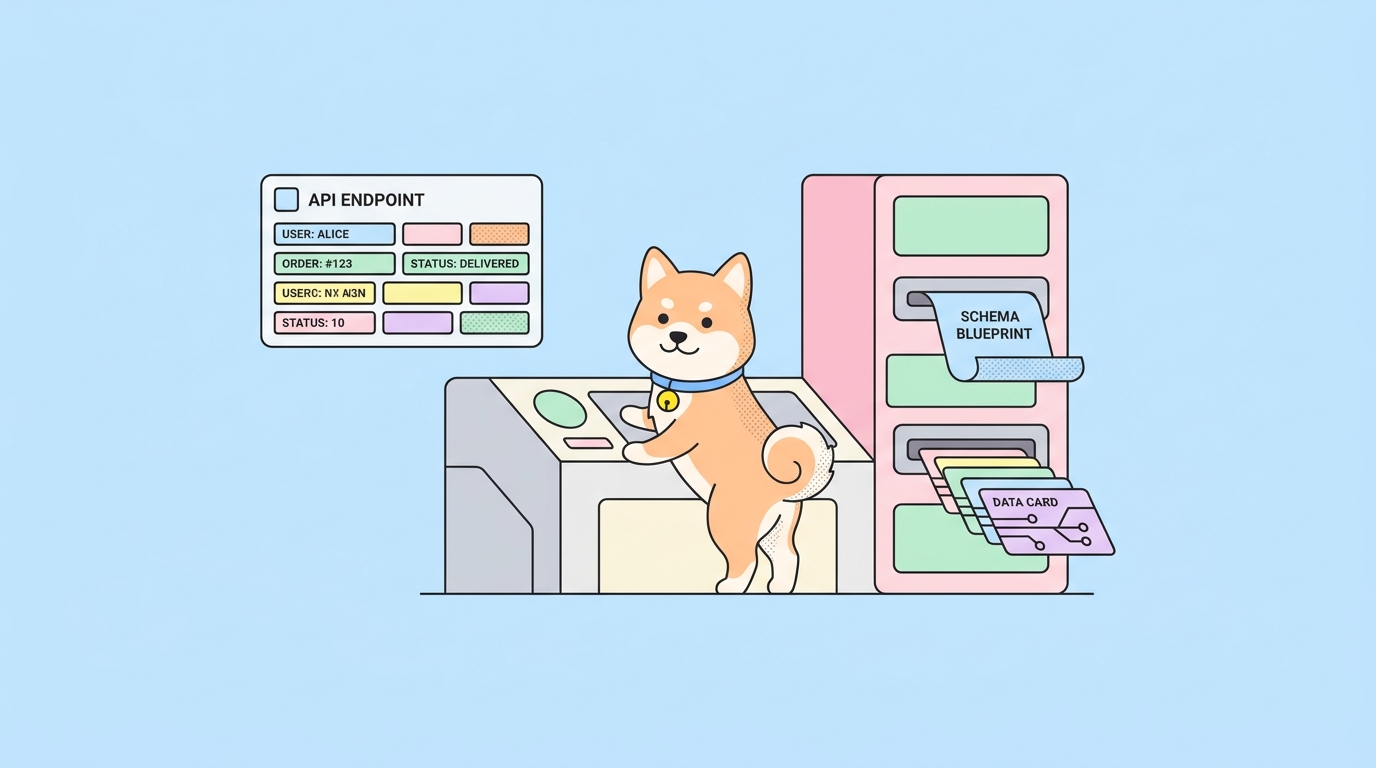
Smart Mock is the zero-config member of that family, and it’s built into Apidog alongside the design, debug, and test tools. You don’t define example bodies, and you don’t write rules. As long as an endpoint has a specified response schema, Smart Mock reads that schema and fills every field with realistic values. It acts as an automatic fallback: any endpoint that lacks a predefined example still returns something sensible, so no request comes back empty.
For a blocked frontend, that’s the whole game. You import or design your API once, and every endpoint becomes a live mock the same minute. When the schema changes, the mock changes with it, because both read from one source.
Before you start: the one requirement
Smart Mock needs a specified response on the endpoint. That’s the single prerequisite. If you designed the API in Apidog, add a response schema under the endpoint’s response definition. If you imported an OpenAPI file, the response schemas usually come along with it. Without a defined response, there’s nothing for the engine to read, and the mock returns nothing useful.
You’ll also want the Apidog desktop client if you plan to use Local Mock, since it runs on your own machine and isn’t available in Apidog Web. Download Apidog to follow along. It’s free, and no credit card is required.
Step-by-step: mock GET /users and GET /orders
Let’s build a mock for a small store API. We’ll define two endpoints and call both.
Step 1: define the endpoints and their response schemas
Create GET /users with a response body like this:
{
  "id": 1024,
  "name": "Amara Osei",
  "email": "amara.osei@example.com",
  "phone": "+1-415-555-0148",
  "createdAt": "2026-03-11T09:24:00Z",
  "isActive": true
}
Then create GET /orders, returning a list:
[
  {
    "orderId": "ORD-58210",
    "userId": 1024,
    "total": 84.50,
    "currency": "USD",
    "status": "shipped",
    "createdAt": "2026-05-02T14:03:00Z"
  }
]
Make sure each property has a type in the schema. Types and names are what Smart Mock uses to pick good values.
Step 2: find and copy the mock URL
Every endpoint gets a mock URL automatically. Where you find it depends on the mode you’re in:
- In DESIGN mode, the mock URL sits in the API tab under the endpoint.
- In DEBUG mode, it sits in the Mock tab.
Click Click to copy to grab it. One thing to note: this copies the URL only. If your endpoint uses a method other than GET, or needs a request body, you add the method and body yourself when you call it.
A Local Mock URL runs on 127.0.0.1 port 4523 and looks like this in path mode:
http://127.0.0.1:4523/m1/{projectID}-{versionNo}-{serverNo}/users
Local Mock starts automatically while the Apidog client is open. There’s also an ID-mode form that targets an endpoint by its ID:
http://127.0.0.1:4523/m2/{projectID}-{versionNo}-{serverNo}/{endpointId}
Step 3: call the mock
Hit the URL with curl:
curl http://127.0.0.1:4523/m1/1234567-0-0/users
You get back something like this, generated from your schema:
{
  "id": 3187,
  "name": "Diego Marchetti",
  "email": "diego.marchetti@example.net",
  "phone": "+1-628-555-0113",
  "createdAt": "2026-01-27T18:41:22Z",
  "isActive": true
}
Notice the name reads like a name and the email reads like an email. That’s Property Name Matching at work, not random noise. Refresh the request and the dynamic values regenerate, so each call gives you fresh data. That’s useful for testing how your UI handles varied content.
Call the orders endpoint the same way:
curl http://127.0.0.1:4523/m1/1234567-0-0/orders
You get an array of order objects with realistic totals, statuses, and timestamps, ready for your order list view.
How Smart Mock decides each value
When Smart Mock fills a single property, it works through a three-tier data-generation priority. Understanding this order tells you exactly how to steer the output.
- Mock Field. If you set a custom value or expression on the property in the response spec, that wins. The Mock Field takes two input types: a Fixed value, which is a static value returned every time, and a Faker statement, which is a dynamic expression that produces varied data. For example, set a
statusfield’s Mock Field to a Faker statement that picks fromshipped,pending, anddelivered. - Property Name Matching. With no Mock Field set, Smart Mock matches the property name against built-in rules using wildcard or regular-expression patterns, then generates data that fits. This is why
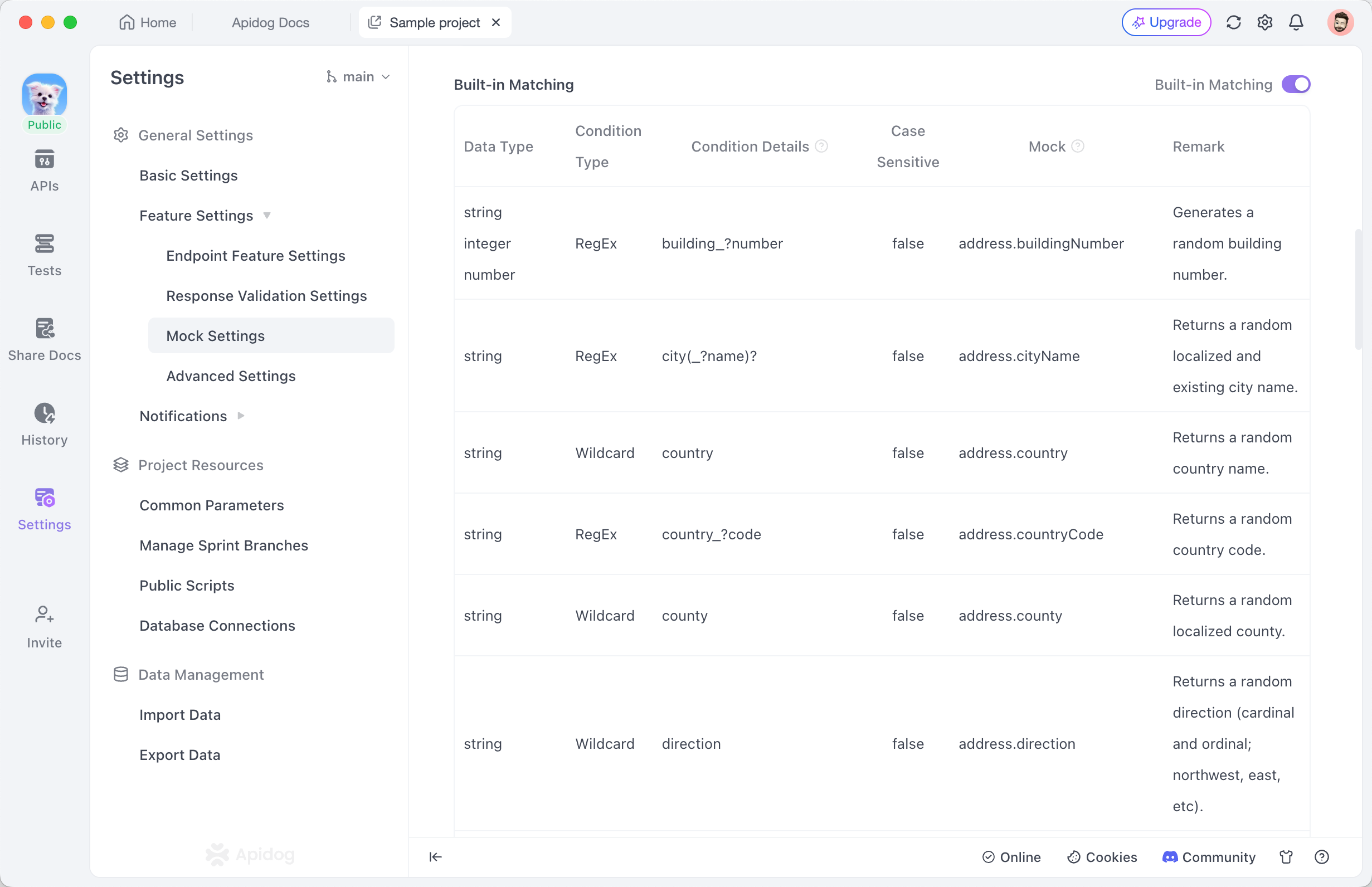
emailandcreatedAtcome out right. The rules live under Mock Settings, and you can add your own. - JSON Schema. If the name matches no rule, Smart Mock falls back to a type-based default constrained by your schema. A string with no matching name and no constraints just gets a generic string.
Generated data respects your JSON Schema constraints throughout: string length, enum values, number ranges, and array length are all honored. If you set status as an enum of three values, Smart Mock only ever returns one of those three. If you set an array’s minItems to 3, you get at least three items back. Every property setting shows up in the final mock data.
Apidog also supports mock locales, so you can generate test data in different languages and regional formats. If your store serves a Japanese market, switch the locale and names and addresses come back in the right format.
When Smart Mock guesses wrong, and how to nudge it
Smart Mock is inference, so sometimes it misses. A property named sku might not match any built-in rule and fall back to a generic string. A total might come back as a plain number when you wanted two decimal places and a sensible range. Here’s how to correct it, from lightest touch to most control.
Tighten the schema first. Often the fix is a better constraint. Add an enum to status, a minimum and maximum to total, or a pattern to sku. Smart Mock respects all of these, so the output snaps into range without any custom values.
Set a Mock Field. When the schema alone can’t express what you want, set the property’s Mock Field. Use a Fixed value when the field should always return the same thing, like a currency of USD. Use a Faker statement when you want variety within bounds. Apidog’s Faker layer builds on the same ideas as the Mock.js library, and our guide to using Faker in Apidog covers the expression syntax in depth.
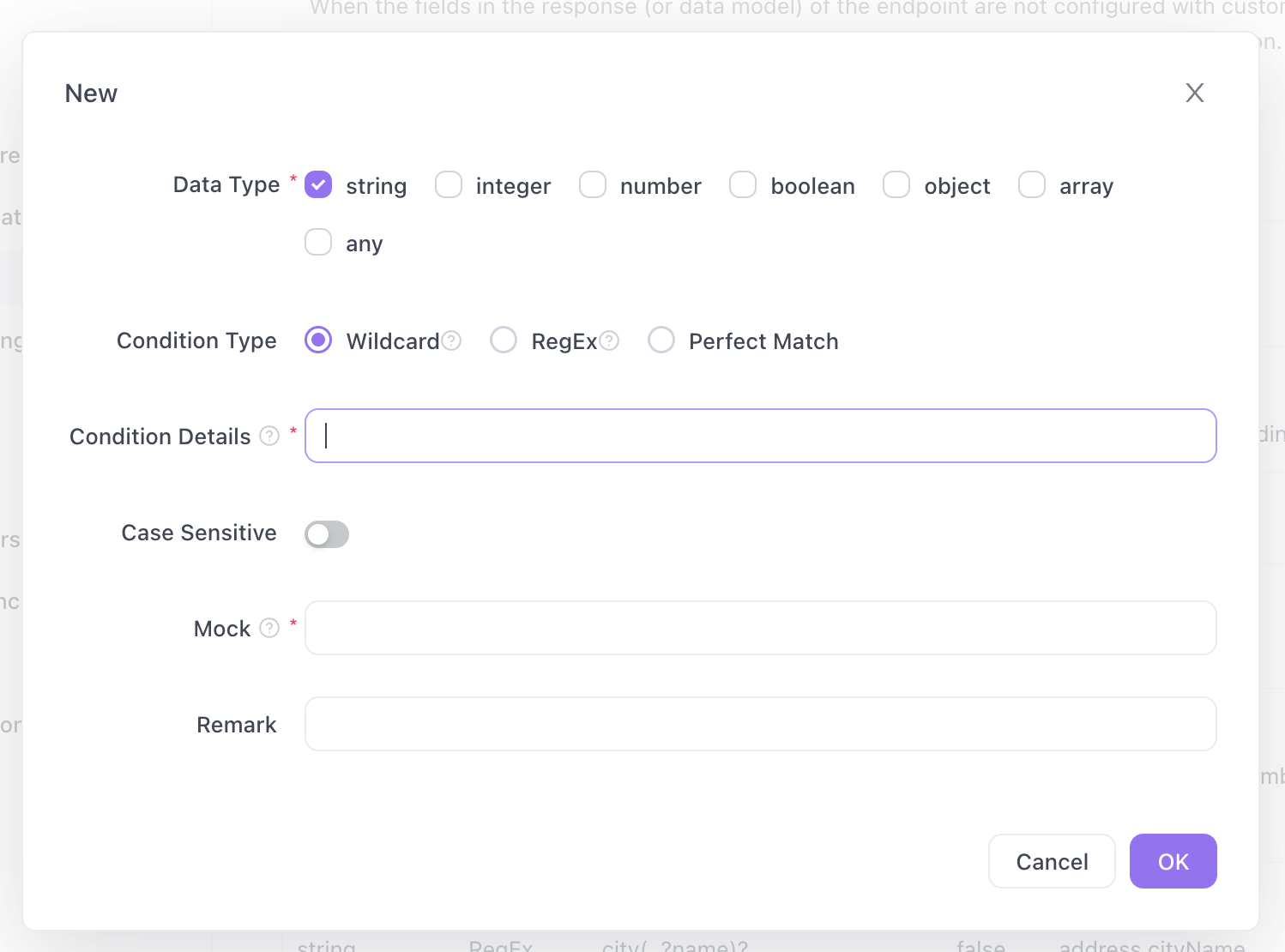
Add a Property Name Matching rule. If the same misnamed field shows up across many endpoints, teach Smart Mock once. Go to Settings, then General Settings, then Feature Settings, then Mock Settings. Click New, define the condition that matches your field name, and give it a mock expression. From then on, every sku across the project generates the pattern you defined instead of a generic string.
The mock priority sequence: what actually wins
A common source of confusion is which response an endpoint returns when several are possible. Apidog resolves this with the Default mock method setting, found in Project Settings under Mock Settings. It has two options:
- Smart Mock First (the default) gives the sequence: Mock Expectation, then Smart Mock.
- Response example first gives the sequence: Mock Expectation, then Response Example, then Smart Mock.
Read those left to right. Under the default, a request checks for a matching Mock Expectation, and if none matches, Smart Mock generates the body. Switch to Response example first and a defined Response Example gets checked before Smart Mock falls back.
One rule sits above both sequences: Mock Expectations always take first priority when they’re configured and their conditions match, no matter which sequence you picked. So if you set up a conditional response that returns a 404 when userId is 9999, that expectation fires regardless of the Default mock method. For a full walkthrough of parameter-driven responses, see our guide on mocking conditional API responses in Apidog.
The practical summary: custom Mock Expectations beat everything, then either Smart Mock or Response Example depending on your setting. Smart Mock is always the last-resort fallback, which is why every request gets a response.
Local, Cloud, and Runner Mock: where the mock runs
Smart Mock and Custom Mock describe how a response is generated. Where that mock is hosted is a separate choice, and Apidog gives you three options:
- Local Mock runs on your computer through the Apidog client. It starts automatically and is only reachable while the client is open. It listens on
127.0.0.1:4523, so for another device on your network you need your machine’s LAN IP. It isn’t available in Apidog Web. - Cloud Mock is hosted on Apidog’s servers and reachable 24/7. It’s off by default, so toggle it on in environment management when you want a teammate or a deployed preview to reach the mock. Its URLs use
https://mock.apidog.comwith the samem1/m2path structure, and they’re meant for testing, not production traffic. - Runner Mock is self-hosted on your own team infrastructure and shared across the team, which suits an internal environment where the mock should live behind your own network.
Pick Local Mock for solo frontend work, Cloud Mock when others need to reach it, and Runner Mock when the mock belongs on your own servers. If you’re weighing hosted options against other services, our comparison of online API mocking tools puts them side by side, and the Apidog Cloud Mock guide covers the hosted setup in detail.
A few routing gotchas worth knowing
Mock routing has a couple of rules that trip people up.
Endpoint paths must start with a /. A path like /orders routes correctly through the mock environment. A complete URL that doesn’t start with / won’t use the mock environment at all, and a path without a leading slash only works in ID mode.
If two APIs share the same method and path, path mode can’t tell them apart on its own. Add an ?apidogApiId={endpointId} query parameter to point at the exact endpoint you mean.
And remember the refresh behavior: mock data updates when you refresh the request. Each refresh regenerates the dynamic values, so if you see the same response twice, you’re likely looking at a cached view rather than a fresh call.
Automate the workflow with the Apidog CLI
Mocking itself is a GUI and cloud capability in Apidog. The mock engine, whether Local, Cloud, or Runner, serves the responses; the Apidog CLI doesn’t host or start a mock server from the terminal. What the CLI does add is a way to keep the schema behind your mocks correct as the project evolves.
Because Smart Mock generates its output from the endpoint schema, the mock is only as good as the spec. The Apidog CLI, and AI coding agents like Cursor, Claude Code, Trae, and Codex working through it, can create and update the endpoints and schemas in your project. That keeps the mock output accurate whenever the contract changes, without anyone opening the app to hand-edit fields.
Then, once the mock has unblocked frontend work, the same project’s test scenarios run headlessly in CI to check the real backend against the same contract the mock described. That’s a single command:
apidog run -t <scenario_id> -e <env_id> -r html,cli
Install with npm install -g apidog-cli (Node.js v16 or later), authenticate with apidog login --with-token <your-token>, and you can wire this into any pipeline. Our guide to running Apidog in a CI/CD pipeline walks through the setup. The mock keeps the frontend moving; the CLI keeps the backend honest against the same source of truth.
FAQ
Do I have to write any code to use Smart Mock? No. As long as an endpoint has a specified response schema, Smart Mock generates realistic data automatically. You only reach for code, a Faker statement or a mock script, when you want to override a specific field. See the mock API overview for the concepts.
Why is my mock URL returning nothing? The most common cause is a missing response definition on the endpoint. Smart Mock reads the response schema, so add one first. Also check that your path starts with a / and, if you use Local Mock, that the Apidog client is open.
How do I make Smart Mock return a specific value instead of a random one? Set the property’s Mock Field. A Fixed value returns the same thing every time; a Faker statement returns varied but controlled data. The Mock Field sits at the top of Smart Mock’s three-tier priority, so it always wins over name matching and schema defaults.
Can teammates reach a mock running on my laptop? Only over your local network, and only while the Apidog client is open, since Local Mock listens on 127.0.0.1:4523. For always-on access, turn on Cloud Mock, which is off by default and hosted at https://mock.apidog.com.
Which response wins if I have both an example and Smart Mock? It depends on the Default mock method. Under Smart Mock First, Smart Mock generates the body. Under Response example first, your Response Example is used before Smart Mock. Either way, a matching Mock Expectation overrides both.
Wrapping up
Smart Mock turns an API schema into a working mock with no code and no configuration, which is exactly what a blocked frontend needs. Define your response, copy the mock URL from the API tab or Mock tab, and call it; when the guesses need steering, tighten the schema or set a Mock Field, and remember that Mock Expectations always win. Download Apidog and mock your first endpoint in the time it takes to read this sentence.