Grok 4.5 didn’t come to Cursor as an afterthought. The model was trained alongside the editor, on trillions of tokens of developer-interaction data Cursor contributed, and it launched inside Cursor on day one. If there’s a home-field environment for this model, this is it.
Per Cursor’s announcement, Grok 4.5 is available on all plans across desktop, web, iOS, the CLI, and the SDK, with one launch perk worth acting on: doubled usage for the first week after the July 8, 2026 release.
This guide covers turning it on, what it costs within Cursor’s plan structure, and when to pick it over the other models in the picker. For the model’s full spec sheet and benchmark record, see what is Grok 4.5.
What you get, by plan
Cursor includes Grok 4.5 in its first-party model pool. Individual and team plans include what Cursor calls “significant usage” of the model, metered through the same plan usage system as its other first-party models.
Three things to know about the accounting:
- The double-usage window. Cursor is doubling Grok 4.5 usage for the first week, so through roughly July 15, 2026, launch-week experimentation is half price against your plan limits. If you’ve been meaning to stress-test a new model on a real project, this is the week.
- Plan limits still apply. “Included” means metered within your plan, not unlimited. How Cursor’s usage pools behave is its own topic; our guides to Cursor’s rate-limit system and the Ultra plan trade-offs explain the mechanics.
- API pricing passthrough. For usage beyond plan allowances, Cursor lists Grok 4.5 at $2/M input and $6/M output, matching xAI’s direct API rates, plus a fast variant at $4/M input and $18/M output for lower-latency serving.
Turning on Grok 4.5
Desktop and web:
- Update Cursor to the latest version.
- Open the agent panel and click the model picker.
- Select Grok 4.5. If you don’t see it, check Settings → Models and make sure it’s enabled for your workspace.
Team admins can control model availability, so on team plans the picker reflects whatever your admin allows.
iOS: the mobile app exposes the same model picker per session, useful for reviewing agent runs away from your desk.
CLI and SDK: the Cursor CLI accepts the same first-party models as the editor; select Grok 4.5 in the session model picker or your configuration. Same for the SDK if you’re scripting agents. We covered the CLI workflow pattern in how to use GPT-5 with Cursor CLI; the model selection step is the only difference.
When to pick Grok 4.5 over the other models
The honest answer depends on the task:
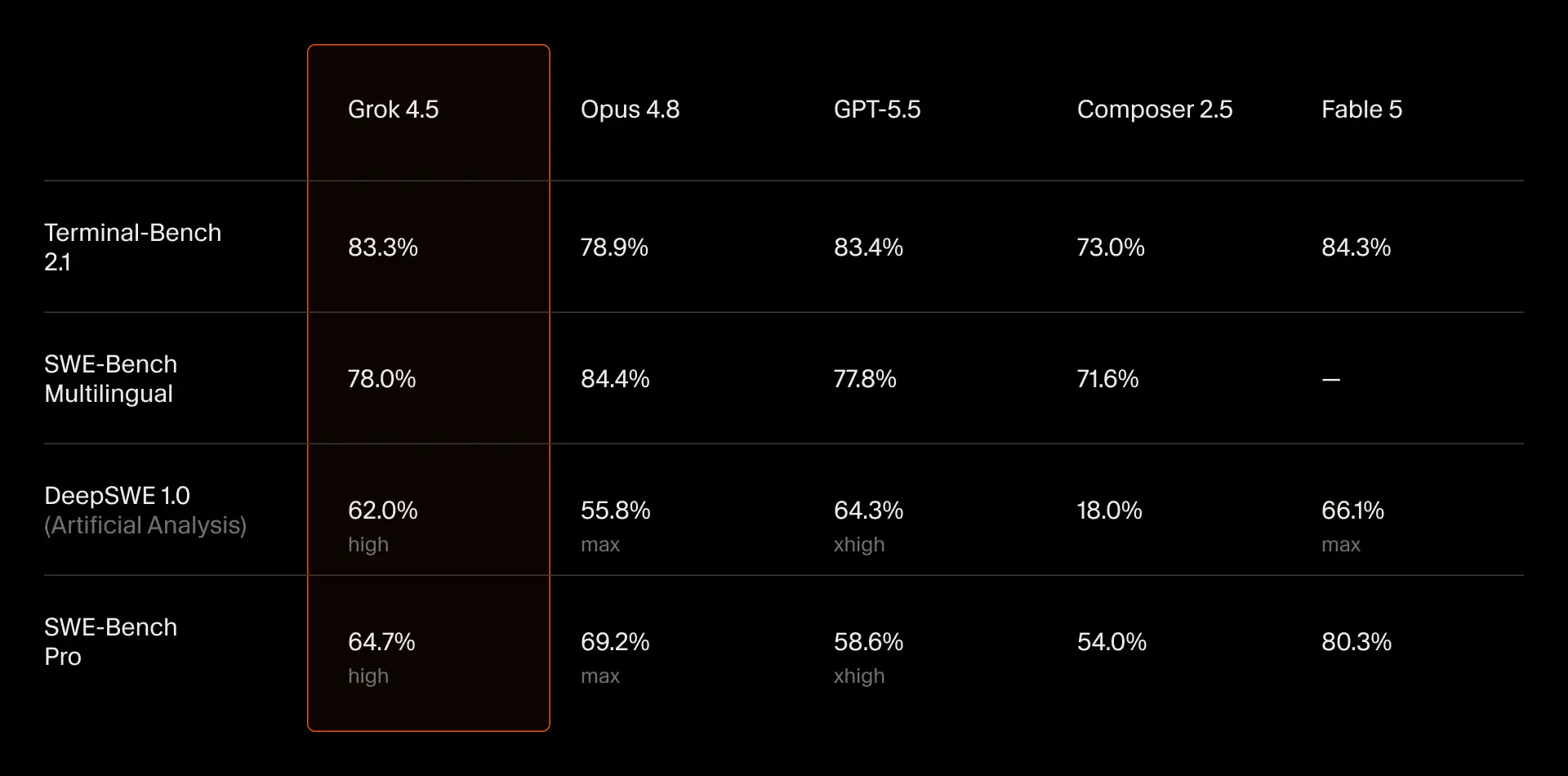
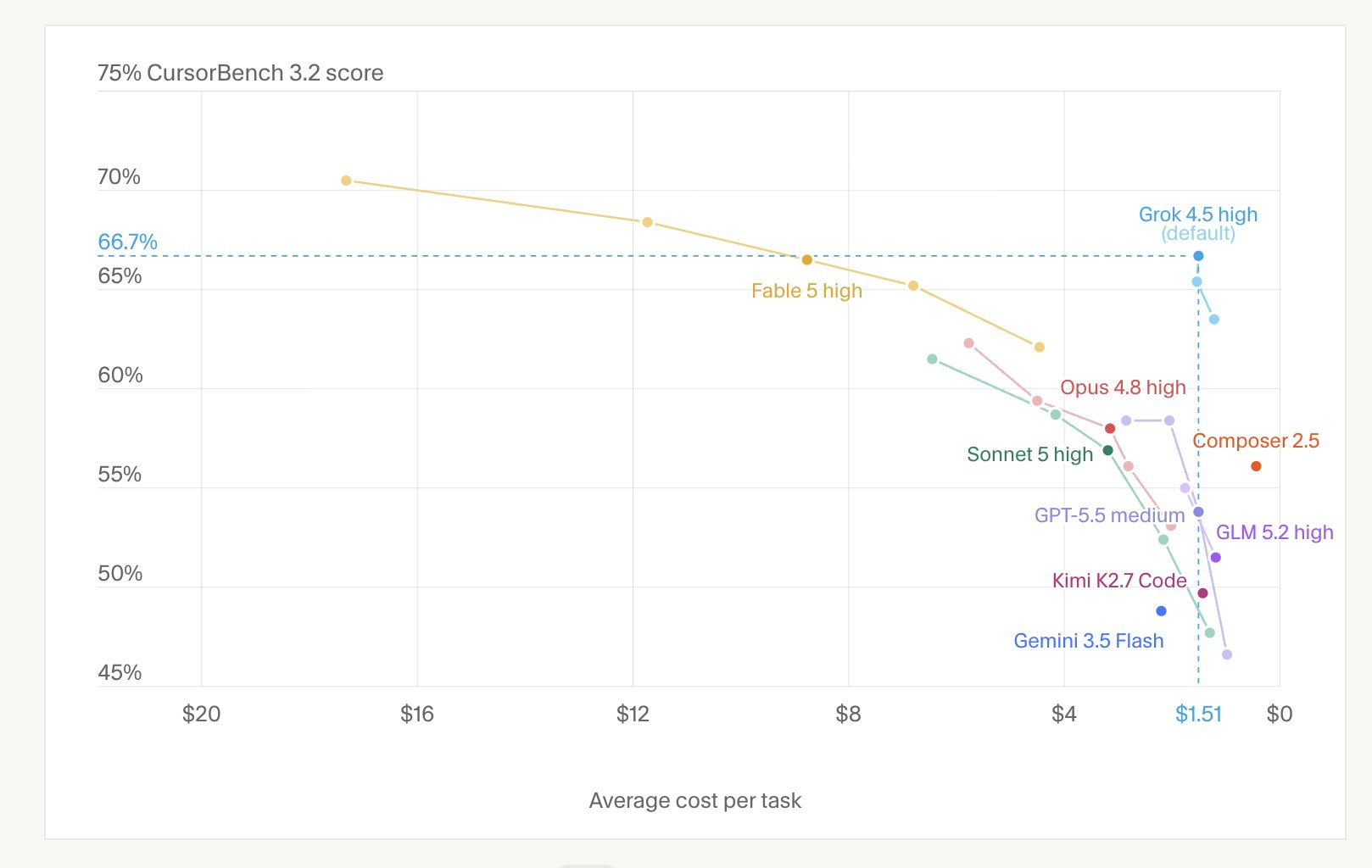
- Long-running agentic tasks: Grok 4.5. This is what it was trained for, and the training data was Cursor sessions. It handles, in Cursor’s words, “difficult, long-running tasks that require creatively using tools,” and its 4.2x token efficiency against Opus 4.8 means agent sessions burn plan usage more slowly per completed task.
- Fast tab-level edits and quick chats: smaller, faster models still win on latency and usage cost. Grok 4.5 at 80 TPS is fast for its class, but it’s a flagship, not an autocomplete engine.
- Composer 2.5 remains Cursor’s own agent model, and it’s kept its place in the lineup. If you’ve tuned workflows around it, the switch isn’t automatic; run both on the same task before moving. Our Composer 2.5 breakdown covers where it shines.
- The hardest single problems: the frontier models in the picker still outscore Grok 4.5 on the toughest benchmarks. The full picture is in Grok 4.5 vs Claude Opus 4.8.
A note for EU users: Grok 4.5 isn’t available in the EU yet in any xAI product or the API console, with availability expected mid-July. Whether it appears in your Cursor picker may depend on that rollout; if it’s missing, this is likely why.
A practical launch-week test
Instead of vibes, give it a structured trial while usage is doubled:
- Pick one real task per category: a multi-file refactor, a failing-test fix, and a from-scratch feature with an API surface.
- Run each with Grok 4.5, then with your current default model, in fresh agent sessions.
- Compare edits-accepted rate, session duration, and how often you had to redirect the agent.
If the API surface is part of what you’re building, close the loop properly: have the agent scaffold the endpoints, then verify the contract in Apidog. Send real requests against the implementation, assert on the response shapes, and mock the unfinished endpoints so frontend work proceeds in parallel. Cursor writes the code; Apidog proves the API behaves. The Apidog CLI runs inside Cursor too, so the agent can run your API test suites as part of its loop and fix its own failures. Download Apidog free to wire that up.
The training-data question
Grok 4.5 learned from Cursor developer sessions: debugging traces, multi-file diffs, and user corrections. That’s why it’s good at this environment, and it’s also a fact worth understanding as a Cursor user. What data was included, what the privacy controls cover, and what it means going forward is its own discussion: Grok 4.5 was trained on Cursor sessions: what that means for developers.
FAQ
Is Grok 4.5 free in Cursor? It’s included in all plans’ usage allowances, doubled for launch week. xAI also says free Grok 4.5 usage is available “for a limited time” in Grok Build and Cursor; every current free path is listed in our free-access guide.
Which Cursor plans include Grok 4.5? All of them, per Cursor: individual and team plans, across desktop, web, iOS, CLI, and SDK.
Is Grok 4.5 the default model in Cursor now? No. It joins the first-party pool alongside Composer 2.5 and others; you select it per session. It is the default in xAI’s own Grok Build.
What’s the Grok 4.5 fast variant? A lower-latency serving tier Cursor lists at $4/M input and $18/M output, versus $2/$6 for standard. Same model, faster infrastructure.
Does using Grok 4.5 in Cursor send my code to xAI? Model inference runs on the provider’s infrastructure, subject to Cursor’s privacy settings and agreements. The training-data specifics are covered in our companion piece.