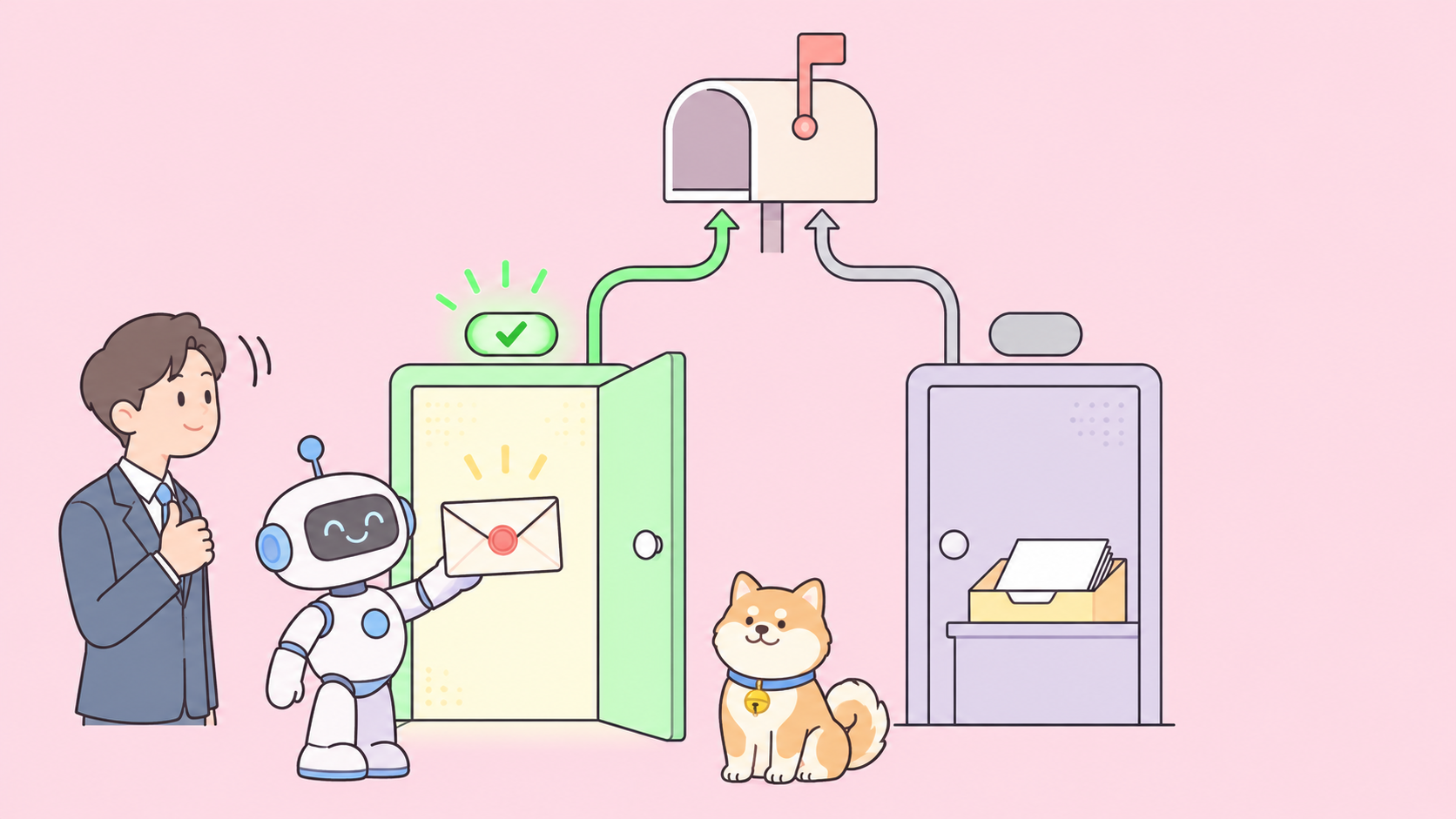
The Gmail MCP server can send email, but only from one of its two endpoints. Google’s tool reference lists send_message, reply and forward on https://gmailmcp.googleapis.com/mcp/v1, where the host asks you to approve each send through MCP form elicitation. The fallback endpoint, /mcp/v1self, drops all three. If your agent only drafts, it’s probably connected to /mcp/v1self or to a host that can’t show the approval form.
That’s the short version of the Hacker News thread titled “Google Will Make AI Agents Use Its MCP Servers. The Gmail One Can’t Send Email.” The headline is half right. Google is moving agents onto its MCP servers. Whether your agent can send depends on which endpoint you pick and what your host supports. This guide covers the setup, the tool list, the send rules and four workarounds, all checked against Google’s docs on November 27, 2026.
What is the Gmail MCP server?
The Gmail MCP server is Google’s hosted Model Context Protocol endpoint for Gmail. An AI agent connects to it over Streamable HTTP with a user-delegated OAuth token and calls tools like search_threads, get_message, create_draft and send_message. You don’t install or run anything: Google hosts it at gmailmcp.googleapis.com.
Google first shipped it as a developer preview on April 22, 2026, according to the Gmail API release notes. The Workspace tools-safety page dates the general launch of the Workspace MCP servers to November 24, 2026. Some Gmail tool pages still show a Developer Preview banner, so expect the docs to keep moving.
If you’ve called Gmail over REST before, the Gmail API guide covers that side. The MCP server sits on top of the same mailbox with a smaller, agent-shaped surface.
Can the Gmail MCP server send email?
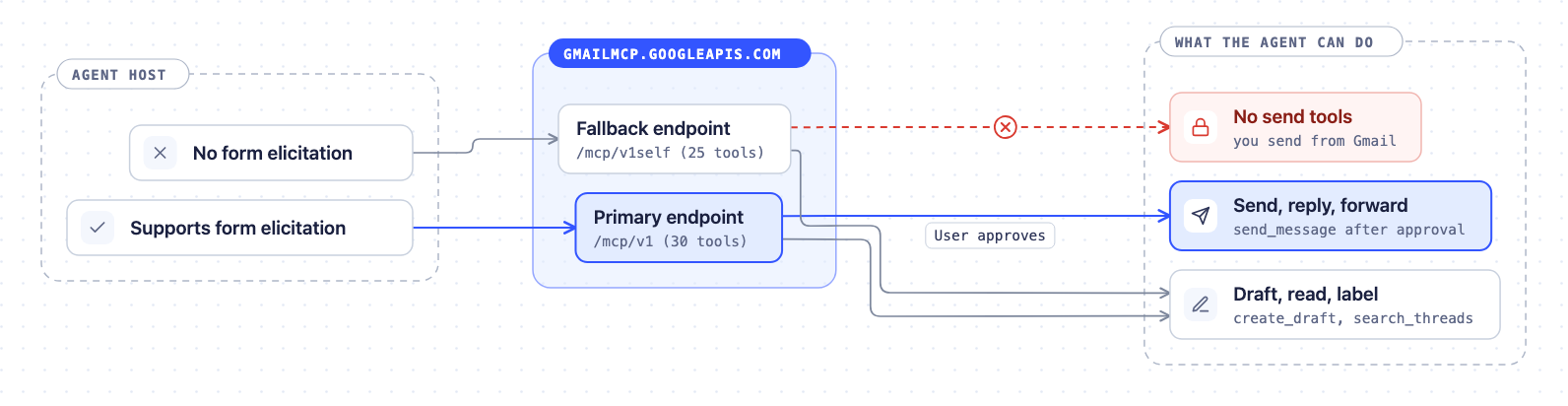
Yes, on one endpoint. Here’s what each endpoint exposes, per the Gmail MCP reference:
| Endpoint | Tools | Send, reply, forward | Meant for |
|---|---|---|---|
/mcp/v1 |
30 | Yes, after you approve | Hosts that support MCP form elicitation |
/mcp/v1self |
25 | No | Hosts that don’t support form elicitation |
The send_message page describes it as a tool that “sends a new email message immediately.” It takes to, cc, bcc, subject, body, htmlBody, attachments up to 25MB in total, and a draftId if you want to send a draft you already made.
So why does the headline say it can’t send? Three reasons:
- Google’s own setup guide tests the server with a draft prompt, and its client “uses
gmail.create_draft” so you “review and send it from Gmail.” - Many hosts don’t support form elicitation yet, so they end up on
/mcp/v1self, which has no send tools. - The techstackups article behind the HN post says send, reply and forward need partner access. Google’s quotas page, tool pages and tools-safety page didn’t say that when we read them on November 27, 2026. If your
send_messagecalls come back refused on/mcp/v1, that’s the first thing to check.
Gmail MCP server tools
The /mcp/v1 endpoint lists 30 tools. Grouped by job:
- Read:
search_threads,get_thread,get_message,list_drafts,get_draft,list_labels,list_filters - Write mail:
create_draft,update_draft,send_message,reply,forward - Organize:
label_message,label_thread,unlabel_message,unlabel_thread,update_message_labels,create_label,update_label,create_filter - Clean up:
trash_message,trash_thread,untrash_message,untrash_thread,mark_message_spam,mark_thread_spam,unmark_message_spam,unmark_thread_spam - Sensitive labels:
apply_sensitive_message_label,apply_sensitive_thread_label
/mcp/v1self has the same list minus send_message, reply, forward and the two sensitive-label tools.
Two details from the create_draft page trip people up. Recipients must be plain addresses, so Ana <ana@example.com> fails. And the page says drafts with attachments aren’t supported yet, even though the input schema has an attachments field.
How to set up the Gmail MCP server
Google’s setup guide takes about ten minutes:
- Pick a Google Cloud project. Create one or reuse one you own.
- Enable both APIs.
gcloud services enable gmail.googleapis.com --project=PROJECT_ID
gcloud services enable gmailmcp.googleapis.com --project=PROJECT_ID
- Configure the OAuth consent screen. Use Internal audience, or External with test users. Add three scopes under Data Access:
https://www.googleapis.com/auth/gmail.readonly
https://www.googleapis.com/auth/gmail.compose
https://www.googleapis.com/auth/gmail.modify
- Create a Web application OAuth client and tick Use this client for an AI-powered agent. This one matters: since November 11, 2026, Workspace MCP servers reject OAuth clients that aren’t marked as agentic.
- Add the redirect URI for your host. Claude uses
https://claude.ai/api/mcp/auth_callback. Antigravity useshttps://antigravity.google/oauth-callback. - Connect your host with the client ID and secret.
For Antigravity, the config goes in ~/.gemini/config/mcp_config.json:
{
  "mcpServers": {
    "gmail": {
      "serverUrl": "https://gmailmcp.googleapis.com/mcp/v1",
      "oauth": {
        "clientId": "OAUTH_CLIENT_ID",
        "clientSecret": "OAUTH_CLIENT_SECRET"
      }
    }
  }
}
In Claude, open Settings, then Connectors, then Add custom connector, and paste the same URL with the client ID and secret under Advanced settings. Google notes this needs a Claude Pro, Max, Team or Enterprise plan. Other hosts take the server URL with the Streamable HTTP transport.
Google’s Personal mode onboarding page can do steps 1 to 5 in one form. The pattern matches other hosted servers, like the Google Drive MCP server.
Why your agent only drafts: form elicitation
MCP elicitation lets a server pause a tool call and ask the user for input through the host. See the MCP elicitation spec. Google uses it for “human-in-the-loop approvals” before sensitive actions “such as sending emails.”
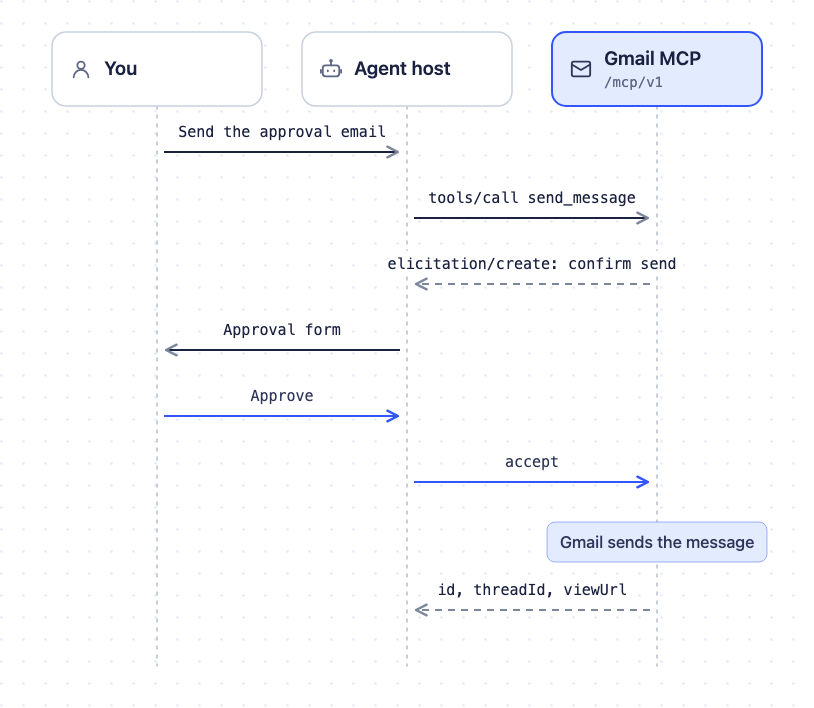
The flow only works if the host can render that form. A host that can’t would leave every send call hanging, so Google gives those hosts /mcp/v1self and removes the send tools there. That’s by design: there’s no way to approve a send, so the server doesn’t offer one.
Workarounds when you need to send
Pick the one that fits your setup:
- Use
/mcp/v1on a host that supports form elicitation. Point the server URL at/mcp/v1, not/mcp/v1self, then check the tool list (the Apidog section below shows how). Ifsend_messageshows up, your agent can send after you approve each email. - Draft, then send by hand. Keep the agent on
create_draftandupdate_draft. You get the draft ID back, open Gmail and press Send. It’s slower, but every outgoing email still gets a human check. - Send an existing draft. On
/mcp/v1,send_messageaccepts adraftId. The agent drafts, you edit in Gmail, and the agent sends that exact draft once you approve. - Call the Gmail API from your own code.
POST https://gmail.googleapis.com/gmail/v1/users/me/messages/sendwith thegmail.sendscope still works for app code you run yourself. Read the next section before you hand that call to an agent.
A community Gmail server you run locally is also an option, but you take on its OAuth handling yourself. If you go that way, the MCP server sandboxing guide shows how to limit what it can reach.
Quotas and dates to plan for
Google’s tools-safety page and Gmail quotas guide set these dates:
| Date | What changes |
|---|---|
| November 11, 2026 | Workspace MCP servers reject non-agentic OAuth clients |
| November 24, 2026 | Standard and Scaled tiers launch; Standard is 5,000 Gmail MCP requests per day, per project |
| February 1, 2027 | AI agents must use Workspace MCP servers or the Google Workspace CLI; agents calling REST directly get Standard Tier quotas |
| April 1, 2027 | Standard limits enforced; Scaled Tier MCP billing starts from the first request |
Watch the multipliers. search_threads and list_drafts each count as 10 requests toward the daily limit, while send_message counts as 1. An agent that searches before every reply uses up 5,000 faster than you’d expect.
Let your coding agent check the Gmail MCP endpoints with Apidog CLI
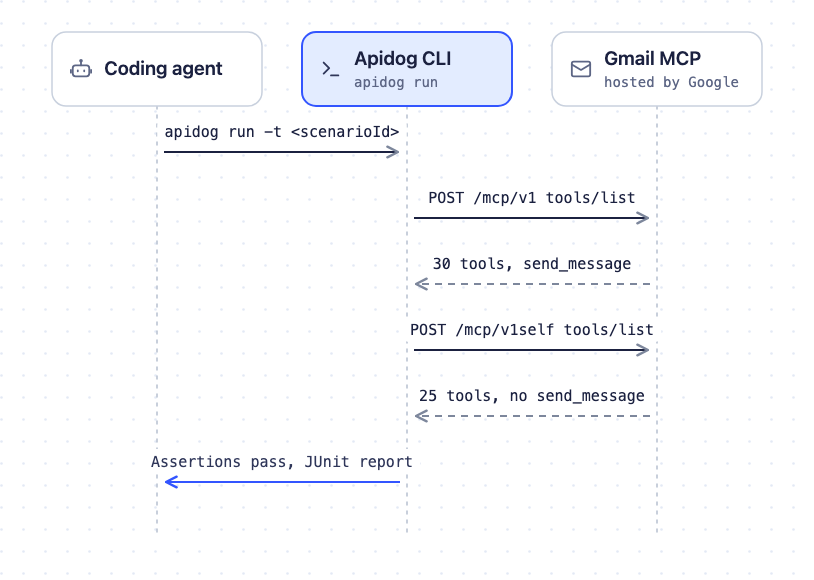
Before you build on the server, confirm which tools your OAuth client actually gets on each endpoint. That’s a plain tools/list call over MCP, so your coding agent can run it as an Apidog CLI test scenario and repeat it whenever Google changes the tool list.
Install the CLI and the agent skill once:
npm install -g apidog-cli@latest
apidog login --with-token <YOUR_TOKEN>
npx -y skills add https://apidog.com   # pick your agent when prompted
Then give Claude Code, Codex or your agent of choice one prompt:
In Apidog project <id>, create an environment "gmail-mcp" with base URL
https://gmailmcp.googleapis.com. Add a test scenario with two steps that
POST a JSON-RPC tools/list request to /mcp/v1 and /mcp/v1self, with
Authorization: Bearer {{GMAIL_TOKEN}} and Accept: application/json, text/event-stream.
Assert HTTP 200, that both responses list create_draft, and that send_message
appears on /mcp/v1 only. List the environments and scenarios, then run it.
The agent reads the payload schema before it writes anything, then runs these commands:
apidog environment list --project <id>
apidog environment create gmail-mcp --project <id> --base-url https://gmailmcp.googleapis.com
apidog cli-schema get test-scenario-create
apidog cli-schema validate test-scenario-create --file gmail-mcp-tools.json
apidog test-scenario create --project <id> --file gmail-mcp-tools.json
apidog test-scenario list --project <id>
apidog run --project <id> -t <scenarioId> -e <environmentId> \
  --env-var GMAIL_TOKEN=<oauthAccessToken> -r cli,junit
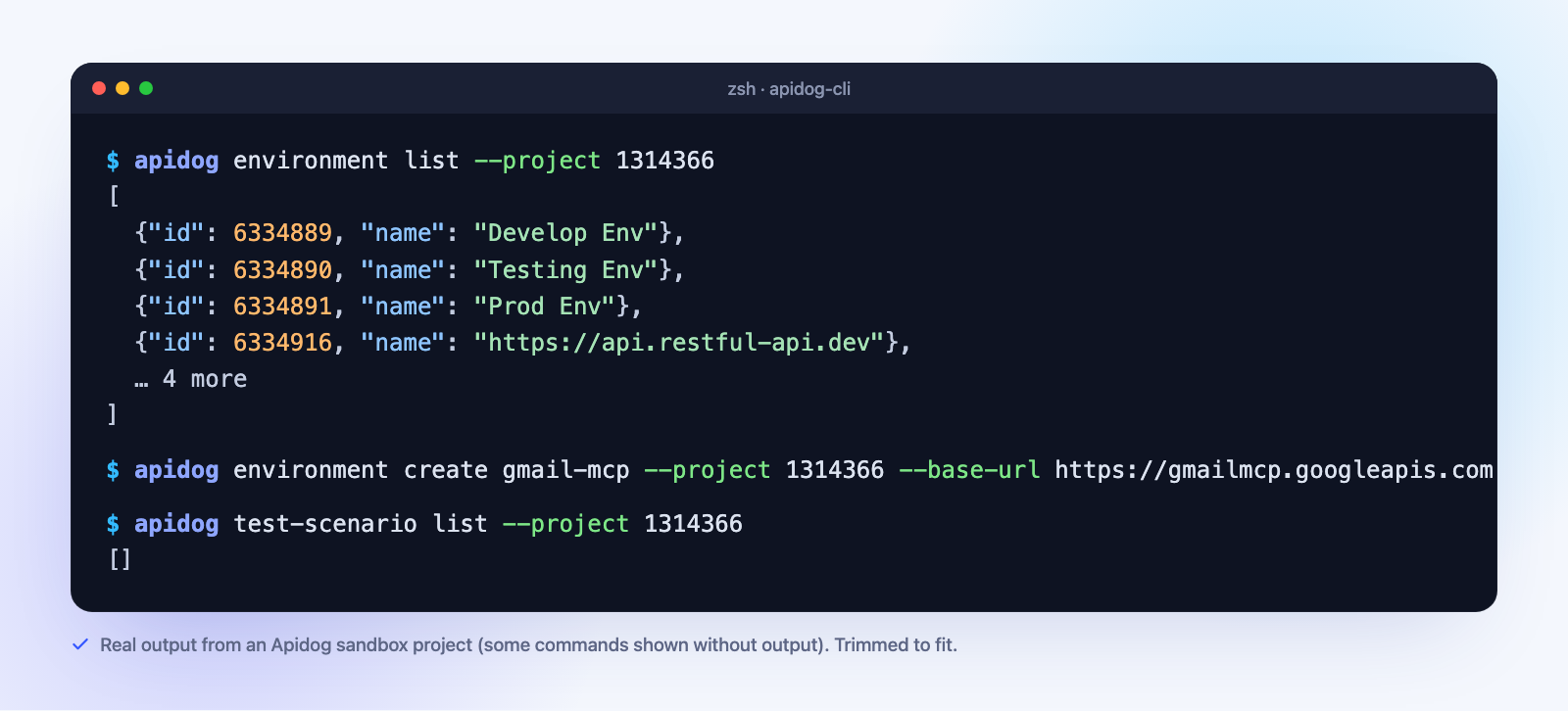
--env-var keeps the OAuth token out of the saved environment, and -r cli,junit gives CI a report. The call reads the tool list and sends nothing, and it costs one request per endpoint against your 5,000. If Google moves send_message or adds a partner gate, the assertion fails and you find out before your users do. The Apidog CLI in Claude Code guide and the apidog run reference cover more flags.
Once checks like this become a weekly job, Sharkly lets your team hand them out as tasks on a board. Each coding agent, Claude Code or Codex included, runs on your own computer with your own plan, and you review what it ships before it merges. It’s free to start.
Wrapping up
The Gmail MCP server can send, but only on /mcp/v1, only from a host that supports form elicitation, and only after you approve each send. /mcp/v1self drafts and stops there. Set up an agentic OAuth client, check your tool list before you build on it, and plan for February 1, 2027, when agents have to go through MCP. For other hosted servers built the same way, see the Jira MCP server guide.
FAQ
Can the Gmail MCP server send emails?
Yes, through send_message, reply and forward on https://gmailmcp.googleapis.com/mcp/v1. Each send waits for you to approve it in the host’s form. The /mcp/v1self endpoint has no send tools.
Why does my agent only create drafts?
Your host is probably on /mcp/v1self, or it doesn’t support MCP form elicitation. Google’s test prompt also uses create_draft by default. Run tools/list against /mcp/v1 to see whether send_message is there for your client.
What OAuth scopes does the Gmail MCP server need?
Google’s setup guide adds gmail.readonly, gmail.compose and gmail.modify. send_message accepts any of mail.google.com, gmail.compose, gmail.modify, gmail.send or gmail.send.self. The OAuth client must also be marked as an AI-powered agent.
Is the Gmail MCP server free?
The Standard Tier needs no billing account and covers 5,000 Gmail MCP requests per day, per project. From April 1, 2027, Scaled Tier MCP usage is billed from the first request. Google lists prices on its quota pricing page.
Can AI agents still use the Gmail REST API?
From February 1, 2027, Google’s terms say AI agents must use Workspace MCP servers or the Google Workspace CLI, and agents calling REST directly get Standard Tier quotas. App code you run yourself, outside an agent, can keep using messages.send.