
Cloudflare Email Service vs Resend comes down to two questions: who you need to email, and how many messages you send a month. On the Workers Free plan, Cloudflare sends only to verified destination addresses in your own account, so it’s a free alert channel for your team, not a free way to email customers. Resend’s Free plan emails anyone, capped at 3,000 a month and 100 a day. For production sending, Cloudflare charges $0.35 per 1,000 emails after 3,000 included on Workers Paid ($5 a month minimum), while Resend starts at $20 a month for 50,000.
Cloudflare brought Email Sending to the Workers Free plan on November 24, 2026, and one reply to the announcement summed up the fine print: “To Verified Recipients* not everyone.” This guide compares both services using their official pricing, limits and API pages, read on November 26, 2026.
Cloudflare Email Service vs Resend at a glance
| Cloudflare Email Service | Resend | |
|---|---|---|
| Free plan recipients | Verified destination addresses in your account only | Anyone |
| Free plan volume | Unmetered to verified addresses | 3,000 a month, 100 a day |
| Paid entry point | Workers Paid, $5 a month minimum, 3,000 emails included | Pro, $20 a month for 50,000 emails |
| Overage | $0.35 per 1,000 | $0.90 per 1,000 on Pro, falling to $0.46 on the largest Scale tier |
| Daily limit | Starts conservative for new accounts, grows with reputation | 100 on Free, none on paid plans |
| Interfaces | Workers binding, REST API, SMTP | REST API, SMTP, official SDKs |
| Recipients per message | 50 (to, cc, bcc combined) | 50 |
| Events | Published to a Cloudflare Queue | Webhooks to your HTTPS endpoint |
| Domain | Must be a domain in your Cloudflare account | Any DNS provider |
| Marketing email | Not covered by Email Sending | Broadcasts, priced by contacts |
What changed on November 24
Cloudflare’s changelog post says accounts on the Workers Free plan can now onboard sending domains and send email to their verified destination addresses at no cost. You can use the Workers binding, the REST API or SMTP.
Three details matter:
- Recipients are gated. Send to an address that isn’t verified on a Free account and the binding throws
E_RECIPIENT_PLAN_RESTRICTED. - Verified sends are free everywhere. On every plan, mail to verified destination addresses doesn’t count toward the monthly quota or the daily limits.
- Verified sends moved products. They were an Email Routing feature; now they’re Email Sending traffic, with Activity log, analytics, events and a new
isVerifiedRecipientGraphQL field.
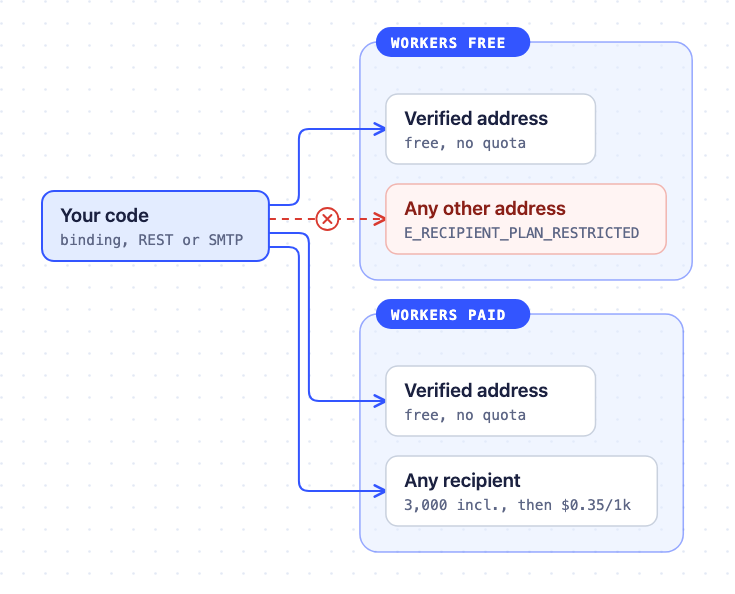
So the free plan fits on-call alerts and nightly reports to your own team. Password resets and receipts go to strangers, and those need Workers Paid.
Cloudflare Email Service vs Resend pricing
Here’s what each service charges at common monthly volumes, worked from the two official pages (Cloudflare pricing, Resend pricing). Cloudflare’s figure includes the $5 Workers Paid minimum, which also covers your Workers usage.
| Emails per month | Cloudflare (Workers Paid) | Resend |
|---|---|---|
| 3,000 | $5.00 | $0 (Free, if you stay under 100 a day) |
| 10,000 | $7.45 | $20 (Pro) |
| 50,000 | $21.45 | $20 (Pro) |
| 100,000 | $38.95 | $35 (Pro) |
| 500,000 | $178.95 | $350 (Scale) |
| 1,000,000 | $353.95 | $650 (Scale) |
The math for Cloudflare is simple: subtract the 3,000 included emails and multiply the rest by $0.35 per 1,000. At 100,000 emails that’s 97 × $0.35 = $33.95, plus $5.
Under 3,000 a month, Resend Free costs nothing if no day goes over 100. Right at Resend’s 50,000 and 100,000 tiers, Resend is slightly cheaper. Between tiers and at high volume, Cloudflare’s flat rate wins: about $300 a month cheaper at 1 million emails.
Billing notes: Cloudflare counts hard bounces toward the quota, but not sends rejected at the API boundary, such as suppressed addresses. Resend bills monthly only, and overages need “Transactional Overages” turned on, otherwise you’re asked to upgrade.
If you also send newsletters, Resend prices marketing separately: Broadcasts are limited by contacts, not emails, starting with 1,000 contacts on Free and $40 a month for 5,000. Cloudflare’s Email Sending pages describe transactional sending only, so compare that line item on Resend alone.
Sending limits and rate limits
Cloudflare doesn’t publish a fixed daily number. New accounts “start with a conservative daily quota” that grows with your sending behavior, deliverability and account standing (limits page). When you hit it, each interface fails its own way:
| Interface | Response at the daily limit |
|---|---|
| Workers binding | E_DAILY_LIMIT_EXCEEDED |
| REST API | HTTP 429 |
| SMTP | 451 4.7.1 at the end of DATA |
Per message: 50 recipients, 25 MiB total and 16 KB of custom headers. A form on the limits page requests a higher limit.
Resend publishes its numbers. Free caps you at 100 emails a day, paid plans have no daily cap, and the API allows 10 requests per second per team on every plan (usage limits). A batch call sends up to 100 emails as one request, and retry-after headers tell your client when to back off.
So on a new Cloudflare account, expect a launch-day spike to hit a limit you can’t see in advance, and handle all three error shapes. On Resend, design around 10 requests per second.
API and SDK shape
Both APIs take the same core fields, so switching is mostly a find-and-replace.
Inside a Worker, Cloudflare gives you a binding. Add it to your Wrangler config:
[[send_email]]
name = "EMAIL"
Then send from your handler:
await env.EMAIL.send({
  from: "alerts@yourdomain.com",
  to: "oncall@example.com",
  subject: "Disk usage above 90%",
  text: "Disk usage on db-1 is above 90%.",
});
Outside Workers, you POST the same fields to /accounts/{account_id}/email/sending/send on the Cloudflare REST API with an API token, or use the official Node, Python and Go SDKs. Resend’s Node SDK looks like this:
import { Resend } from "resend";
const resend = new Resend(process.env.RESEND_API_KEY);

const { data, error } = await resend.emails.send({
  from: "Acme <welcome@yourdomain.com>",
  to: ["user@example.com"],
  subject: "Welcome",
  html: "<strong>Thanks for signing up.</strong>",
});
Resend adds an idempotencyKey, scheduled sends, batch sending and React Email templates. Our Resend API guide walks through each, and the Resend API key guide covers scoping keys. If you’d rather drive it from a terminal, see how to install and use the Resend CLI.
Events and webhooks
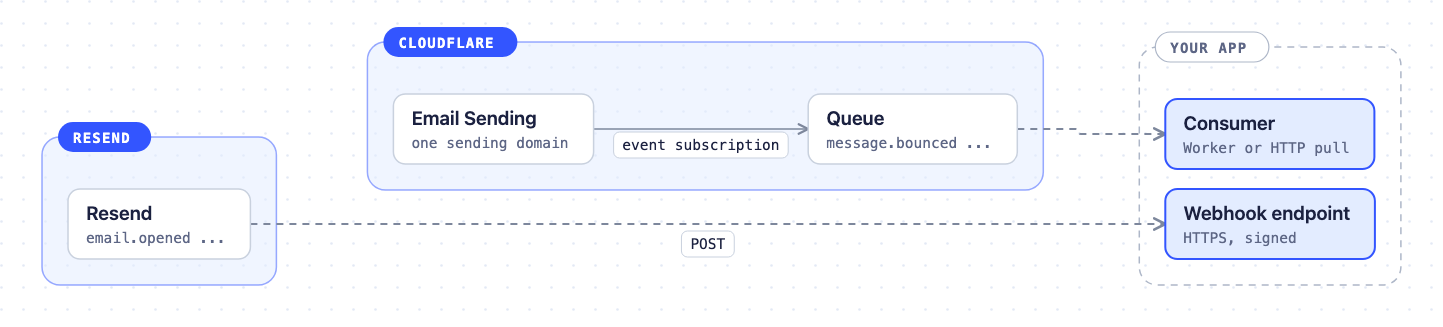
Cloudflare publishes Email Sending events through event subscriptions to a Cloudflare Queue. You consume it with a Worker or an HTTP pull consumer. Each subscription covers one sending domain. The events are message.delivered, message.deferred, message.bounced, message.failed, message.rejected and message.complained. The list has no open or click events.
Resend posts webhooks to your HTTPS endpoint, signed. Events include email.sent, email.delivered, email.delivery_delayed, email.bounced, email.complained, email.opened, email.clicked, email.failed, email.suppressed and email.received. The Free plan allows 1 webhook endpoint, Pro 5 and Scale 10.
Need open and click tracking? Resend has it on every plan. Already on Workers? A Queue consumer saves you a public webhook route.
Domain setup
Cloudflare onboards a domain from your Cloudflare account and writes the DNS records for you: MX and SPF records on a cf-bounce subdomain for bounce handling, a DKIM record and a DMARC record on _dmarc. If your DNS lives elsewhere, you’d move the zone to Cloudflare first.
Resend works with any DNS provider: you add the SPF and DKIM records it gives you. Free includes 3 domains, Pro 10 and Scale 1,000, with 100 more for $20 a month on Pro and Scale.
Which one should you pick?
- Alerts and reports to your own team, $0 budget: Cloudflare on Workers Free. Verify each teammate’s address, and sends are free with no quota.
- A side project emailing real users under 100 a day: Resend Free.
- An app already on Workers, sending 200,000 or more a month: Cloudflare on Workers Paid. The per-message rate is about half of Resend’s at that volume.
- You need open and click tracking, scheduling, React Email or marketing Broadcasts: Resend.
- Your DNS isn’t on Cloudflare and you don’t want to move it: Resend.
Some teams run both: Cloudflare for internal mail, Resend for customers. Our free email APIs roundup lists other options.
Test both send APIs with Apidog CLI
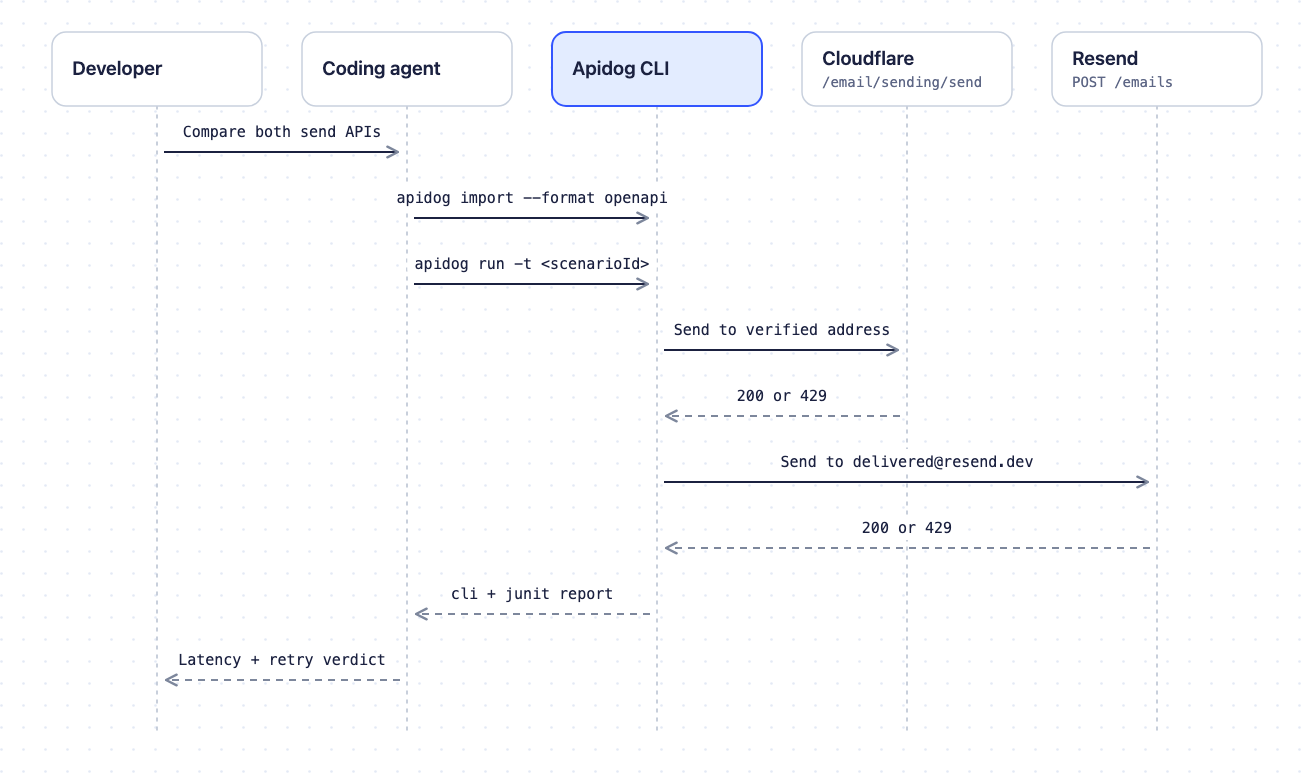
Before you switch providers, test both with the same requests, including what your code does on a 429. Your coding agent can do this with Apidog CLI while you review the result.
Set it up once:
npm install -g apidog-cli@latest
apidog login --with-token <YOUR_TOKEN>
npx -y skills add https://apidog.com   # pick your agent when prompted
Then give Claude Code, Codex or OpenCode one prompt:
Write email-providers.yaml, an OpenAPI 3.1 file describing Cloudflare's
POST /accounts/{account_id}/email/sending/send and Resend's POST /emails,
including their 429 responses. Import it into Apidog project <projectId>,
list the endpoints, pick the environment for staging, then run test
scenario <scenarioId> with both keys passed as env vars and tell me which
provider was slower and whether our retry logic handled the 429.
The agent runs these commands:
apidog import --project <projectId> --format openapi --file ./email-providers.yaml
apidog endpoint list --project <projectId>
apidog environment list --project <projectId>
apidog run --project <projectId> -t <scenarioId> -e <environmentId> \
  --env-var "CF_API_TOKEN=<token>" --env-var "RESEND_API_KEY=<key>" -r cli,junit
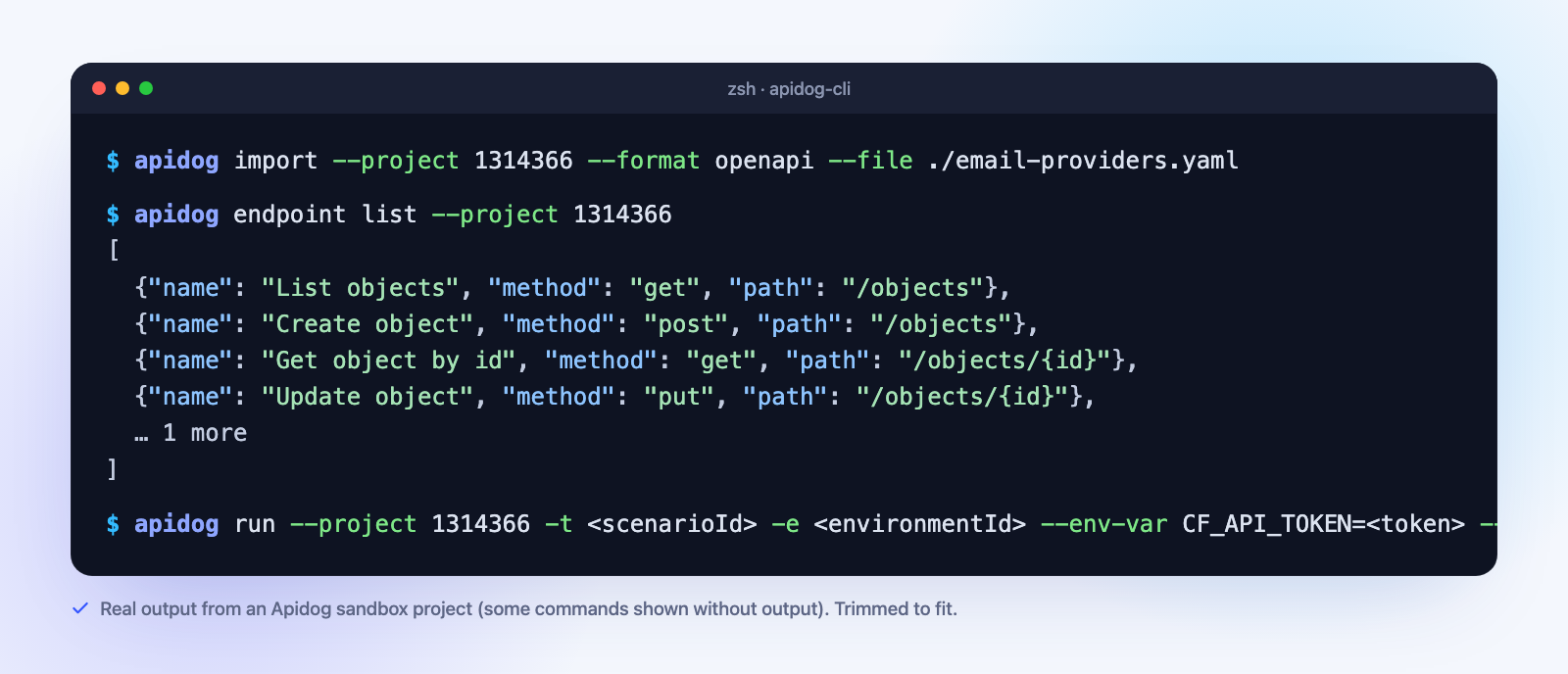
Point the scenario at verified addresses on Cloudflare and Resend’s delivered@resend.dev test address, so no test emails a customer. Add --upload-report to view the run in the app; Apidog CLI in Claude Code covers the agent setup.
Once that works for one developer, a team can hand it out: Sharkly is a board where you assign tasks like “migrate password-reset mail to Cloudflare and rerun the email tests” to coding agents that run on your own machines with your own Claude Code, Codex or OpenCode plan, run several in parallel, and review what they ship before it merges. It’s free to start.
FAQ
Is Cloudflare Email Service free? Sending to verified destination addresses in your account is free on every plan, including Workers Free, and doesn’t count toward any quota. Sending to anyone else needs Workers Paid, which includes 3,000 emails a month and then costs $0.35 per 1,000.
Is Cloudflare cheaper than Resend? At most volumes, yes. At 1 million emails a month it’s about $354 against $650. Right at Resend’s 50,000 and 100,000 Pro tiers, Resend is a few dollars cheaper, and under 3,000 a month Resend Free costs nothing.
Can I use Cloudflare Email Service without Workers? Yes. The REST API and SMTP work from any backend, but your domain must be in your Cloudflare account.
Does Cloudflare Email Service track opens and clicks? Its Email Sending event list covers delivered, deferred, bounced, failed, rejected and complained. It has no open or click events. Resend tracks opens and clicks on every plan.
What’s the Resend free plan limit? 3,000 emails a month and 100 a day, 3 domains and 1 webhook endpoint, sending to any recipient.