
Cloudflare Email Sending became free on the Workers Free plan on November 24, 2026, and the announcement on X passed 950,000 views in a day. The top reply put the catch in five words: “To Verified Recipients* not everyone.”
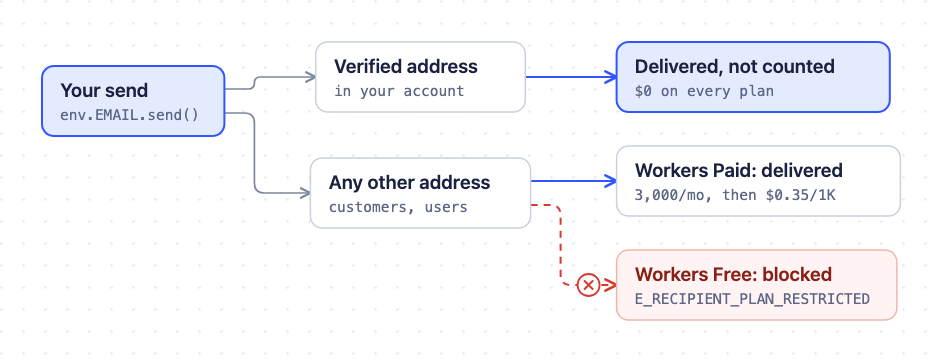
Quick answer: Yes, Cloudflare Email Sending is free on Workers Free, but only to verified destination addresses in your own account. Any other recipient fails with E_RECIPIENT_PLAN_RESTRICTED. To email customers you need Workers Paid: 3,000 emails a month included, then $0.35 per 1,000. Sends to verified addresses stay free on every plan.
Facts below come from Cloudflare’s changelog, Email Service pricing and limits pages, read November 26, 2026.
Is Cloudflare Email Sending free? Free vs Paid at a glance
| Workers Free | Workers Paid | |
|---|---|---|
| Who you can email | Verified destination addresses in your account only | Any recipient |
| Emails to verified addresses | Free, not counted | Free, not counted |
| Emails to anyone else | Blocked (E_RECIPIENT_PLAN_RESTRICTED) |
3,000 a month included, then $0.35 per 1,000 |
| Inbound email | Unlimited | Unlimited |
| Interfaces | Workers binding, REST API, SMTP | Workers binding, REST API, SMTP |
| Plan cost | $0 | $5 a month account minimum |
Free is a real $0 route for one job: mail to inboxes you control and have verified. The Workers pricing page doesn’t say whether signup needs a card.
What the Workers Free plan actually covers
A verified destination address is one you add in the dashboard and confirm from its own inbox. It’s shared across every domain in the account, and an account can hold 200.
To verify one:
- In the Cloudflare dashboard, open Compute > Email Service > Email Routing > Destination Addresses.
- Enter the address and submit.
- Open the email Cloudflare sends to it and select Verify email address.
You also need a sending domain from your Cloudflare account: Email Sending > Onboard Domain. Cloudflare adds the SPF and DKIM records for you, per the domain setup docs.
That covers error alerts, cron reports, contact-form mail to your team, and staging environments that must never email a real user. Here’s a send from a Worker with the plan error handled, using a binding declared as "send_email": [{ "name": "EMAIL" }]:
export default {
  async fetch(request, env) {
    try {
      const { messageId } = await env.EMAIL.send({
        from: "alerts@yourdomain.com",
        to: "you@yourdomain.com", // a verified destination address
        subject: "Nightly job finished",
        text: "All 3 steps passed.",
      });
      return Response.json({ messageId });
    } catch (error) {
      if (error.code === "E_RECIPIENT_PLAN_RESTRICTED") {
        return new Response("Recipient not verified on Workers Free", { status: 403 });
      }
      throw error;
    }
  },
};
What doesn’t fit on Free
Anything a customer receives needs Workers Paid. That means signup confirmations, password resets, magic links, receipts and invoices. Your users aren’t verified destination addresses in your account, and they can’t be: each one would have to click a Cloudflare verification email first.
So “time to wipe my resend API key” is early for most teams. Free replaces your internal mail, not the API that emails customers. Our roundup of free email APIs lists options with free tiers that reach any recipient, and the Resend API guide covers the most common one.
Split mixed recipient lists, too: over SMTP, an unverified address on Free is refused at RCPT TO with 550 5.7.1.
Cloudflare Email Sending pricing on Workers Paid
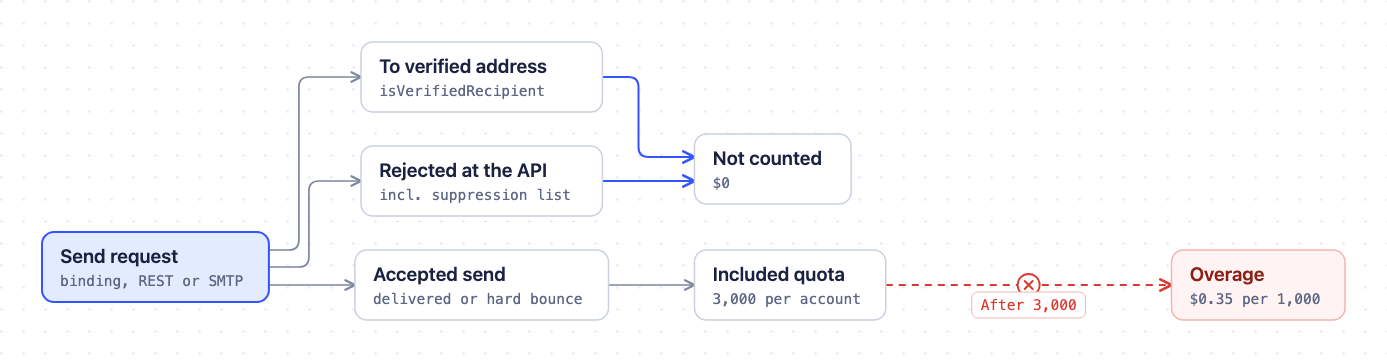
Workers Paid lets you email anyone. The pricing page lists outbound email as “3,000 included per month, then $0.35 per 1,000 emails.”
Four details decide your bill:
- The 3,000 are per account, not per domain. They reset with your Cloudflare subscription billing cycle, not the calendar month.
- Verified sends don’t count. Mail to verified destination addresses is free on every plan, Paid included, and skips both the quota and the daily limits.
- Hard bounces count. Cloudflare bills an email it accepted, even if it bounced.
- Rejected requests don’t count. An email refused at the API boundary, including one blocked by your suppression list, isn’t billed.
Workers Paid itself carries “a minimum charge of $5 USD per month for an account”, per the Workers pricing page. The email pricing page doesn’t say whether email overage counts toward that $5, so budget for both until your first invoice shows otherwise.
What 10K, 100K and 1M emails a month cost
Billable emails are your customer-facing sends minus the 3,000 included, at $0.35 per 1,000:
| Emails a month (non-verified) | Billable after 3,000 | Email overage | Workers Paid minimum |
|---|---|---|---|
| 3,000 | 0 | $0.00 | $5 |
| 10,000 | 7,000 | $2.45 | $5 |
| 50,000 | 47,000 | $16.45 | $5 |
| 100,000 | 97,000 | $33.95 | $5 |
| 1,000,000 | 997,000 | $348.95 | $5 |
A worked example: an app sends 20,000 emails to customers and 5,000 alerts to 8 verified team addresses. Only the 20,000 count: 17,000 billable, or $5.95 in overage. Route internal mail to verified addresses on purpose; it stays free at any volume.
Daily sending limits for new accounts
Cloudflare’s limits page says “New accounts start with a conservative daily quota and scale up over time.” It doesn’t publish the starting number, so don’t plan a launch-day blast on a brand-new account. Each interface reports the limit differently:
| Interface | Response at the daily limit |
|---|---|
| Workers binding | E_DAILY_LIMIT_EXCEEDED |
| REST API | HTTP 429 |
| SMTP | 451 4.7.1 at the end of DATA |
Treat all three as “try again later”: queue the message and retry hours later. Our guide to retries with exponential backoff covers the timing, and HTTP 429 Too Many Requests explains the status code. If you need more headroom, the limits page ends with a “Need a higher limit?” request form.
Verified-address sends skip the daily limit too, so your alerts keep flowing on a throttled day.
Verified sends moved from Email Routing to Email Sending
Sends to verified addresses “now count as Email Sending traffic” and no longer show up in Email Routing analytics. Look for them here instead:
- The Email Sending Activity log and analytics
- Event subscriptions, which receive
message.deliveredandmessage.bounced - GraphQL, where Email Sending datasets gain an
isVerifiedRecipientfield so you can split free sends from billable ones
Filter on that field, and the non-verified count is what Cloudflare charges against your 3,000.
Should you stay on Free or upgrade?
- Do you only email yourself or your team? Stay on Free and verify each address.
- Do any recipients sit outside your account? You need Workers Paid, starting at the $5 minimum.
- Will you send under 3,000 customer emails a month? Your email overage is $0.
- Will you send more? Multiply the excess by $0.35 per 1,000, and route internal mail to verified addresses.
- Is the account new? Expect a low daily cap at first and queue anything that can wait.
Test the plan rule with Apidog CLI from your coding agent
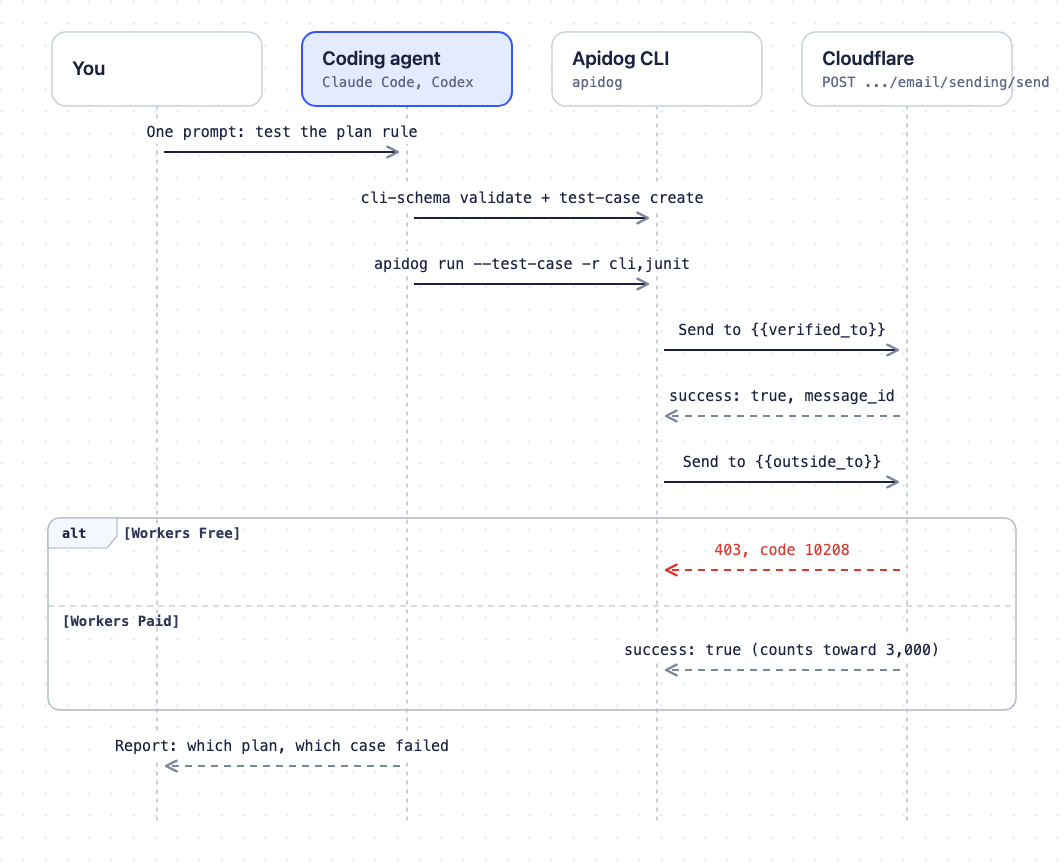
The plan rule breaks quietly: a staging config points at a real customer, or a teammate’s address was never verified. Let your coding agent pin it down with Apidog CLI as two test cases against Cloudflare’s REST endpoint.
Install the CLI and the agent skill once:
npm install -g apidog-cli@latest
apidog login --with-token <YOUR_TOKEN>
npx -y skills add https://apidog.com   # pick your agent when prompted
Then give Claude Code, Codex or OpenCode one prompt:
In Apidog project <id>, find POST /accounts/{account_id}/email/sending/send.
Create two test cases: one sends to {{verified_to}} and asserts success is true
and result.message_id exists; one sends to {{outside_to}} and asserts HTTP 403
with errors[0].code 10208. Validate each payload with cli-schema first, then run
both against the staging environment and tell me which plan the account is on.
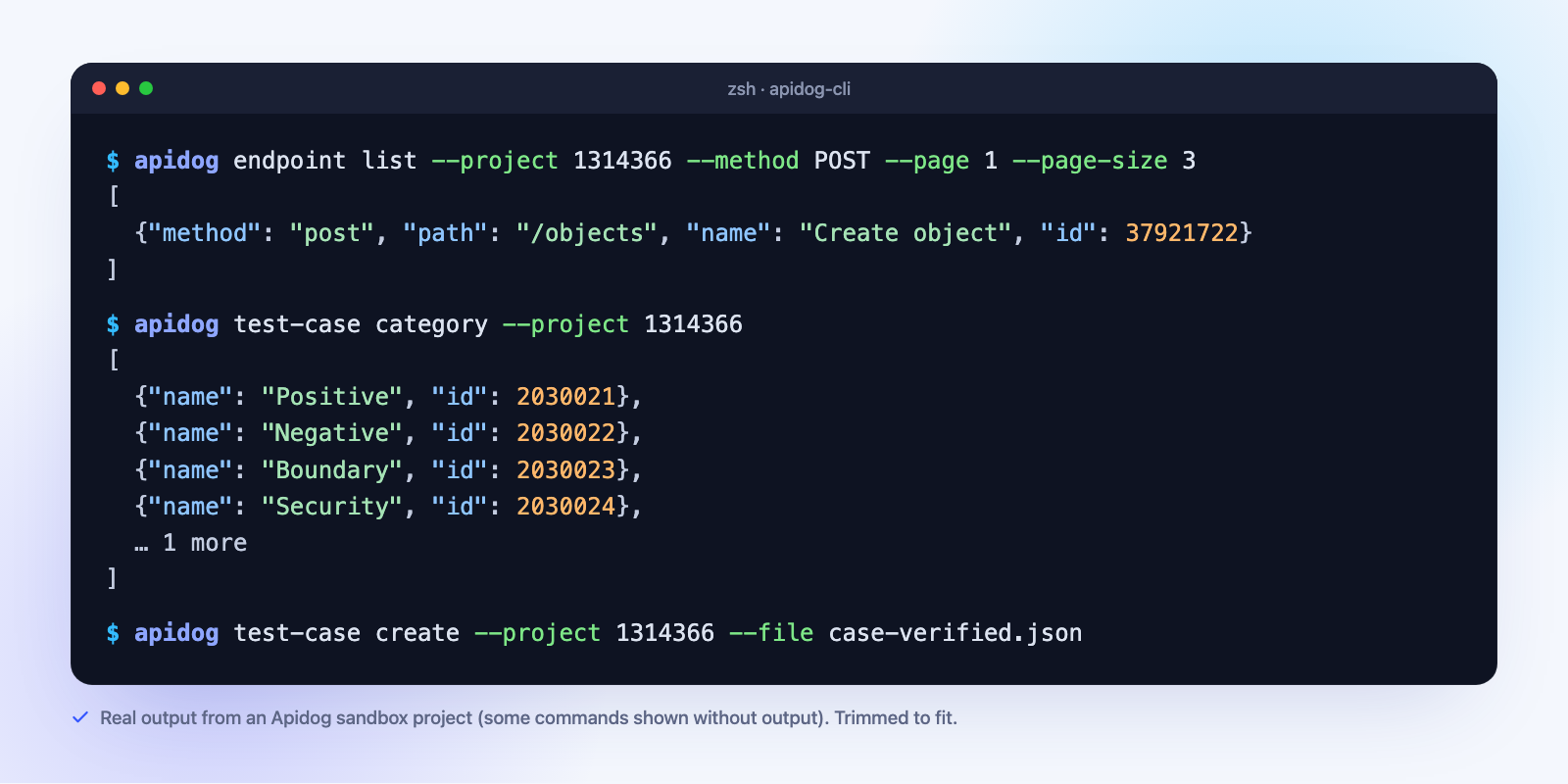
The agent reads the schema, validates its JSON, writes the cases and runs them:
apidog endpoint list --project <id> --method POST
apidog test-case category --project <id>
apidog cli-schema get test-case-create
apidog cli-schema validate test-case-create --file case-verified.json
apidog test-case create --project <id> --file case-verified.json
apidog run --test-case <caseId> --project <id> -e <envId> \
  --env-var "CF_API_TOKEN=<token>" -r cli,junit
If the second case passes, the account is on Workers Free. If it fails because the send succeeded, you’re on Workers Paid and that email counted toward your 3,000, so point {{outside_to}} at an address you own. The same apidog run ... -r junit line drops into CI; see Apidog CLI in a CI/CD pipeline, and Apidog CLI in Claude Code for the agent setup.
When a team runs checks like these every week, Sharkly lets you hand them out as tasks on a board: each one goes to a coding agent like Claude Code or Codex running on your own computer with your own plan, several can run in parallel, and you review what they ship before it merges. It’s free to start.
Wrapping up
Cloudflare Email Sending is free in a narrow, honest way: every email to verified addresses in your account, at any volume. Customer email needs Workers Paid, with 3,000 a month included and $0.35 per 1,000 after that. Verify your internal addresses, count only customer mail, and test the plan rule before launch.
FAQ
Is Cloudflare Email Sending free? Yes, on the Workers Free plan since November 24, 2026, but only to verified destination addresses in your account. Sending to anyone else needs Workers Paid.
How many free emails do I get on Workers Paid? 3,000 a month per account, aligned with your billing cycle. After that it’s $0.35 per 1,000. Sends to verified addresses don’t count toward the 3,000.
What does E_RECIPIENT_PLAN_RESTRICTED mean? You’re on Workers Free and the recipient isn’t a verified destination address. The REST API returns it as HTTP 403 with code 10208. Verify the address or upgrade; retrying won’t help.
What is the daily sending limit for a new account? Cloudflare doesn’t publish a number. New accounts start with a conservative daily quota that scales up over time, and you can request more through the form on the limits page.
Do bounced emails count toward the quota? Hard bounces count, because Cloudflare accepted them. Emails rejected at the API boundary, including suppression-list blocks, don’t.
Does the Free plan include receiving email? Yes. Cloudflare’s pricing page lists inbound email as unlimited on both Workers Free and Workers Paid. Only outbound sending is limited to verified addresses on Free.