
Automate Your GitHub Workflow with AI: Gemini CLI GitHub Actions Guide
Are you looking to streamline code reviews, issue triage, and repetitive tasks in your GitHub repository? Discover how Gemini CLI GitHub Actions integrates Google’s Gemini AI directly into your development workflow—so your team can work smarter, not harder.
💡 Looking for a robust API testing platform that generates beautiful API Documentation? Need an all-in-one solution for collaborative, high-productivity API development? Maximize your team's productivity with Apidog—your cost-effective Postman alternative. See how Apidog compares!
What Is Gemini CLI?
Gemini CLI is an open-source command-line tool by Google, designed to bring advanced AI capabilities—powered by Gemini 2.5 Pro with a 1M token context window—right to your terminal. Whether you need to generate or debug code, analyze large codebases, or even draft technical documentation, Gemini CLI acts as an AI assistant you control from the command line.
- Free for Google accounts: 60 requests/min, 1,000 per day
- Supports advanced features: Tool integration, Model Context Protocol (MCP) servers for specialized tasks
- Ideal for: Python refactoring, rapid prototyping, and automating repetitive developer workflows
How GitHub Actions Powers Modern CI/CD
If you’re new to GitHub Actions, think of it as GitHub’s built-in automation engine. By defining workflows in YAML files under .github/workflows, you can automatically:
- Run tests when code is pushed
- Deploy apps on merge
- Manage issues and pull requests
Now, by integrating Gemini CLI into GitHub Actions, you can automate even more—like AI-powered code reviews, automated issue triage, and more.
Introducing Gemini CLI GitHub Actions
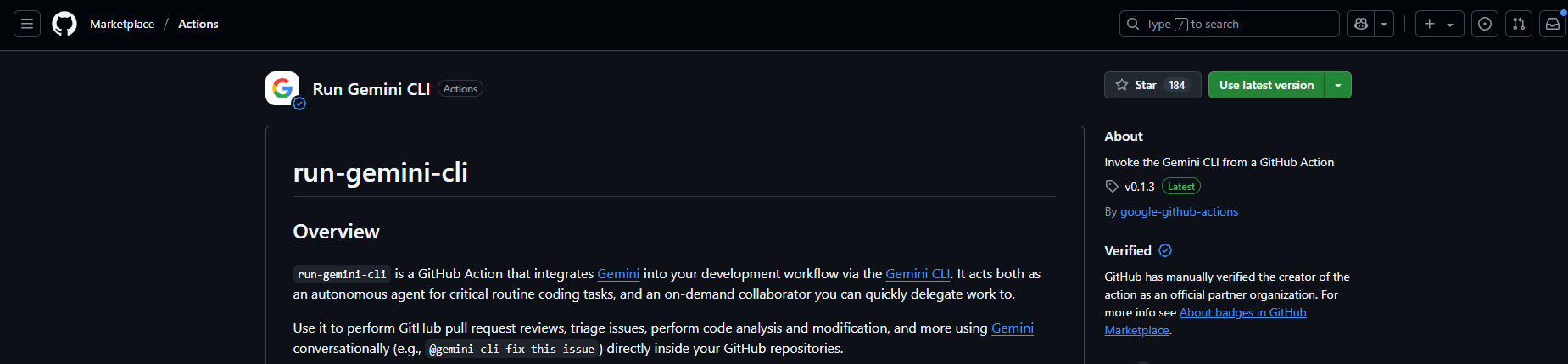
Gemini CLI GitHub Actions lets your team run Gemini CLI tasks automatically in the cloud whenever code is pushed, issues are created, or pull requests are opened.
Key Features:
- Automated Issue Triage
Gemini AI reads and labels new issues, helping you prioritize bug fixes or enhancements. - AI Code Review
Gemini provides instant, context-aware feedback on pull requests—catching bugs, suggesting improvements, and maintaining code quality. - On-Demand AI Collaboration
Tag@gemini-cliin issues or PRs to request tasks like code generation or bug fixes.
Technical Highlights:
- Open-source (Apache 2.0) and secure—Uses Google Cloud’s Workload Identity Federation (WIF) for authentication, avoiding persistent API keys.
- Runs in isolated containers for maximum security.
- Customizable with prompts, project context files, and workflow triggers.
- Telemetry supported for debugging via Google Cloud Monitoring.
Step-by-Step: Setting Up Gemini CLI GitHub Actions
Ready to bring AI automation to your GitHub repo? Here’s how to get started quickly:
1. Install Gemini CLI
Prerequisites:
- Node.js 20+ (Download from nodejs.org)
- Or use Homebrew for macOS/Linux
Install via npm:
npm install -g @google-gemini/gemini-cli
Or via Homebrew:
brew install gemini-cli
Authenticate:
After installing, run gemini and sign in with your Google account. (Free: 60 requests/min, 1,000/day. For higher limits, get an API key from Google AI Studio.)
2. Configure Gemini CLI GitHub Actions
A. Generate an API Key:
- Go to Google AI Studio, sign in, and create an API key.
B. Add the API Key to GitHub:
- Navigate to your repo:
Settings > Secrets and variables > Actions - Click "New repository secret", set the name as
GEMINI_API_KEY, and paste your key.
C. Add the Workflow to Your Repo:
- Visit github.com/google-github-actions/run-gemini-cli.
- Copy a workflow example (e.g., issue triage or PR review) from
examples/workflowsto your repo’s.github/workflowsfolder.
Sample workflow (gemini.yml):
name: Gemini CLI Issue Triage
on:
  issues:
    types: [opened]
jobs:
  triage:
    runs-on: ubuntu-latest
    steps:
      - uses: google-github-actions/run-gemini-cli@v1
        with:
          gemini_api_key: ${{ secrets.GEMINI_API_KEY }}
          prompt: "Triage this issue and apply labels"
Customize the prompt or add options like gcp_project_id for advanced features.
D. Run Setup Command:
gemini /setup-github
This configures your repository for Gemini CLI GitHub Actions.
3. Test Your AI-Driven Workflow
Trigger a Workflow:
- Open a new issue or PR. The workflow will automatically analyze and label it, or review code changes.
- For manual review, add a comment:
@gemini-cli /reviewin a pull request.
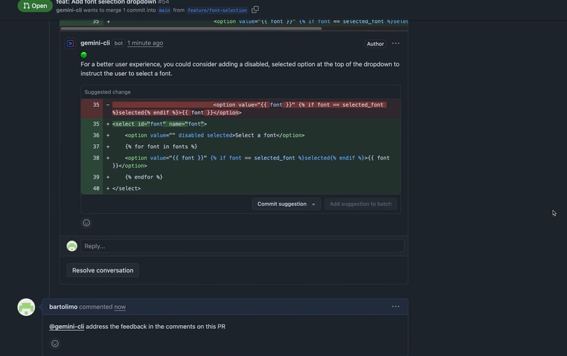
Check Workflow Results:
- Go to the "Actions" tab in your repo to see output logs.
- Example: The issue triage workflow might label new issues with tags like “bug” or “enhancement”.

4. Customize and Scale Up
- Custom Prompts: Edit the YAML workflow with your own prompts, or add tools like
ghCLI for extended GitHub operations. - Add Project Context: Create a
GEMINI.mdfile in your root directory with coding guidelines—this helps AI provide more relevant output. - Enable Telemetry: Configure OpenTelemetry for detailed workflow monitoring.
- Leverage MCP Servers: Integrate with services like Google Search or Imagen for advanced tasks such as content or media generation.
Troubleshooting Common Issues
- API Key Errors: Double-check your
GEMINI_API_KEYin GitHub Secrets and ensure it is active in Google AI Studio. - Workflow Not Triggering: Validate your YAML syntax and make sure the
on:trigger matches your intended event. - Rate Limits: Free accounts are limited to 60 requests/min. For more throughput, obtain an upgraded API key.
- Performance: Use the
ubuntu-latestrunner for best speed.
Conclusion: Supercharge Developer Productivity with AI
Gemini CLI GitHub Actions is a powerful tool for any team looking to automate GitHub workflows with the intelligence of Google’s AI—free, secure, and highly customizable. It enables faster issue triage, instant code reviews, and lets your team focus on higher-value work while AI handles the busywork.
Many developers report significant time savings and improved team collaboration using this integration. For teams that build and test APIs, pairing Gemini CLI GitHub Actions with a unified API platform like Apidog ensures your workflow is seamless from automated code review to API documentation.
💡 Want an API tool that generates beautiful API Documentation? Need a collaborative platform for maximum productivity? Apidog covers your needs—and offers more value than Postman.