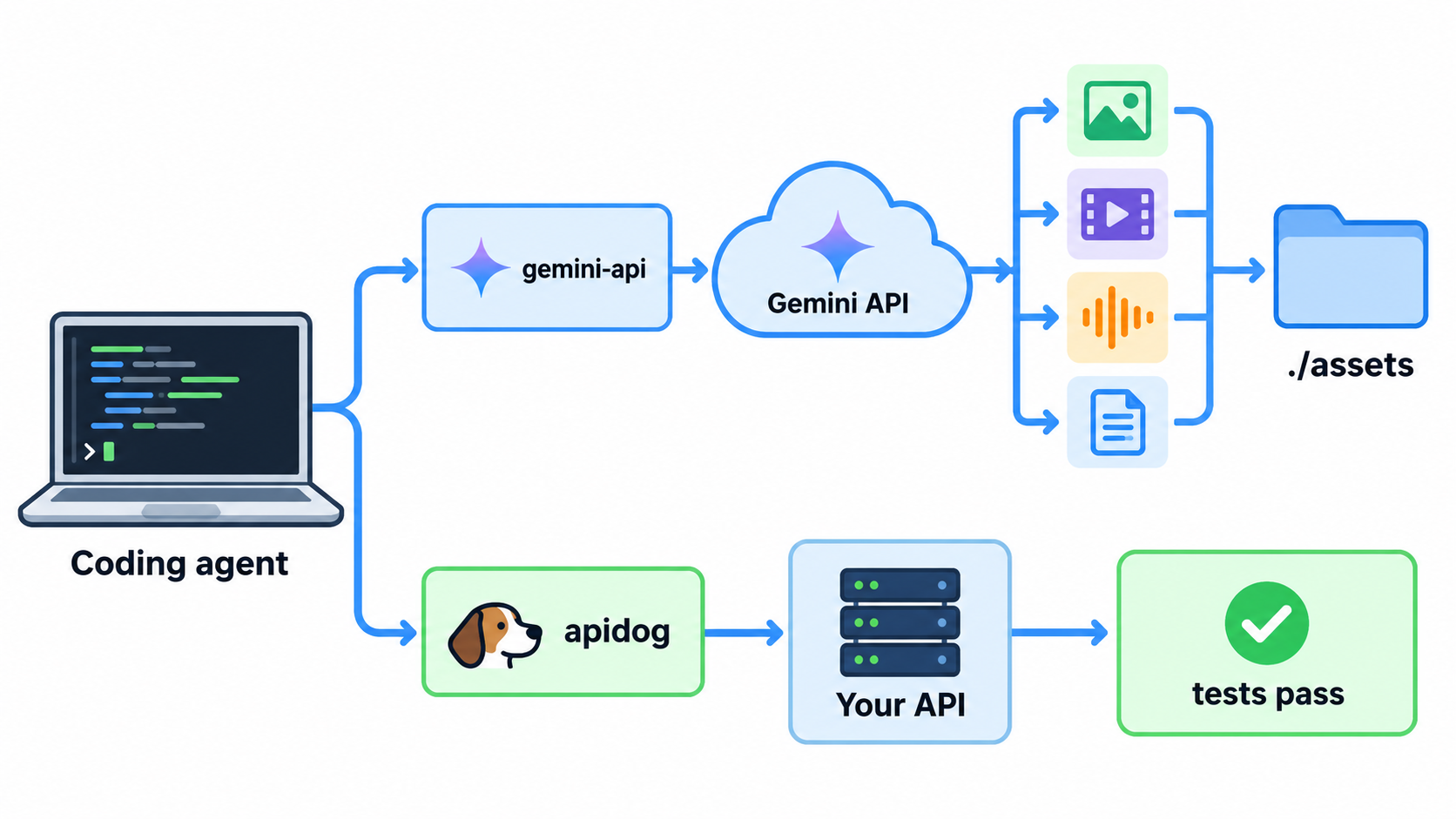
The Gemini API CLI (gemini-api) is Google’s open-source command-line client for the Gemini API, built for coding agents like Claude Code, Codex, Cursor and Antigravity. Install one Go binary, set GEMINI_API_KEY, and your agent can generate images, video, speech and music, analyze PDFs and recordings, transcribe audio to SRT, and launch Deep Research in the background.
Below: install, auth, the commands your agent will run, how it differs from Gemini CLI, and how to pair it with Apidog CLI. Every flag was copied from gemini-api --help on version 0.4.5, released October 30, 2026.
What is the Gemini API CLI?
The Gemini API CLI is a stateless, single-binary client for Google’s Interactions API. Each command is one HTTP call: a prompt goes in, and a file path, transcript, analysis or interaction ID comes out. It’s a tool your existing agent calls when a task needs Gemini.
Google’s official docs page calls it “an open-source beta release that evolves alongside the Interactions API.” The code lives at google-gemini/gemini-api-cli under Apache 2.0, and it runs on macOS, Linux and Windows.
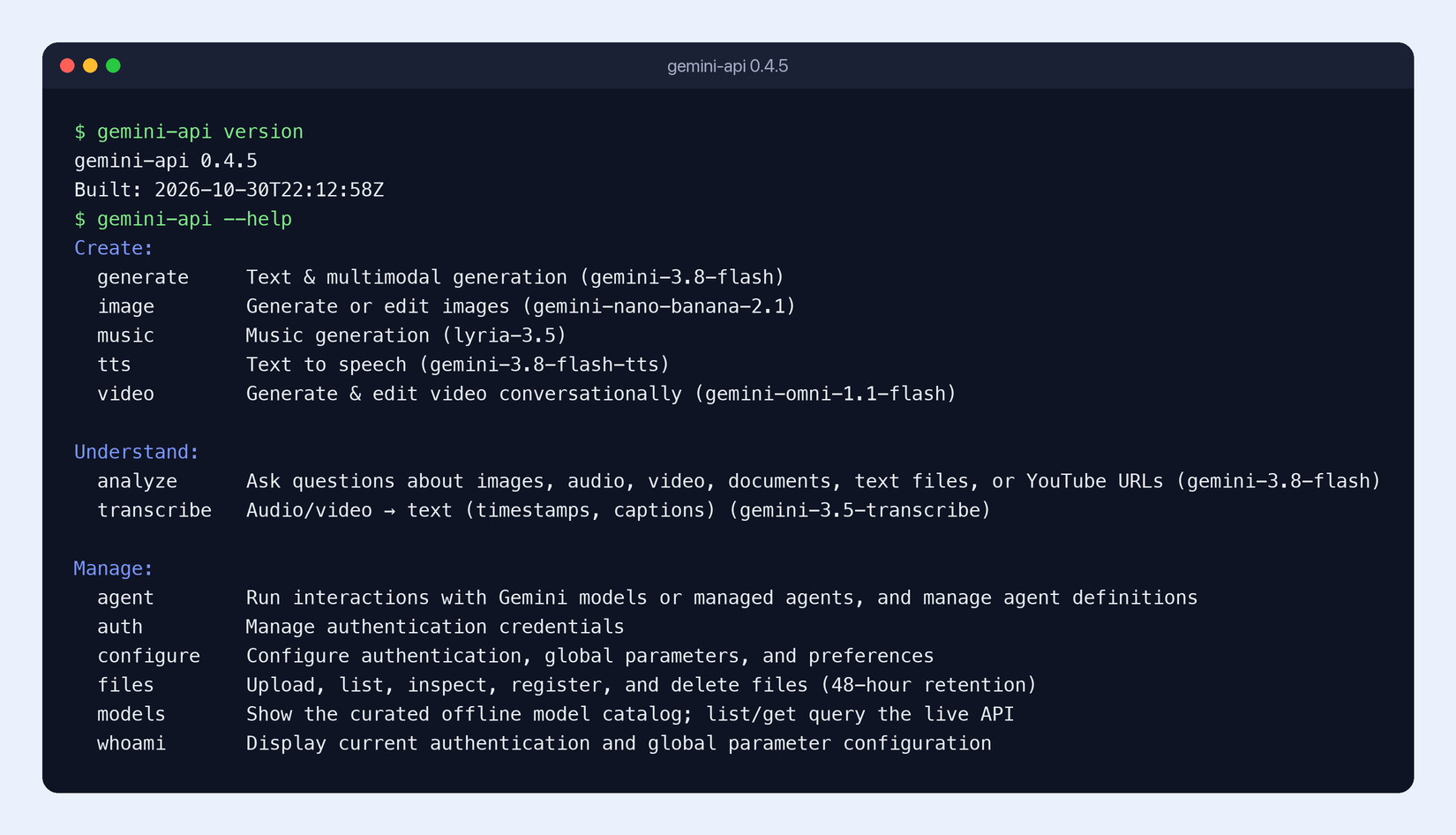
Here’s what gemini-api --help lists on 0.4.5, with the default model for each command:
| Group | Command | What it does | Default model |
|---|---|---|---|
| Create | generate |
Text and multimodal generation | gemini-3.8-flash |
| Create | image |
Generate or edit images | gemini-nano-banana-2.1 |
| Create | video |
Generate and edit video | gemini-omni-1.1-flash |
| Create | tts / music |
Speech and music | gemini-3.8-flash-tts / lyria-3.5 |
| Understand | analyze |
Questions about PDFs, images, audio, video, YouTube URLs | gemini-3.8-flash |
| Understand | transcribe |
Audio or video to md, text, json or srt | gemini-3.5-transcribe |
| Manage | agent |
Run models or managed agents such as Deep Research | set per run |
| Manage | files |
Files API uploads, 48-hour retention | n/a |
Gemini API CLI vs Gemini CLI
The names are close, so here’s the split. Gemini CLI (@google/gemini-cli) is an interactive coding agent, a Claude Code alternative that you chat with. The Gemini API CLI (gemini-api) has no agent loop at all. It’s a tool another agent runs.
| Gemini API CLI | Gemini CLI | |
|---|---|---|
| Binary | gemini-api |
gemini |
| Role | A tool your agent calls | An agent you talk to |
| Media output | Images, video, speech, music to disk | Not its focus |
| Best for | Giving Claude Code, Codex or Cursor Gemini’s models | Using Gemini as your coding agent |
If you work in Claude Code or Codex and want Gemini’s media and research models inside that workflow, use gemini-api. It’s the same pattern as the OpenAI CLI, pointed at Google.
How to install the Gemini API CLI
Pick one of four routes from the README.
macOS and Linux:
curl -fsSL https://raw.githubusercontent.com/google-gemini/gemini-api-cli/main/scripts/install.sh | bash
Windows (PowerShell):
iwr -useb https://raw.githubusercontent.com/google-gemini/gemini-api-cli/main/scripts/install.ps1 | iex
Go:
go install github.com/google-gemini/gemini-api-cli/cmd/gemini-api@latest
Prebuilt binaries: download the archive for your platform from GitHub Releases, check it against checksums.txt, and put gemini-api on your PATH. We used the Darwin_arm64 archive; shasum -a 256 -c checksums.txt --ignore-missing printed OK.
Google warns that breaking changes can land between minor versions, so pin a release in CI. The docs show the install script with GEMINI_VERSION=<release-tag> placed before bash.
Confirm the install:
gemini-api version
# gemini-api 0.4.5
Gemini API CLI authentication
Create a key in Google AI Studio (our guide to getting a Gemini API key for free walks through it), then export it:
export GEMINI_API_KEY="YOUR_API_KEY"
On your own workstation you can store it instead:
gemini-api configure --api-key "YOUR_API_KEY"
gemini-api whoami
configure saves the key to your OS keychain (macOS Keychain, Linux Secret Service or Windows Credential Manager). Add the global --no-keyring flag to keep it in ~/.config/gemini-api/config.yaml instead. whoami shows which credential is active and where it came from.
With no key set, gemini-api --help prints a line addressed to the agent itself: an API key “must be created manually by the user in Google AI Studio. Stop and ask the user to create one”. Your agent will ask you rather than configure a key on its own.
Preview any call with --dry-run
--dry-run validates flags and prints the request with credentials redacted, with no network call and no keychain read. It works before you’ve set a key, which is how we checked every example here.
Here’s a real dry run of a background Deep Research job:
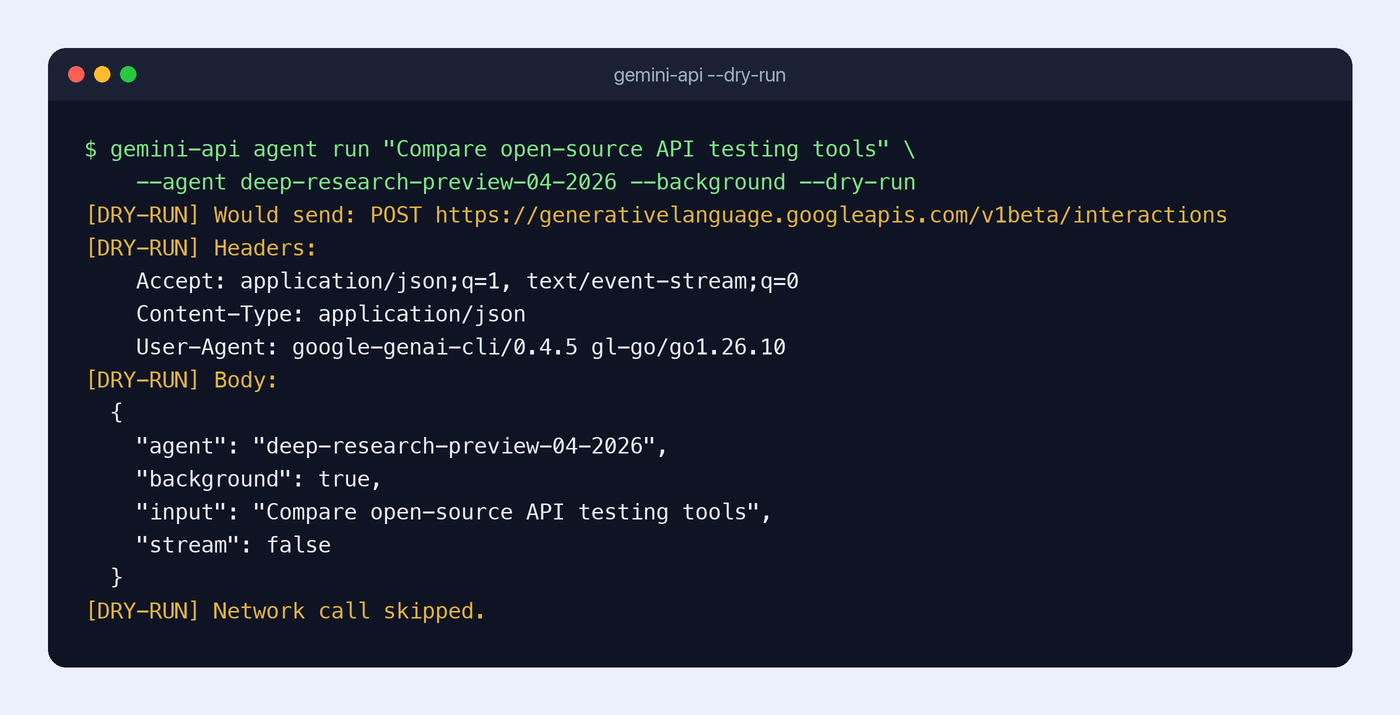
Every command posts to https://generativelanguage.googleapis.com/v1beta/interactions. Add -o json to get one JSON object per request on stdout, which an agent can parse before it spends a token.
Gemini API CLI commands your agent will run
Generate and edit images
gemini-api image "A friendly robot mascot, soft studio lighting" --out ./assets/mascot.jpg
gemini-api image "Add a winter scarf" -i ./assets/mascot.jpg --out ./assets/mascot-winter.jpg
Media commands write the file and print only its path, so the agent captures it with $(...) and keeps building. image also takes --aspect-ratio and --image-size (512, 1K, 2K or 4K). The default model is Nano Banana 2.1; see our Nano Banana 2.1 API guide for what it does well.
Generate video, speech and music
gemini-api video "A slow camera move through a sunlit workshop" --resolution 1080p --out ./assets/
gemini-api tts "Welcome. Let's build something together." --out ./assets/welcome.wav
gemini-api music "Warm ambient music for a product walkthrough" --out ./assets/
Video takes longer, so video polls for you. Use --async to get the operation handle right away and --resume <id> to pick polling back up later. --resolution defaults to 720p.
Analyze PDFs, images and YouTube URLs
gemini-api analyze -i product-brief.pdf "What should we build first, and why?" > plan.md
gemini-api analyze -i before.png -i after.png "Summarize the visual design changes"
-i/--input is repeatable and accepts a local path, a files/<id> URI, or a YouTube URL. Inline inputs cap at about 14 MB raw. For bigger files, upload once and reuse the URI:
FILE_URI=$(gemini-api files upload interview.mp4 --wait --output-format json --jq '.name')
gemini-api analyze -i "$FILE_URI" "List the key action items with timestamps"
Uploaded files are deleted after 48 hours.
Transcribe audio and video
gemini-api transcribe -i interview.mp4 --format srt --out interview.srt
--format takes md (default), text, json or srt. Add --no-speakers or --no-timestamps to strip either from the output.
Run Deep Research in the background
ID=$(gemini-api agent run "Research battery recycling approaches and cite sources" \
  --agent deep-research-preview-04-2026 --background --jq '.id')
gemini-api agent status "$ID" --stream=false --output-format json
--background returns an interaction ID at once instead of holding a stream open. The agent stores the ID, works on something else, and checks back with agent status. agent cancel stops a run. The 0.4.5 help also lists deep-research-max-preview-04-2026 and antigravity-preview-05-2026 as managed agents.
Flags that make gemini-api safe for agents
These are the global flags worth putting in your agent’s instructions, all from gemini-api --help-global:
--agent-mode(orGEMINI_CLI_AGENT_MODE=1): structured JSON errors on stderr and compact TOON output on stdout.-o, --output-format:pretty,json,yaml,tableortoon.-q, --jq: filter output inline, for example--jq '.id'.--no-interactive: no prompts or TUI forms, which a headless agent needs.--usage: the full command tree as machine-readable KDL.--schema(per command): the JSON Schema for a--bodypayload.
Exit codes tell the agent what went wrong without parsing text: 0 ok, 1 runtime or API failure, 2 usage or validation error, 3 authentication. One gotcha: streaming commands (generate, agent run) need --stream=false before -o json or --jq will give a single parseable result.
Give your coding agent the Gemini API CLI
Google’s README ships a block to paste into AGENTS.md, CLAUDE.md or .cursorrules. Trimmed:
You have access to gemini-api through the shell.
1. Inspect --help or --usage to choose a command, and --schema when building a --body JSON payload.
2. Preview API calls with --dry-run.
3. For JSON output or --jq on streaming commands, pass --stream=false --output-format json.
4. Capture returned file paths and interaction IDs to continue multi-step tasks.
Make sure GEMINI_API_KEY reaches the agent’s subprocess environment. Then prompt as usual: “Build the landing page, use Gemini for a mascot image and a 20-second voiceover, and start a Deep Research run on competing products.” The agent picks the commands.
What it doesn’t do: real-time voice or video. There’s no WebSocket support, so the Live API still needs the GenAI SDKs.
Test the API you build with Apidog CLI
gemini-api gives your agent Gemini’s models. It knows nothing about your own API: the /summarize or /thumbnail endpoint your app wraps around Gemini, its environments, or the assertions that prove a release didn’t break. That’s the job of Apidog CLI, and the same agent can run both.
Set it up once:
npm install -g apidog-cli@latest
apidog login --with-token <YOUR_TOKEN>
npx -y skills add https://apidog.com   # pick your agent when prompted
Then give your agent one prompt:
Use gemini-api to dry-run an analyze call on ./docs/sample-invoice.pdf, then run it for real.
Import ./openapi.yaml into Apidog project <id>, create a test case for POST /v1/invoices/extract
that uploads the same PDF and asserts a 200 and a non-empty "total" field, run it against the
staging environment, and summarize any failures.
The agent checks Gemini’s answer with gemini-api, then reads the Apidog schema before writing a payload, validates it, and creates and runs the case:
apidog import --project <id> --format openapi --file ./openapi.yaml
apidog cli-schema get test-case-create
apidog cli-schema validate test-case-create --file case.json
apidog test-case create --project <id> --file case.json
apidog run --test-case <caseId> --project <id> -e <envId> -r cli,json
apidog test-case create --help flags one trap: the case needs a valid categoryId, so list them first with apidog test-case category --project <id>. Swap -r cli,json for -r junit and the same line runs in CI. If Claude Code is your agent, start with Apidog CLI in Claude Code. Apidog’s Free plan covers up to 4 users.
FAQ
Is the Gemini API CLI free? The CLI itself is free and open source under Apache 2.0. Every call bills to your API key under normal Gemini API pricing. For what the free tier covers, see our Gemini API free tier guide.
Is gemini-api the same as Gemini CLI? No. Gemini CLI is an interactive coding agent. gemini-api is a stateless tool that other agents, scripts and CI jobs call to reach Gemini models and managed agents.
Can I test commands without an API key? Yes. --dry-run validates the command and prints the exact request with no network call and no keychain read. Every example in this post was checked that way on 0.4.5.
How do I handle files larger than 14 MB? Run gemini-api files upload <file> --wait, keep the returned files/<id>, and pass it to -i on analyze, transcribe, generate, image, video or agent run. Uploads expire after 48 hours.
Should I pin a version? Yes, in CI. Google says breaking changes can happen between minor versions while the CLI is in beta.