The Gemini 4 Hydrogen API uses the model ID gemini-4-hydrogen. You call it with a POST to https://generativelanguage.googleapis.com/v1beta/interactions, your key in the x-goog-api-key header, and model plus input in the JSON body. It runs on the free tier and the paid tier ($1.50 input, $7.50 output per 1M tokens) and defaults to the high thinking level.
This guide walks the full path: key, first request, thinking level, a PDF, function calling, streaming and error handling. Every field name comes from Google’s docs.
What do you need before your first Gemini 4 Hydrogen API call?
You need a Gemini API key, the model ID gemini-4-hydrogen and the Interactions endpoint. Google released Hydrogen on November 12, 2026, as the fast Gemini 4 model next to Carbon and Argon (what Gemini 4 Hydrogen is).
| Item | Value |
|---|---|
| Model ID | gemini-4-hydrogen |
| Endpoint | POST /v1beta/interactions on generativelanguage.googleapis.com |
| Auth header | x-goog-api-key: $GEMINI_API_KEY |
| APIs | Interactions API and generateContent |
| Thinking levels | low, medium, high (default), xhigh |
| Context window | 1,048,576 tokens, shared by input, thinking and output |
| Output per synchronous hop | 65,536 tokens, streaming or not |
| Free tier | Yes, rate-limited |
| Paid price | $1.50 / 1M input, $7.50 / 1M output (thinking included) |
| Cached input | $0.075 / 1M via implicit caching |
Google’s docs call generateContent legacy, so these examples use Interactions.
How do you get a Gemini API key for Hydrogen?
Hydrogen is on the free tier, so you can start without billing:
- Open the API keys page in Google AI Studio.
- Click Create API key. New keys created in AI Studio are authorization keys, bound to a service account.
- Export it:
export GEMINI_API_KEY="YOUR_API_KEY". The SDKs readGEMINI_API_KEYorGOOGLE_API_KEY; if both are set,GOOGLE_API_KEYwins. - A Cloud project created outside AI Studio may need project verification before the free tier works.
Google publishes the free-tier numbers on its rate limits page, not in the launch guide. Our Gemini 4 Hydrogen free guide covers what you get at $0.
How do you send your first Gemini 4 Hydrogen API request?
Send model and input to the Interactions endpoint. Keep the model in a variable so swapping models is a one-line change.
export GEMINI_MODEL="gemini-4-hydrogen"

curl "https://generativelanguage.googleapis.com/v1beta/interactions" \
  -H "x-goog-api-key: $GEMINI_API_KEY" \
  -H 'Content-Type: application/json' \
  -X POST \
  -d '{
    "model": "'"$GEMINI_MODEL"'",
    "input": "Write a Python function that retries an HTTP call with exponential backoff."
  }'
The same call with the Python SDK (pip install -U google-genai):
import os
from google import genai

client = genai.Client()  # reads GEMINI_API_KEY

interaction = client.interactions.create(
    model=os.environ.get("GEMINI_MODEL", "gemini-4-hydrogen"),
    input="Write a Python function that retries an HTTP call with exponential backoff.",
)

print(interaction.output_text)
print(interaction.usage)
The response carries an id, a status and a steps array. Text lives in model_output steps, reasoning in thought steps, and the SDK’s output_text joins the text for you. The usage object holds total_input_tokens, total_thought_tokens, total_output_tokens and total_tokens.
These snippets follow Google’s quickstart. We didn’t run them for this post (no Gemini key on our test machine), so check the shape against your own first response.
How do you set the Gemini 4 Hydrogen thinking level?
Set thinking_level inside generation_config. Hydrogen defaults to high, adds a new xhigh level, and rejects minimal with an error.
thinking_level |
Token use | Google’s suggested use |
|---|---|---|
low |
Fewest tokens, lowest latency | Fast chat, high-throughput processing |
medium |
Lower token use, faster | Interactive coding, live UI prototyping, quick tool calls |
high (default) |
Balanced | Complex coding, agentic execution, multimodal document work |
xhigh |
Most tokens, deepest reasoning | Hard multi-step problems where high falls short |
curl "https://generativelanguage.googleapis.com/v1beta/interactions" \
  -H "x-goog-api-key: $GEMINI_API_KEY" \
  -H 'Content-Type: application/json' \
  -X POST \
  -d '{
    "model": "gemini-4-hydrogen",
    "input": "Audit this payment retry queue for race conditions.",
    "generation_config": {
      "thinking_level": "medium",
      "max_output_tokens": 65536
    }
  }'
Two rules matter. max_output_tokens caps thinking and output together, so an old low cap (say 8,192) can cut answers short; Google says to raise it to 65,536 and lower the thinking level instead. And thinking tokens bill at the $7.50 output rate, so xhigh costs more even when the visible answer is the same length. The Gemini 4 Hydrogen pricing breakdown runs the numbers per level.
Google also says the server ignores temperature, top_p and top_k on Hydrogen, so drop them from your requests.
How do you send a PDF to Gemini 4 Hydrogen?
Add a document item to the input array, next to a text item with your instruction. For small files, send the PDF inline as base64:
PDF_PATH="invoice.pdf"
B64=$(base64 < "$PDF_PATH" | tr -d '\n')

curl -X POST "https://generativelanguage.googleapis.com/v1beta/interactions" \
  -H "x-goog-api-key: $GEMINI_API_KEY" \
  -H 'Content-Type: application/json' \
  -d '{
    "model": "gemini-4-hydrogen",
    "input": [
      {"type": "document", "data": "'"$B64"'", "mime_type": "application/pdf"},
      {"type": "text", "text": "Extract the line items as a table."}
    ]
  }'
For larger files or reuse across turns, upload once with the Files API (free, kept 48 hours) and pass {"type": "document", "uri": "<file uri>", "mime_type": "application/pdf"} instead. Per the document processing guide, PDFs can be up to 50 MB or 1,000 pages, and the model reads the charts, tables and images in them, not just the text.
How does function calling work with Gemini 4 Hydrogen?
Declare your function in tools. The model doesn’t run anything; it returns a function_call step, your code runs the function, and you send back a function_result. Here’s step one, from Google’s function calling guide:
curl -X POST "https://generativelanguage.googleapis.com/v1beta/interactions" \
  -H "x-goog-api-key: $GEMINI_API_KEY" \
  -H 'Content-Type: application/json' \
  -d '{
    "model": "gemini-4-hydrogen",
    "input": "What'\''s the temperature in London?",
    "tools": [{
      "type": "function",
      "name": "get_current_temperature",
      "description": "Gets the current temperature for a given location.",
      "parameters": {
        "type": "object",
        "properties": {
          "location": {"type": "string", "description": "The city name"}
        },
        "required": ["location"]
      }
    }]
  }'
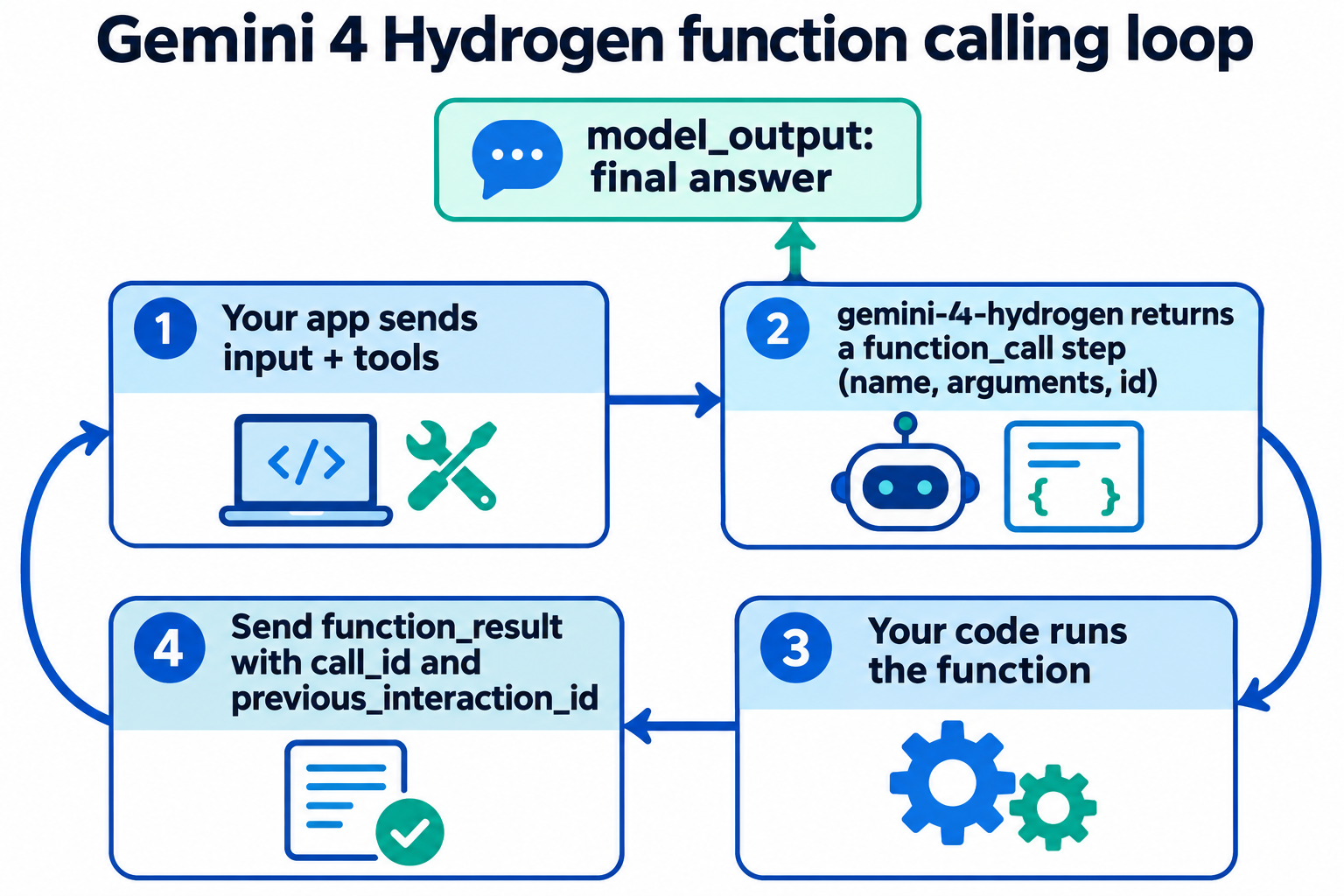
Find the step where type is function_call and read its name, arguments and id. Run your function, then send the result back on the same session:
fc = next(s for s in interaction.steps if s.type == "function_call")
result = get_current_temperature(**fc.arguments)

final = client.interactions.create(
    model="gemini-4-hydrogen",
    input=[{
        "type": "function_result",
        "name": fc.name,
        "call_id": fc.id,
        "result": [{"type": "text", "text": json.dumps(result)}],
    }],
    tools=[weather_function],
    previous_interaction_id=interaction.id,
)
print(final.output_text)
previous_interaction_id keeps conversation and thought state on Google’s side, so you don’t resend history. One warning from Google’s migration notes: prompting the model to print raw JSON “tool calls” with no tools declared can return MALFORMED_FUNCTION_CALL. Declare tools natively or use structured outputs.
How do you stream Gemini 4 Hydrogen responses?
Add "stream": true to the body. The API answers with Server-Sent Events:
curl -X POST "https://generativelanguage.googleapis.com/v1beta/interactions" \
  -H "x-goog-api-key: $GEMINI_API_KEY" \
  -H "Content-Type: application/json" \
  --no-buffer \
  -d '{
    "model": "gemini-4-hydrogen",
    "input": "Explain idempotency keys in three short paragraphs.",
    "stream": true
  }'
Per Google’s streaming guide, you get interaction.created, then step.start, step.delta and step.stop for each step (thought, then model_output), then interaction.completed with the final usage. Append delta.text from model_output steps to build the answer. Streaming doesn’t raise the ceiling: each hop still stops at 65,536 tokens. For longer output, set "background": true with max_output_tokens above 65,536 and poll GET /v1beta/interactions/{id} until status leaves in_progress or queued.
How do you handle Gemini 4 Hydrogen API errors?
Non-streaming errors come back as an HTTP status plus an error object with code and message. In a stream, you get an error event with the same fields. The codes you’ll hit most, from Google’s API errors page:
| HTTP | code |
What to do |
|---|---|---|
| 400 | invalid_request |
Fix the payload; check field names against the docs |
| 403 | permission_denied |
Check key permissions, verification or billing |
| 404 | model_not_found |
Check the model string is gemini-4-hydrogen |
| 429 | rate_limit_exceeded |
Back off and retry |
| 429 | quota_exceeded |
Daily quota hit; wait for the reset |
| 503 | service_unavailable |
Back off and retry |
Google’s troubleshooting guide says to retry only 429, 408 and 5xx, with exponential backoff plus jitter and a retry cap, and never 400, 402 or 403. The Python SDK already retries transient errors up to four times.
Let your coding agent test the Hydrogen API with Apidog CLI
Rather than reading JSON after every prompt or thinking-level change, let your coding agent (Claude Code, Codex, Cursor) build a repeatable test and run it with Apidog CLI.
Set it up once:
npm install -g apidog-cli@latest
apidog login --with-token <YOUR_TOKEN>
npx -y skills add https://apidog.com   # pick your agent when prompted
Then give your agent one prompt:
In Apidog project <projectId>, create an environment "gemini" with base URL
https://generativelanguage.googleapis.com and variables GEMINI_API_KEY and
THINKING (default "low"). Add an endpoint for POST /v1beta/interactions with the
x-goog-api-key header from GEMINI_API_KEY. Create a test case that sends model
"gemini-4-hydrogen", a short prompt and generation_config.thinking_level
{{THINKING}}, and asserts: HTTP 200, status is "completed", steps contains a
non-empty model_output, and usage.total_tokens exists. Run it at low and at high,
then compare usage.total_thought_tokens.
The agent checks each payload against the CLI’s schemas before it writes anything:
apidog environment create gemini --project <projectId> --base-url https://generativelanguage.googleapis.com
apidog cli-schema get endpoint-create
apidog cli-schema validate endpoint-create --file endpoint.json
apidog endpoint create --project <projectId> --file endpoint.json
apidog cli-schema validate test-case-create --file case.json
apidog test-case create --project <projectId> --file case.json
apidog run --test-case <caseId> --project <projectId> -e <envId> --env-var "THINKING=low" -r cli,json
apidog run --test-case <caseId> --project <projectId> -e <envId> --env-var "THINKING=high" -r cli,json
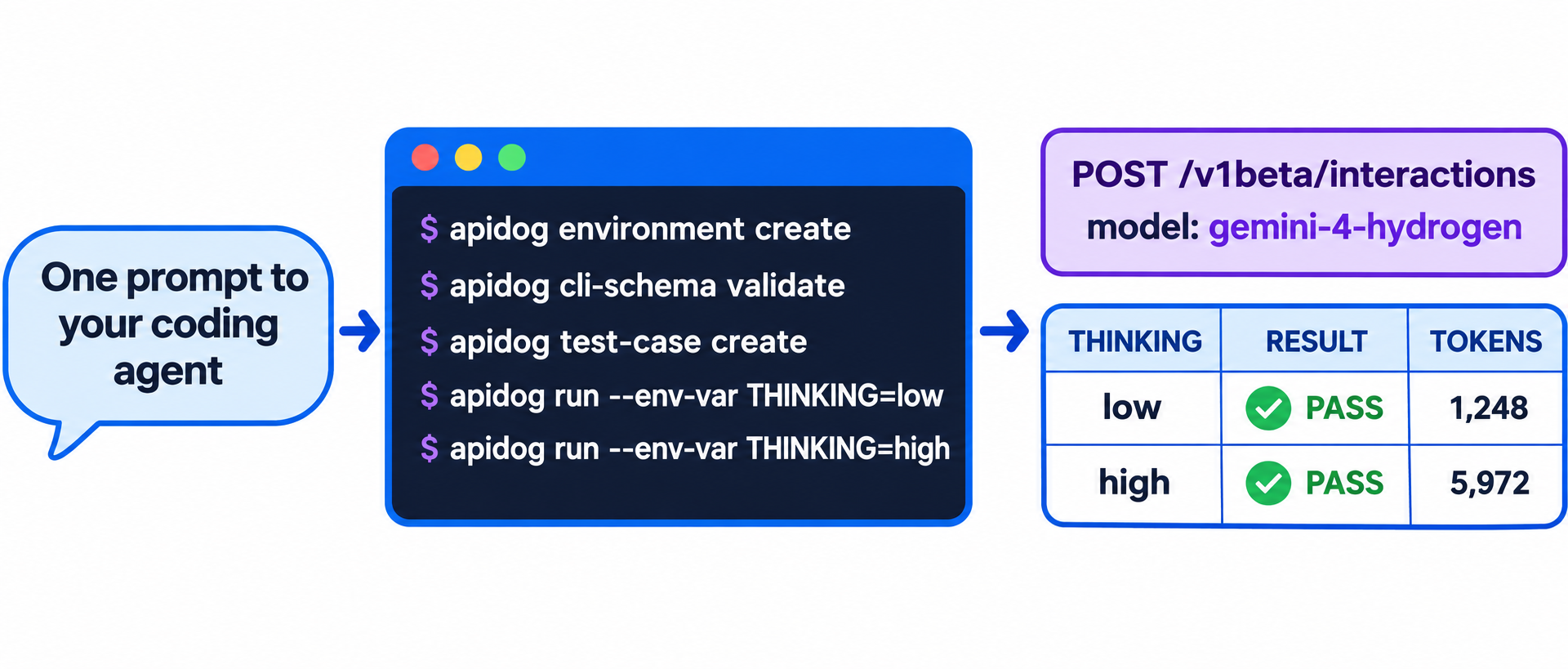
The two runs compare thought tokens for the same prompt, the number that moves your bill. Swap -r cli,json for -r junit and the same run goes into CI; the Apidog CLI CI/CD guide shows the pipeline and Apidog CLI in Claude Code covers the agent setup. Apidog’s Free plan covers up to 4 users.
FAQ
What is the Gemini 4 Hydrogen model ID? gemini-4-hydrogen. It works with the Interactions API and generateContent.
Is the Gemini 4 Hydrogen API free? Yes, within limits. Google lists Hydrogen on the free tier of the Gemini API and AI Studio, rate-limited. Paid use costs $1.50 per 1M input tokens and $7.50 per 1M output tokens.
How do I migrate from Gemini 3.8 Flash? Change the model string, raise low max_output_tokens caps, remove temperature, top_p, top_k and explicit caching (cachedContents), and replace minimal thinking with low or medium.
Does Hydrogen support context caching? Only implicit caching. It runs by default on prompts of at least 4,096 tokens and discounts cache hits by 95%. Explicit caching isn’t supported.
How is Hydrogen different from Gemini 4 Argon in the API? Same request schema. Hydrogen defaults to high and adds xhigh, while Argon defaults to medium. See the Gemini 4 Argon API guide, the Gemini 4 Carbon API guide and Gemini 4 Hydrogen Orchestrator for pairing models.