Claude Code AGENTS.md support landed in v2.1.277: in a project with no CLAUDE.md, Claude Code now reads your AGENTS.md as its project instructions. You don’t need an import, a symlink or a setting. If your repo has both files, Claude reads CLAUDE.md only, unless you switch the Project instructions setting in /config to load both.
If your team mixes coding agents, the same AGENTS.md that Codex and Cursor already read now steers Claude Code too. This guide covers precedence, migration, and an AGENTS.md that teaches any agent to test your APIs with the Apidog CLI.
What is AGENTS.md in Claude Code?
AGENTS.md is a plain Markdown file of instructions for coding agents: build commands, test commands, code style and project rules. Since v2.1.277, Claude Code reads it through a built-in plugin, so a repository set up for other agents works with Claude Code without extra files. It needs no required fields or special syntax.
The format itself is open. The AGENTS.md site describes it as “a simple, open format for guiding coding agents,” used by over 60,000 open-source projects and now stewarded by the Agentic AI Foundation under the Linux Foundation. OpenAI Codex and Cursor both document AGENTS.md support, and Claude Code was the obvious holdout until this release.
New to the format? Start with how to write AGENTS.md files for API development teams.
Here’s the release trail from the official Claude Code changelog:
| Version | What changed |
|---|---|
| 2.1.277 | Added AGENTS.md support: with no CLAUDE.md, Claude Code reads AGENTS.md; change it under “Project instructions” in /config |
| 2.1.280 | /memory and /context list an AGENTS.md that Claude read directly |
| 2.1.281 | AGENTS.md support also works on Amazon Bedrock, Google Vertex AI, Microsoft Foundry, LLM gateways and sessions with telemetry disabled |
| 2.1.285 | The built-in plugin’s ID became cc-plugin-agents-md@builtin (was agents-md@builtin) |
Run claude --version before you rely on any of this. On anything older than 2.1.277, Claude Code reads CLAUDE.md files only.
CLAUDE.md vs AGENTS.md: which one wins?
By default, CLAUDE.md wins. Claude Code reads AGENTS.md only when no CLAUDE.md exists in your working directory or any directory above it. The Claude Code memory docs spell out three cases:
| Your repository has | Claude Code reads |
|---|---|
AGENTS.md, and no CLAUDE.md or CLAUDE.local.md in the working directory or above |
Your AGENTS.md |
AGENTS.md plus a CLAUDE.md or CLAUDE.local.md in the working directory or above |
Your CLAUDE.md files only |
A CLAUDE.md that imports AGENTS.md with @AGENTS.md |
Your CLAUDE.md, with AGENTS.md pulled in through the import |
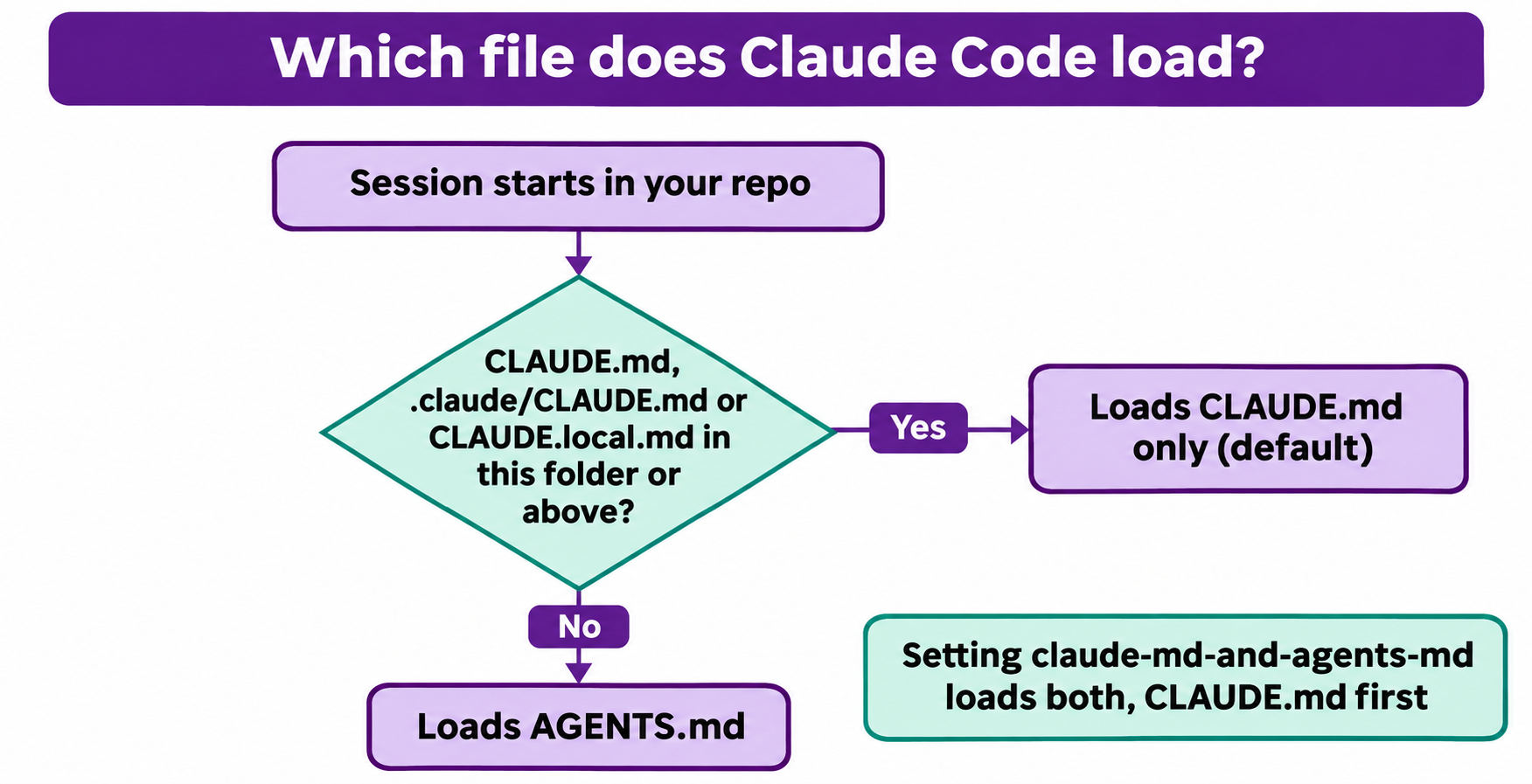
Not every file counts for that check. These three block AGENTS.md:
CLAUDE.mdin the working directory or above.claude/CLAUDE.mdin the working directory or aboveCLAUDE.local.mdin the working directory or above
These don’t block it, and keep loading alongside AGENTS.md: your user file at ~/.claude/CLAUDE.md, your organization’s managed CLAUDE.md, and files under .claude/rules/.
Watch the CLAUDE.local.md trap: add a personal one for uncommitted notes, and Claude stops reading the team’s AGENTS.md for you.
What Claude Code loads, and when
When nothing blocks it, Claude Code reads:
- At session start: every
AGENTS.mdand.claude/AGENTS.mdin the working directory and the directories above it. Interactive sessions print a line likeno CLAUDE.md found; AGENTS.md loaded: /home/you/repo/AGENTS.md. - In subdirectories: a subdirectory’s
AGENTS.md, once Claude opens a file there with the Read tool and that folder has noCLAUDE.mdof its own. - Imports:
@pathimports insideAGENTS.mdare expanded, andclaudeMdExcludespatterns apply.
Claude Code does not read AGENTS.local.md, AGENTS.override.md, or anything under .agents/. If you share a repo with Codex, which documents AGENTS.override.md, keep that in mind.
How to change which instruction files Claude Code loads
Type /config in a session and set Project instructions to one of four values:
| Value | What Claude Code reads |
|---|---|
claude-md-or-agents-md |
CLAUDE.md, or AGENTS.md when no CLAUDE.md exists. This is the default |
claude-md-and-agents-md |
Both, each directory’s CLAUDE.md first and its AGENTS.md after. An AGENTS.md already imported or symlinked isn’t read twice |
claude-md |
CLAUDE.md files only |
managed-only |
Only your organization’s managed CLAUDE.md and auto memory at launch |
For most mixed teams, claude-md-and-agents-md is the setting you want. It keeps your personal CLAUDE.local.md and still loads the shared AGENTS.md.
You can set it in a settings file instead. Claude Code reads this entry from ~/.claude/settings.json, a --settings file or managed settings, and ignores it in project and local settings files:
{
  "pluginConfigs": {
    "cc-plugin-agents-md@builtin": {
      "options": { "instructionFiles": "claude-md-and-agents-md" }
    }
  }
}
Before v2.1.285 the plugin ID was agents-md@builtin. Versions from 2.1.285 on read either ID, so use the old one if older installs share the file. The change applies from your next message.
If Project instructions is missing from /config, your session can’t load AGENTS.md: you’re on a version before 2.1.277, you disabled the built-in plugin through /plugin, or it’s your first session after upgrading (it works from the next one).
How to migrate an older AGENTS.md workaround
Many teams wired AGENTS.md into Claude Code by hand before this release. The docs recommend:
| Your old setup | What to do now |
|---|---|
CLAUDE.md containing @AGENTS.md |
Leave it. The import never makes Claude read AGENTS.md twice. Delete the CLAUDE.md only if it holds nothing else |
CLAUDE.md that says “read AGENTS.md” in words |
Replace the sentence with @AGENTS.md, or delete the file. A sentence only works if Claude decides to open the file |
CLAUDE.md symlinked to AGENTS.md |
Nothing required. Claude reads the content once either way |
SessionStart hook that prints AGENTS.md |
Remove it. Otherwise Claude gets a second copy in context |
Keep the @AGENTS.md import if anyone on your team still runs a version older than 2.1.277. It’s the one setup that works on every version.
Import or symlink?
If you need Claude-specific rules on top of the shared file, use an import. Claude reads the imported file first, then the rest:
@AGENTS.md

## Claude Code

Use plan mode for changes under `src/billing/`.
If you don’t need anything Claude-specific, a symlink works:
ln -s AGENTS.md CLAUDE.md
Two catches: Claude’s Edit and Write tools won’t write through a symlink, and Git on Windows checks out a committed symlink as a one-line text file unless core.symlinks is on. If anyone on your team uses Windows, pick the import.
Either way, run /context all in your next session and confirm CLAUDE.md shows under Memory files.
One AGENTS.md for Codex, Cursor and Claude Code
The payoff is a single source of truth. Put your build commands, test commands and conventions in AGENTS.md at the repo root. Codex, Cursor and Claude Code all read it.
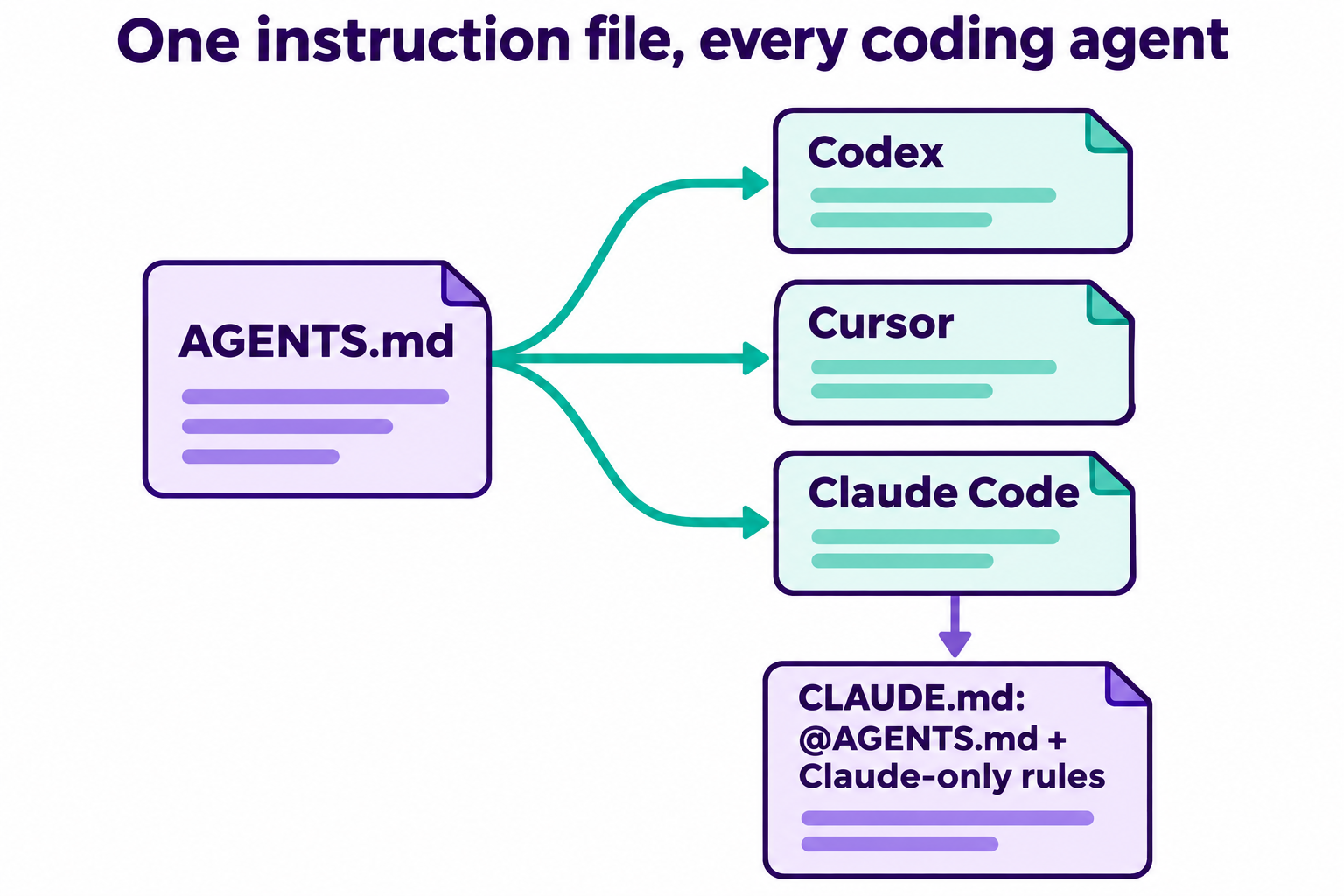
A layout that holds up in practice:
AGENTS.mdat the root: everything every agent needs. Commands, folder map, style rules, what not to touch.AGENTS.mdin big subfolders: rules that only apply there, likeservices/payments/AGENTS.md. Claude Code loads these on demand when it reads a file in that folder.- Optional
CLAUDE.md: only if you need Claude-only behavior, such as plan mode or hooks. Start it with@AGENTS.md.
One caveat: an AGENTS.md loaded through the setting doesn’t fire InstructionsLoaded hooks, and isn’t loaded from --add-dir directories. If you depend on either, use the @AGENTS.md import route.
Teach your agent to test APIs with Apidog CLI in AGENTS.md
Write your API testing rules once, and whichever agent opens the repo runs tests the same way. The Apidog CLI gives the agent structured JSON output it can read, so the loop stays in the terminal.
Set it up once per machine:
npm install -g apidog-cli@latest
apidog auth login --with-token <YOUR_TOKEN>
apidog skill install
A shortcut: tell your agent “Read https://apidog.com/apidog-cli-installation-guide.md and set up Apidog CLI”. That guide is written for agents and covers install, login and the skill.
Then add a section like this to your AGENTS.md:
## API testing (Apidog CLI)

- Apidog project ID: 123456. Staging environment ID: 7890.
- Never build Apidog JSON payloads from memory. Run
  `apidog cli-schema get <key>` first, then
  `apidog cli-schema validate <key> --file <path>`, and write only after it passes.
- After changing any handler under `src/routes/`, find its endpoint with
  `apidog endpoint list --project 123456` and its cases with
  `apidog test-case list --project 123456 --endpoint <endpointId>`.
- If a route has no test case, create one with
  `apidog test-case create --project 123456 --file case.json`.
- Run cases with
  `apidog run --test-case <caseId> --project 123456 -e 7890 -r cli,json`
  and summarize every failure before you say the task is done.
- Do not edit or delete endpoints in Apidog unless the task asks for it.
Now one prompt does the work in Claude Code, Codex or Cursor:
I changed POST /orders to require a currency field. Update the Apidog test
case for it and run it against staging, following AGENTS.md.
The agent follows your rules and runs commands like these:
apidog endpoint list --project 123456
apidog test-case list --project 123456 --endpoint <endpointId>
apidog cli-schema get test-case-create
apidog cli-schema validate test-case-create --file case.json
apidog test-case create --project 123456 --file case.json
apidog run --test-case <caseId> --project 123456 -e 7890 -r cli,json
Every flag above comes from apidog <cmd> --help on Apidog CLI 2.2.12. The same apidog run line with -r junit drops into CI, and --upload-report sends the run overview to the app so your team can see it. For the Claude Code side in detail, see how to use the Apidog CLI in Claude Code; Codex users can follow the Apidog CLI in Codex. Apidog Free covers up to 4 users, so a small team can try this today.
Troubleshooting: my AGENTS.md isn’t loading
- Look for a
CLAUDE.mdon the path. ACLAUDE.md,.claude/CLAUDE.mdorCLAUDE.local.mdin your working directory or above wins by default. Your~/.claude/CLAUDE.mddoesn’t count. - Check your version. Run
claude --version. You need 2.1.277 or later, and 2.1.281 or later on Bedrock, Vertex AI, Foundry, gateways or with telemetry off. - Check the setting. Open
/configand make sure Project instructions isn’tclaude-mdormanaged-only. - Confirm it loaded. Run
/memoryand look for theAGENTS.mdpath in the list.
FAQ
Does Claude Code read AGENTS.md now? Yes, from v2.1.277. With no CLAUDE.md in your working directory or above, Claude Code reads AGENTS.md as its project instructions automatically.
If I have both CLAUDE.md and AGENTS.md, which does Claude Code use? CLAUDE.md only, by default. Set Project instructions to claude-md-and-agents-md in /config to load both, CLAUDE.md first.
Should I delete my CLAUDE.md that imports @AGENTS.md? No need. The import never loads AGENTS.md twice, and it still works for teammates on versions before 2.1.277. Delete it only if it holds nothing else and everyone has upgraded.
Does Claude Code read AGENTS.override.md like Codex? No. Claude Code ignores AGENTS.override.md, AGENTS.local.md and anything under .agents/.
Does AGENTS.md work on Amazon Bedrock or Google Vertex AI? Yes, from v2.1.281. Earlier versions on Bedrock, Vertex AI, Foundry, gateways or with telemetry off read CLAUDE.md only; use an @AGENTS.md import there.