Yes, you can use ChatGPT Images 2.6 for free, but only inside ChatGPT. A free account gets limited image creation, and OpenAI publishes no fixed count, so ChatGPT’s own limit notice is your real number. Codex image generation isn’t on the Free plan, and the API has no free image route. GIF access on Free isn’t confirmed.
This guide covers the one $0 route, what we could confirm about GIFs, and what happens when you run out. Every limit comes from OpenAI’s pages as read on November 5, 2026, the day after launch. We didn’t test a Free account. For the full release, read our ChatGPT Images 2.6 explainer. Our Images 2.5 and Images 2.0 free guides describe earlier versions, so don’t apply their limits here.
Is ChatGPT Images 2.6 free?
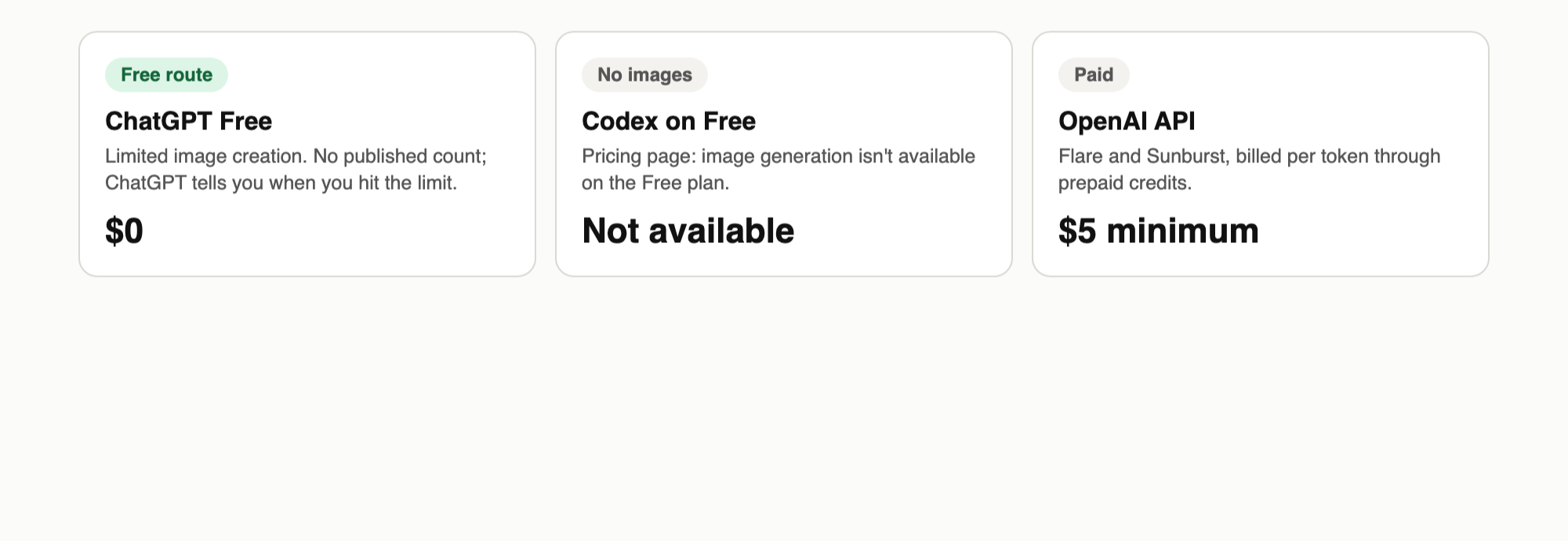
ChatGPT Images 2.6 is free to try on ChatGPT’s $0 plan. OpenAI says it’s available “across all subscription tiers” on desktop, mobile and web, and its pricing page lists Free as “Limited image creation”. You don’t pay anything, but you get a capped allowance that OpenAI doesn’t quantify.
Here’s how each OpenAI route looks for someone paying nothing:
| Route | Cost | What you get | Limit | Payment needed |
|---|---|---|---|---|
| ChatGPT Free | $0 | Image creation with Images 2.6 | “Limited”; no published count | No |
| Codex on Free | $0 | Limited Codex, but no image generation | Not available | No |
| OpenAI API | Pay per token | Flare and Sunburst models | $5 minimum credit purchase | Yes |
All rows were checked on November 5, 2026. Only the first row gets you a free image.
The Codex row needs a note. The launch post says Images 2.6 is in ChatGPT and Codex across all subscription tiers, while the Codex pricing page says “Image generation isn’t available on the Free plan.” We’re going with the more specific page until OpenAI says otherwise.
How to use ChatGPT Images 2.6 on the free plan
The free route takes four steps and no model picker:
- Create or sign in to a free account. Go to chatgpt.com. OpenAI’s account help says creating a second account needs no payment and starts it on Free, and the pricing page lists Free at $0.
- Open a new chat or the Images page. ChatGPT’s sidebar has an Images entry, and a normal chat works too.
- Describe the image. Name the subject, the setting, the format and any exact words. For example: “A vertical poster for a neighborhood book swap, warm paper texture, headline reads ‘Swap Saturday’.”
- Save what you like. Download each keeper before you start another round of changes.
OpenAI doesn’t state which of its two API models ChatGPT uses for Free accounts, so don’t assume you’re getting Flare’s speed or Sunburst’s edit consistency.
Reuse a photo with saved references
Images 2.6 adds saved reference images in ChatGPT. OpenAI’s release notes give this example: save a photo of your dog as Pepper, then ask for a watercolor portrait of @Pepper without uploading it again. The notes don’t confirm Free access. If you see the option, use it: file uploads have their own limit on Free.
Can you make GIFs for free?
OpenAI hasn’t confirmed it. The release notes say GIF creation “is rolling out in ChatGPT” and name no plan. The pricing page has no GIF row, and “all subscription tiers” describes Images 2.6 as a whole, not every feature inside it.
The test costs you one prompt. Ask for a short looping animation:
Create a looping GIF of a small orange robot that waves, blinks
and returns to its starting pose. Plain light background.
OpenAI’s notes also suggest uploading a sketch and asking ChatGPT to make the character wave. If you get a real GIF, you can adjust the playback speed and share it. If you get a still image or a limit notice, GIF creation isn’t available to you yet.
The sprite sheet fallback
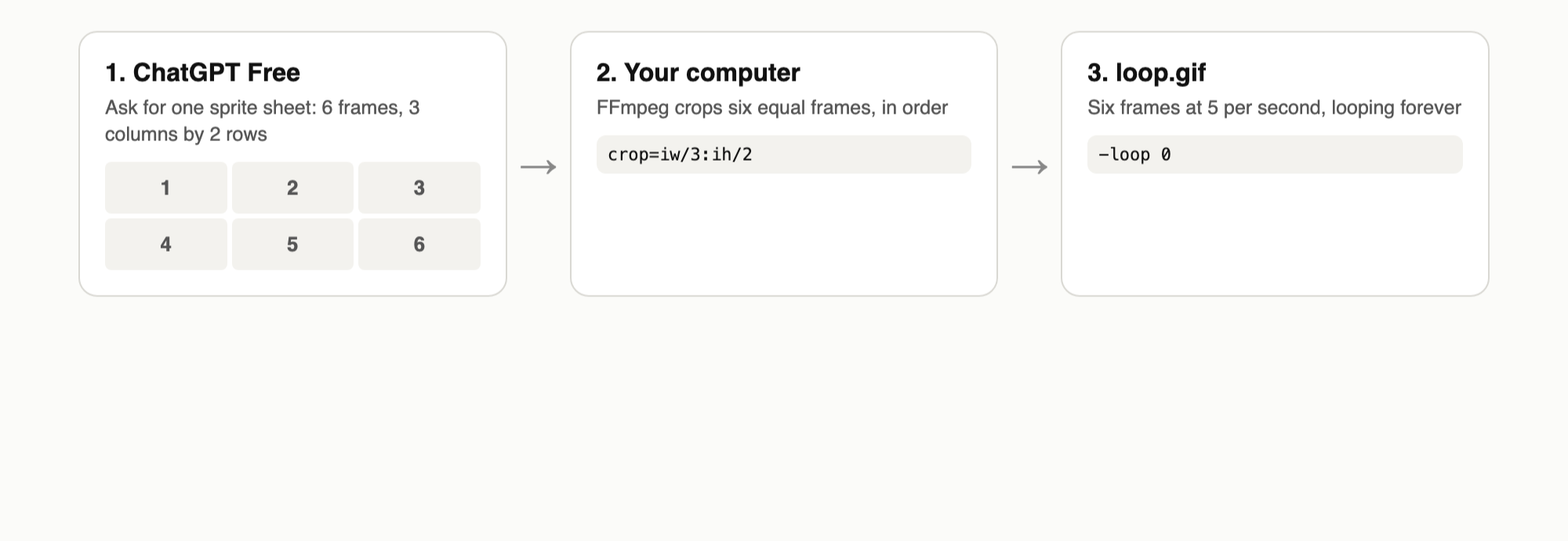
A still image is enough to build a GIF yourself. OpenAI’s own launch prompts ask for “a single animation sprite sheet”, with six frames in a 3-column by 2-row grid and no borders or gutters. Borrow that structure:
Create a single animation sprite sheet for a looping GIF.
A small orange robot waves, then lowers its arm. Exactly 6 sequential
frames in a precise 3-column by 2-row grid, read left to right, then
top to bottom. Every panel has identical dimensions. Same character,
fixed camera, plain background. Sixth frame leads back to the first.
No text, no labels, no borders, no gutters.
Save the image as sheet.png, then cut it into a loop with FFmpeg, which is free and runs on your machine:
ffmpeg -loop 1 -framerate 5 -t 1.2 -i sheet.png \
  -vf "crop=iw/3:ih/2:mod(n\,3)*iw/3:floor(n/3)*ih/2" \
  -loop 0 loop.gif
We ran this command on a test 3x2 sheet and got a six-frame looping GIF at five frames per second. The model’s grid is the weak point: if the panels aren’t exactly even, the animation will jitter, so check the sheet before you cut it.
What the free plan doesn’t include
The clearest differences are volume and Thinking. This comes from the ChatGPT pricing page on November 5:
| Plan | Monthly price | Image creation | Image generation with Thinking |
|---|---|---|---|
| Free | $0 | Limited | No |
| Go | $8 | More image creation | No |
| Plus | $20 | “More complex and accurate” | Yes |
| Pro | From $100 | “Unlimited and faster”, abuse guardrails apply | Yes |
The page gives no image count for any plan. Ads may also appear on Free in some countries, according to the Free tier FAQ.
Every plan gets the same provenance marks. OpenAI’s system card describes C2PA metadata plus an invisible SynthID watermark across ChatGPT, Codex and the API, so paying won’t remove them.
How the free image limit works
Image generation has its own limit, separate from your text chats. The Free tier FAQ says everyday text chats are unlimited, subject to abuse safeguards, while image creation, file uploads and other tools have separate usage limits. ChatGPT tells you when you reach one, and you wait until a later time to use that tool again.
Three things follow from that:
- Third-party counts aren’t official. OpenAI’s pages don’t publish a daily number for Images 2.6, so any figure you see online is someone’s observation.
- Limits can change. OpenAI says the default model and available limits can change over time.
- Upgrading resets the limit. The FAQ says your usage rates reset when you move to Plus, Pro or Business.
Don’t plan a deadline around the free allowance.
Make a small allowance last
OpenAI doesn’t say how edits count, so assume each generation and each edit uses some of your allowance. These habits waste fewer attempts:
- Write the whole brief first. Include format, subject, setting, style and exact text in one prompt.
- Put exact words in quotes. That tells the model what to letter instead of leaving it to improvise.
- Change one thing per edit. OpenAI says 2.6 is better at preserving details across edits, like an outfit when the background changes. A focused request gives it less to redraw.
- Start from a sketch. OpenAI’s launch post shows a pen drawing becoming an animated owl, so a rough layout photo can replace a long description.
- Save as you go. A downloaded file never needs regenerating.
When free isn’t enough: the API
The API isn’t free, even though OpenAI’s rate limit guide lists a Free usage tier. That tier is a $100 monthly usage ceiling for accounts in allowed countries, not a grant of image credit. New API accounts use prepaid billing with a $5 minimum purchase. Any free credits on your account get used first, but don’t count on having them. Our guide to getting an OpenAI API key covers that setup.
Here’s what $5 buys for a 1024x1024 image, using the output costs from OpenAI’s calculator:
quality |
Output cost per image | Images for $5 |
|---|---|---|
low |
$0.02469 | About 200 |
medium |
$0.04347 | About 115 |
high |
$0.05268 | About 95 |
Those counts are our arithmetic and leave out input tokens, so your real number will be lower. They also don’t cover GIFs, which have no published billing formula. The API’s GIF output requires access to a preview, so a rejected request may be an access issue. Set complexity yourself too, because it defaults to high.
Let your coding agent test the API calls with Apidog CLI
Once you move to paid calls, your coding agent can test them with Apidog CLI. Apidog’s Free plan covers up to 4 users. Set it up once:
npm install -g apidog-cli@latest
apidog auth login --with-token <YOUR_TOKEN>
apidog skill install
Then give Claude Code, Codex or Cursor one prompt:
In Apidog project <id>, add POST /v1/images/generations on
https://api.openai.com, reading the bearer token from OPENAI_API_KEY.
Create one test case for gpt-image-2.6-flare at low quality and low
complexity that asserts status 200 and that data[0].b64_json exists.
Run it against environment <envId> and summarize any failure.
The agent checks its payload, writes the case and runs it:
apidog cli-schema get test-case-create
apidog cli-schema validate test-case-create --file case.json
apidog test-case create --project <id> --file case.json
apidog run --test-case <caseId> --project <id> -e <envId> -r cli,json
Each passing run makes one real, billable generation, so keep the quality low. See our Codex setup guide or Claude Code setup guide for agent details.
FAQ
How many free images do you get with ChatGPT Images 2.6? OpenAI doesn’t publish a number. The pricing page says “Limited”, and ChatGPT shows a notice when you reach your limit.
Is ChatGPT Images 2.6 free for GIFs? Not confirmed. OpenAI says GIF creation is rolling out in ChatGPT without naming plans. Try one prompt, or use the sprite sheet fallback above.
Do you need a credit card for the free plan? No. OpenAI says creating an account doesn’t require payment, and a new account starts on Free.
Can you use Images 2.6 for free in Codex? Not according to the Codex pricing page, which says image generation isn’t available on the Free plan. The launch post’s wording is broader, so recheck that page if you depend on it.
Is there a free GPT-Image-2.6 API? No. The API bills per token, and new accounts buy at least $5 in credit. Use ChatGPT’s Free plan if you want to spend nothing.
Do free images have a watermark? Yes, in the provenance sense. OpenAI uses C2PA metadata and an invisible SynthID watermark. Neither is a visible logo on the image.