OpenAI shipped ChatGPT Images 2.5 on September 8, 2026, and the line that matters most for anyone without a subscription sits near the bottom of the launch post: the new model is rolling out “across all tiers”. Free accounts get the same image model as Pro accounts; what changes is how many images you can make before the app asks you to wait.
This guide covers the free route: where to click, what the four new features do, what each plan gets, and how to stretch a small cap. It also covers the developer path with OpenAI’s published numbers, and how to test a prompt inside Apidog before you spend a starter credit. If you used our ChatGPT Images 2.0 free guide in April, this is the same shape with the 2.5 details swapped in.
TL;DR
- Yes, ChatGPT Images 2.5 is on the free tier. OpenAI says it is available to “all ChatGPT, ChatGPT Work, and Codex users across desktop, mobile, and web” and “across all tiers”.
- Free, Go, Plus, and Pro run the same model; paid plans buy more generations. OpenAI publishes no fixed per-plan numbers, so the in-app banner is your limit, and it moves with demand.
- Four new ChatGPT features ship with 2.5: Sketch (type
@Sketch), templates such as Poster and Merch, comments placed directly on an image, and a shareable prompt. - Developers get no perpetual free API tier. A starter credit plus the
lowquality setting is the cheapest real path, at about $0.006 per 1024x1024 image by OpenAI’s own calculator.
What ChatGPT Images 2.5 is
ChatGPT Images 2.5 is the September 2026 update to the image generator inside ChatGPT, backed by two API models, gpt-image-2.5-flare and gpt-image-2.5-sunburst, both with snapshots dated 2026-09-08. OpenAI’s headline claims are “up to 50%” lower latency than Images 2.0, “more natural lighting and richer textures”, better preservation of the subjects in your reference photos, edits that change only what you asked for, and “more complex layouts including transparent backgrounds”. Our ChatGPT Images 2.5 explainer covers every claim, the safety numbers, and the full pricing table.
Step-by-step: using Images 2.5 on the free tier
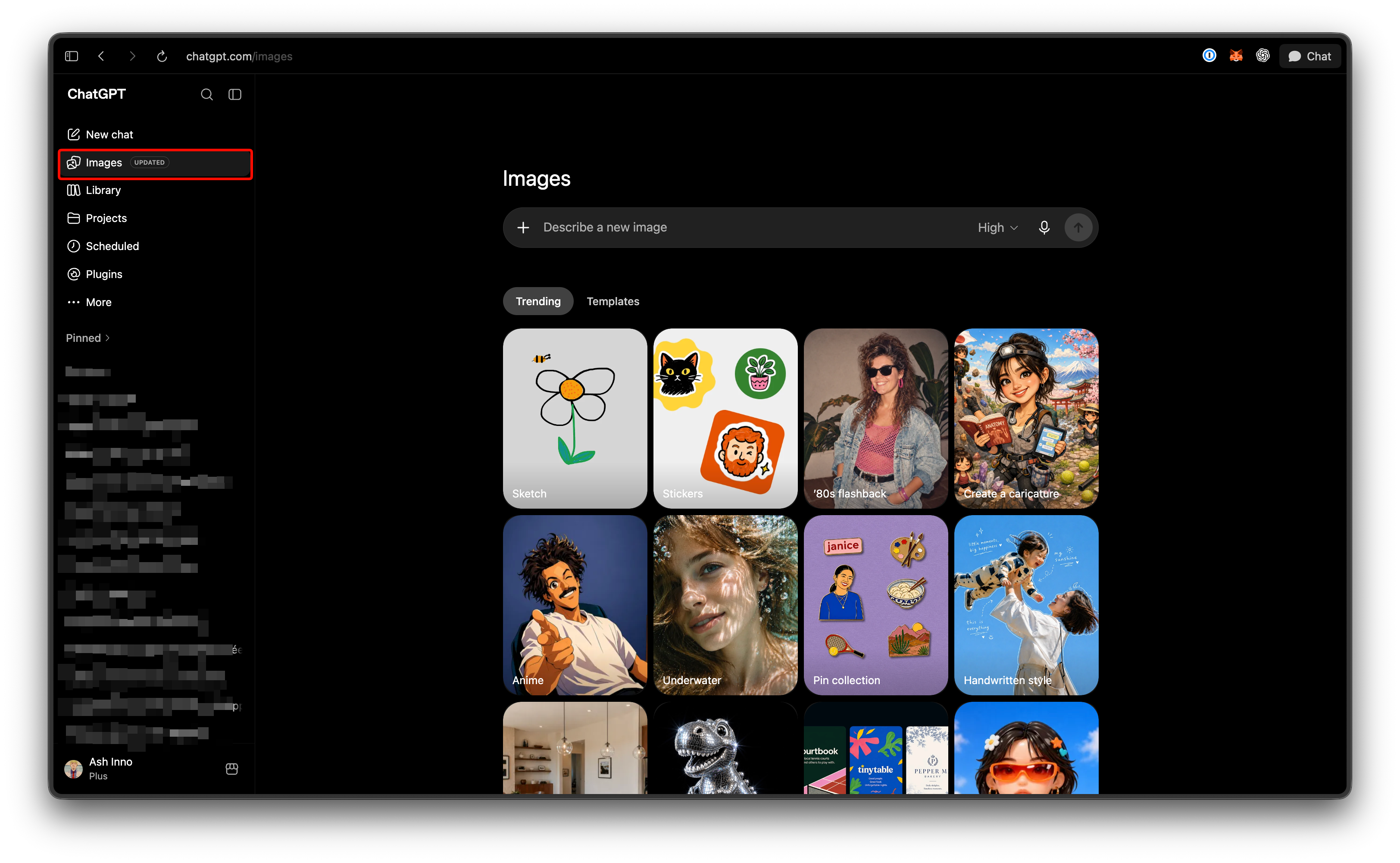
- Open ChatGPT. Go to chatgpt.com or open the mobile app. A free account needs an email address and no payment method.
- Ask for an image in a new chat. No model switch needed. Type something concrete: “A poster for a neighborhood coffee tasting, warm palette, headline reads ‘Third Saturday Cupping’, vertical.”
- Draw a guide with Sketch. Type
@Sketchin the composer, or open chatgpt.com/sketch, rough out where the subject, text, and empty space go, then describe the rest in words. - Pick a template for common formats. Presets such as Poster, Merch, flyers, and product photos set the framing, so your prompt only supplies the content. One outlet reports templates are not available in Work mode.
- Edit with a comment. Place a comment on the spot you want changed (“make this mug blue”, “remove the second chair”) instead of re-describing the whole scene.
- Share the prompt with the image. When you share a result, ChatGPT can include the prompt so others can remix it with their own photos.
- Add reference photos. Attach a photo of a product, a pet, or a person and ask for it in a new scene; OpenAI says 2.5 is “better at preserving the subjects in your reference photos”.
Every generation and every edit counts against your cap, so save what you like as you go.
Free vs Go vs Plus vs Pro: what changes
The only difference OpenAI states between plans is the generation cap; the model, the four features, and the output quality are the same everywhere. OpenAI publishes no per-plan image counts, so the ranges below come from community reports and April 2026 coverage, not from OpenAI.
| Plan | Model | Generation cap (community-reported, not an OpenAI figure) |
|---|---|---|
| Free | Images 2.5, same as paid | About 2-3 per 24 hours (April 2026 reports) or 3-10 per rolling 3-hour window (our Images 2.0 guide) |
| Go | Images 2.5 | Reported as “10x” the free tier |
| Plus | Images 2.5 | About 40-50 per 3-hour window |
| Pro | Images 2.5 | Effectively unlimited, with abuse guardrails |
The paid tiers sell throughput, not a better picture, so a handful of images a week needs no subscription. The numbers also move: April’s reports described a tighter free cap than our Images 2.0 guide did, and both predate 2.5. Trust the banner over any table, including this one.
Prompt tips that stretch a small cap
- Sketch before you generate. A ten-second
@Sketchlayout removes the most common wasted render: right subject, wrong placement. - Start from a reference photo. With 2.5’s subject preservation, a photo of your product plus “on a marble counter, morning light” lands closer on the first try than a paragraph of description.
- Ask for one change per turn. Comments on images exist for focused edits; stacking three changes in one message invites the model to redraw more than you wanted.
- Pin the text in quotes. “headline reads ‘Third Saturday Cupping’” tells the model exactly what to letter. Text placement and clarity are still listed as limitations in OpenAI’s image generation guide, so leave it little room to improvise.
Limits and the watermark note
- Wait times vary. OpenAI’s docs say “Complex prompts may take up to 2 minutes to process”, even after the latency improvement.
- Known weak spots remain. The docs still list text placement and clarity, recurring-character consistency, and precise layout control as limitations; Sketch and templates help with layout without removing the limit.
- Every image is marked. Outputs carry C2PA metadata plus an invisible watermark; the system card names the watermarking technology, and both apply on every plan. If a project needs unmarked output, our roundup of AI image generators without restrictions covers the alternatives.
The developer free path, honestly
There is no perpetual free API tier for image generation. Here is what “free” means on the API side, with the unconfirmed parts flagged.
- New OpenAI developer accounts receive a starter credit; after it runs out, the API is pay-as-you-go. Our guide to getting an OpenAI API key for free covers the credit and the tier ladder.
- The image endpoints (
/v1/images/generationsand/v1/images/edits) require a paid usage tier, Tier 1 or above; the 2.5 model pages point to the org limits page instead of listing tiers. - Per-token prices match gpt-image-2 on the pricing page: $30 per 1M image output tokens, $5 per 1M text input tokens, and $8 per 1M image input tokens.
Cost per image decides how far a credit goes. OpenAI’s calculator lists 196 output tokens for a 1024x1024 image at low quality, about $0.006 per image at $30 per million tokens. Derived from that calculator, a $5 credit covers roughly 850 low-quality square images, around 380 at medium (439 tokens, about $0.013 each), and under 100 at high (1,756 tokens, about $0.053 each). These are calculator estimates, not measured values: the usage.output_tokens field in each response is what you are billed on, and the text input tokens for your prompt are extra.
A minimal request at the cheapest setting looks like this:
curl https://api.openai.com/v1/images/generations \
  -H "Authorization: Bearer $OPENAI_API_KEY" \
  -H "Content-Type: application/json" \
  -d '{
    "model": "gpt-image-2.5-flare",
    "prompt": "Flat-lay product photo of a ceramic pour-over coffee dripper on a walnut board, soft window light",
    "size": "1024x1024",
    "quality": "low",
    "output_format": "jpeg"
  }'
Flare is the right model for this kind of testing: OpenAI positions it as “the default choice for most applications” at 50% lower latency than gpt-image-2, while Sunburst uses the same tokens and takes longer for tighter edit control. Our gpt-image-2.5 API guide covers Python, Node, the edits endpoint, and streaming, and the pricing comparison has the full per-quality cost table.
Test a prompt across quality levels before you spend
The most expensive mistake on a small credit is generating at max when low would have shown whether the prompt works. Apidog is an API client and testing platform, so it does not generate images itself, but it is where you run the same request at several quality settings and read the bill before you commit.
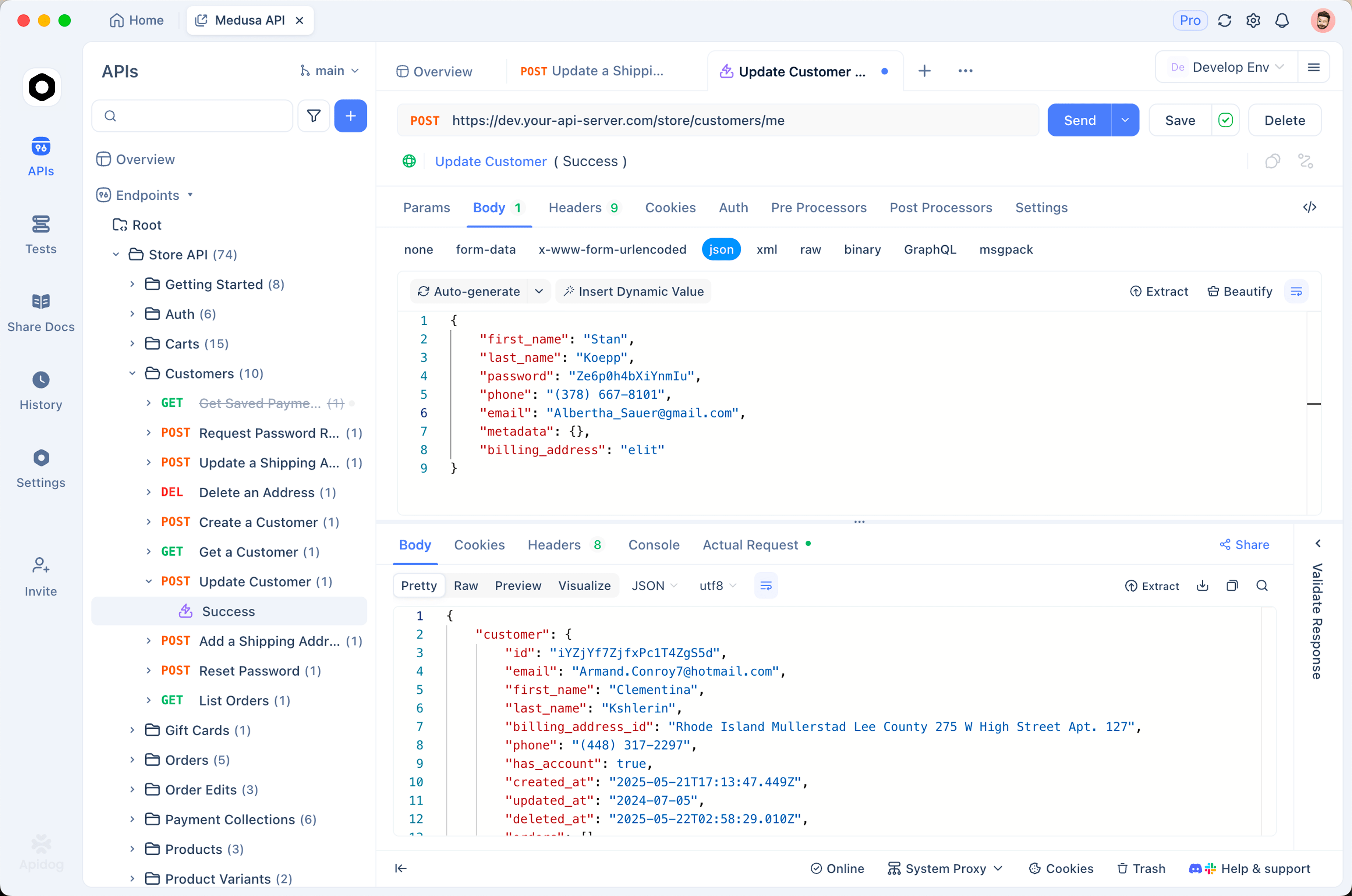
- Store the key as an environment variable. Put
OPENAI_API_KEYin an Apidog environment and reference it as{{OPENAI_API_KEY}}in the Authorization header, so the key stays out of any collection you share. - Save one request, vary one field. Duplicate the generations call with
qualityset tolow,medium, andhigh, run all three, and compare the returnedusage.output_tokens, the measured numbers the invoice will match. - Assert on cost. Add an assertion that
usage.output_tokensstays under a ceiling (say 500) so aquality: "auto"request cannot quietly render at a higher tier, then schedule the request so a snapshot change shows up as a token delta, not a surprise on the invoice.
Download Apidog to follow along with the requests above.
FAQ
Is ChatGPT Images 2.5 free? Yes. The launch post states availability “across all tiers”, which includes free accounts. The only stated plan difference is the number of generations.
How many images can free users make? OpenAI does not publish a number. Community reports range from about 2-3 per day to 3-10 per rolling 3-hour window, and the in-app banner is the only authoritative figure for your account.
Is there a free gpt-image-2.5 API? No. New accounts get a starter credit, the image endpoints require a paid tier, and after that it is pay-as-you-go. At low quality a 1024x1024 image costs about $0.006, so even a small credit buys hundreds of test renders.
What is the free alternative if I hit the cap? Google’s image model has its own free route, and our Nano Banana 2 free guide walks through it; expect different strengths on text and edits.
Where the free tier stops making sense
A few images a week: stay on free, it is the same model. Hitting the banner every day: Go or Plus buys throughput at consumer prices, and images inside a product belong on the API at low quality, where reading usage.output_tokens before you scale keeps a test run from becoming a bill you did not plan for.


