The GPT-Image-2.6 API generates and edits images through two OpenAI models, gpt-image-2.6-flare and gpt-image-2.6-sunburst. Send a prompt to POST /v1/images/generations with your API key, then decode b64_json from the response. Version 2.6 adds image markup, SVG and GIF output, and a complexity parameter.
This guide covers authentication, a first generation, a markup edit, SVG export, and quality and complexity settings. It sticks to what’s new, so read our gpt-image-2.5 API guide for streaming and the Responses API tool, and our ChatGPT Images 2.6 explainer for the full release. We built every request below from OpenAI’s docs on November 5, 2026. We haven’t run them against a live key, so test them before you ship.
GPT-Image-2.6 API at a glance
| Item | Detail |
|---|---|
| Model IDs | gpt-image-2.6-flare, gpt-image-2.6-sunburst |
| Generate | POST /v1/images/generations |
| Edit | POST /v1/images/edits |
| Auth | Authorization: Bearer $OPENAI_API_KEY |
| Output | b64_json; PNG by default, plus JPEG, WebP, GIF, SVG |
quality |
low, medium, high, xhigh, max, auto (default) |
complexity |
low, medium, high (high if omitted) |
| Image token rates | $8 input, $2 cached input, $30 output per 1M |
| Text token rates | $5 input, $1.25 cached input per 1M |
Rates come from the OpenAI pricing page. Both models cost the same per token, so pick on speed and edit precision.
Flare or Sunburst: which model should you call?
Call Flare for fast iteration and everyday generation. OpenAI says it can return an image in as little as six seconds at low quality, and that it improves layout for posters and product imagery. Call Sunburst for detailed work and repeated edits, where OpenAI claims better consistency at medium or high quality.
Those are OpenAI’s claims, not independent benchmarks. Our Flare vs Sunburst comparison for 2.5 explains the split.
Authentication and setup
You need three things before your first call:
- Create an API key in the OpenAI dashboard and export it as
OPENAI_API_KEY. - Complete API Organization Verification if your organization needs it. OpenAI says you may have to before you can use GPT Image models.
- Install
jqfor the curl examples, or theopenaipackage for Python.
If your app serves individual users, also send a hashed safety_identifier of up to 128 characters. It replaces the deprecated user parameter.
Generate your first image
This request uses Flare at low quality, which suits drafts.
curl --fail-with-body --silent --show-error \
  https://api.openai.com/v1/images/generations \
  -H "Authorization: Bearer $OPENAI_API_KEY" \
  -H "Content-Type: application/json" \
  -d '{
    "model": "gpt-image-2.6-flare",
    "prompt": "A minimal poster for a developer meetup, with the words SHIP IT in bold type",
    "size": "1024x1536",
    "quality": "low",
    "complexity": "low"
  }' | jq -er '.data[0].b64_json' | base64 --decode > poster.png
The same call in Python:
import base64
from pathlib import Path
from openai import OpenAI

client = OpenAI()

result = client.images.generate(
    model="gpt-image-2.6-sunburst",
    prompt="A product shot of a ceramic mug on a walnut desk, soft morning light",
    size="1536x1024",
    quality="medium",
    extra_body={"complexity": "low"},
)

Path("mug.png").write_bytes(base64.b64decode(result.data[0].b64_json))
We pass complexity through extra_body so the call doesn’t depend on your SDK version exposing it as a named argument. GPT Image models always return base64, so don’t send response_format, and don’t look for a url field.
OpenAI’s guide says to read the response’s usage object to measure token use. The API reference describes that field as gpt-image-1 only, though its sample response includes it, so confirm it appears on your 2.6 responses before you build cost tracking on it.
Edit an image with markup
Markup tells the model where to make a change. You send the original image, a transparent PNG with your circles or sketches, and a prompt describing the edit.
curl --fail-with-body --silent --show-error \
  https://api.openai.com/v1/images/edits \
  -H "Authorization: Bearer $OPENAI_API_KEY" \
  -H "Content-Type: application/json" \
  -d '{
    "model": "gpt-image-2.6-flare",
    "images": [{"image_url": "https://your-bucket.example/kitchen.png"}],
    "markup": {"image_url": "https://your-bucket.example/vase-overlay.png"},
    "prompt": "Recolor the vase inside the red circle to solid cobalt blue. Keep everything else unchanged. Remove the red circle.",
    "quality": "medium",
    "complexity": "low"
  }' | jq -er '.data[0].b64_json' | base64 --decode > vase.png
JSON requests use the images array and a markup object that holds exactly one of image_url or file_id. An image_url can be an HTTPS URL or a base64 data URL. Multipart requests take a file upload instead, and the image generation guide has that version in Python.
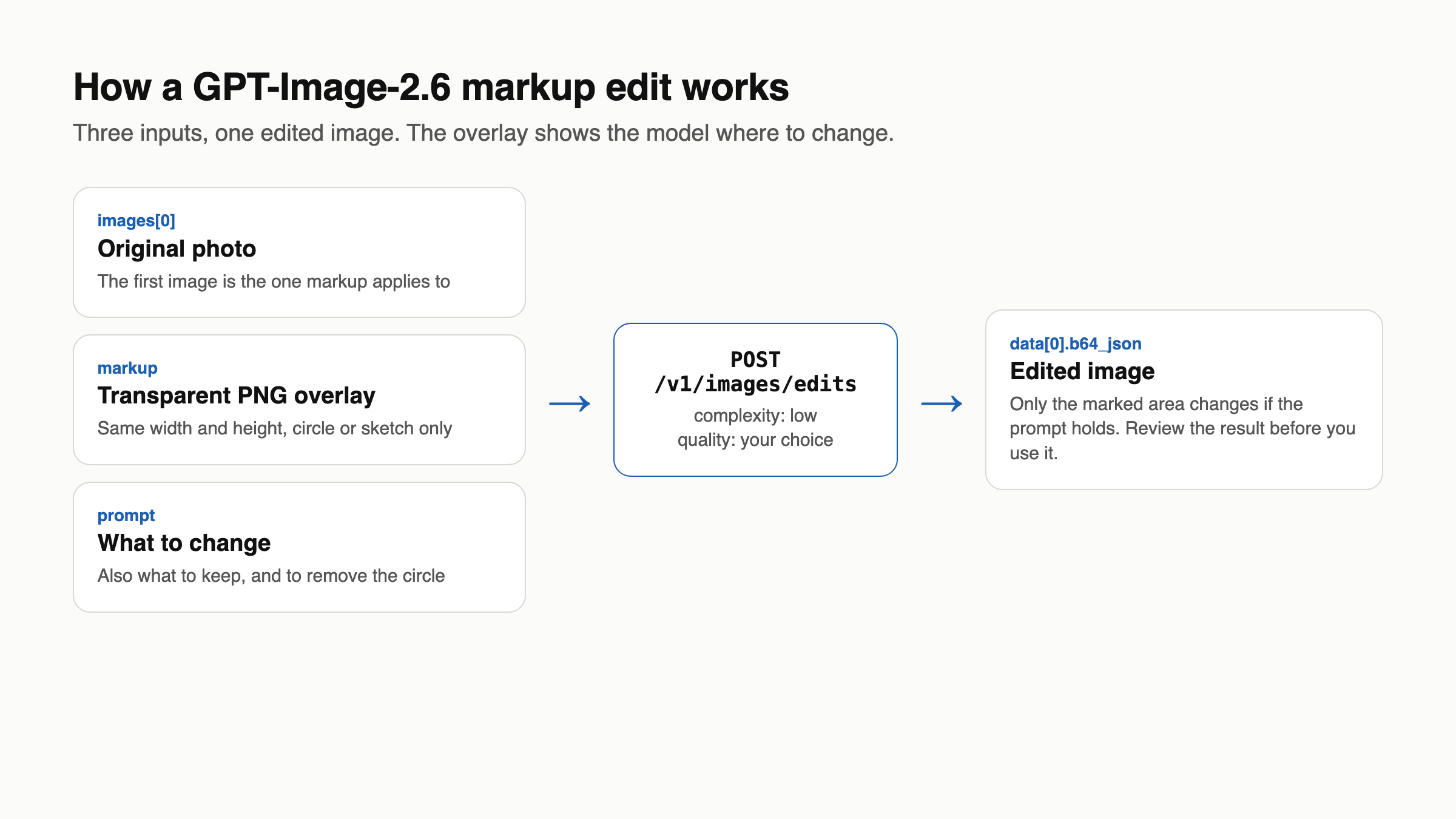
The overlay has strict rules:
- After orientation, it must match the first image’s width and height.
- It must contain transparent pixels, so don’t flatten it onto the photo.
- It applies to the first input image. Any others act as references.
- Each of the two images can hold at most 16,777,216 pixels, and the overlay file can’t exceed 50 MB.
- You can’t combine
markupwithmaskorprompt_rewriter.
Tell the model to remove the annotation, as OpenAI’s own example does. Markup costs the same as any other edit. The Responses API doesn’t take it, so use a mask there.
Export SVG
Set output_format to svg on the generations endpoint for icons, logos and illustrations that need editable paths.
curl --fail-with-body --silent --show-error \
  https://api.openai.com/v1/images/generations \
  -H "Authorization: Bearer $OPENAI_API_KEY" \
  -H "Content-Type: application/json" \
  -d '{
    "model": "gpt-image-2.6-sunburst",
    "prompt": "A flat two-color wheat logo for a bakery called Field and Flour",
    "output_format": "svg",
    "quality": "medium",
    "n": 1
  }' | jq -er '.data[0].b64_json' | base64 --decode > logo.svg
The API first renders a reference image, which quality controls, then writes the SVG from it. The decoded bytes are UTF-8 XML with no scripts, external resources or embedded rasters.
Four limits apply:
nmust be 1.- Streaming, partial images,
output_compressionandprompt_rewriterdon’t work. - The edits endpoint can’t output SVG, and it won’t accept an SVG as a raster input.
- The optional
svgobject picks the authoring model, but only if your account has SVG model selection. Otherwise, omit it.
You pay twice: the image rate for the reference image and the authoring model’s rate for its tokens. The API reference lists a separate svg_usage object for that second part, so log it.
Generate a GIF
The API returns a finished GIF, not a sprite sheet. Add three fields to a generations request:
{
  "model": "gpt-image-2.6-flare",
  "prompt": "A small orange robot waves, blinks and returns to its starting pose. Make it loop.",
  "output_format": "gif",
  "frame_count": 9,
  "frame_duration_ms": 200,
  "size": "auto"
}
Decode b64_json the same way and save it as .gif. Check two things first:
- Frame limit. The guide says
frame_countruns from 2 to 64. The API reference says 2 to 16. Stay at 16 or below until you’ve tested higher. - Access. The reference says GIF output requires access to the GIF preview for the selected model, while the guide doesn’t mention this. A rejected GIF request may be an access issue, not a bad payload.
GIF output doesn’t support streaming, partial images or custom output_compression, and the edits endpoint can’t return it. OpenAI publishes no GIF-specific billing formula, so run a small test and check your bill before you scale.
Set quality and complexity
quality controls rendering detail and drives token cost. complexity controls how much the model plans before rendering, and changing it carries no separate fee.
Set complexity on every request. The default is high, yet OpenAI recommends low for most edits. The guide warns that higher settings can add latency and introduce unwanted changes.
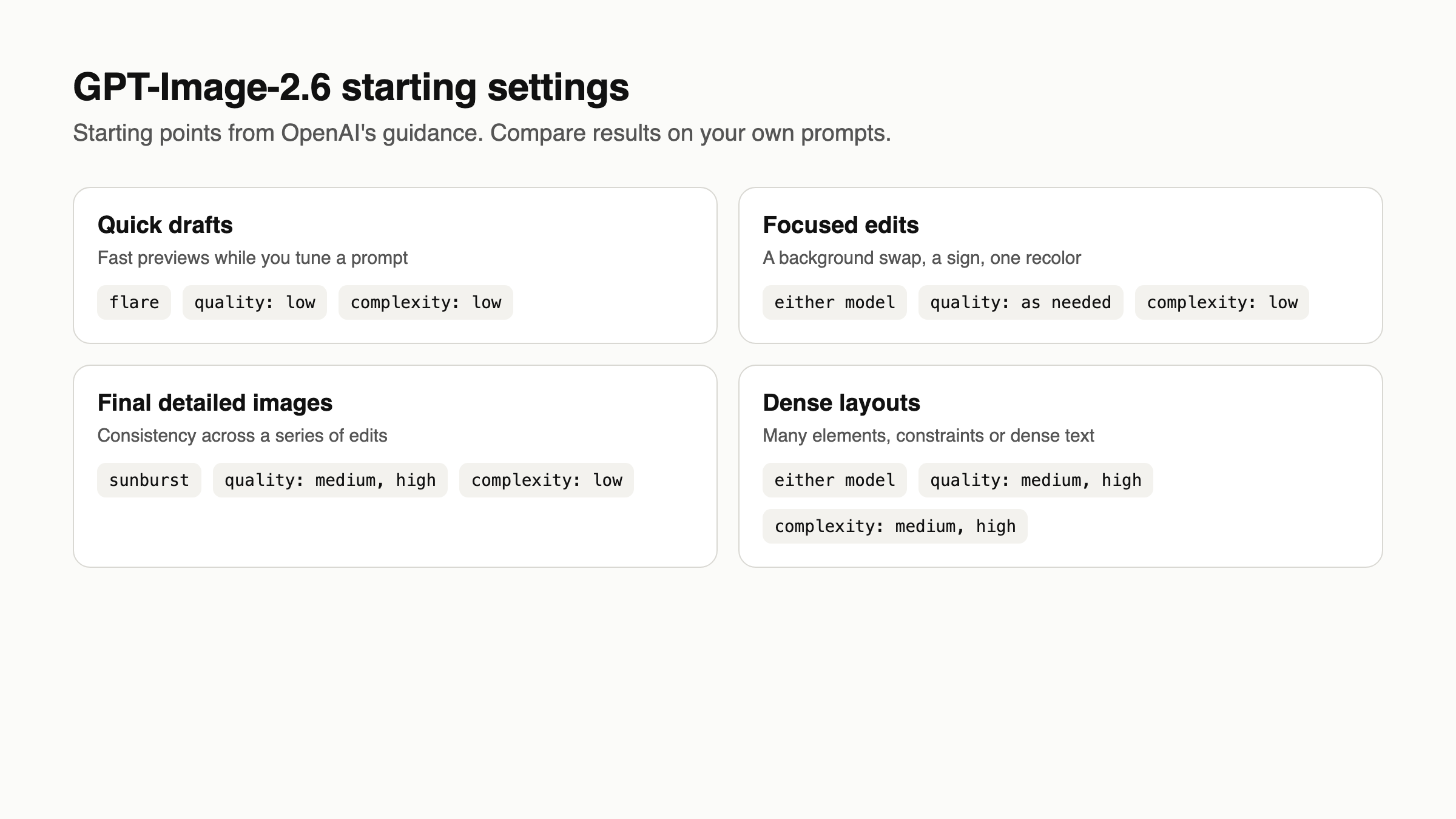
Quality also sets your output bill. This table uses OpenAI’s calculator for a 1024x1024 image, read November 5, and excludes input tokens:
quality |
Output tokens | Output cost |
|---|---|---|
low |
823 | $0.02469 |
medium |
1,449 | $0.04347 |
high |
1,756 | $0.05268 |
xhigh |
3,122 | $0.09366 |
max |
7,024 | $0.21072 |
The gap between medium and high is about a cent, so compare both. The pricing page’s Batch tab doesn’t list 2.6 yet, so don’t assume the 2.5 batch discount applies.
Handle errors and timeouts
Sort failures by whether a retry can help:
| Failure | What to do |
|---|---|
| Rate limit or server error | Retry with backoff |
| Quota error | Don’t retry; fix billing |
error.type is image_generation_user_error |
Change the prompt or input first |
error.code is moderation_blocked |
Read moderation_details, then revise |
Use error.code as your stable check, and log the request ID. moderation_details carries moderation_stage and coarse categories, which belong in your logs, not in user-facing messages. Set client timeouts above two minutes, because OpenAI says complex prompts can take that long.
Let your coding agent test it with Apidog CLI
Your coding agent can turn these requests and limits into a test suite with Apidog CLI. Set it up once:
npm install -g apidog-cli@latest
apidog auth login --with-token <YOUR_TOKEN>
apidog skill install
Then give Claude Code, Codex or Cursor one prompt:
In Apidog project <id>, add POST /v1/images/generations and POST /v1/images/edits
on https://api.openai.com. Read the bearer token from OPENAI_API_KEY.
Create test cases for gpt-image-2.6-flare at low quality and low complexity:
1. PNG generation: assert status 200 and data[0].b64_json exists.
2. SVG generation: assert status 200 and output_format equals svg.
3. GIF with frame_count 6: assert status 200 and output_format equals gif.
4. SVG with n set to 2: assert a 4xx status and that error.message exists.
5. GIF with frame_count 17: record the status, because OpenAI's docs disagree.
Put them in a test suite named "GPT-Image-2.6", run it against environment
<envId>, and summarize every failure.
The agent reads each schema, validates its payload, then writes and runs the suite:
apidog cli-schema get endpoint-create
apidog cli-schema validate endpoint-create --file endpoint.json
apidog endpoint create --project <id> --file endpoint.json
apidog cli-schema get test-case-create
apidog cli-schema validate test-case-create --file case.json
apidog test-case create --project <id> --file case.json
apidog cli-schema validate test-suite-create --file suite.json
apidog test-suite create --project <id> --file suite.json
apidog test-suite run <suiteId> --project <id> -e <envId> \
  --env-var "OPENAI_API_KEY=$OPENAI_API_KEY" --on-error continue -r cli,json
Case 5 settles the frame limit for your account, and case 3 shows whether you have GIF access. Successful cases make real, billable generations, so keep quality low. Swap in -r junit to run the suite in a CI pipeline, and see the Claude Code setup guide for agent details.
FAQ
What are the GPT-Image-2.6 API model names? gpt-image-2.6-flare and gpt-image-2.6-sunburst. The API reference lists no dated snapshots for them yet, unlike the 2.5 models.
How much does the GPT-Image-2.6 API cost? Image tokens cost $8 per 1M input and $30 per 1M output. A 1024x1024 image costs about $0.025 in output at low and about $0.053 at high, before input tokens.
Should I migrate from gpt-image-2.5? Migrate if you need SVG, GIF or complexity. Test your costs first: a low image uses about 4.2 times the tokens it did on 2.5, and the 2.6 models have no Batch pricing listed yet.
Can I use complexity on the edits endpoint? Yes. OpenAI recommends low for most edits.
Can I turn an uploaded image into a GIF through the API? No. The edits endpoint doesn’t return GIF or SVG, so both formats start from a text prompt on the generations endpoint.
Does the API return a URL? No. GPT Image models always return base64 in b64_json, so decode it and store the file yourself.