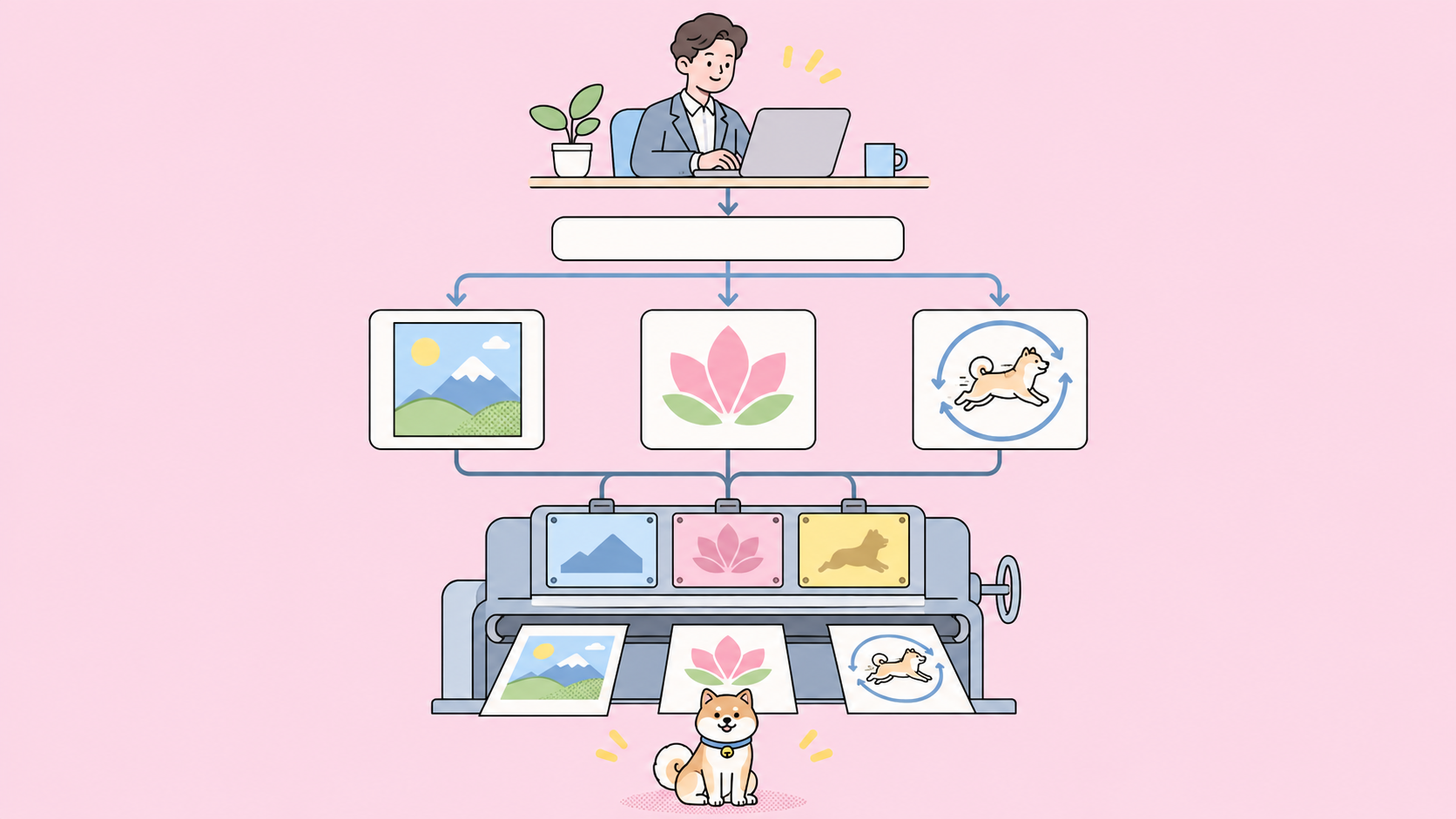
Use GPT-Image-2.6 Flare for drafts, high-volume jobs, posters and product imagery. Use Sunburst for final assets and repeated edits at medium or high quality. In the GPT-Image-2.6 Flare vs Sunburst decision, both models cost the same per token, so you’re trading seconds for detail, not dollars.
OpenAI released both models on November 4, 2026. This post compares them on speed, quality, edit consistency and cost, then gives you a pick for each use case. We haven’t run the two models head to head against a live key, so every number below names its source, and the last section shows how to measure them on your own prompts.
For the full release, read our ChatGPT Images 2.6 explainer. For the previous pair, see our Flare vs Sunburst comparison for 2.5.
GPT-Image-2.6 Flare vs Sunburst at a glance
| Item | Flare | Sunburst |
|---|---|---|
| API model ID | gpt-image-2.6-flare |
gpt-image-2.6-sunburst |
| OpenAI’s one-line pitch | Fast iteration | Detailed visual work |
| Published speed | As little as six seconds at low |
No figure |
| OpenAI’s stated strength | Layout for posters and product imagery | Quality and edit consistency at medium or high |
| Text-to-Image Arena (Medium) | #4, 1384 points | #2, 1409 points |
| Image Edit Arena (Medium) | #5, 1462 points | #3, 1476 points |
| Image output rate | $30 per 1M tokens | $30 per 1M tokens |
complexity, markup, SVG, GIF |
Yes | Yes |
The feature rows match. OpenAI’s image generation guide says both models support complexity control, markup-guided edits, SVG output and animated GIF output. You aren’t giving up a capability with either one.
Speed: Flare wins, but the gap is unpublished
Flare is the faster model. OpenAI’s launch post says it can generate an image in as little as six seconds at low quality, and that Images 2.6 runs 50% faster than before. It gives no time for Sunburst, and the Flare and Sunburst model pages both list speed as “Not specified.”
Read that six-second figure carefully:
- It’s a best case (“as little as”), not an average.
- It applies to
lowquality only. - OpenAI doesn’t say which
complexitysetting produced it, and the API defaults tohigh.
We found no independent 2.6 timing yet. The closest evidence comes from the 2.5 pair, so treat it as a rough guide:
| Test (2.5 models) | Flare | Sunburst | Sunburst takes |
|---|---|---|---|
| Pixmax, matched 2048x1152 render | 19.7 s | 27.7 s | 1.4x as long |
| PoYo, median of a 12-request benchmark | 30.89 s | 35.06 s | 1.1x as long |
Both tests put Flare ahead, but they disagree on how far. The gap depends on your prompt and settings, so one benchmark won’t settle it for your workload. OpenAI’s guide also warns that complex prompts may take up to two minutes on GPT Image models, so set a generous client timeout on either one.
Quality: Sunburst leads, narrowly
Sunburst scores higher in both of the Arena rankings Arena posted on November 5, and it took first place in the Cartoon, Anime and Fantasy category. Flare still lands in the top five on both boards.
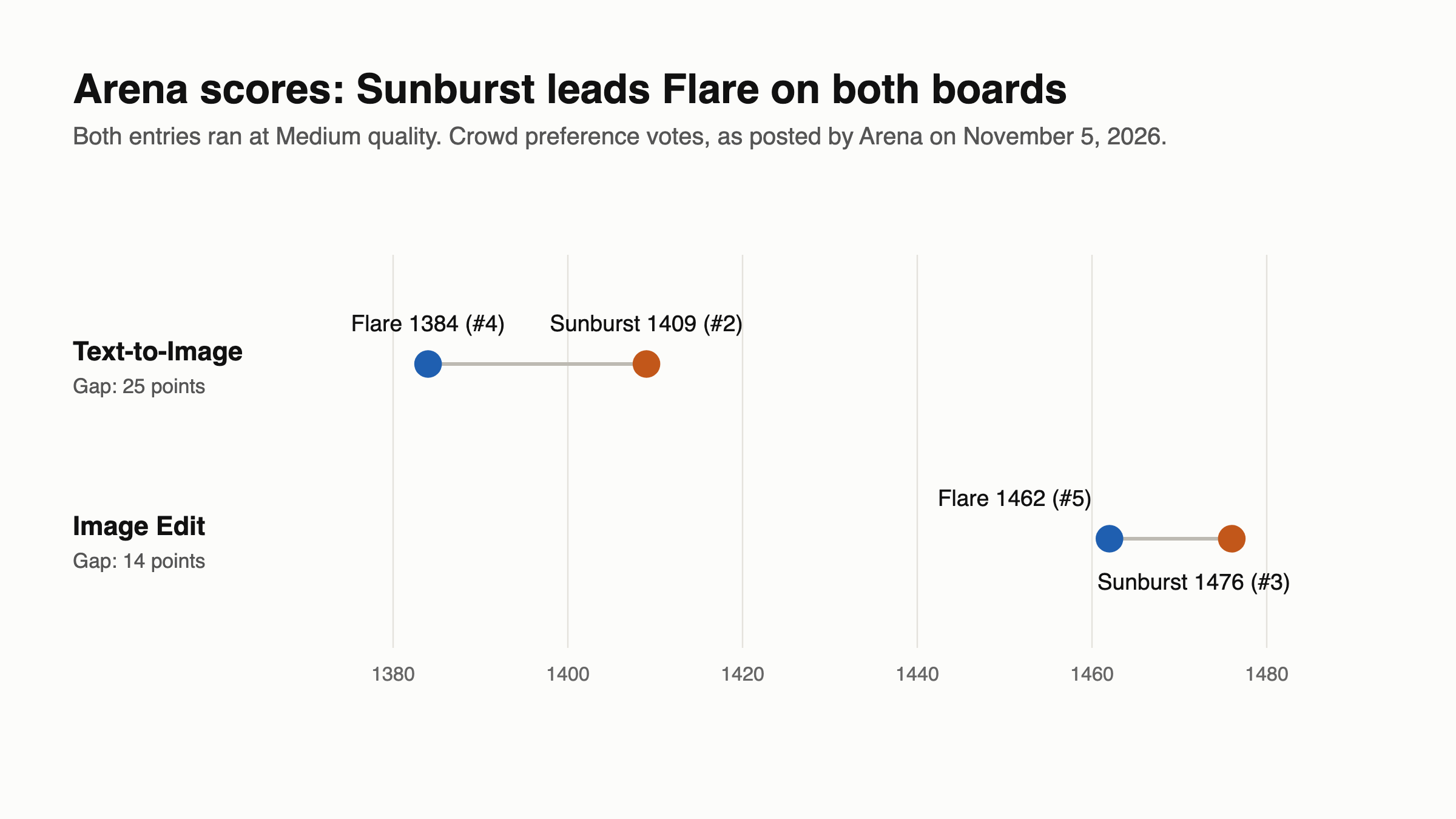
Keep three limits in mind when you read those scores:
- They’re crowd preference votes, not an OpenAI benchmark.
- Both entries ran at Medium, so they say nothing about
lowormax. - Arena scores move as votes come in. We read them from Arena’s post, not the live board.
A 25-point lead in Text-to-Image means voters tended to prefer Sunburst’s output. It doesn’t mean Flare’s images are poor. On a poster or product shot, OpenAI’s layout claim for Flare may matter more to you than a general preference score, so test that category yourself.
Edit consistency: Sunburst’s main claim
Edit consistency is why you’d pay Sunburst’s extra wait. OpenAI says it brings “even greater image consistency across edits” at medium or high quality, which helps when a character, product or logo has to survive several rounds of changes.
There’s less public proof here than you’d expect:
- OpenAI publishes no consistency metric.
- The system card says both updated models improve editing consistency and detail preservation, so Flare gains too.
- Arena’s Image Edit gap is 14 points, smaller than the 25-point gap on Text-to-Image. That board scores which edit voters preferred, not whether a subject stayed stable across five rounds.
So Sunburst is the safer default for multi-round edits, but only your own edit chain can confirm it’s worth the time. For a single focused change, such as swapping a background or fixing a sign, try Flare first.
Whichever model you pick, set complexity yourself. If you omit it, both models use high, while OpenAI recommends low for most edits. Its guide warns that higher complexity can add latency and introduce unwanted changes, which is the opposite of what an edit workflow needs.
Cost: the same price, so quality is the real lever
Flare and Sunburst cost the same. The pricing page lists both at $8 per 1M image input tokens, $2 cached, and $30 output. OpenAI’s calculator also treats them as one entry, “GPT Image 2.6 (Sunburst and Flare),” so the output estimate below applies to either model.
quality (1024x1024) |
Output tokens | Cost per image | Cost per 1,000 |
|---|---|---|---|
low |
823 | $0.02469 | $24.69 |
medium |
1,449 | $0.04347 | $43.47 |
high |
1,756 | $0.05268 | $52.68 |
xhigh |
3,122 | $0.09366 | $93.66 |
max |
7,024 | $0.21072 | $210.72 |
These figures exclude text and image input tokens, and an edit bills its reference image on top. The calculator notes that token use can vary, so read usage.output_tokens from real responses.
Two things follow from that table:
- Moving from Flare to Sunburst changes your time, not your rate. Choosing
highoverlowroughly doubles your output cost on either model. mediumtohighcosts about one cent more per square image. Since OpenAI ties Sunburst’s gains to both levels, compare them before you settle onmedium.
Batch is the one cost catch. On November 5, the pricing page’s Batch tab listed 2.5 at half price but didn’t list either 2.6 model. If you run overnight jobs on the 2.5 pair, check that tab before you switch.
Which model should you use?
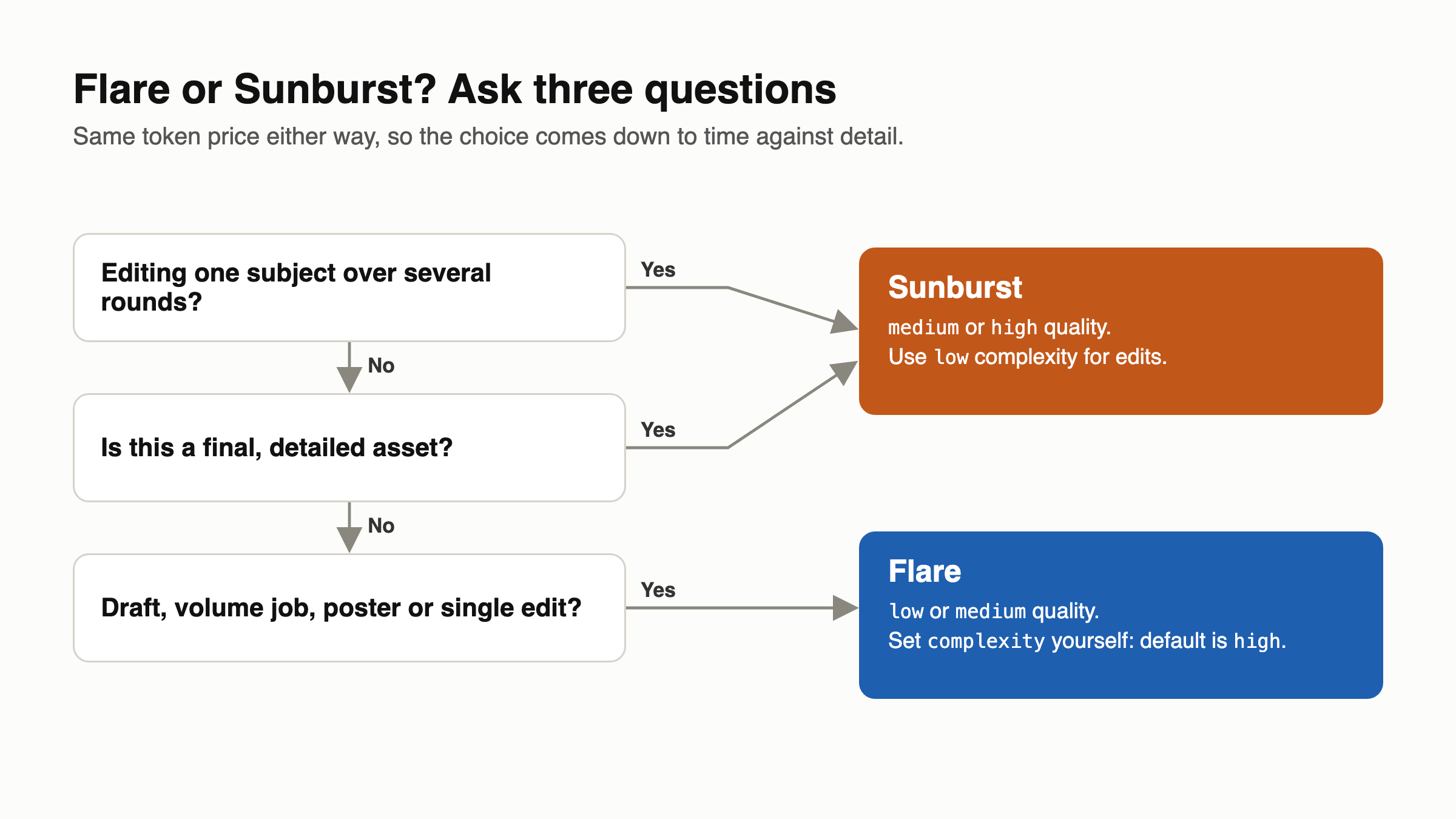
Default to Flare, then move a job to Sunburst when you can see the difference. These starting settings are our suggestions, not OpenAI’s, so adjust them after your first tests.
| Use case | Pick | quality |
complexity |
|---|---|---|---|
| Concept drafts and quick iteration | Flare | low |
low |
| High-volume image jobs | Flare | low or medium |
low |
| Posters and product imagery | Flare | medium |
medium |
| One focused edit | Flare | medium |
low |
| Repeated edits to one subject | Sunburst | medium or high |
low |
| Final hero and campaign images | Sunburst | high |
medium |
| Cartoon, anime and fantasy art | Sunburst | medium |
medium |
| Dense text, many constrained elements | Sunburst | high |
high |
For GIF and SVG, OpenAI publishes no quality or speed split between the models. Draft on Flare, then rerun your best prompt on Sunburst and compare. Check two GIF details first: OpenAI’s guide allows 2 to 64 frames while its API reference says 2 to 16, and the reference says GIF output requires preview access for the selected model.
If you pin models in production, note that both model pages show only the alias on November 5, with no dated snapshot. Re-check your approved prompts when OpenAI updates a model.
Compare both models with Apidog CLI
Public scores can’t tell you how each model handles your prompts. Your coding agent can run the same prompt set against both models with Apidog CLI and compare response times. Set it up once:
npm install -g apidog-cli@latest
apidog auth login --with-token <YOUR_TOKEN>
apidog skill install
Save five prompts from your real workload in prompts.csv, with prompt as the header. Then give Claude Code, Codex or Cursor one prompt:
In Apidog project <id>, add POST https://api.openai.com/v1/images/generations
with a bearer token from {{OPENAI_API_KEY}}. Create a test case that sends
model {{MODEL}}, prompt {{prompt}}, quality medium, complexity low and size
1024x1024. Assert status 200 and that data[0].b64_json exists.
Run it with prompts.csv once per model, gpt-image-2.6-flare and
gpt-image-2.6-sunburst, then compare the timings in the two JSON reports.
The agent reads each schema, validates its payload, creates the case, then runs it twice:
apidog cli-schema get endpoint-create
apidog cli-schema validate endpoint-create --file endpoint.json
apidog endpoint create --project <id> --file endpoint.json
apidog cli-schema get test-case-create
apidog cli-schema validate test-case-create --file case.json
apidog test-case create --project <id> --file case.json
apidog run --test-case <caseId> --project <id> -e <envId> -d prompts.csv \
  --env-var "MODEL=gpt-image-2.6-flare" \
  --env-var "OPENAI_API_KEY=$OPENAI_API_KEY" \
  --timeout-request 180000 --on-error continue -r cli,json --out-file flare
apidog run --test-case <caseId> --project <id> -e <envId> -d prompts.csv \
  --env-var "MODEL=gpt-image-2.6-sunburst" \
  --env-var "OPENAI_API_KEY=$OPENAI_API_KEY" \
  --timeout-request 180000 --on-error continue -r cli,json --out-file sunburst
Each JSON report stores milliseconds under result.timings, in responseAverage, responseMin, responseMax and responseSd. Your agent can put those side by side and tell you the real gap on your prompts. Ten images at medium cost about $0.43 in output tokens, plus input.
We built this flow from apidog --help and the CLI schemas, and we haven’t run it against OpenAI, so check the first report before you trust it. Apidog measures speed and response correctness, not image quality, so you still judge the pixels yourself. To keep timing the pair after each model update, move the run into a CI pipeline, and see the Claude Code setup guide for agent details.
FAQ
Is Flare or Sunburst better? Neither wins everywhere. Sunburst ranks higher on Arena’s Text-to-Image and Image Edit boards, and OpenAI aims it at detailed work. Flare is built for speed. Start with Flare and move to Sunburst when you can see a gain.
Does Sunburst cost more than Flare? No. Both list $8 image input, $2 cached and $30 output per 1M tokens, and they share one calculator entry. Your quality setting changes the bill, not your model choice.
How much faster is Flare than Sunburst? OpenAI hasn’t said. It gives only Flare’s best case, six seconds at low. Two independent tests of the 2.5 pair showed Sunburst taking about 1.1 to 1.4 times as long, but those results may not carry over to 2.6.
Which model is better for editing? Use Sunburst for repeated edits to one subject, at medium or high quality. Try Flare for one focused change. Set complexity to low on both, since the default is high.
Can both models make GIFs and SVGs? Yes. OpenAI’s guide lists GIF and SVG output for both models on POST /v1/images/generations. The edits endpoint can’t return either format.
Should I still use GPT-Image-2.5? Check Batch first. The Batch tab listed 2.5 at half price on November 5 but didn’t list 2.6. OpenAI’s calculator also shows 2.6 uses more tokens at low and medium, so high-volume low jobs may cost less on 2.5.