
Building on January's foundation, February doubles down on the MCP and testing experience—delivering richer debugging insights, parallel execution for Test Suites, cross-scenario shared test data, a completely redesigned test report, and seamless Hoppscotch migration.
Hello Apidog Users,
January introduced the MCP Client and Test Suites. February is about making them production-ready.
We have refined the MCP debugging experience with richer content previews—Markdown rendering, image display, and direct Content field access. Test Suites now support parallel execution for dramatically faster regression runs. A new Shared Test Data system eliminates redundant data setup across scenarios. And the test report has been completely redesigned from the ground up with structured step display and failure filtering.
On top of that, we have shipped Hoppscotch Collection import, SSE debugging improvements, and a long list of quality-of-life fixes across eight releases this month.
Here is everything new this month👇
⭐ New Updates
🔥 Refined MCP Client Debugging Experience
When debugging MCP Servers with Apidog's built-in MCP Client, the response viewing experience has been comprehensively upgraded with more convenient content preview and verification capabilities.
1. Direct Content Field Viewing
When debugging an MCP Server in Apidog, you can now view the response Content field directly in the "Content" tab—no more digging through raw JSON to find what you need. The "Raw" tab still provides the full JSON-RPC payload for deep inspection, giving you the best of both worlds depending on your debugging context.
2. Markdown Rendering Preview
When an MCP response contains Markdown content, you can now toggle between raw Markdown and a rendered preview. This makes it easy to visually verify formatted documentation, README content, or any structured text returned by your MCP tools—without leaving the debugger.
3. Image Preview
Images in MCP responses are now rendered directly in the "Preview" tab, allowing developers to quickly verify image content and format without external tools. This is particularly useful when debugging MCP tools that return screenshots, charts, or generated visuals.
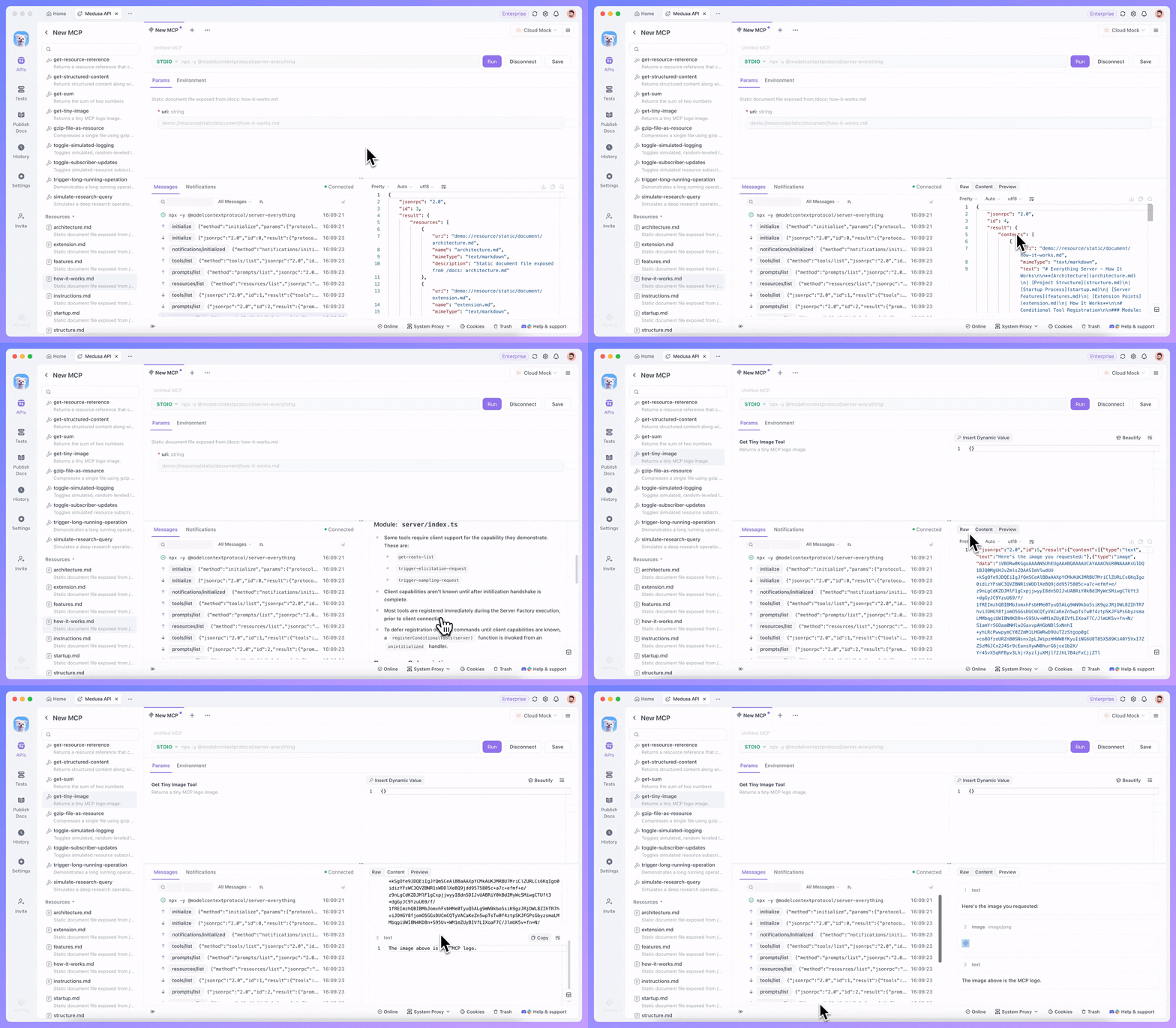
Together, these three improvements transform the MCP Client from a raw protocol inspector into a full-fidelity debugging environment—one where you can see exactly what your AI agents see.
🚀 Test Suites: Parallel Execution & Environment-Aware Scheduling
Building on January's Test Suite launch, we are adding two capabilities that make orchestration significantly more powerful.
Parallel Execution Mode
Test Suites now support a "Parallel" run mode, allowing multiple test cases and scenarios to execute concurrently. You can flexibly configure parallel execution rules to dramatically reduce overall test time—especially valuable for large-scale regression suites where sequential execution becomes a bottleneck.
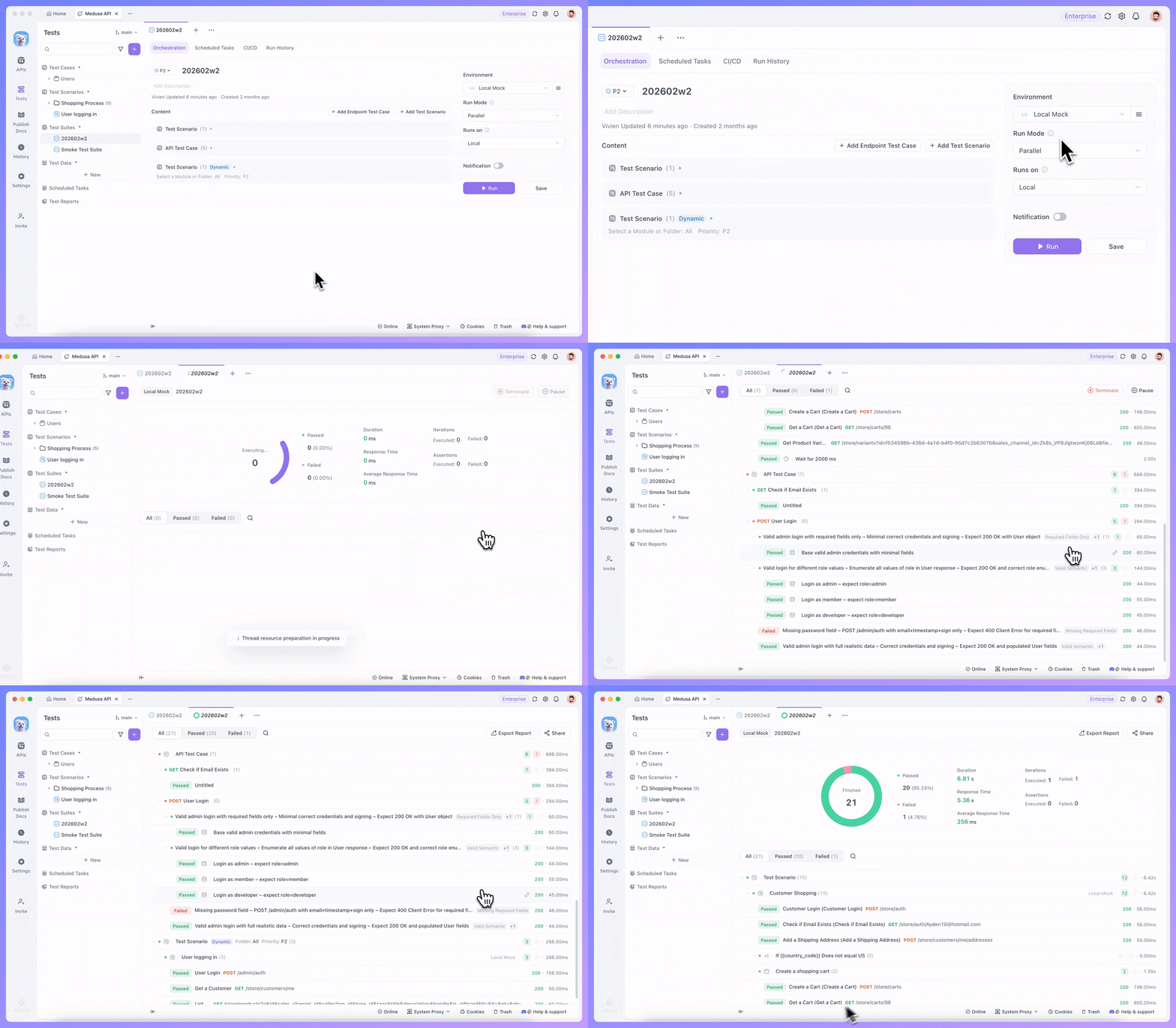
Run Mode Comparison:
| Mode | Behavior |
|---|---|
| Sequential | Scenarios run in order. Variables persist and propagate across scenario steps—ideal for dependent workflows. |
| Parallel | Multiple scenarios run concurrently for maximum speed. Note: concurrency isolates context between scenarios—cases that depend on upstream variables may need to be restructured. |
Note: Actual speedup depends on the available hardware resources of the machine running the tests.
Scheduled Tasks Now Support Environment Selection
When creating scheduled tasks for Test Suites, you can now select the target environment, enabling precise control over automated execution across different environments (e.g., staging, production). This means you can schedule the same suite to run against multiple environments on different cadences—a critical capability for teams managing multi-stage deployment pipelines.
🆕 Shared Test Data: Cross-Scenario Reusability
A brand-new capability in this release: Shared Test Data. You can now create common test datasets that are reusable across multiple test scenarios, fundamentally changing how teams manage test data at scale.
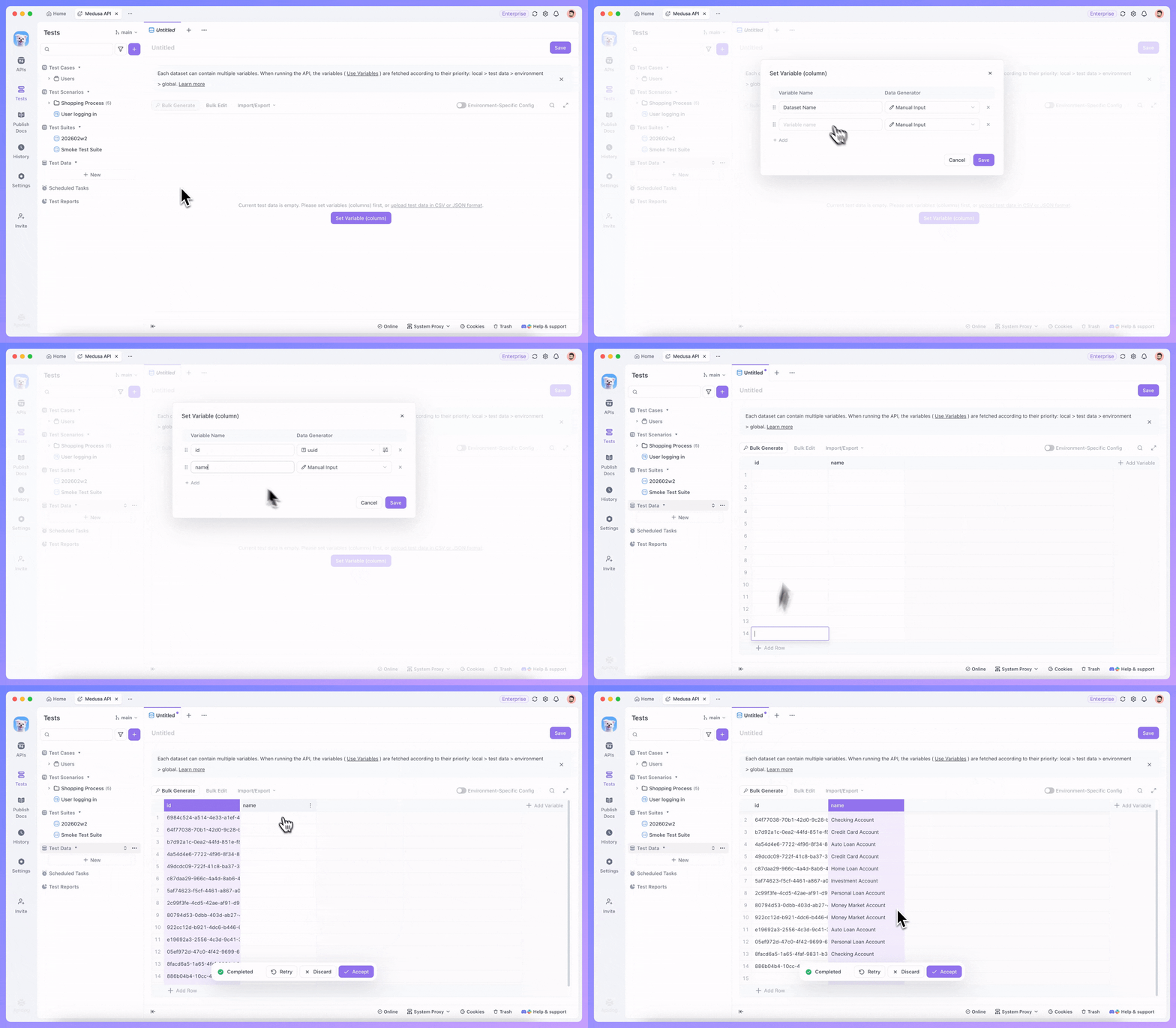
Why This Matters:
Previously, each test scenario maintained its own isolated test data. If ten scenarios needed the same user credentials, payment details, or product catalog, you had to duplicate that data ten times—and maintain it in ten places.
Shared Test Data solves this by introducing a centralized data layer:
- Create once, use everywhere: Define a dataset once and reference it from any test scenario in your project.
- Single source of truth: Update the shared data in one place, and every scenario that references it picks up the change automatically.
- Standardized testing: Ensures all scenarios test against consistent, validated data—eliminating subtle discrepancies caused by copy-paste drift.
This is especially powerful when combined with the new parallel execution mode, as shared data provides a stable foundation for concurrent test runs.
📊 Test Reports: Complete Redesign
The test report experience has been rebuilt from the ground up this month, delivered across two releases (v2.8.4 and v2.8.11).
Structured Step Display (v2.8.4)
The entire test report UI has been redesigned to support structured display of all test steps. Instead of a flat log, you now see a hierarchical view that mirrors the actual execution flow—making it immediately clear which scenario, case, and step produced each result. The test report list has also been optimized with structured display and filtering capabilities.
Failed Case Filtering (v2.8.11)
Building on the redesigned foundation, we have added a failed case filter and step-level detail inspection, helping you quickly zero in on failures and understand exactly what went wrong at each step.
The report intelligently adapts its display based on your viewing context:
- Viewing all steps: Presented in a tree structure that clearly shows step hierarchy and execution context.
- Filtering failed cases: Automatically switches to a flat list that aggregates all failed steps for rapid issue identification.
The combination of structured display and smart filtering means you can go from "the suite failed" to "here's the exact assertion that broke" in seconds rather than minutes.
🔗 Hoppscotch Collection Import
For teams migrating from Hoppscotch, Apidog now supports direct import of Hoppscotch Collections. Simply export your collections from Hoppscotch and import them into Apidog—your endpoints, parameters, headers, and request bodies are preserved, making the transition seamless.
This joins our existing import support for Postman, Swagger/OpenAPI, Insomnia, and other formats, reinforcing Apidog's position as a universal API platform that meets you where you are.
⚡️ Optimizations
Beyond the headline features, we have shipped a series of quality-of-life improvements:
- Protected Branch UI: Redesigned the protected branch interaction for a cleaner, more intuitive workflow.
- Preset Common Fields UX: Improved the interface for applying preset common fields to endpoints, reducing friction in schema reuse.
cryptoGlobal Object in Scripts: Pre and post processor scripts now support thecryptoglobal object, enabling cryptographic operations (hashing, HMAC, encryption) directly in your test scripts without external dependencies.- SSE Debugging: When debugging SSE (Server-Sent Events) endpoints, Apidog now correctly handles
\r\nline breaks, ensuring accurate event stream parsing. - Project Invitation Flow: Optimized the process of inviting collaborators to join a project, making team onboarding smoother.
- Test Report List: The test report list view now supports structured display and filtering, making it easier to navigate large test histories.
🐞 Bug Fixes
We resolved a total of 17 bugs across eight releases this month. Here are the highlights:
Testing & Automation:
- Fixed an issue where the loop count displayed as 0 in test reports when using
{{variable}}as the iteration count in automated tests. - Fixed an issue where response validation could not be configured when batch-running test data from the test case page.
- Fixed an issue where custom request endpoints would occasionally not include auth during automated test scenario execution if the endpoint did not switch to auth.
Data Import & Export:
- Fixed an issue where RAML files could not be imported into Apidog.
- Fixed an issue where Hoppscotch Collections failed to import in certain cases.
- Fixed an issue where generating SQL code from a schema did not use the schema name as the table name, resulting in all table names being
tableName.
Endpoint & Debugging:
- Fixed an issue where the response content of Socket endpoints was not formatted.
- Fixed an issue where the header parameter input field would lose focus after typing the first character when the field name was in English.
- Fixed an issue where directly saving a quick request under a subfolder would incorrectly move it to the root folder (v2.8.9).
- Fixed an issue where renaming a quick request would occasionally not be saved.
Platform & Governance:
- Fixed a 500 error that occurred in certain cases when configuring custom roles at the organization level.
- Fixed an issue where deleted branches did not release SEO custom URL slug bindings from endpoints.
- Fixed URL validation in published documentation navigation configuration.
🌟 Looking Ahead
February's eight releases reflect our commitment to shipping fast and iterating on feedback. As we move into March, we are continuing to deepen the MCP debugging experience, expand Test Suite orchestration capabilities, and invest in the AI-native workflows that will define the next generation of API development.
We are also actively working on deeper Git integrations and text-mode editing to align with git-first development habits—stay tuned.
💬 Join the Conversation
Connect with fellow API engineers and the Apidog team:
- Join our Discord community for real-time discussions.
- Participate in our Slack community for technical deep dives.
- Follow us on X (Twitter) for the latest updates.
P.S. Explore the complete details of all these updates in the Apidog Changelog! 🚀
Happy API Building!
Best Regards,
The Apidog Team