An AI agent that fixes bugs on its own works when it follows one rule: no reproduction, no fix. The agent turns the bug report into a test that fails today, patches the code on an isolated branch, re-runs that test plus the full suite, and reports back only when everything is green. A human still merges. If it can’t reproduce the bug, it stays quiet.
The DeepSeek Harness team put this idea in front of a big audience on November 1, 2026, in an essay on super-agent design. This guide turns it into a pipeline you can build this week, with the reproduction written as an API test your agent creates and runs from the terminal.
Why “agent, fix this” fails without a repro
Ask a coding agent to fix a bug report and you’ll usually get a confident diff. You can’t tell whether it fixes your bug, a bug it imagined, or nothing.
Without a reproduction step, three things go wrong:
- The agent guesses the cause. It picks the most likely line from the error message and edits it.
- “Fixed” has no definition. The only proof is the agent’s own summary.
- Regressions slip in. A patch to a shared validator can fix one endpoint and break four others.
A failing test solves all three: it pins the bug, defines done, and stays in your suite as a regression check.
Where “silently reproduce and fix” comes from
In “Exploring Super-agent Design,” the DeepSeek Harness team describes a policy from their own user group: when someone reports a bug, an agent tries to reproduce it in the background. It speaks up only with a confirmed, simple fix. Otherwise it says nothing.
The essay calls this speculative execution and pairs it with two pieces you’ll reuse here. Workers get one isolated session per task, full tools and the strongest model, and report to a router instead of talking to humans. A watchdog is a separate session that checks whether each worker is progressing or drifting.
One caveat: the essay describes an architecture, not shipped DeepSeek Harness features. Parts of it live in a prototype plugin, dsh-superagent-prototype, which the authors say isn’t an official DeepSeek product. For the router and worker picture, see how to build a super-agent.
The five-step bug-fixing agent pipeline
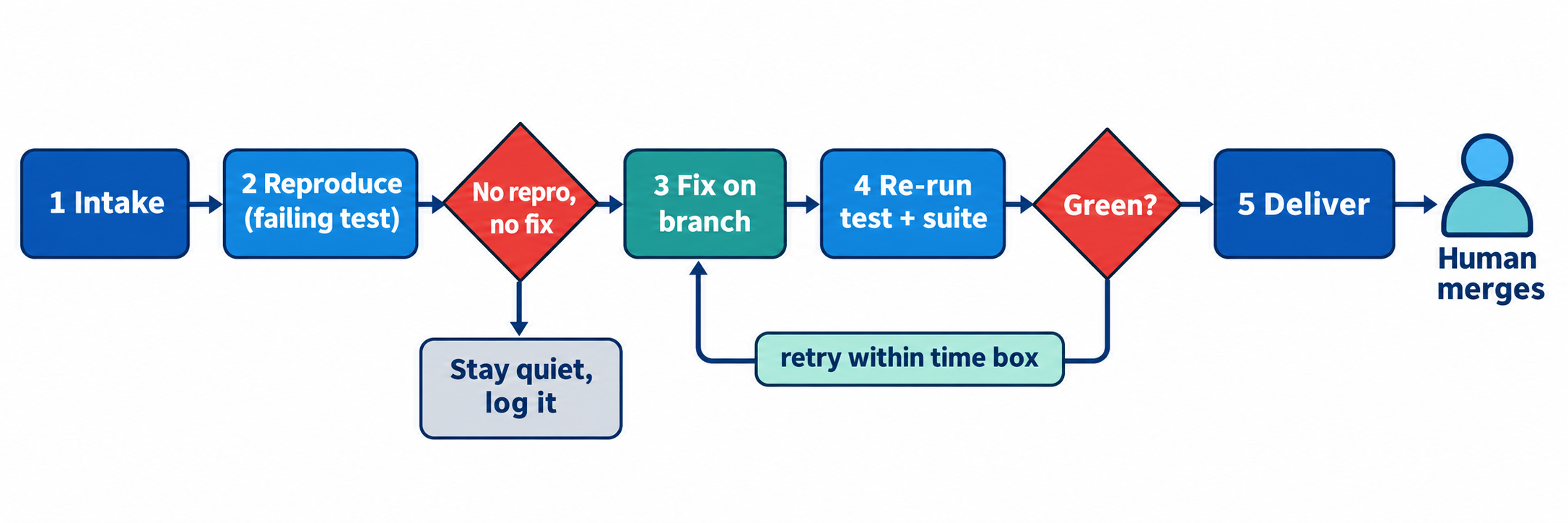
A self-fixing agent runs the same loop every time, with two gates:
- Intake: collect the report, the failing request and the response it got.
- Reproduce: write a test that fails for the reported reason. No failing test, no fix.
- Fix: patch the code on an isolated branch or worktree.
- Re-run: the new test must pass, and so must the existing suite.
- Deliver: open a pull request with the evidence, or stay quiet.
Step 1: Intake the bug report
Your agent can’t reproduce “checkout is broken again.” Give intake a fixed shape:
| Field | Example | Why it matters |
|---|---|---|
| Endpoint | POST /orders |
Which handler to read |
| Request | Body with "coupon": null |
The exact input that broke it |
| Actual response | 500, {"error":"internal"} |
What the test must see fail |
| Expected response | 201 with an order id |
What the test asserts |
| Environment | staging | Where the repro runs |
If fields are missing, the agent asks once or pulls the request from logs. Error bodies that follow RFC 9457 problem details help, because the error type arrives in a predictable shape.
Step 2: Reproduce the bug as a failing API test
This is the gate. The agent turns the intake record into a test case with two assertions, the expected status code and a field the response should contain, and runs it against the real environment. Three outcomes are possible:
- It fails for the reported reason. You have a repro. Move on.
- It passes. The bug isn’t reproducible as described. Log it and stop.
- It fails for another reason (auth error, missing data, timeout). That’s a broken repro, not a confirmed bug. Stop.
Only the first unlocks a fix. That’s what “silently” means in practice: the other two produce a log entry for whoever reviews the queue, not a message in the user’s chat.
Write the repro as an API test, not a unit test: the agent hits the interface the user hit, so it can’t reproduce a different bug by accident.
Step 3: Fix the code in an isolated branch
Once the repro is red, the worker gets its own copy of the code. A git worktree is the lightest option: a second working directory on a new branch, so the agent’s edits never touch your checkout. Run the service from it and point the test environment there.
Keep two constraints tight. The fix must be small: set a limit such as 3 files or 50 changed lines, and treat anything larger as a report for a human. And it must target the repro: no refactors, renames or tidying, because every extra change is something your reviewer has to check.
Step 4: Re-run the repro and the full suite
The second gate has two parts. First, the agent re-runs the same test case from step 2, unchanged, and it must pass. If the agent edited the assertions to get there, the fix fails; your pipeline catches that by diffing the test file before and after.
Second, the existing suite must stay green. A fix that turns one test green and three red goes back to step 3. Time-box the loop, for example 3 attempts or 20 minutes, then stop and log what was tried. This is where the watchdog earns its place: it can kill a worker that keeps editing the same line or drifts into files the repro never touched.
Step 5: Deliver only a confirmed simple fix
When both gates are green, the agent opens a pull request with evidence, not a story: the report, the failing run, the diff, and the passing run with suite results. A human reviews and merges. Protected branches make sure the agent’s token can push a branch but never merge into main. If any gate failed, the reporter hears nothing; the agent writes a log line and moves on.
Guardrails for a self-fixing AI agent
Set these fences before the first unattended run:
| Guardrail | Setting | What it prevents |
|---|---|---|
| Scope | Max files and lines per fix | Rewrites passed off as fixes |
| Time box | Max attempts and minutes per bug | Runaway loops burning tokens |
| Credentials | Staging only, no production keys | A repro that writes real orders |
| Merge rights | Push branches, never merge | Unreviewed code reaching main |
| Test integrity | Diff the test file before and after | Assertions edited to pass |
| Silence | No user-facing message on failure | Noise and half-confirmed claims |
Credentials matter most: a repro hits the API for real, so use staging or seeded local data.
Let your coding agent build the repro with Apidog CLI
Step 2 is the heart of the pipeline, and it’s what Apidog CLI is built for. Your coding agent (Claude Code, Codex, Cursor or OpenCode) writes the test case as JSON, creates it in your Apidog project and runs it from the terminal. You write one prompt.
Set it up once:
npm install -g apidog-cli@latest
apidog auth login --with-token <YOUR_TOKEN>
npx -y skills add https://apidog.com   # pick your agent when prompted
Then hand your agent the bug report and this prompt:
Here is a bug report for POST /orders in Apidog project <projectId>.
Turn it into an Apidog test case that fails today: assert status 201
and that $.id exists. Run it against staging and confirm it fails for
the reported reason. If it does, fix the handler on a new worktree
branch until the same test passes, run the endpoint's other cases, and
open a PR with both JSON reports. If it doesn't reproduce, stop and log why.
The agent doesn’t build the payload from memory. It reads the schema, finds a category, validates its file and only then creates the case:
apidog cli-schema get test-case-create
apidog test-case category --project <projectId>
apidog cli-schema validate test-case-create --file repro-orders.json
apidog test-case create --project <projectId> --file repro-orders.json
The file it writes looks like this (IDs come from your project):
{
  "name": "Repro: POST /orders with null coupon returns 500",
  "apiDetailId": 123456,
  "categoryId": 1,
  "method": "post",
  "path": "/orders",
  "parameters": {},
  "commonParameters": {},
  "requestBody": {
    "type": "application/json",
    "data": "{\"items\":[{\"sku\":\"A-100\",\"qty\":1}],\"coupon\":null}"
  },
  "postProcessors": [
    { "type": "assertion", "defaultEnable": true, "enable": true,
      "data": { "name": "status is 201", "subject": "httpCode", "comparison": "equal", "path": "", "value": "201" } },
    { "type": "assertion", "defaultEnable": true, "enable": true,
      "data": { "name": "order id exists", "subject": "responseJson", "comparison": "exists", "path": "$.id" } }
  ]
}
Now the red run that proves the bug:
apidog run --test-case <caseId> --project <projectId> -e <stagingEnvId> -r cli,json --out-file repro-before
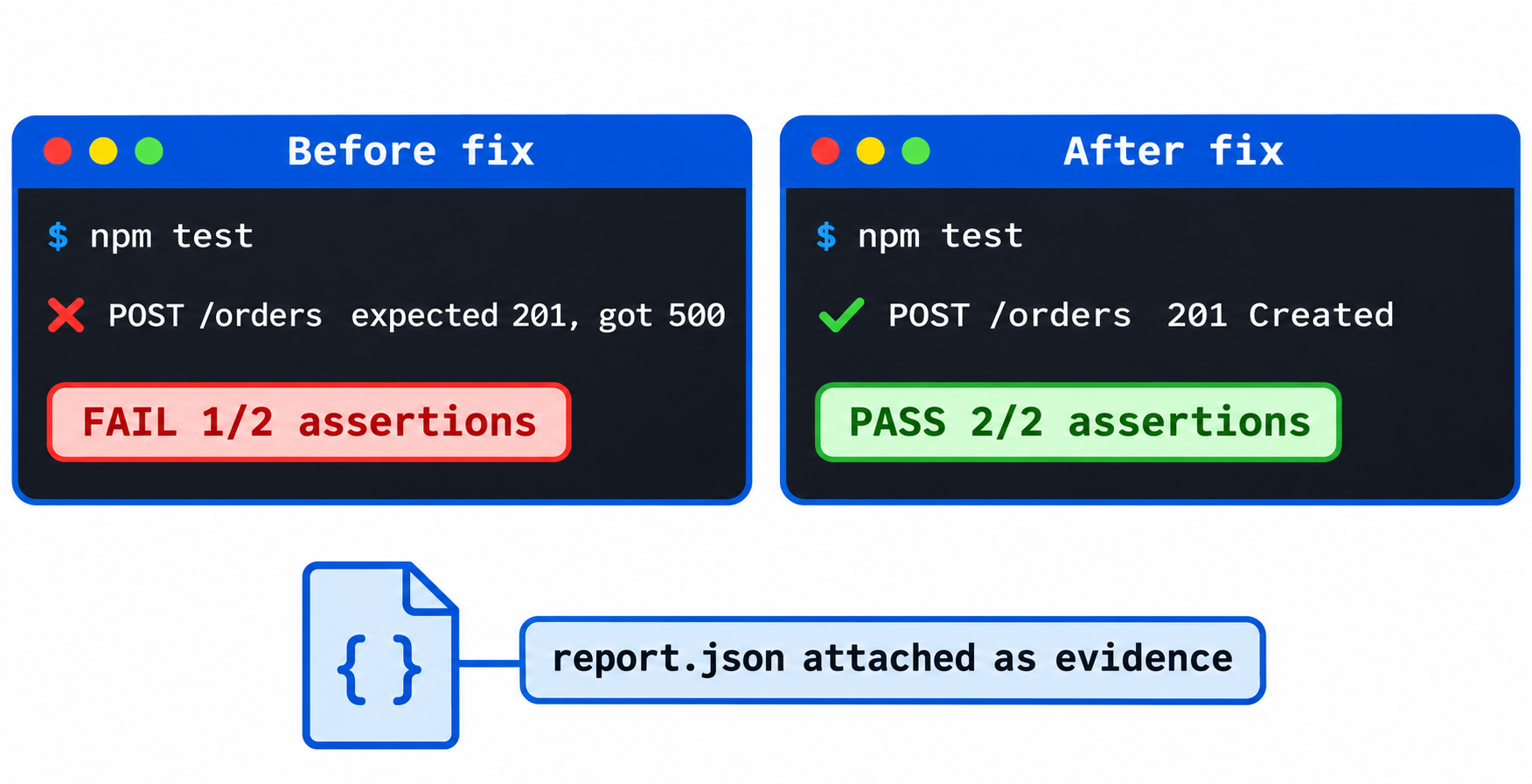
The CLI reporter shows the status assertion failing on a 500, and repro-before.json lands in apidog-reports/. After the fix, the agent runs the identical command with --out-file repro-after and both assertions pass. Those two files are the evidence in the pull request. For step 4, it runs every case on the endpoint so the fix can’t quietly break a neighbor:
apidog test-case run --project <projectId> --endpoint <endpointId> -e <stagingEnvId> -r cli,json
Add --upload-report to show the run in the Apidog app. After the merge, the repro case stays in your project as a regression test, and the same apidog run with -r junit drops into CI, as shown in running Apidog CLI in a CI/CD pipeline. For more setups, see the Apidog CLI agent workflow and Apidog CLI in Claude Code. Apidog Free covers up to 4 users, so you can try the whole loop without a paid plan.
FAQ
Can an AI agent really fix bugs without a human?
It can reproduce, patch and prove many simple bugs on its own, but it shouldn’t merge them. Keep a human on the merge, and let branch protection enforce it.
What if the agent can’t reproduce the bug?
It stops and logs what it tried. A bug it can’t reproduce is a fix it can’t confirm, so any patch would be a guess. A human then adds detail to the report or closes it.
How do I stop the agent from editing the test to make it pass?
Save a copy or hash of the test case when it first fails and compare before accepting the fix. Keep the test file outside the paths the worker may edit.
Do I need DeepSeek Harness to build this?
No. The essay describes a design, and its prototype plugin isn’t an official DeepSeek product. Any coding agent that runs shell commands works, including Claude Code in GitHub Actions. See what DeepSeek Harness is if you want to try it there.