The GLM-5.2 API gives you programmatic access to Z.ai’s newest open-weights flagship, a ~753B-parameter MoE model that scores highest among open-source models on long-horizon coding benchmarks. This guide is hands-on. You get an API key, fire your first request, then work through Python, curl, thinking modes, streaming, tool calling, and cost tracking, all with real values you can paste into a terminal.
If you are coming from the previous release, start here.
What changed since GLM-5.1
GLM-5.2 supersedes the 5.1 generation. If you already wrote integration code against the GLM-5.1 API, the wire format is the same, so you mostly just swap the model id. The differences worth knowing:
- A new sparse attention scheme. GLM-5.2 introduces “IndexShare,” which reuses a single indexer across every four sparse-attention layers to cut attention cost at long context. You don’t touch it as an API user; it just makes the 1M-token window cheaper to serve.
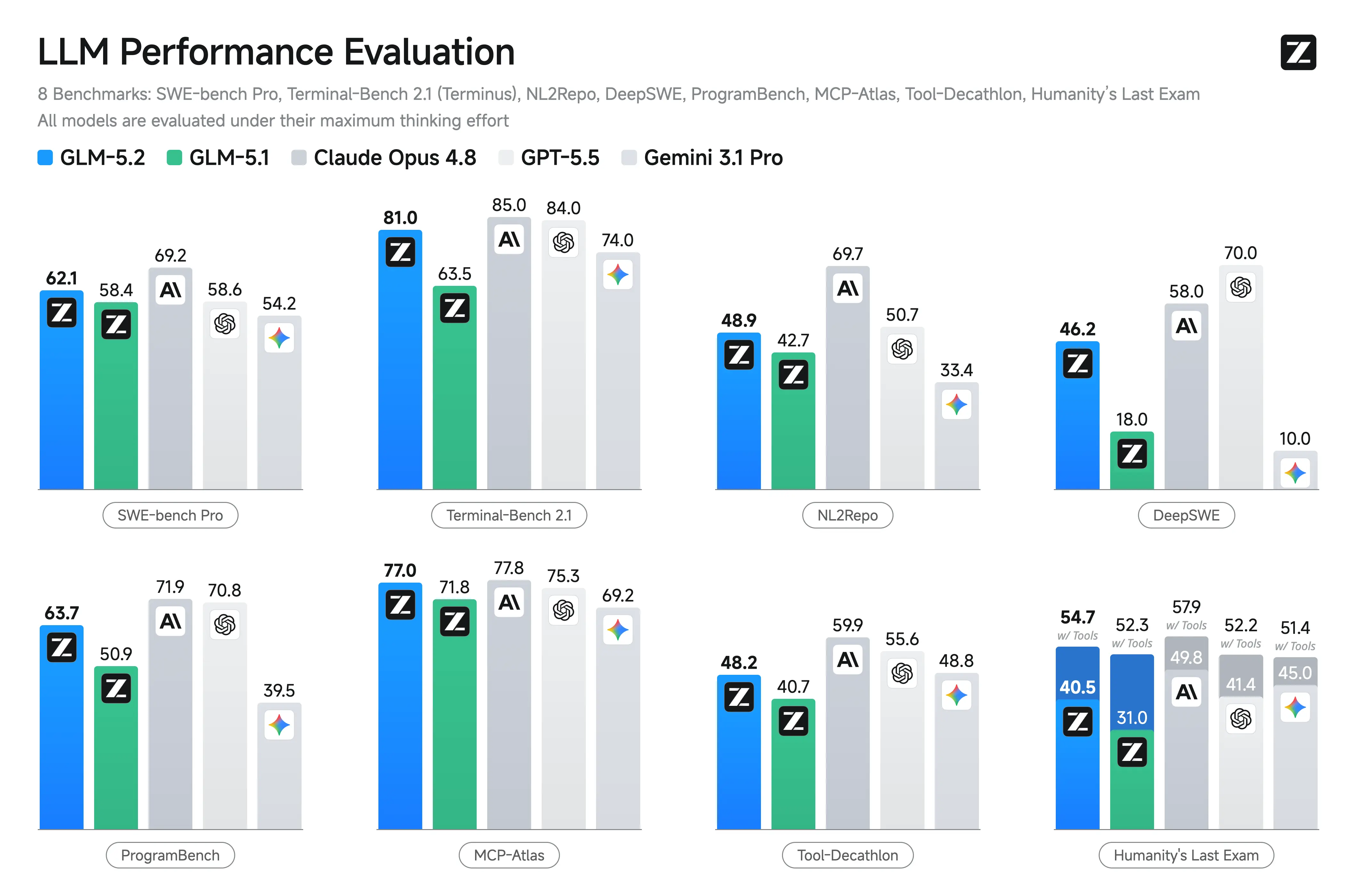
- A real jump on agentic coding. Z.ai’s published results put Terminal-Bench 2.1 at 81.0, up from GLM-5.1’s 62.0. That is the headline stat for anyone building coding agents.
- Two thinking-effort levels. GLM-5.2 exposes High and Max reasoning effort, and Z.ai recommends Max for coding tasks. More on that below.
Because the 5.1 request code already works, this guide does not rehash it. Everything here targets glm-5.2 directly.
Step 1: Get a GLM-5.2 API key
Sign in at z.ai and open the API keys section of your account dashboard. Create a key, copy it once (you usually can’t view it again), and store it in an environment variable instead of pasting it into source:
export ZAI_API_KEY="your-glm-5.2-api-key"
Keep your glm-5.2 api key out of git. A leaked key bills against your account, and GLM-5.2 output is priced per million tokens, so a runaway script costs real money.
Step 2: Know the endpoint and base_url
GLM-5.2 is glm-5.2 openai compatible, which means any client that speaks the OpenAI Chat Completions format works once you repoint the base URL. The values you need:
| Setting | Value |
|---|---|
| Chat completions endpoint | https://api.z.ai/api/paas/v4/chat/completions |
| Base URL (for SDKs) | https://api.z.ai/api/paas/v4/ |
| Model id | glm-5.2 |
| Auth | Authorization: Bearer $ZAI_API_KEY |
The OpenRouter alias is z-ai/glm-5.2 if you prefer to route through OpenRouter instead of calling Z.ai directly. For local runs, Ollama publishes the weights as glm-5.2 (see the Ollama library), and the open weights live on Hugging Face under an MIT license.
A note on limits before you build: the context window is 1M tokens (1,048,576). For max output, the z.ai docs list up to 128K, but OpenRouter does not publish a number, so treat it as up to 128K per z.ai docs (verify live) rather than a fixed guarantee.
Step 3: Your first request with curl
Here is a minimal glm-5.2 curl call. It sends one user message and prints the JSON response:
curl https://api.z.ai/api/paas/v4/chat/completions \
  -H "Authorization: Bearer $ZAI_API_KEY" \
  -H "Content-Type: application/json" \
  -d '{
    "model": "glm-5.2",
    "messages": [
      {"role": "system", "content": "You are a concise backend engineer."},
      {"role": "user", "content": "Write a SQL query that returns the 5 newest orders per customer."}
    ]
  }'
The response shape matches the OpenAI standard: an id, a choices array with the assistant message, and a usage object. That last field is how you track cost, covered at the end.
Step 4: Call it from Python with the OpenAI SDK
Because the API is OpenAI-compatible, you don’t need a special client. Install the standard SDK and point base_url at Z.ai. This is the canonical glm-5.2 python setup:
pip install openai
from openai import OpenAI
import os

client = OpenAI(
    api_key=os.environ["ZAI_API_KEY"],
    base_url="https://api.z.ai/api/paas/v4/",
)

resp = client.chat.completions.create(
    model="glm-5.2",
    messages=[
        {"role": "system", "content": "You are a concise backend engineer."},
        {"role": "user", "content": "Explain idempotency keys in 3 sentences."},
    ],
)

print(resp.choices[0].message.content)
That’s the whole integration. The client object behaves exactly like it does against OpenAI, so existing helper code, retries, and logging all carry over. If you want a deeper tour of the platform itself, the GLM-5 API overview covers the family-wide conventions.
Step 5: Control reasoning with thinking and reasoning_effort
GLM-5.2 is a reasoning model. You can turn its internal thinking on or off, and when it’s on, you can set how hard it works.
Disable thinking for fast, cheap, low-latency responses (classification, short rewrites, routing):
resp = client.chat.completions.create(
    model="glm-5.2",
    messages=[{"role": "user", "content": "Classify: 'my card was charged twice'"}],
    extra_body={"thinking": {"type": "disabled"}},
)
Enable thinking and push effort to Max for hard coding and math. Z.ai recommends Max specifically for coding:
resp = client.chat.completions.create(
    model="glm-5.2",
    messages=[
        {"role": "user", "content": "Refactor this function to remove the N+1 query and explain the fix."},
    ],
    extra_body={
        "thinking": {"type": "enabled"},
        "reasoning_effort": "max",
    },
)
The extra_body wrapper is how the OpenAI Python SDK passes non-standard fields through to Z.ai. In a raw curl body, you’d put thinking and reasoning_effort at the top level next to model. Max effort burns more output tokens (reasoning counts), so reserve it for tasks where the quality jump pays for itself.
Step 6: Stream the response
For chat UIs and long generations, stream tokens as they arrive instead of waiting for the full completion. Set stream: true and iterate over the chunks:
stream = client.chat.completions.create(
    model="glm-5.2",
    messages=[{"role": "user", "content": "Write a 200-word changelog entry for a rate-limit fix."}],
    stream=True,
)

for chunk in stream:
    delta = chunk.choices[0].delta.content
    if delta:
        print(delta, end="", flush=True)
In curl, add "stream": true to the body and the server returns Server-Sent Events, one data: line per chunk, ending with data: [DONE]. Streaming changes nothing about pricing; you still pay per token, you just see them sooner.
Step 7: Function and tool calling
Tool calling is where GLM-5.2’s agentic strength shows up, and it scores 77.0 on MCP-Atlas in Z.ai’s published results, close to Claude Opus 4.8. The pattern is the standard OpenAI two-step: you describe a tool, the model returns a tool_calls request, you run the function, then you feed the result back.
Here’s a small realistic glm-5.2 api example with a weather lookup:
import json

tools = [
    {
        "type": "function",
        "function": {
            "name": "get_weather",
            "description": "Get the current temperature for a city.",
            "parameters": {
                "type": "object",
                "properties": {
                    "city": {"type": "string", "description": "City name, e.g. Berlin"},
                    "unit": {"type": "string", "enum": ["c", "f"]},
                },
                "required": ["city"],
            },
        },
    }
]

messages = [{"role": "user", "content": "What's the weather in Berlin in celsius?"}]

first = client.chat.completions.create(
    model="glm-5.2",
    messages=messages,
    tools=tools,
)

call = first.choices[0].message.tool_calls[0]
args = json.loads(call.function.arguments)

# You run the real function here. Stubbed for the example:
def get_weather(city, unit="c"):
    return {"city": city, "temp": 12, "unit": unit}

result = get_weather(**args)

# Append the assistant's tool call, then your tool's result.
messages.append(first.choices[0].message)
messages.append({
    "role": "tool",
    "tool_call_id": call.id,
    "content": json.dumps(result),
})

final = client.chat.completions.create(
    model="glm-5.2",
    messages=messages,
    tools=tools,
)

print(final.choices[0].message.content)
The model decides when to call the tool, you execute it, and the second request lets GLM-5.2 turn the raw result into a natural answer. The same loop scales to multiple tools and to agent frameworks; nothing about the contract is Z.ai-specific.
Testing this loop by hand gets tedious fast. This is a good place to use Apidog: you can define the GLM-5.2 endpoint once, save request bodies for each thinking mode, and replay tool-calling turns without rewriting curl every time. It handles the OpenAI-style schema and lets you inspect streamed responses in one place.
Step 8: Read the usage object for cost
Every non-streamed response carries a usage object. That is your source of truth for billing:
resp = client.chat.completions.create(
    model="glm-5.2",
    messages=[{"role": "user", "content": "Summarize REST vs gRPC in 4 bullets."}],
)

u = resp.usage
print(u.prompt_tokens, u.completion_tokens, u.total_tokens)
GLM-5.2 pricing is $1.40 per 1M input tokens and $4.40 per 1M output tokens (confirmed by OpenRouter). Cached input runs about $0.26 per 1M (per VentureBeat, attributing their figure). So a call with 8,000 input and 1,500 output tokens costs roughly:
(8000 / 1_000_000 * 1.40) + (1500 / 1_000_000 * 4.40)
= 0.0112 + 0.0066
= about $0.0178
Reasoning tokens from Max effort land in the output count, so a Max-effort coding call will read more expensive than a thinking-disabled one. VentureBeat reports GLM-5.2 “beats GPT-5.5 on long-horizon coding at roughly 1/6 the cost,” which is the economic pitch behind these numbers (attributing the claim to VentureBeat).
If you’d rather use a flat-rate plan than metered API calls, Z.ai also sells GLM Coding Plan tiers (Lite, Pro, Max, plus Team). Exact pricing shifts, so as of June 2026, verify current tiers at z.ai before committing. For a head-to-head on the metered side, the GLM-5.2 pricing breakdown goes deeper, and how to use GLM-5.2 for free covers the local-weights route.
Using GLM-5.2 inside Claude Code
GLM-5.2 also ships an Anthropic-compatible path, so you can drive it from Claude Code. Point the coding base URL at https://api.z.ai/api/coding/paas/v4 (some sources show open.z.ai/api/paas/v4, so verify live), then set these environment variables:
export ANTHROPIC_BASE_URL="https://api.z.ai/api/coding/paas/v4"
export ANTHROPIC_API_KEY="your-glm-coding-plan-key"
export ANTHROPIC_DEFAULT_SONNET_MODEL="glm-5.2[1m]"
export ANTHROPIC_DEFAULT_OPUS_MODEL="glm-5.2[1m]"
export CLAUDE_CODE_AUTO_COMPACT_WINDOW=1000000
export API_TIMEOUT_MS=3000000
The [1m] suffix selects the 1M-context variant, and the long API_TIMEOUT_MS matters: without it, Claude Code can kill long large-context calls before they return. The full walkthrough lives in our guide on running GLM with Claude Code, and if you’re weighing tools, Claude Code vs Codex vs Cursor vs GLM Plan lays out the trade-offs.
How GLM-5.2 stacks up
Quick reference for the values that drive integration decisions:
| Property | GLM-5.2 |
|---|---|
| Model id (API) | glm-5.2 |
| Architecture | ~753B MoE, BF16, IndexShare sparse attention |
| Context window | 1M tokens (1,048,576) |
| Max output | up to 128K per z.ai docs (verify live) |
| Thinking modes | High / Max, or disabled |
| Input price | $1.40 / 1M tokens |
| Output price | $4.40 / 1M tokens |
| License | MIT, open weights |
For benchmark detail, Z.ai’s published results include SWE-bench Pro 62.1 (GPT-5.5 58.6), Humanity’s Last Exam with tools 54.7, and AIME 2026 99.2. The GLM-5.2 benchmarks roundup breaks those down, and GLM-5.2 vs GPT-5.5, Claude Opus, and Gemini puts them side by side.
FAQ
Is the GLM-5.2 API really OpenAI-compatible? Yes. Point the OpenAI SDK’s base_url at https://api.z.ai/api/paas/v4/ and set the model to glm-5.2. Standard chat, streaming, and tool-calling code works unchanged.
What is the GLM-5.2 model id I should send? Send glm-5.2 to the Z.ai API. On OpenRouter it’s z-ai/glm-5.2, on Ollama it’s glm-5.2, and the Claude Code variant is glm-5.2[1m] for the 1M-context window.
How do I turn reasoning off for speed? Pass thinking: {"type": "disabled"} (via extra_body in the Python SDK). For hard coding tasks, enable thinking and set reasoning_effort: "max", which Z.ai recommends for code.
How much does GLM-5.2 cost per call? $1.40 per 1M input tokens and $4.40 per 1M output tokens (OpenRouter-confirmed). Read the usage object on each response to compute exact cost; remember Max-effort reasoning tokens count as output.
Does GLM-5.2 have a vision model? There is no confirmed vision variant as of June 2026. The API is text in, text out. Don’t rely on image inputs until Z.ai documents support.
Wrapping up
The GLM-5.2 API is a short hop from any OpenAI-compatible codebase: swap the base URL, send glm-5.2, and you have a 1M-context, MIT-licensed coding model with tunable reasoning at output pricing of $4.40 per 1M tokens. Start with a curl ping, move to the Python SDK, then layer in thinking modes and tool calling as your use case demands.
When you’re ready to test endpoints, save request variants, and inspect tool-calling turns without hand-writing curl each time, download Apidog and wire up the GLM-5.2 endpoint once. For the bigger picture on the model itself, see what GLM-5.2 is and the GLM-5.2 vs GLM-5.1 comparison.