Alibaba’s Qwen team open-sourced Qwen-Image-2.1 on September 20, 2026. It is one model that does text-to-image generation and image editing, with 7B parameters in its visual generation component, and it can output transparent PNGs directly from a prompt instead of faking them with a background-removal pass. The launch post lists four changes: a lighter, faster architecture, native transparency, editing with up to 10 reference images, and better typography and portrait detail. Weights are on Hugging Face and ModelScope, and the code is on GitHub.
One line in the model card matters more than any feature: the license is the Qwen Research License, not Apache 2.0. Commercial use needs a separate agreement. If you’re evaluating 2.1 for a product, read that section before the benchmarks. If you want to run it, the Qwen-Image-2.1 how-to guide has the diffusers code and an HTTP wrapper you can test in Apidog. If you’re weighing it against the hosted Qwen Image 3.0 API, the 2.1 vs 3.0 comparison is the decision page.
Qwen-Image-2.1 at a glance
| Item | Detail (launch post, model card, GitHub README) |
|---|---|
| Release date | September 20, 2026 |
| What it does | Text-to-image and image editing in one model, including transparent (RGBA) output |
| Visual generator | 32 Single-Stream DiT layers, 7B parameters |
| Text encoder | Qwen3-VL 8B |
| VAE | 64-channel RGBA autoencoder, 16x spatial compression |
| Default output | 2048 x 2048; seven aspect ratios up to 2752 x 1536 |
| Reference images | Up to 10 per edit |
| Local editing | Circles, painted annotations, or a separate mask image |
| Companion models | Qwen-Image-2.1-PE-T2I and PE-I2I prompt-rewriting models (Qwen3.5-VL 9B fine-tunes) |
| License | Qwen Research License Agreement; commercial use needs a separate license |
| Try it | Hugging Face Space, Qwen Chat, ComfyUI (native support since launch day) |
Where it sits in the Qwen-Image line
The original Qwen-Image shipped in August 2025 as a 20B MMDiT model known for text rendering, with Qwen-Image-Edit as a separate editing model. Through late 2025 the line split further: the 2512 refresh for realism, Edit-2511 for multi-person consistency, and Qwen-Image-Layered in December for transparent layers. Qwen-Image-2.0 in February 2026 collapsed generation and editing into one 7B model with native 2K output.
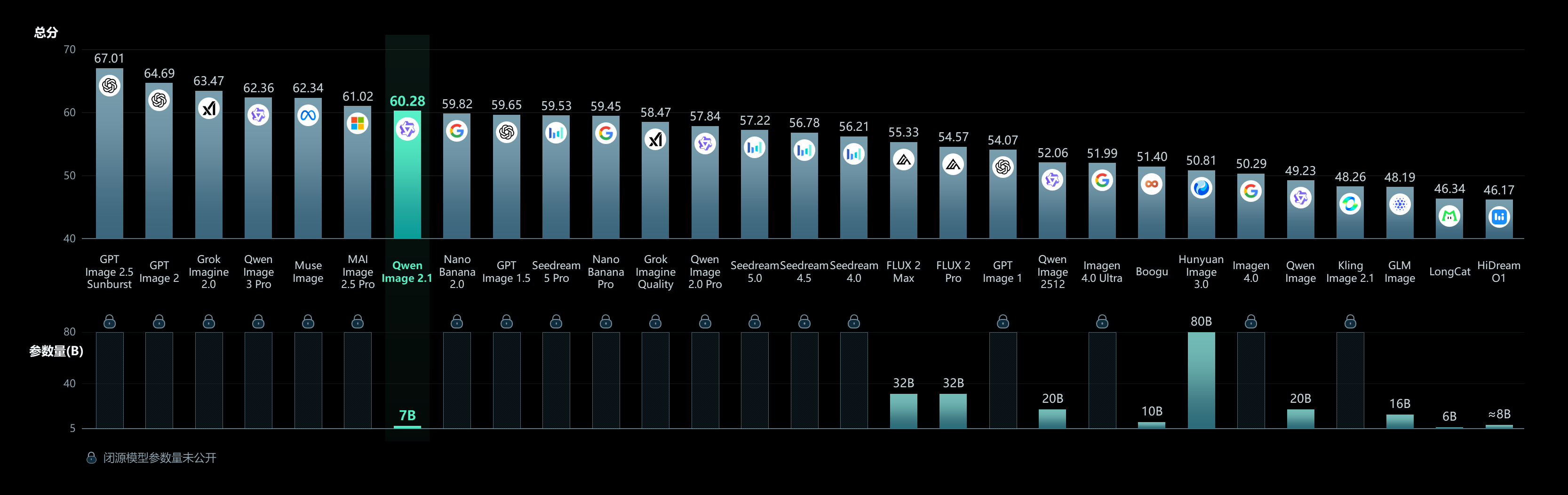
Version 2.1 keeps 2.0’s size and unified design and folds in the Layered model’s transparency, so one checkpoint now covers what used to take three. It also gets a new inference path (more on that below) and an editing interface built around masks and multiple references. In parallel, Alibaba runs a hosted line: Qwen Image 3.0 and 3.0 Pro launched in July 2026 as API models with no published weights. So the naming is a fork, not a sequence. 2.1 is the open model you download; 3.0 is the model you rent.
What’s new in 2.1
A lighter architecture and a faster editing path
The visual generator is 32 Single-Stream DiT layers at 7B parameters, paired with the 8B Qwen3-VL encoder and a VAE that carries an alpha channel natively. The interesting engineering is in attention. Qwen calls it mixed-granularity: text tokens (the system prefix and your editing instruction) use a token-level causal mask, while image generation uses a chunk-level mask. Because input images and the instruction are static across denoising steps, the model computes their key-value cache once on the first step and reuses it. Qwen’s stated payoff is lower latency and memory when editing with several reference images, which is exactly the workload that got heavier with the 10-image limit.
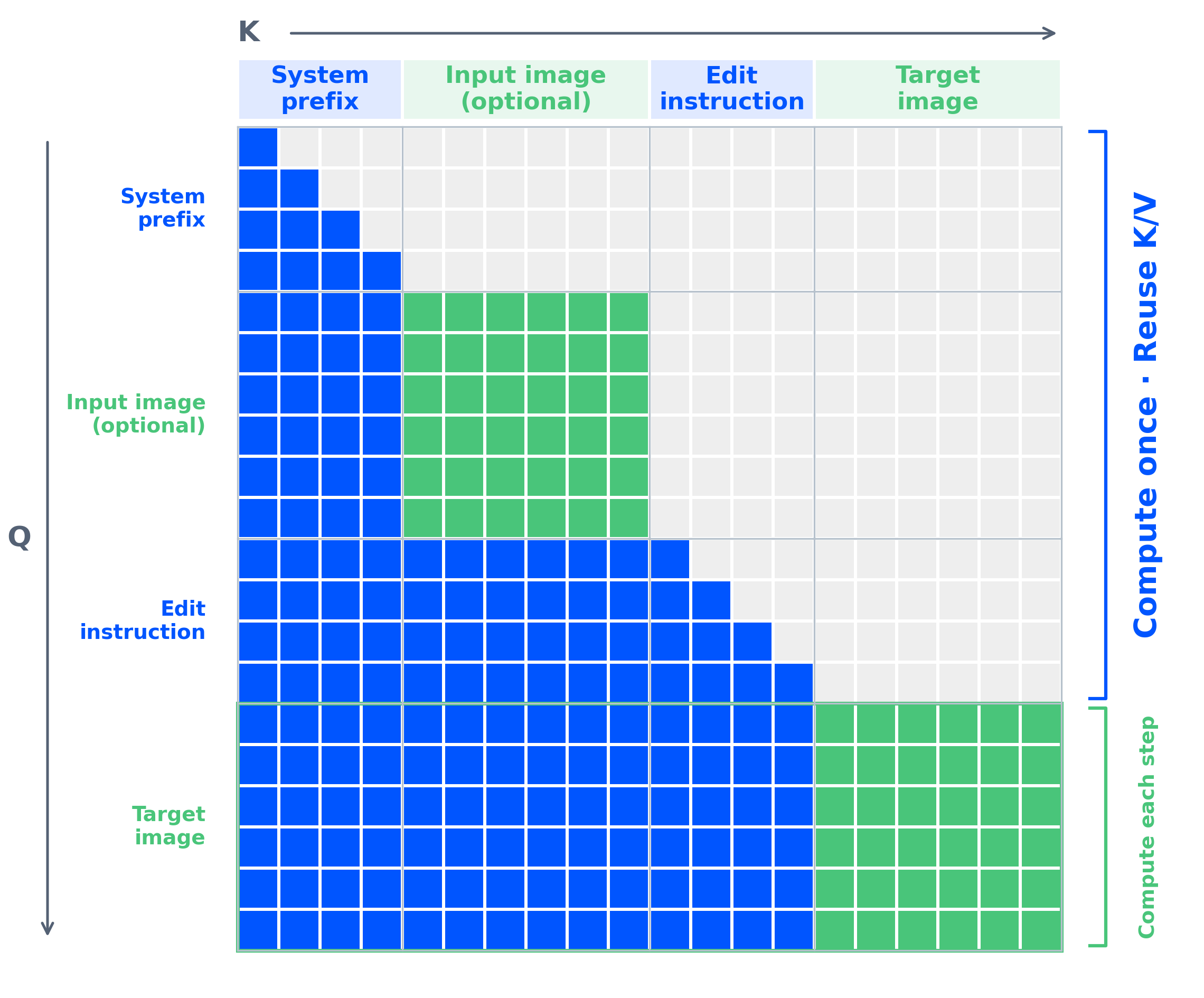
The scheduler is flow matching with Euler discrete steps, and the reference code runs 40 steps by default.
Native transparency in the same model
This is the headline. You ask for a transparent image in the prompt and the model returns RGBA. The recommended phrasing from the README is literal: start with “This is an RGBA image with transparency” and say the background is transparent. The launch post shows single subjects, multi-element compositions, and three editing cases on transparent inputs: changing a subject’s expression while keeping the alpha, replacing text inside a transparent layer, and extracting a subject from an ordinary RGB photo as an RGBA cutout.

For product teams this replaces a two-model pipeline (generate, then matte) with one call. It also removes the halo artifacts that background removers leave around hair and glass, because the alpha is generated, not inferred afterward. Whether the edges hold up at 2K on your own assets is something to test rather than assume; the free-tier guide shows where to run those tests without a GPU.
Editing with up to 10 references and real region control
Three editing features stand out in the launch examples:
- Multiple references. Six portraits become one group photo; a model, clothing, shoes, bag, and hat become a full outfit; ten furniture photos become a furnished room. The limit is 10 input images.
- Local editing three ways. Draw colored circles and address each by color in the prompt (“remove the watch in the blue circle”), paint over a region, or pass the untouched original plus a separate mask as two inputs so nothing in the source is covered up.
- Fidelity. Qwen says facial identity and product text, texture, and shape survive edits better than in 2.0. The post shows before-and-after pairs but no metric, so treat it as a claim to verify on your own SKUs.
The same editing path handles panoramas from a selfie, infographics from a product photo, and storyboards from a three-view character sheet. Sequential local edits can be strung into short animations, which the post demonstrates with a capybara clip.
Typography and portrait quality
Qwen has led open text rendering since the first Qwen-Image, and 2.1 extends it to type style, layout, and how text sits in the composition rather than only spelling. Portrait lighting and fine detail also get a pass. The launch post backs this with a Qwen-Image-Bench chart against open and closed models; the chart is an image and the post prints no numbers, so we don’t quote any here.
The license: open weights, research terms
The original Qwen-Image was Apache 2.0. Qwen-Image-2.1 is released under the Qwen Research License Agreement, and the license text is short and clear on the point that matters:
- You may not use the model “for any commercial purpose without obtaining a separate commercial license,” requested by email from Qwen.
- Redistribution and derivatives must carry the license, a “Built with Qwen” or “Improved using Qwen” notice, and the copyright line naming Hangzhou Tongyi Laboratory.
- You can’t use “Qwen” as the primary name of a derivative.
- The agreement is governed by Chinese law with jurisdiction in Hangzhou.
The prompt-rewriting companions ship under the same terms. For a hobby project, a research paper, or an internal evaluation, this is fine. For a SaaS feature, it means a conversation with Alibaba first, or using the hosted 3.0 API, which comes with ordinary commercial terms and a per-image price.
The two prompt-rewriting models
Alongside the generator, Qwen published Qwen-Image-2.1-PE-T2I and Qwen-Image-2.1-PE-I2I. PE-T2I is a fine-tuned Qwen3.5-VL 9B that takes a short request in any language and returns JSON with a detailed English prompt and a recommended aspect ratio. PE-I2I is the editing counterpart [VERIFY]. They’re optional, and they’re how the demo Space gets long, structured prompts out of one-line inputs. If you’re building an API around 2.1, this is the “prompt enhancement” step that products like ChatGPT Images do invisibly.
What the launch didn’t say
- No VRAM figures by resolution. The README points to
enable_model_cpu_offload(), vLLM-Omni with FP8, SGLang, and LightX2V for lighter or faster serving, plus AMD support, but no table. - No published benchmark numbers, only a chart.
- No hosted API for 2.1 on Model Studio as of launch [VERIFY]; the hosted line is 3.0.
- No fixed inference-speed claim, only “improved efficiency” from the KV cache reuse.
Putting it behind an API and testing it
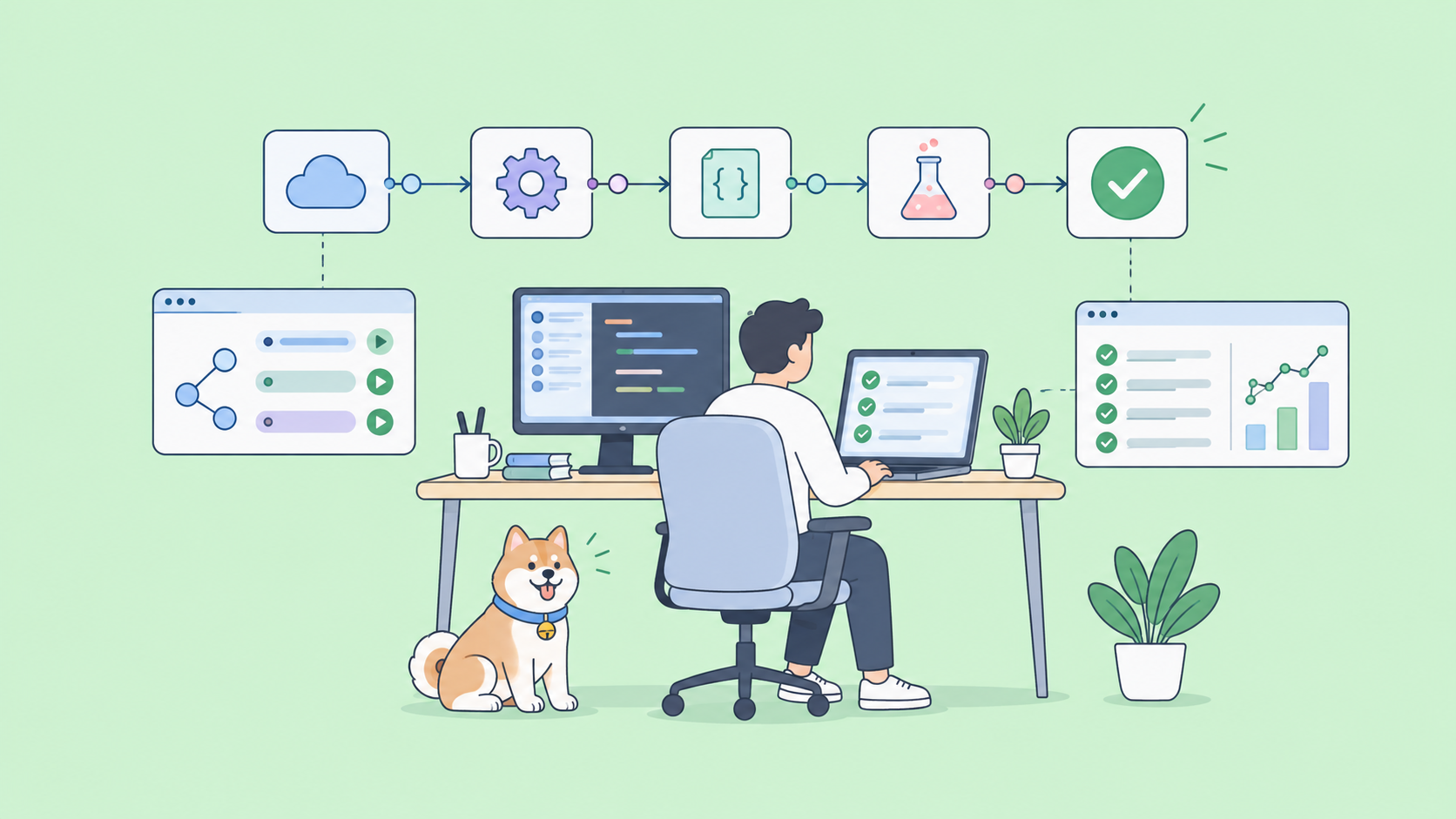
Most teams won’t call a diffusers pipeline from application code. They’ll wrap it in an HTTP service on a GPU box and call that. Once it’s an endpoint, it’s an API like any other, and Apidog is where you design and test it: define the request schema (prompt, optional reference images, aspect ratio, a transparency flag), send real calls, assert that the response is a PNG with an alpha channel, and turn the good cases into a regression suite you rerun after every model update. You can also mock the endpoint so the frontend team builds against a stable contract while the GPU is busy. The how-to guide walks through that wrapper and the Apidog tests step by step.
Download Apidog to follow along.
FAQ
Is Qwen-Image-2.1 free to use commercially? No, not without a separate commercial license from Qwen. The weights are free to download and use for research and non-commercial purposes. See the license section above and the free-tier guide for the no-cost ways to try it.
How is 2.1 different from Qwen-Image-2.0? Same 7B size and unified generation-plus-editing design. New in 2.1: native RGBA output and editing, up to 10 reference images, mask and annotation-driven local edits, a mixed-granularity attention path with KV cache reuse for faster multi-image editing, and improved typography and portrait detail.
Is it the same as Qwen Image 3.0? No. 3.0 and 3.0 Pro are hosted API models launched in July 2026 with no open weights; 2.1 is the open-weights model. The comparison covers price and capability differences.
What hardware does it need? Qwen hasn’t published VRAM requirements. The reference code loads the pipeline in bfloat16 on one CUDA device and offers CPU offload; community serving stacks add FP8. Expect a data-center or high-end consumer GPU for 2K output at 40 steps.
Can it edit transparent images, not only generate them? Yes. The launch examples change a subject’s expression and replace text inside a transparent layer while keeping the alpha channel, and extract an RGBA subject from an RGB photo.
Where to go next
Qwen-Image-2.1 is a strong open editing model with one feature nobody else ships in a single checkpoint, native transparency, and one constraint that decides whether you can use it, the research license. Run it locally with the how-to guide, try it without a GPU via the free options, and compare the hosted 3.0 API before you commit. Whichever you pick, put the endpoint under test in Apidog so a model swap never breaks your product silently.